
1. పరిచయం
This manual provides essential information for the safe and efficient installation, operation, and maintenance of the FUZHUI SKI780-2D2G-4 Variable Frequency Drive (VFD) Frequency Converter. Please read this manual thoroughly before using the product to ensure proper functionality and to prevent potential hazards. This device is designed for controlling the speed of 3-phase AC motors in various industrial applications, including constant pressure water supply systems.
2. ఉత్పత్తి ముగిసిందిview
The FUZHUI SKI780-2D2G-4 is a compact and robust frequency converter designed for precise motor control. It features a built-in braking unit and advanced interference-reduction technology.
ముఖ్య లక్షణాలు:
- Built-In Braking Unit: Enables fast forward and reverse rotation switching with an external braking resistor, enhancing operational efficiency.
- Exceptional Immunity to Disturbance: Equipped with interference-reduction technology for stable performance in electromagnetically noisy environments.
- User-Friendly Functionality: Designed for ease of operation and wiring, facilitating quick setup and integration.
- బహుముఖ అప్లికేషన్లు: Suitable for constant pressure water supply and wind pressure constant pressure control, adaptable to various industrial needs.
- కాంపాక్ట్ మరియు తేలికపాటి డిజైన్: Measures approximately 142 x 110 x 85mm and weighs 1.5kg, making it easy to install and transport.

చిత్రం 2.1: కోణీయ view of the FUZHUI SKI780-2D2G-4 VFD Frequency Converter, showing the control panel and terminal blocks.

చిత్రం 2.2: వెనుక view of the frequency converter, highlighting the ventilation grilles and mounting points.
3. స్పెసిఫికేషన్లు
| పరామితి | విలువ |
|---|---|
| మోడల్ | SKI780-2D2G-4 |
| అప్లికేషన్ పరిధి | యూనివర్సల్ |
| దశ సంఖ్య | మూడు దశ |
| సరఫరా వాల్యూమ్tage | Three-phase AC380V 50/60Hz |
| అవుట్పుట్ వాల్యూమ్tage | Three-phase AC380V |
| Adapted Motor Capacity | 2.2kW |
| DC Supply Properties | వాల్యూమ్tagఇ రకం |
| నియంత్రణ పద్ధతి | Current Direction |
| అవుట్పుట్ వాల్యూమ్tagఇ రెగ్యులేషన్ మోడ్ | PWM నియంత్రణ |
| రేటింగ్ కరెంట్ | 5.1A |
| ఉత్పత్తి పరిమాణం (సుమారు.) | 142 x 110 x 85mm / 5.6 x 4.3 x 3.3in |
| Panel Opening Size (Approx.) | 61 x 81mm / 2.4 x 3.2in |
| బరువు (సుమారుగా) | 1.5 కిలోలు / 3.3 పౌండ్లు |
| తయారీదారు | FUZHUI |
| అంశం మోడల్ సంఖ్య | FUZHUI3ytmw2dggu |
4. భద్రతా సమాచారం
హెచ్చరిక: విద్యుత్ షాక్ ప్రమాదం. సంస్థాపన మరియు నిర్వహణ అర్హత కలిగిన సిబ్బంది మాత్రమే చేయాలి.
- Always disconnect power before installation, wiring, or maintenance.
- Ensure proper grounding of the unit and connected equipment.
- Do not operate the VFD with damaged cables or if the enclosure is open.
- Protect the unit from moisture, dust, and corrosive environments.
- అన్ని స్థానిక మరియు జాతీయ విద్యుత్ కోడ్లను గమనించండి.
- The VFD may have residual voltage even after power is disconnected. Wait at least 5 minutes after power-off before touching internal components.
5. సెటప్ మరియు ఇన్స్టాలేషన్
5.1 మౌంటు
Mount the VFD in a clean, dry, and well-ventilated area. Ensure adequate clearance around the unit for heat dissipation. The compact size (142 x 110 x 85mm) allows for flexible installation.
5.2 వైరింగ్
Refer to the terminal block diagrams for correct wiring connections. Ensure all connections are secure and properly insulated.

మూర్తి 5.1: ముందు view of the VFD, detailing the control panel and the main power and control terminal blocks.

చిత్రం 5.2: పై నుండి క్రిందికి view of the VFD's terminal blocks, showing input (R, S, T), output (U, V, W), braking (P+, PB), and control terminals (24V, 10V, AI1, GND, DI1-DI5, TA, TB, TC, AO1, FM, A+, B-).
- Power Input (R, S, T): Connect the three-phase AC380V 50/60Hz power supply to these terminals.
- మోటార్ అవుట్పుట్ (U, V, W): Connect the 3-phase motor to these terminals.
- Braking Resistor (P+, PB): Connect an external braking resistor here if fast deceleration or frequent stopping is required.
- నియంత్రణ టెర్మినల్స్: These include 24V and 10V auxiliary power, analog inputs (AI1, AO1), digital inputs (DI1-DI5), relay outputs (TA, TB, TC), and communication interfaces (FM, A+, B-). Refer to the detailed wiring diagram in the included user manual for specific connections based on your application.
5.3 Panel Compatibility Note
IMPORTANT: This product is an unused inverter and is designed to be used only with an unused panel. If your existing panel is an older model, it may not be compatible with this product. Please refer to the provided images or the full user manual to distinguish between old and new panel models for compatibility.
6. ఆపరేటింగ్ సూచనలు
The VFD features a user-friendly control panel for setting parameters and operating the motor.
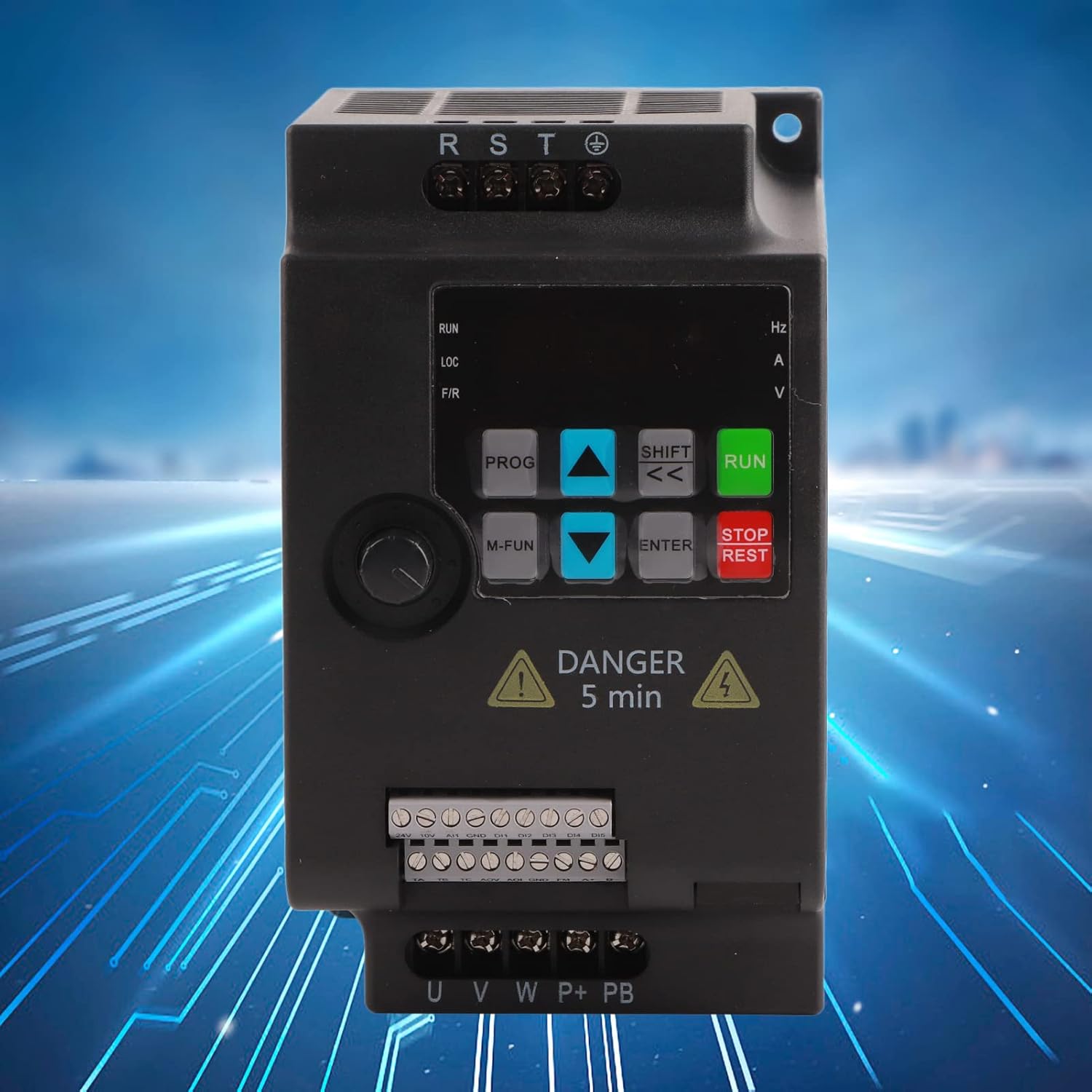
Figure 6.1: Close-up of the VFD control panel, showing buttons for RUN, STOP/REST, PROG, M-FUN, SHIFT, ENTER, and arrow keys.
6.1 నియంత్రణ ప్యానెల్ విధులు
- రన్: మోటారును ప్రారంభిస్తుంది.
- STOP/REST: Stops the motor or resets errors.
- ప్రోగ్ (కార్యక్రమం): Enters or exits parameter setting mode.
- M-FUN (Multi-Function): Accesses multi-function menus.
- SHIFT (<<): Shifts cursor position or changes display.
- నమోదు చేయండి: పారామీటర్ సెట్టింగ్లను నిర్ధారిస్తుంది లేదా ఉప-మెనూలలోకి ప్రవేశిస్తుంది.
- పైకి/క్రిందికి బాణాలు: Navigate through menus or adjust parameter values.
6.2 ప్రాథమిక ఆపరేషన్ సీక్వెన్స్
- పవర్ ఆన్: Apply three-phase AC380V power to the VFD.
- పారామీటర్ సెట్టింగ్: Use the PROG button to enter parameter setting mode. Adjust necessary parameters such as motor frequency, acceleration/deceleration times, and control mode (Current Direction, PWM Control) using the arrow keys and ENTER button.
- మోటారును ప్రారంభించండి: Press the RUN button to start the motor. The display will show the output frequency or other selected operating parameters.
- వేగాన్ని సర్దుబాటు చేయండి: Use the up/down arrow keys (if configured for local speed adjustment) or external control signals to change the motor speed.
- మోటార్ ఆపు: Press the STOP/REST button to stop the motor.
For detailed parameter descriptions and advanced functions, refer to the comprehensive user manual included with your product.
7. నిర్వహణ
Regular maintenance ensures the longevity and reliable operation of your VFD.
- శుభ్రపరచడం: Periodically clean the VFD's exterior and ventilation grilles to prevent dust accumulation, which can impede cooling. Use a soft, dry cloth. Do not use liquid cleaners.
- తనిఖీ: Regularly inspect all wiring connections for tightness and signs of wear or damage. Check for any unusual noises or odors during operation.
- పర్యావరణ పరిస్థితులు: ఆపరేటింగ్ వాతావరణం పేర్కొన్న ఉష్ణోగ్రత మరియు తేమ పరిధిలో ఉండేలా చూసుకోండి.
- కెపాసిటర్ లైఫ్: Electrolytic capacitors have a finite lifespan. If the VFD is in continuous operation for many years, consider professional inspection or replacement of capacitors.
Always disconnect power and wait for the discharge period before performing any maintenance.
8. ట్రబుల్షూటింగ్
This section provides general guidance for common issues. For specific error codes and advanced troubleshooting, consult the full user manual.
| సమస్య | సాధ్యమైన కారణం | పరిష్కారం |
|---|---|---|
| VFD పవర్ ఆన్ చేయదు | ఇన్పుట్ పవర్ లేదు; ఎగిరిన ఫ్యూజ్; అంతర్గత లోపం | Check power supply; Inspect fuses; Contact technical support. |
| మోటారు నడవదు | Incorrect wiring; Parameter settings incorrect; Overload; Emergency stop active | Verify motor wiring; Check parameter settings (e.g., frequency, control mode); Reduce load; Reset emergency stop. |
| ఓవర్ కరెంట్ లోపం | Motor overload; Short circuit in motor or wiring; Rapid acceleration | Reduce load; Check motor and wiring for shorts; Increase acceleration time parameter. |
| ఓవర్వోల్tagఇ తప్పు | Rapid deceleration; High input voltage | Increase deceleration time parameter; Install braking resistor if needed; Verify input voltage. |
| అండర్ వోల్tagఇ తప్పు | తక్కువ ఇన్పుట్ వాల్యూమ్tage; Power supply interruption | ఇన్పుట్ వాల్యూమ్ని ధృవీకరించండిtage; Check power supply stability. |
If the problem persists after attempting these solutions, please contact FUZHUI technical support.
9. వారంటీ మరియు మద్దతు
Specific warranty details for the FUZHUI SKI780-2D2G-4 Frequency Converter are not provided in this document. Please refer to the product packaging, purchase documentation, or contact your vendor for warranty information.
For technical support or inquiries, please visit the official FUZHUI store or contact their customer service department.
FUZHUI Store: https://www.amazon.com/stores/FUZHUI/page/E72029D9-145D-4226-96C5-6B17B08C907A