
1. పరిచయం
This manual provides essential information for the proper use and maintenance of your BNCF Bpad 10 Android 14 Tablet. Please read it thoroughly before operating your device to ensure optimal performance and longevity. The Bpad 10 is designed for a seamless user experience, powered by a Snapdragon 685 processor and running Android 14.
2. ప్యాకేజీ విషయాలు
క్రింద జాబితా చేయబడిన అన్ని అంశాలు మీ ఉత్పత్తి ప్యాకేజింగ్లో ఉన్నాయని నిర్ధారించుకోండి:
- BNCF Bpad 10 Tablet
- వినియోగదారు మాన్యువల్
- Charging Adapter (5V/2A)
- Type-C Cable (5V/2A)
- SIM Card Ejector Pin

Figure 2.1: Package Contents and Tablet Components Overview
3. ఉత్పత్తి ముగిసిందిview
The BNCF Bpad 10 features a sleek design with strategically placed components for ease of use.

Figure 3.1: BNCF Bpad 10 Tablet Front and Rear View
3.1 భౌతిక భాగాలు
- మైక్రో SD స్లాట్: విస్తరించదగిన నిల్వ కోసం.
- టైప్-సి పోర్ట్: ఛార్జింగ్ మరియు డేటా బదిలీ కోసం.
- వాల్యూమ్ బటన్లు: ఆడియో వాల్యూమ్ను సర్దుబాటు చేయండి.
- పవర్ బటన్: Turn the device on/off or lock/unlock the screen.
- స్పీకర్లు: Dual stereo speakers for audio output.
- మైక్రోఫోన్: వాయిస్ ఇన్పుట్ కోసం.
- వెనుక కెమెరా: Main camera for photos and videos.
- ముందు కెమెరా: వీడియో కాల్స్ మరియు సెల్ఫీల కోసం.
4. సెటప్
4.1 ప్రారంభ ఛార్జింగ్
Before first use, fully charge your BNCF Bpad 10 tablet using the provided Type-C cable and charging adapter. Connect the Type-C cable to the tablet's charging port and the adapter to a power outlet. The charging indicator will show the charging status.
4.2 పవర్ చేయడం ఆన్/ఆఫ్
- పవర్ ఆన్ చేయడానికి: Press and hold the Power Button until the BNCF logo appears on the screen.
- పవర్ ఆఫ్ చేయడానికి: Press and hold the Power Button until the power options menu appears, then select 'Power Off'.
- పునఃప్రారంభించడానికి: Press and hold the Power Button until the power options menu appears, then select 'Restart'.
4.3 ప్రారంభ కాన్ఫిగరేషన్
Upon first power-on, the tablet will guide you through the initial setup process. This includes selecting your language, connecting to a Wi-Fi network, setting up your Google account, and configuring security options like facial recognition.
5. ఆపరేటింగ్ సూచనలు
5.1 ఆండ్రాయిడ్ 14 ఫీచర్లు
Your Bpad 10 runs on Android 14, offering enhanced multitasking, security, and user-friendly features:
- ముఖ గుర్తింపు: Securely unlock your device using your face.
- స్ప్లిట్-స్క్రీన్: Use two applications simultaneously by dividing the screen.
- Smart Projection: Cast your tablet's screen to compatible external displays.
- Three-Finger Screenshot: Capture screenshots quickly by swiping down with three fingers.
- తల్లిదండ్రుల నియంత్రణలు: Manage and monitor device usage for children.
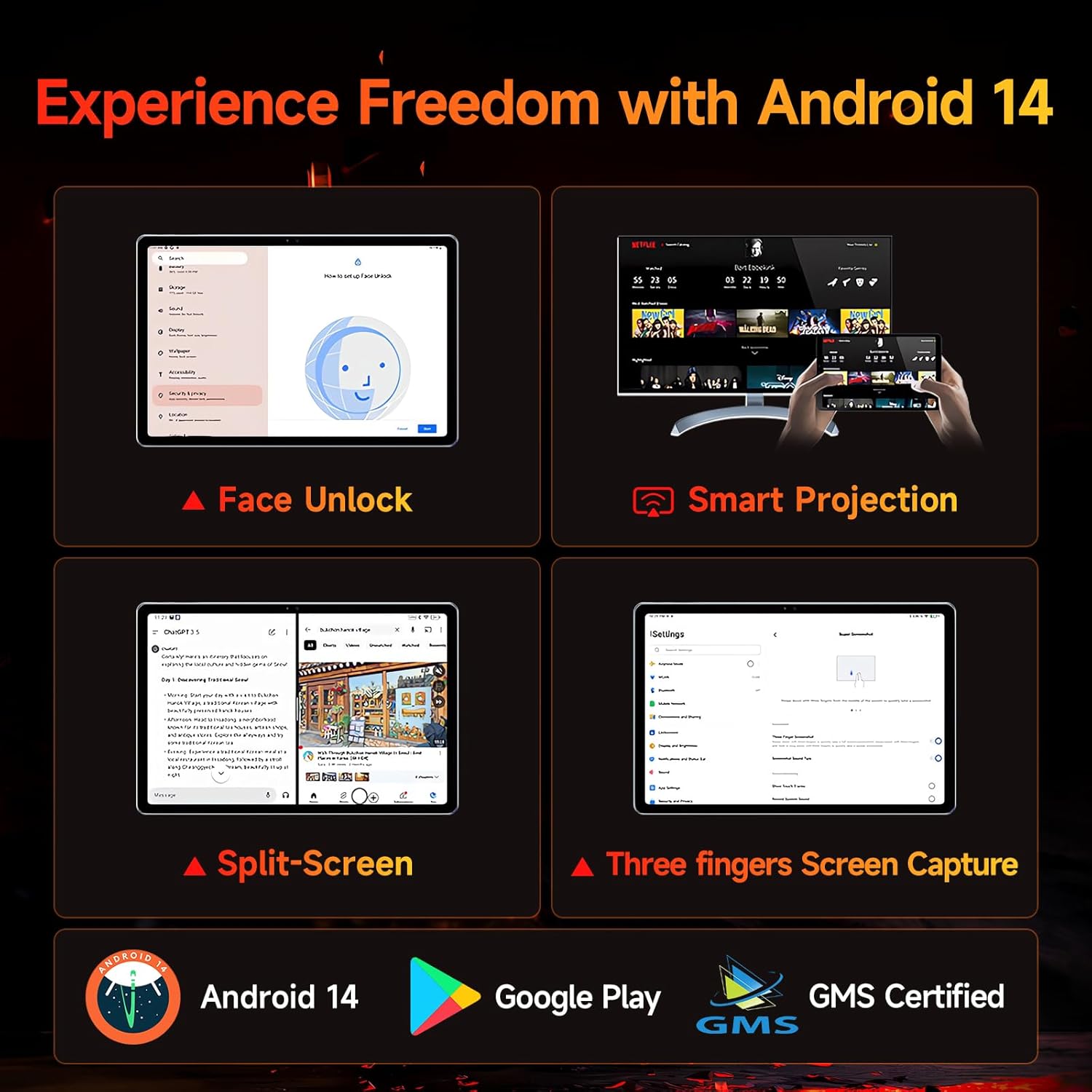
Figure 5.1: Android 14 User Interface and Features
5.2 పనితీరు
The Bpad 10 is equipped with a 6nm Snapdragon 685 processor (2.8GHz) and Adreno 610 GPU, ensuring efficient performance for various tasks. A 6-Axis Gyro Sensor enhances gaming and video recording stability.

Figure 5.2: Snapdragon 685 Processor Details
5.3 డిస్ప్లే మరియు ఆడియో
Experience clear visuals and immersive sound with the Bpad 10:
- ప్రదర్శన: 10.1-inch FHD IPS screen with 1920x1200 resolution and a 60Hz refresh rate. It features 400 Nits brightness and Incell technology for improved touch accuracy.
- వైడ్వైన్ L1: Supports HD streaming on platforms like Netflix and Prime Video.
- ఆడియో: Dual stereo speakers provide a cinematic audio experience.

Figure 5.3: Display and Widevine L1 Capabilities
5.4 కెమెరాలు
The tablet is equipped with 5MP front and 5MP rear cameras, suitable for capturing photos, 4K videos, and conducting HD video calls.
5.5 కనెక్టివిటీ
Stay connected with the following features:
- Wi-Fi: Supports 2.4G/5G dual-band Wi-Fi for stable internet access.
- బ్లూటూత్ 5.0: వైర్లెస్ ఉపకరణాలను కనెక్ట్ చేయడానికి.
- GPS: నావిగేషన్ మరియు స్థాన సేవల కోసం.
- హాల్ సెన్సార్: Enables smart on/off functionality with compatible covers.
5.6 Storage and Battery
The Bpad 10 offers ample storage and long-lasting power:
- RAM: 12GB (4GB physical + 8GB virtual) for smooth multitasking.
- ROM: 128GB UFS storage, expandable up to 1TB via MicroSD card.
- బ్యాటరీ: 6500mAh battery supporting 18W PD fast charging for extended use.

Figure 5.4: Storage and Battery Specifications
6. నిర్వహణ
To ensure the longevity and optimal performance of your BNCF Bpad 10 tablet, follow these maintenance guidelines:
- శుభ్రపరచడం: స్క్రీన్ మరియు బాడీని శుభ్రం చేయడానికి మృదువైన, మెత్తటి బట్టను ఉపయోగించండి. రాపిడి పదార్థాలు లేదా కఠినమైన రసాయనాలను నివారించండి.
- ఉష్ణోగ్రత: Operate the tablet within recommended temperature ranges. Avoid extreme heat or cold.
- నీటి బహిర్గతం: Keep the tablet away from water and high humidity. It is not waterproof.
- నిల్వ: Store the tablet in a dry, cool place when not in use.
- సాఫ్ట్వేర్ అప్డేట్లు: భద్రత మరియు పనితీరు మెరుగుదలలను నిర్ధారించుకోవడానికి సిస్టమ్ నవీకరణల కోసం క్రమం తప్పకుండా తనిఖీ చేయండి మరియు ఇన్స్టాల్ చేయండి.
7. ట్రబుల్షూటింగ్
If you encounter issues with your BNCF Bpad 10, refer to the following common troubleshooting steps:
| సమస్య | సాధ్యమైన పరిష్కారం |
|---|---|
| టాబ్లెట్ ఆన్ అవ్వడం లేదు | బ్యాటరీ ఛార్జ్ అయ్యిందని నిర్ధారించుకోండి. ఛార్జర్ను కనెక్ట్ చేసి, మళ్లీ పవర్ ఆన్ చేయడానికి ప్రయత్నించే ముందు కొన్ని నిమిషాలు వేచి ఉండండి. స్పందించకపోతే, పవర్ బటన్ను 10-15 సెకన్ల పాటు నొక్కి ఉంచడం ద్వారా బలవంతంగా రీస్టార్ట్ చేయండి. |
| నెమ్మదిగా పనితీరు | Close unnecessary background applications. Clear cache for frequently used apps. Restart the tablet. Ensure sufficient storage space is available. |
| Wi-Fi కనెక్టివిటీ సమస్యలు | Restart your Wi-Fi router. Forget the network on your tablet and reconnect. Ensure the tablet is within range of the Wi-Fi signal. |
| స్క్రీన్ స్పందించడం లేదు | Restart the tablet. Ensure the screen is clean and free from moisture or debris. |
| బ్యాటరీ త్వరగా అయిపోతుంది | Reduce screen brightness. Close background apps. Disable unused features like Bluetooth or GPS. Check for apps consuming excessive power in battery settings. |
8. స్పెసిఫికేషన్లు
Key technical specifications for the BNCF Bpad 10 tablet:
| ఫీచర్ | స్పెసిఫికేషన్ |
|---|---|
| స్క్రీన్ పరిమాణం | 10.1 అంగుళాలు |
| స్క్రీన్ రిజల్యూషన్ | 1920 x 1200 పిక్సెల్స్ (FHD) |
| ఆపరేటింగ్ సిస్టమ్ | ఆండ్రాయిడ్ 14 |
| ప్రాసెసర్ | Qualcomm Snapdragon 685 (2.8GHz) |
| RAM | 12GB (4GB + 8GB వర్చువల్) |
| ఫ్లాష్ మెమరీ పరిమాణం | 128 GB UFS (Expandable to 1TB) |
| కెమెరాలు | 5MP ఫ్రంట్, 5MP వెనుక |
| బ్యాటరీ కెపాసిటీ | 6500mAh |
| ఛార్జింగ్ | 18W PD ఫాస్ట్ ఛార్జింగ్ |
| వైర్లెస్ రకం | 802.11b/g (2.4G/5G WiFi), Bluetooth 5.0 |
| వస్తువు బరువు | 1.07 పౌండ్లు (సుమారు 485గ్రా) |
| ఉత్పత్తి కొలతలు | 7.9 x 4.9 x 0.3 అంగుళాలు (సుమారు 20.1 x 12.4 x 0.76 సెం.మీ) |
| రంగు | బూడిద రంగు |
9. వారంటీ మరియు మద్దతు
BNCF is committed to providing quality products and customer satisfaction.
9.1 వారంటీ విధానం
BNCF offers a one-year warranty for its products. For tablets purchased from the BNCF Official Flagship Store, customers benefit from a 12-month free repair warranty and lifetime technical support.
9.2 కస్టమర్ మద్దతు
If you encounter any issues or have inquiries regarding your BNCF Bpad 10 tablet, please contact BNCF customer service. You can expect a response within 24 hours. They can assist with troubleshooting, returns, or exchange services.
- సంప్రదించండి: Please refer to the contact information provided on the BNCF official webసైట్ లేదా మీ కొనుగోలు వేదిక.
- తరచుగా అడిగే ప్రశ్నలు:
- Are you specialized in tablets? Yes, BNCF is dedicated to designing and manufacturing innovative tablets, prioritizing quality, performance, and user experience.
- What is the RMA policy for this tablet? We offer a one-year warranty. You can expect a response from us within 24 hours for any issues or inquiries.
- If my products have issues, what should I do? Please leave us a message, and we will use our expertise to solve the problem for you, or provide a return or exchange service.