
1. పరిచయం
The ExtreLife Luggage Tag (Model MF75) is designed to provide a reliable and convenient way to track your belongings using Apple's Find My network. This rechargeable tag offers real-time location tracking, sound alerts, and left-behind notifications, ensuring peace of mind during your travels. Its durable faux leather design and magnetic flap protect your personal information while offering a stylish accessory for your luggage.
2 కీ ఫీచర్లు
- Apple Find My Compatibility: Seamlessly integrates with Apple's Find My network for global tracking.
- Real-time Bluetooth Tracking: Pinpoint the exact location of your tag.
- సౌండ్ అలర్ట్లు: Play a sound to easily locate your luggage in crowded areas.
- ఎడమ-వెనుక నోటిఫికేషన్లు: Receive alerts on your iPhone if you leave your tag వెనుక.
- లాస్ట్ మోడ్: Enable lost mode to display contact information for anyone who finds your tag.
- పునర్వినియోగపరచదగిన బ్యాటరీ: Eco-friendly design with a battery life of up to 4 months on a single charge.
- Durable Faux Leather: Stylish and robust construction with a secure buckle strap.
- Magnetic Privacy Flap: Protects your personal identification information.
3. ప్యాకేజీ విషయాలు
- ExtreLife Luggage Tag (Model MF75) x 1
- Leather Strap x 1
- Double-sided ID Tag Cards x 2
- వినియోగదారు మాన్యువల్ x 1
4. సెటప్ సూచనలు
4.1 Attaching the Luggage Tag
The ExtreLife Luggage Tag comes with a durable leather strap for easy attachment. Simply thread the strap through the designated loop on the tag and secure it to your suitcase, backpack, or other belongings. The adjustable buckle ensures a snug fit.

Image: ExtreLife Luggage Tag securely attached to a suitcase handle.
4.2 Apple Find My తో జత చేయడం
To enable tracking, you must pair your ExtreLife Luggage Tag with your Apple iPhone (iPhone 8 series or later, running iOS 14.5 or later with Two-Factor Authentication enabled).
- Ensure your iPhone has Two-Factor Authentication enabled for your Apple ID.
- Turn on the Find My app and Bluetooth on your iPhone.
- షార్ట్ ప్రెస్ ది tag's power button once to turn it on. The power button is located under the magnetic flap.
- మీ iPhoneలో Find My యాప్ని తెరవండి.
- Tap the "Items" tab at the bottom of the screen.
- Tap "Add New Item" and then select "Other Supported Item".
- Your iPhone will search for the ExtreLife Find Tag. Once detected, tap "Connect".
- Follow the on-screen prompts to name your tag and assign an emoji.
- Agree to the terms and conditions to link the item to your Apple ID.

Image: Visual guide for pairing the ExtreLife Luggage Tag Apple Find My యాప్తో.
Video: A demonstration of setting up the ExtreLife Smart Tag Apple Find My యాప్తో.
5. ఆపరేటింగ్ సూచనలు
5.1 Locating Your Luggage
Once paired, you can track your luggage using the Apple Find My app:
- మీ iPhoneలో Find My యాప్ని తెరవండి.
- Select the "Items" tab and choose your ExtreLife Luggage Tag.
- The map will display the current or last known location of your tag.
- Tap "Directions" to get navigation to your tagయొక్క స్థానం.

Image: The Find My app showing the location of the ExtreLife Luggage Tag మ్యాప్లో.
5.2 Playing a Sound Alert
If your luggage is nearby but out of sight (e.g., on a baggage carousel), you can play a sound to help locate it:
- In the Find My app, select your ExtreLife Luggage Tag.
- Tap "Play Sound". The tag will emit an audible alert.
- Tap "Stop Sound" once you've located your luggage.

Image: Using the 'Play Sound' feature in the Find My app to locate the ExtreLife Luggage Tag on a baggage carousel.
5.3 Left-Behind Notifications
Receive alerts if you accidentally leave your luggage behind:
- In the Find My app, select your ExtreLife Luggage Tag.
- Under "Notifications", enable "Notify When Left Behind".
- You can customize safe locations where you don't want to be notified (e.g., your home).
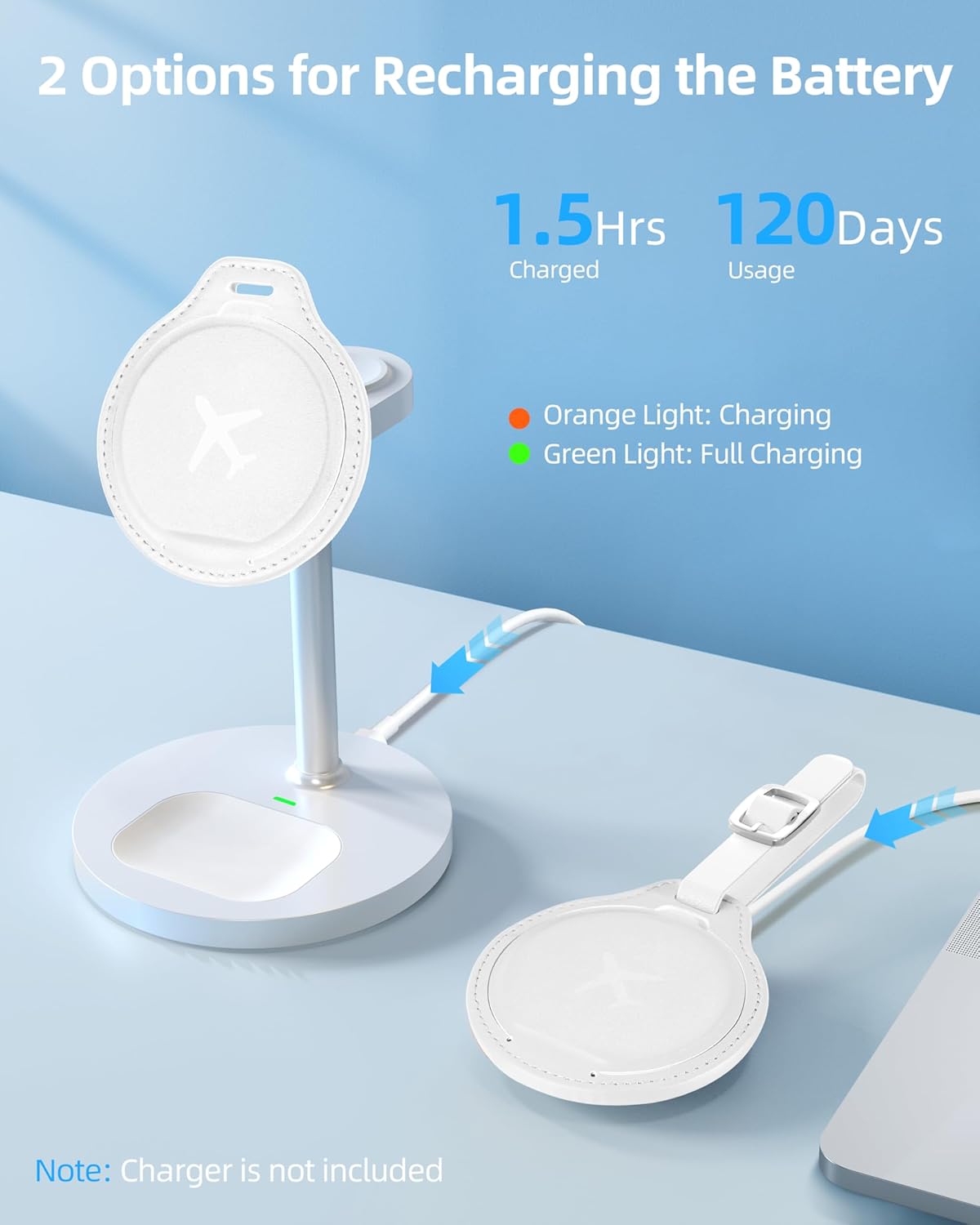
Image: An iPhone displaying a notification indicating the ExtreLife Luggage Tag has been left behind.
5.4 లాస్ట్ మోడ్
If your luggage is lost, you can enable Lost Mode:
- In the Find My app, select your ExtreLife Luggage Tag.
- Under "Lost Mode", tap "Enable".
- Enter a phone number or email address where you can be contacted.
- If someone finds your tag, they can use their iPhone to view your contact information.

Image: The Find My app showing the 'Lost Mode' feature for the ExtreLife Find Tag.
6. ఛార్జింగ్ & బ్యాటరీ
The ExtreLife Luggage Tag features a rechargeable battery that can last up to 4 months on a single charge. It supports wireless charging.
- ఉంచండి tag on a compatible wireless charger (charger not included).
- An orange light indicates that the tag వసూలు చేస్తోంది.
- A green light indicates that the tag పూర్తిగా ఛార్జ్ చేయబడుతుంది.
- ఛార్జింగ్ సాధారణంగా దాదాపు 1.5 గంటలు పడుతుంది.

Image: The ExtreLife Luggage Tag being charged wirelessly, showing charging indicators.
7. నిర్వహణ
- ఫాక్స్ లెదర్ ఉపరితలాన్ని మృదువైన, డితో తుడవండిamp శుభ్రం చేయడానికి గుడ్డ.
- కఠినమైన రసాయనాలు లేదా రాపిడి క్లీనర్లను ఉపయోగించడం మానుకోండి.
- ఉంచండి tag dry and away from extreme temperatures.
- Ensure the magnetic flap is closed to protect the internal components and ID cards.
8. ట్రబుల్షూటింగ్
8.1 Tag Not Pairing
- Ensure your iPhone is an iPhone 8 series or later, running iOS 14.5 or later.
- Verify that Two-Factor Authentication is enabled for your Apple ID.
- Make sure Bluetooth is enabled on your iPhone.
- నిర్ధారించండి tag is powered on by pressing the power button once.
- Try restarting your iPhone and the Find My app.
8.2 No Indicator Light During Charging
- నిర్ధారించండి tag is correctly placed on a compatible wireless charger.
- Check if the wireless charger is powered on and functioning correctly.
- Try a different wireless charger if available.
8.3 Inaccurate Location Tracking
- Location accuracy depends on the density of Apple devices in the vicinity. In areas with fewer Apple devices, location updates may be less frequent or precise.
- నిర్ధారించండి tag's battery is sufficiently charged.
9. స్పెసిఫికేషన్లు
| ఫీచర్ | వివరాలు |
|---|---|
| మోడల్ సంఖ్య | MF75 |
| ఉత్పత్తి కొలతలు | 3.34 x 2.99 x 0.33 అంగుళాలు |
| వస్తువు బరువు | 2.39 ఔన్సులు |
| బ్యాటరీ | 1 లిథియం అయాన్ బ్యాటరీ (చేర్చబడింది), రీఛార్జబుల్ |
| బ్యాటరీ లైఫ్ | ఒక్కసారి ఛార్జ్ చేస్తే 4 నెలల వరకు |
| కనెక్టివిటీ | Bluetooth, Apple Find My network |
| మెటీరియల్ | ఫాక్స్ లెదర్ |
| రంగు | క్రీమ్ వైట్ |
10. వారంటీ & సపోర్ట్
We offer a warranty of 365 days from the date of purchase. For any problems or inquiries, please feel free to contact ExtreLife via the Amazon message center. We are committed to replying to your message within 24 hours.