
1. ఉత్పత్తి ముగిసిందిview
The Mastech MS850D is a 6000-count True RMS auto-ranging digital multimeter designed for precise electrical measurements. It is suitable for professionals, technicians, and enthusiasts, offering a wide range of functions for various electrical applications.

మూర్తి 1: ముందు view of the Mastech MS850D Digital Multimeter, displaying a measurement of 198.7 mV.
ముఖ్య లక్షణాలు:
- 6000 Counts Auto Ranging: Provides precise measurements across various ranges automatically.
- నిజమైన RMS: Ensures accurate readings for non-sinusoidal AC waveforms.
- Comprehensive Measurement Capabilities: కొలతలు AC/DC వాల్యూమ్tage, AC/DC Current, Resistance, Capacitance, Frequency, and Temperature.
- భద్రత ధృవీకరించబడింది: CAT III 600V rating for safe use in electrical testing environments.
- వినియోగదారు-స్నేహపూర్వక విధులు: Includes Buzzer/Continuity, Diode Test, Transistor Test (optional), MAX/MIN, REL, Non-Contact Voltage (NCV) Detection, Live Wire Recognition, Data Hold, Flashlight, and Auto Power Off.
- కాంపాక్ట్ డిజైన్: Ergonomic dimensions (150mm x 75mm x 47mm) and lightweight (284g) for easy handling.
2. ప్యాకేజీ విషయాలు
క్రింద జాబితా చేయబడిన అన్ని వస్తువులు మీ ప్యాకేజీలో చేర్చబడ్డాయని ధృవీకరించండి:
- 1 x Mastech MS850D-6000 Counts True RMS Auto Ranging Digital Multimeter
- 1 x Temperature probe
- 1 x Pair of Test leads
- 2 x Batteries (AAA type, 1.5V)
- 1 x వినియోగదారు మాన్యువల్
3. భద్రతా సమాచారం
హెచ్చరిక: To avoid electric shock or personal injury, read all safety information before using this product. Use the multimeter only as specified in this manual; otherwise, the protection provided by the multimeter may be impaired.
- Always ensure the multimeter is in good working condition before use.
- రేట్ చేయబడిన వాల్యూమ్ కంటే ఎక్కువ వర్తించవద్దుtage, as marked on the multimeter, between the terminals or between any terminal and earth ground. The MS850D is rated for క్యాట్ III 600 వి.
- వాల్యూమ్తో పని చేస్తున్నప్పుడు జాగ్రత్త వహించండిtag30V AC RMS, 42V పీక్ లేదా 60V DC కంటే ఎక్కువ. ఈ వాల్యూమ్లుtagషాక్ ప్రమాదాన్ని కలిగిస్తుంది.
- Do not use the multimeter if the test leads are damaged or if the meter appears damaged.
- Ensure the rotary switch is in the correct position for the measurement you intend to make.
- పరీక్ష లీడ్లను వాల్యూమ్కి ఎప్పుడూ కనెక్ట్ చేయవద్దుtage source when the rotary switch is set to current, resistance, or continuity mode.
- Replace the battery and fuses only with the specified type and rating.
- Do not operate the multimeter in explosive gas, vapor, or dusty environments.
- కొలతలు వేసేటప్పుడు పరీక్ష ప్రోబ్స్పై వేళ్లను ఫింగర్ గార్డ్ల వెనుక ఉంచండి.
4. సెటప్
4.1 బ్యాటరీ ఇన్స్టాలేషన్
The MS850D multimeter requires two 1.5V AAA batteries for operation. To install or replace batteries:
- మల్టీమీటర్ పవర్ ఆఫ్ చేయబడిందని నిర్ధారించుకోండి మరియు అన్ని పరీక్ష లీడ్లను డిస్కనెక్ట్ చేయండి.
- మల్టీమీటర్ వెనుక భాగంలో బ్యాటరీ కంపార్ట్మెంట్ కవర్ను గుర్తించండి.
- బ్యాటరీ కవర్ను భద్రపరిచే స్క్రూను విప్పడానికి స్క్రూడ్రైవర్ని ఉపయోగించండి.
- Remove the cover and insert the two AAA batteries, observing the correct polarity (+ and -).
- బ్యాటరీ కవర్ను మార్చండి మరియు స్క్రూను బిగించండి.
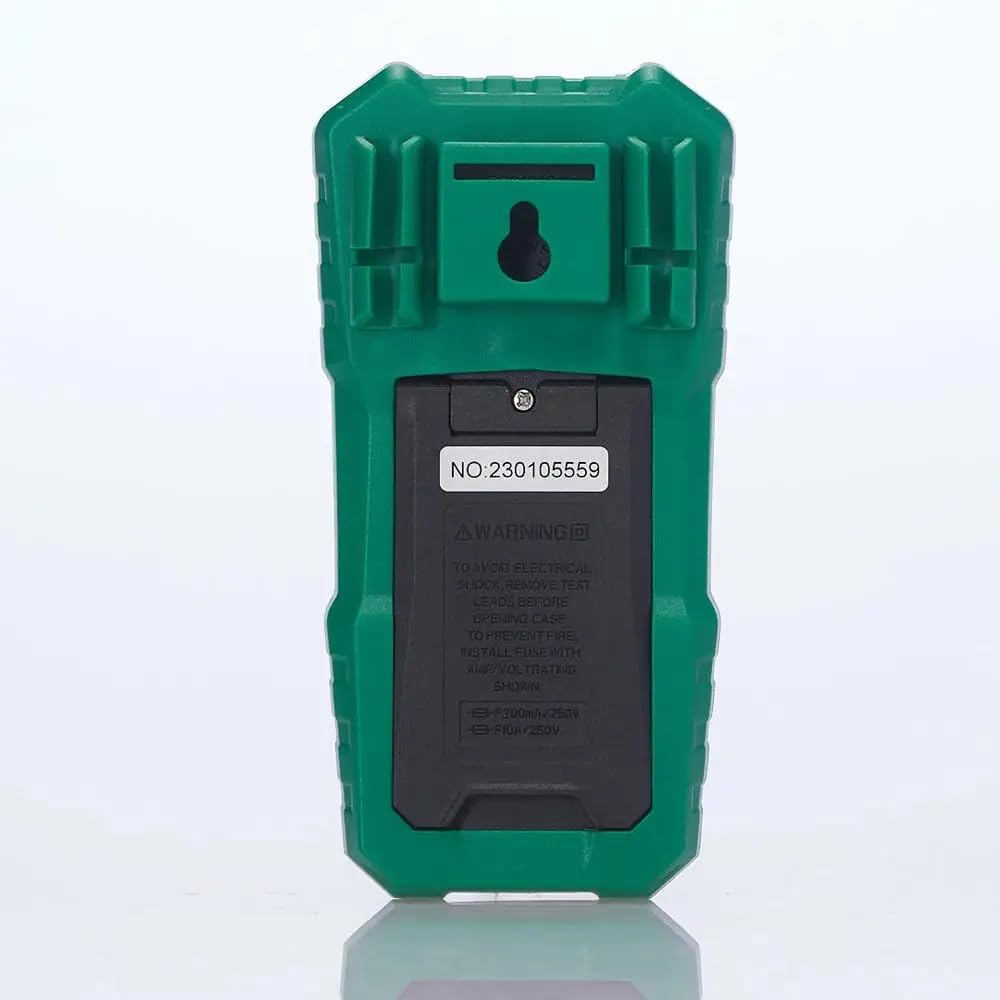
చిత్రం 2: వెనుక view of the multimeter, illustrating the battery compartment and safety warnings.
4.2 టెస్ట్ లీడ్లను కనెక్ట్ చేయడం
Proper connection of test leads is essential for accurate and safe measurements.
- బ్లాక్ టెస్ట్ లీడ్ని ఇన్సర్ట్ చేయండి COM (సాధారణ) ఇన్పుట్ జాక్.
- చాలా వాల్యూమ్లకుtage, resistance, continuity, capacitance, frequency, and temperature measurements, insert the red test lead into the VΩmA ఇన్పుట్ జాక్.
- For current measurements up to 600mA, insert the red test lead into the VΩmA ఇన్పుట్ జాక్.
- For current measurements between 600mA and 10A, insert the red test lead into the 10A MAX ఇన్పుట్ జాక్.

చిత్రం 3: కోణీయ view of the multimeter, highlighting the input jacks for test leads.
5. ఆపరేటింగ్ సూచనలు
This section details how to use the Mastech MS850D for various measurements.
5.1 పవర్ చేయడం ఆన్/ఆఫ్
Rotate the central dial from the "OFF" position to any desired measurement function to power on the multimeter. To power off, rotate the dial back to the "OFF" position.
5.2 Rotary Switch Functions
The rotary switch selects the primary measurement function:
- V~ (AC Voltagఇ): ఆల్టర్నేటింగ్ కరెంట్ వాల్యూమ్ను కొలుస్తుందిtage.
- V- (DC Voltagఇ): డైరెక్ట్ కరెంట్ వాల్యూమ్ను కొలుస్తుందిtage.
- Hz/% (Frequency/Duty Cycle): Measures frequency and duty cycle.
- Ω (Resistance): విద్యుత్ నిరోధకతను కొలుస్తుంది.
- కొనసాగింపు/డయోడ్: Checks for circuit continuity and tests diodes.
- NCV/లైవ్: సంపర్కం కాని సంtage detection and Live Wire recognition.
- °C/°F (Temperature): Measures temperature using the included probe.
- hFE (Transistor Test): Measures transistor gain (requires optional socket).
- μA~ / μA- (AC/DC Microampఈరెస్): Measures microampఎరే కరెంట్.
- mA~ / mA- (AC/DC Milliampఈరెస్): Measures milliampఎరే కరెంట్.
- A~ / A- (AC/DC Ampఈరెస్): చర్యలు ampere current (up to 10A).
5.3 బటన్ విధులు
- SEL (Select): Toggles between different functions within a single rotary switch position (e.g., AC/DC voltage, continuity/diode, °C/°F).
- పట్టుకోండి: డిస్ప్లేపై ప్రస్తుత రీడింగ్ను స్తంభింపజేస్తుంది. విడుదల చేయడానికి మళ్ళీ నొక్కండి.
- MIN/MAX/REL:
- Press once to enter MIN/MAX mode. The multimeter will record the minimum and maximum values. Press again to cycle between MIN, MAX, and current reading.
- Long press to activate REL (Relative) mode. This subtracts the current reading from all subsequent readings, useful for measuring changes.
- Flashlight Button (often combined with backlight): Activates the built-in flashlight for illuminating the measurement area.
5.4 నిర్దిష్ట కొలత విధానాలు
5.4.1 సంtagఇ కొలత (AC/DC)
- రోటరీ స్విచ్కు సెట్ చేయండి V~ AC వాల్యూమ్ కోసంtagఇ లేదా V- DC వాల్యూమ్ కోసంtage. Use the SEL button to switch between AC and DC if the position combines them.
- బ్లాక్ టెస్ట్ లీడ్ను కనెక్ట్ చేయండి COM జాక్ మరియు రెడ్ టెస్ట్ దీనికి దారి తీస్తాయి VΩmA జాక్.
- కొలవవలసిన సర్క్యూట్ లేదా కాంపోనెంట్ అంతటా పరీక్ష ప్రోబ్లను సమాంతరంగా కనెక్ట్ చేయండి.
- సంపుటాన్ని చదవండిtagడిస్ప్లేలో ఇ విలువ.
5.4.2 Current Measurement (AC/DC)
జాగ్రత్త: మల్టీమీటర్ను సమాంతరంగా వాల్యూమ్తో ఎప్పుడూ కనెక్ట్ చేయవద్దుtagకరెంట్ కొలిచేటప్పుడు e మూలం. ఎల్లప్పుడూ లోడ్తో సిరీస్లో కనెక్ట్ చేయండి.
- Determine if the current is AC or DC.
- Set the rotary switch to the appropriate current range (μA, mA, or A). Use the SEL button to switch between AC and DC.
- బ్లాక్ టెస్ట్ లీడ్ను కనెక్ట్ చేయండి COM జాక్.
- 600mA వరకు విద్యుత్తు కోసం, ఎరుపు పరీక్ష లీడ్ను దీనికి కనెక్ట్ చేయండి VΩmA జాక్. 10A వరకు కరెంట్ల కోసం, ఎరుపు పరీక్ష లీడ్ను దీనికి కనెక్ట్ చేయండి 10A MAX జాక్.
- Open the circuit where the current is to be measured and connect the multimeter in series.
- డిస్ప్లేలో ప్రస్తుత విలువను చదవండి.
5.4.3 నిరోధక కొలత
- రోటరీ స్విచ్ను సెట్ చేయండి Ω స్థానం.
- బ్లాక్ టెస్ట్ లీడ్ను కనెక్ట్ చేయండి COM జాక్ మరియు రెడ్ టెస్ట్ దీనికి దారి తీస్తాయి VΩmA జాక్.
- నిరోధకతను కొలిచే ముందు సర్క్యూట్ లేదా భాగం డీ-ఎనర్జైజ్ చేయబడిందని నిర్ధారించుకోండి.
- పరీక్ష ప్రోబ్లను కాంపోనెంట్ అంతటా కనెక్ట్ చేయండి.
- ప్రదర్శనలో నిరోధక విలువను చదవండి.
5.4.4 కొనసాగింపు పరీక్ష
- రోటరీ స్విచ్ను సెట్ చేయండి Continuity/Diode position. Use SEL to select continuity mode (usually indicated by a speaker icon).
- బ్లాక్ టెస్ట్ లీడ్ను కనెక్ట్ చేయండి COM జాక్ మరియు రెడ్ టెస్ట్ దీనికి దారి తీస్తాయి VΩmA జాక్.
- సర్క్యూట్ లేదా కాంపోనెంట్ అంతటా పరీక్ష ప్రోబ్లను కనెక్ట్ చేయండి.
- If the resistance is below approximately 50Ω, the buzzer will sound, indicating continuity.
5.4.5 డయోడ్ టెస్ట్
- రోటరీ స్విచ్ను సెట్ చేయండి Continuity/Diode position. Use SEL to select diode mode (usually indicated by a diode symbol).
- బ్లాక్ టెస్ట్ లీడ్ను కనెక్ట్ చేయండి COM జాక్ మరియు రెడ్ టెస్ట్ దీనికి దారి తీస్తాయి VΩmA జాక్.
- ఎరుపు ప్రోబ్ను ఆనోడ్కు మరియు నల్ల ప్రోబ్ను డయోడ్ యొక్క కాథోడ్కు కనెక్ట్ చేయండి. డిస్ప్లే ఫార్వర్డ్ వాల్యూమ్ను చూపుతుందిtagఇ డ్రాప్.
- ప్రోబ్స్ ని రివర్స్ చేయండి. మంచి డయోడ్ కోసం డిస్ప్లే "OL" (ఓపెన్ లూప్) ని చూపించాలి.
5.4.6 కెపాసిటెన్స్ కొలత
- రోటరీ స్విచ్ను సెట్ చేయండి కెపాసిటెన్స్ position (often combined with Hz/% or other functions, use SEL to select).
- బ్లాక్ టెస్ట్ లీడ్ను కనెక్ట్ చేయండి COM జాక్ మరియు రెడ్ టెస్ట్ దీనికి దారి తీస్తాయి VΩmA జాక్.
- Ensure the capacitor is fully discharged before measurement to prevent damage to the multimeter.
- Connect the test probes across the capacitor terminals.
- డిస్ప్లేలో కెపాసిటెన్స్ విలువను చదవండి.
5.4.7 ఫ్రీక్వెన్సీ కొలత
- రోటరీ స్విచ్ను సెట్ చేయండి Hz /% position. Use SEL to select frequency mode.
- బ్లాక్ టెస్ట్ లీడ్ను కనెక్ట్ చేయండి COM జాక్ మరియు రెడ్ టెస్ట్ దీనికి దారి తీస్తాయి VΩmA జాక్.
- Connect the test probes across the signal source.
- డిస్ప్లేలో ఫ్రీక్వెన్సీ విలువను చదవండి.
5.4.8 ఉష్ణోగ్రత కొలత
- రోటరీ స్విచ్ను సెట్ చేయండి ° C / ° F. position. Use SEL to switch between Celsius and Fahrenheit.
- Connect the temperature probe to the COM మరియు VΩmA jacks, observing polarity if specified by the probe.
- ఉష్ణోగ్రతను కొలవవలసిన వస్తువుపై లేదా సమీపంలో ఉష్ణోగ్రత ప్రోబ్ యొక్క కొనను ఉంచండి.
- డిస్ప్లేపై ఉష్ణోగ్రత విలువను చదవండి.
5.4.9 నాన్-కాంటాక్ట్ వాల్యూమ్tagఇ (NCV) గుర్తింపు
- రోటరీ స్విచ్ను సెట్ చేయండి NCV/లైవ్ స్థానం.
- Move the top front part of the multimeter close to the conductor or outlet.
- The multimeter will emit an audible beep and the NCV indicator light will flash if AC voltage is detected, with the frequency of beeps and flashes increasing with voltagఇ బలం.
6. నిర్వహణ
Proper maintenance ensures the longevity and accuracy of your multimeter.
6.1 శుభ్రపరచడం
- ప్రకటనతో కేసును తుడిచివేయండిamp వస్త్రం మరియు తేలికపాటి డిటర్జెంట్. అబ్రాసివ్లు లేదా ద్రావకాలను ఉపయోగించవద్దు.
- Keep the input terminals free of dirt and moisture.
6.2 బ్యాటరీ భర్తీ
Refer to Section 4.1 for detailed instructions on battery replacement. Replace batteries when the low battery indicator appears on the display.
6.3 ఫ్యూజ్ రీప్లేస్మెంట్
If the current measurement function fails, the fuse may need replacement. The MS850D uses two fuses:
- F1: F300mA/250V (for mA/μA range)
- F2: F10A/250V (for 10A range)
To replace fuses:
- మల్టీమీటర్ పవర్ ఆఫ్ చేయబడిందని నిర్ధారించుకోండి మరియు అన్ని పరీక్ష లీడ్లను డిస్కనెక్ట్ చేయండి.
- Open the battery compartment cover (refer to Section 4.1).
- Carefully remove the old fuse(s) and replace with new fuses of the exact same type and rating.
- బ్యాటరీ కవర్ను మార్చండి మరియు స్క్రూను బిగించండి.
7. ట్రబుల్షూటింగ్
If you encounter issues with your Mastech MS850D, refer to the following common problems and solutions:
| సమస్య | సాధ్యమైన కారణం | పరిష్కారం |
|---|---|---|
| డిస్ప్లే లేదు లేదా డిమ్ డిస్ప్లే లేదు | తక్కువ లేదా చనిపోయిన బ్యాటరీలు | బ్యాటరీలను మార్చండి (విభాగం 4.1 చూడండి). |
| సరికాని రీడింగ్లు | Incorrect function selected; Loose test leads; Damaged test leads; Out of range measurement | Verify rotary switch position; Ensure test leads are securely connected; Inspect test leads for damage; Check if the measurement is within the multimeter's specified range. |
| కరెంట్ కొలత పనిచేయడం లేదు | ఎగిరిన ఫ్యూజ్ | తగిన ఫ్యూజ్ని మార్చండి (విభాగం 6.3 చూడండి). |
| "OL" (ఓవర్లోడ్) ప్రదర్శించబడింది | Measurement exceeds the selected range or multimeter's maximum capacity | Select a higher range if available, or confirm the measurement is within the multimeter's limits. |
8. స్పెసిఫికేషన్లు
Detailed technical specifications for the Mastech MS850D Digital Multimeter:

Figure 4: Detailed specifications and packaging information for the Mastech MS850D.
| కొలత | పరిధి | ఖచ్చితత్వం |
|---|---|---|
| DC సంtage | 600mV, 6V, 60V, 600V | ±(0.8%+5) |
| AC వాల్యూమ్tage | 600mV, 6V, 60V, 600V | ±(1.0%+10) |
| DC కరెంట్ | 600μA, 6000μA, 60mA, 600mA, 6A, 10A | ±(2.0%+5) (μA/mA), ±(3.0%+5) (A) |
| ఎసి కరెంట్ | 600mA, 6A, 10A | ±(2.5%+5) (mA), ±(3.0%+5) (A) |
| ప్రతిఘటన | 600Ω, 6KΩ, 60KΩ, 600KΩ, 6MΩ, 60MΩ | ±(1.0%+5) (600Ω-6MΩ), ±(1.2%+5) (60MΩ) |
| కెపాసిటెన్స్ | 60nF, 600nF, 6μF, 60μF, 600μF, 6mF, 60mF, 100mF | ±(4.0%+25) (60nF-600μF), ±(5.0%+25) (6mF-100mF) |
| ఫ్రీక్వెన్సీ | 10Hz, 100Hz, 1KHz, 10KHz, 100KHz, 1MHz, 10MHz | ±(0.5%+4) |
| ఉష్ణోగ్రత | -20°C to 0°C, 0°C to 400°C, 400°C to 1000°C | ±(4°C), ±(3.0%+3), ±(2.0%+3) |
| ప్రదర్శించు | 6000 గణనలు | |
| భద్రతా రేటింగ్ | క్యాట్ III 600 వి | |
| శక్తి మూలం | 2 x 1.5V AAA బ్యాటరీలు | |
| కొలతలు (L x W x H) | 150 మిమీ x 75 మిమీ x 47 మిమీ (సుమారుగా) | |
| బరువు | 284 గ్రా (సుమారుగా) | |
9. వారంటీ మరియు మద్దతు
The Mastech MS850D Digital Multimeter is manufactured by Mastech and imported by REES52. For warranty information, technical support, or service inquiries, please refer to the warranty card included with your product or contact the seller/manufacturer directly.
వారంటీ క్లెయిమ్ల కోసం దయచేసి మీ కొనుగోలు రుజువును ఉంచుకోండి.
- తయారీదారు: మాస్టెక్
- దిగుమతిదారు: REES52
- మోడల్ సంఖ్య: MS850D