
whall EV691
Whall EV691 Cordless Stick Vacuum Cleaner User Manual
Model: EV691 | Brand: Whall
1. ముఖ్యమైన భద్రతా సూచనలు
Please read all instructions carefully before using the Whall EV691 Cordless Stick Vacuum Cleaner. Keep this manual for future reference.
- పరికరాన్ని ఆరుబయట లేదా తడి ఉపరితలాలపై ఉపయోగించవద్దు.
- పిల్లలు వాక్యూమ్ క్లీనర్ను ఆపరేట్ చేయడానికి అనుమతించవద్దు. పిల్లల దగ్గర ఉపయోగించినప్పుడు దగ్గరి పర్యవేక్షణ అవసరం.
- మండే లేదా మండే పదార్థాలను (తేలికైన ద్రవం, గ్యాసోలిన్, కిరోసిన్ మొదలైనవి) తీసుకోకండి లేదా అవి ఉండే ప్రదేశాలలో ఉపయోగించవద్దు.
- సిగరెట్లు, అగ్గిపుల్లలు లేదా వేడి బూడిద వంటి కాలుతున్న లేదా ధూమపానం చేసే ఏదైనా తీసుకోవద్దు.
- డస్ట్ కప్ మరియు/లేదా ఫిల్టర్లు లేకుండా ఉపయోగించవద్దు.
- Turn off the appliance before connecting or disconnecting the motorized brush, extension wand, or other accessories.
- ఈ మాన్యువల్లో వివరించిన విధంగా మాత్రమే ఉపయోగించండి. తయారీదారు సిఫార్సు చేసిన అటాచ్మెంట్లను మాత్రమే ఉపయోగించండి.
2. ఉత్పత్తి ముగిసిందిview
Familiarize yourself with the components included with your Whall EV691 Cordless Stick Vacuum Cleaner.

మూర్తి 2.1: All components of the Whall EV691 Cordless Stick Vacuum Cleaner as packaged in the box. This includes the main motor unit, battery, extension wand, floor brush, various nozzles, and filters.
భాగాల జాబితా:
- Main Motor Unit with Dust Cup
- పునర్వినియోగపరచదగిన బ్యాటరీ ప్యాక్
- Adjustable Extension Wand
- LED లైట్లతో కూడిన మోటరైజ్డ్ ఫ్లోర్ బ్రష్
- Long Flat Nozzle (Crevice Tool)
- 2-in-1 Soft Brush
- వాల్ మౌంట్ ఛార్జర్
- అదనపు HEPA ఫిల్టర్
- వినియోగదారు మాన్యువల్
3. అసెంబ్లీ & సెటప్
మొదటి ఉపయోగం ముందు మీ వాక్యూమ్ క్లీనర్ను సమీకరించడానికి ఈ దశలను అనుసరించండి.
3.1 Assembling the Main Unit and Attachments
- బ్యాటరీని అటాచ్ చేయండి: Slide the rechargeable battery pack into the designated slot on the main motor unit until it clicks securely into place.
- ఎక్స్టెన్షన్ వాండ్ను కనెక్ట్ చేయండి: Insert the adjustable extension wand into the main motor unit until it locks.
- ఫ్లోర్ బ్రష్ను అటాచ్ చేయండి: Connect the motorized floor brush to the other end of the extension wand, ensuring it clicks into place.
- దండం పొడవును సర్దుబాటు చేయండి: Press the release button on the extension wand to adjust its length for comfortable use.
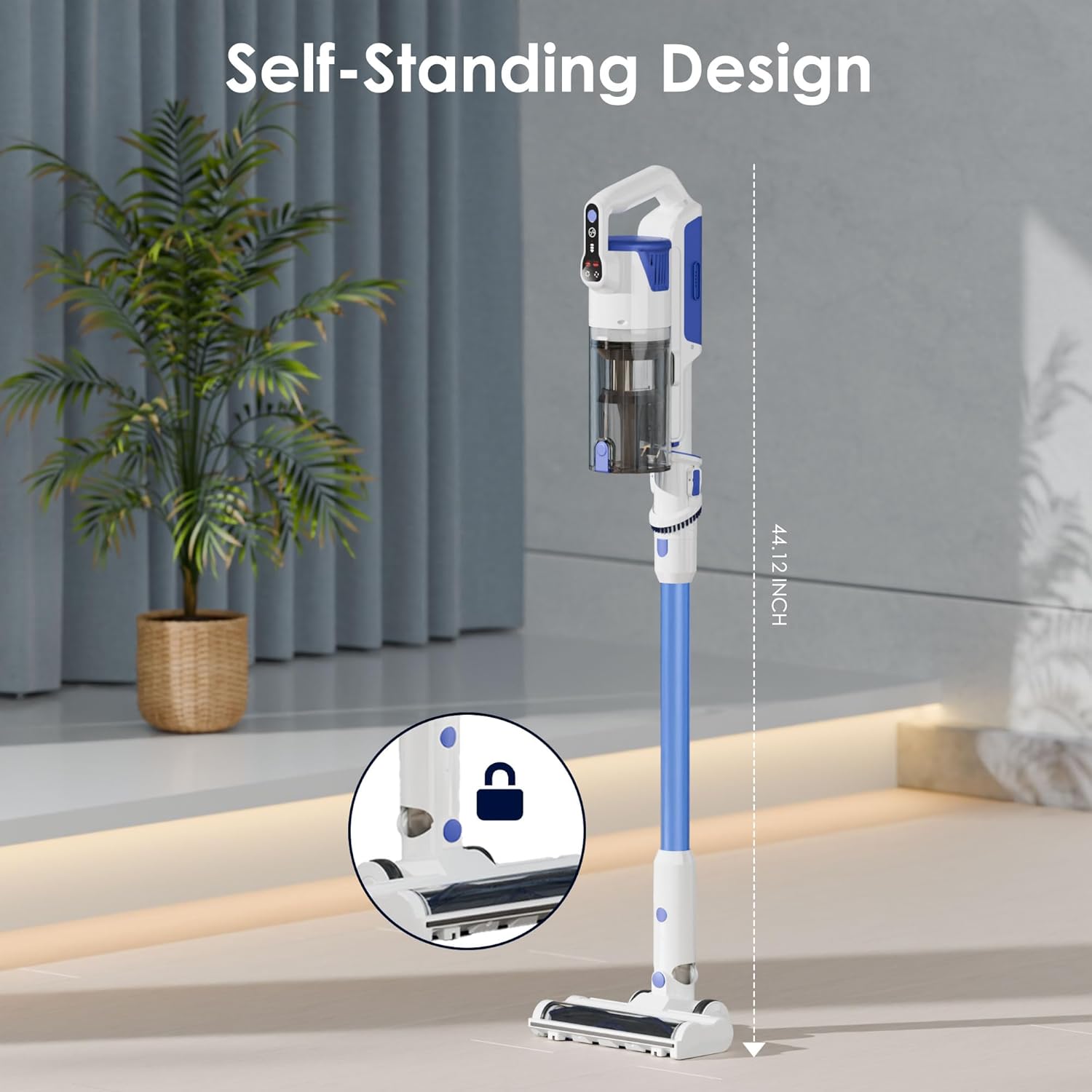
మూర్తి 3.1: The Whall EV691 vacuum cleaner assembled in its self-standing position, demonstrating the connection points for the main unit, extension wand, and floor brush.
3.2 ప్రారంభ ఛార్జింగ్
Before first use, fully charge the battery. Refer to the Charging section for detailed instructions.
3.3 అసెంబ్లీ ప్రదర్శన వీడియో
వీడియో 3.1: A demonstration of the assembly process for the Whall Cordless Vacuum Cleaner, including attaching the main unit, extension wand, and floor brush, and showcasing its various cleaning capabilities and filter maintenance.
4. ఆపరేషన్
Learn how to effectively use your Whall EV691 Cordless Stick Vacuum Cleaner for various cleaning tasks.
4.1 పవర్ ఆన్/ఆఫ్ మరియు సక్షన్ మోడ్లు
- పవర్ ఆన్: Press the power button on the main unit to turn on the vacuum.
- Change Suction Mode: Use the mode selection button to cycle through the three available suction modes: Standard, Medium, and MAX. The LED display will indicate the current mode.
- పవర్ ఆఫ్: వాక్యూమ్ను ఆఫ్ చేయడానికి పవర్ బటన్ను మళ్లీ నొక్కండి.

మూర్తి 4.1: The intelligent LED display screen provides real-time information on air duct blockage, battery level, ground brush status, HEPA filter presence, and the selected suction mode.
4.2 Using the Motorized Floor Brush
The motorized floor brush is designed for efficient cleaning on various floor types, including carpets and hard floors.

మూర్తి 4.2: The powerful 88,000 RPM brushless motor provides strong 45KPA suction for effective cleaning on various surfaces.

మూర్తి 4.3: The upgraded V-shaped roller brush design is engineered to prevent hair tangling while efficiently removing dust and debris.

మూర్తి 4.4: The flexible floor brush features LED lights to illuminate dust and debris in dark areas, and offers 90° up/down and 180° left/right maneuverability.
4.3 Using Handheld Mode and Attachments
Detach the extension wand and floor brush to use the main unit as a handheld vacuum. Attach the appropriate nozzle for specific cleaning needs.
- Long Flat Nozzle (Crevice Tool): Ideal for cleaning tight spaces, corners, and crevices in furniture or vehicles.
- 2-in-1 Soft Brush: Suitable for delicate surfaces, upholstery, keyboards, and curtains.

మూర్తి 4.5: The lightweight and multifunctional design allows for quick conversion to a handheld vacuum, perfect for cleaning sofas, car interiors, keyboards, and hard-to-reach gaps.
5. ఛార్జింగ్
Ensure your vacuum is always ready for use by following proper charging procedures.
5.1 బ్యాటరీ రన్టైమ్
The large-capacity battery provides:
- Up to 55 minutes of runtime in Standard mode.
- Up to 16 minutes of runtime in MAX mode for deep cleaning.

మూర్తి 5.1: The vacuum is equipped with a powerful 6*2500mAh battery, offering up to 45 minutes of continuous runtime.
5.2 Charging Methods and Time
బ్యాటరీ పూర్తిగా ఛార్జ్ కావడానికి దాదాపు 4-5 గంటలు పడుతుంది.
Three charging methods are available:
- డైరెక్ట్ ఛార్జింగ్: Plug the charger directly into the battery pack.
- Charging on Main Unit: Plug the charger into the main unit with the battery installed.
- Wall Mount Charging: Install the wall mount charger and hang the vacuum for convenient charging and storage.

మూర్తి 5.2: The vacuum offers versatile charging and storage options, including charging the battery directly, charging the main unit, or using the wall mount for integrated charging and storage.
6. నిర్వహణ
క్రమం తప్పకుండా నిర్వహణ సరైన పనితీరును నిర్ధారిస్తుంది మరియు మీ వాక్యూమ్ క్లీనర్ యొక్క జీవితకాలాన్ని పొడిగిస్తుంది.
6.1 డస్ట్ కప్ ఖాళీ చేయడం
The dust cup features a one-touch empty design for easy disposal of debris.
- ప్రధాన యూనిట్లో డస్ట్ కప్ విడుదల బటన్ను గుర్తించండి.
- Press the button to open the bottom flap of the dust cup and empty contents into a trash bin.
6.2 వడపోత వ్యవస్థను శుభ్రపరచడం
The vacuum features a 4-layer high-efficiency filtration system, including a stainless steel filter and a HEPA filter. These filters are washable.

మూర్తి 6.1: The 4-layer high-efficiency filtration system, consisting of a dust cup, single cone filtration, stainless steel filter, and HEPA filter, captures fine dust and prevents secondary air pollution.
- డస్ట్ కప్ తొలగించండి: ప్రధాన యూనిట్ నుండి డస్ట్ కప్పును వేరు చేయండి.
- Disassemble Filters: Carefully remove the HEPA filter and the stainless steel filter from the dust cup.
- వాష్ ఫిల్టర్లు: Rinse the filters under running water until clean. Do not use harsh detergents.
- గాలి పొడి: Allow all filter components to air dry completely for at least 24 hours before reassembling. Ensure they are completely dry to prevent mold and maintain suction power.
- మళ్లీ కలపండి: Once dry, reassemble the filters and dust cup, then attach them back to the main unit.

మూర్తి 6.2: Step-by-step guide for one-touch emptying of the dust cup, disassembling the HEPA filter, cleaning the filter and dust cup, and air drying the components.
6.3 Filter Cleaning Demonstration Video
వీడియో 6.1: This video demonstrates the process of cleaning the washable filters of the Whall Cordless Vacuum Cleaner, ensuring proper maintenance for sustained performance.
7. ట్రబుల్షూటింగ్
If you encounter any issues with your Whall EV691, refer to the following common problems and solutions.
| సమస్య | సాధ్యమైన కారణం | పరిష్కారం |
|---|---|---|
| పవర్ లేదు / ఆన్ చేయడం లేదు | Battery not charged; Battery not properly installed. | Charge the battery fully; Ensure battery is securely clicked into place. |
| తగ్గిన చూషణ శక్తి | Dust cup full; Filters clogged; Air duct blockage. | Empty dust cup; Clean or replace filters; Check for and clear any blockages in the air duct. Refer to LED display for 'Air duct blockage reminder'. |
| Motorized Brush Not Spinning | Brush roll tangled with hair/debris; Brush roll stuck. | Turn off vacuum and remove any obstructions from the brush roll. Refer to LED display for 'Ground brush stuck reminder'. |
| బ్యాటరీ ఛార్జింగ్ కాదు | Charger not properly connected; Faulty charger/battery. | Ensure charger is securely plugged into both the battery/unit and the power outlet; Contact customer support if issue persists. Refer to LED display for 'Battery reminder'. |
| HEPA Filter Missing Reminder | HEPA filter not installed or incorrectly installed. | Ensure the HEPA filter is correctly inserted into the dust cup. |
8. స్పెసిఫికేషన్లు
Key technical specifications for the Whall EV691 Cordless Stick Vacuum Cleaner.
| ఫీచర్ | స్పెసిఫికేషన్ |
|---|---|
| బ్రాండ్ | whall |
| మోడల్ పేరు | EV691 |
| శక్తి మూలం | బ్యాటరీ ఆధారితమైనది |
| వాట్tage | 280 వాట్స్ |
| వాల్యూమ్tage | 110 వోల్ట్లు |
| గరిష్ట చూషణ | 25KPA (Upgraded) |
| శక్తి స్థాయిల సంఖ్య | 3 |
| ఫిల్టర్ రకం | HEPA ఫిల్టర్ |
| డస్ట్ కప్ కెపాసిటీ | 500 మిల్లీలీటర్లు |
| బ్యాటరీ రకం | లిథియం-అయాన్ |
| రన్టైమ్ | Up to 55 minutes (Standard mode) |
| బ్యాటరీ ఛార్జ్ సమయం | 4-5 గంటలు |
| అంశం కొలతలు (L x W x H) | 9.84"లీ x 7.48"వా x 45.28"హ |
| రంగు | నీలం |
| ప్రత్యేక ఫీచర్ | Cordless, Lightweight, Multifunctional, LED Display, Self-Standing |
| సిఫార్సు చేసిన ఉపయోగాలు | Car, Carpet, Hard Floor |
9. వారంటీ మరియు మద్దతు
Your Whall EV691 Cordless Stick Vacuum Cleaner comes with a manufacturer's warranty. For specific warranty details, please refer to the warranty card included in your product packaging or visit the official Whall webసైట్.
For technical support, troubleshooting assistance, or to inquire about replacement parts, please contact Whall Customer Service. Contact information can typically be found on the product packaging, the official Whall webసైట్ లేదా మీ రిటైలర్ ద్వారా.
Ask a question about this manual
Ask about setup, troubleshooting, compatibility, parts, safety, or missing instructions. Manuals+ will review the question and use this page’s manual context to help answer it.