
GTRACING CH241
GTRACING Ergonomic High-Back Office Chair User Manual
మోడల్: CH241
బ్రాండ్: GTRACING
1. పరిచయం
Thank you for choosing the GTRACING Ergonomic High-Back Office Chair. This manual provides detailed instructions for assembly, operation, maintenance, and troubleshooting to ensure optimal performance and longevity of your chair. Please read this manual thoroughly before use and retain it for future reference.
2. ఉత్పత్తి లక్షణాలు
- Ergonomic High-Back Design: Provides comprehensive back support.
- సర్దుబాటు చేయగల నడుము మద్దతు: Adjusts 1.18" forward & backward and 2.16" up & down for personalized spinal health.
- గాలి ఆడే మెష్ ఫాబ్రిక్: Ensures airflow to keep you cool and comfortable.
- Wide Seat & High-Density Cushioning: 20-inch wide seat with thick sponge for enhanced comfort, supporting up to 350 lbs.
- సర్దుబాటు చేయగల హెడ్రెస్ట్: Reduces neck pressure with up/down and rotation adjustments.
- వాలు లక్షణం: Backrest reclines from 90° to 145° for various activities.
- సర్దుబాటు చేయగల ఫుట్రెస్ట్: Provides leg support for relaxation.
- SGS & BIFMA Certified: Ensures safety and durability.

Figure 1: Key dimensions and features of the GTRACING Ergonomic High-Back Office Chair.
3. అసెంబ్లీ సూచనలు
Follow these steps carefully for proper assembly. All necessary hardware and tools are included.
- బేస్ను ఇన్స్టాల్ చేయండి: Assemble the chair base components.
- Install Castors and Gas Lift: Insert the five castors into the base and then place the gas lift cylinder into the center hole of the base.
- Install Mechanism and Footrest Rails: Attach the mechanism and footrest rails to the underside of the seat cushion. For easier installation, place the seat on top of the packaging box.
- గ్యాస్ లిఫ్ట్ పై సీటు ఉంచండి: Carefully place the assembled seat onto the gas lift cylinder.
- Insert Footrest: Slide the footrest into the footrest rails and adjust until it pulls smoothly.
- Install Backrest Connector: Secure the connector bracket to the backrest using the provided screws.
- Attach Backrest to Mechanism: Insert the backrest connector into the rear end of the mechanism and secure it.
- ఆర్మ్రెస్ట్లను ఇన్స్టాల్ చేయండి: Attach the armrests to the sides of the seat and backrest.
- Install Headrest and Hanger: Attach the headrest to the top of the backrest and install the decorative hanger cover.
Video 1: GTRACING Office Chair Assembly Guide. This video demonstrates the step-by-step assembly process for the chair.
4. ఆపరేటింగ్ సూచనలు
Your GTRACING office chair is designed with multiple adjustable features to provide personalized comfort and support.
- ఎత్తు సర్దుబాటు: Use the lever located under the seat on the right side to adjust the chair's height. Pull the lever up to raise or lower the seat. Release the lever at your desired height.
- కటి మద్దతు సర్దుబాటు: The lumbar support can be adjusted 1.18 inches forward/backward and 2.16 inches up/down. Use the knob on the backrest to fine-tune the depth and the vertical slider to adjust the height for optimal spinal alignment.
- రిక్లైనింగ్ ఫంక్షన్: The backrest can recline from 90° to 145°. Use the lever on the left side under the seat to unlock the recline. Lean back to your desired angle and push the lever down to lock it in place.
- ఫుట్రెస్ట్ ఆపరేషన్: Pull the footrest out from under the seat to extend it. Adjust its position for comfortable leg support. Push it back in when not in use.
- హెడ్రెస్ట్ సర్దుబాటు: The headrest can be adjusted up and down, and rotated to provide optimal neck support.
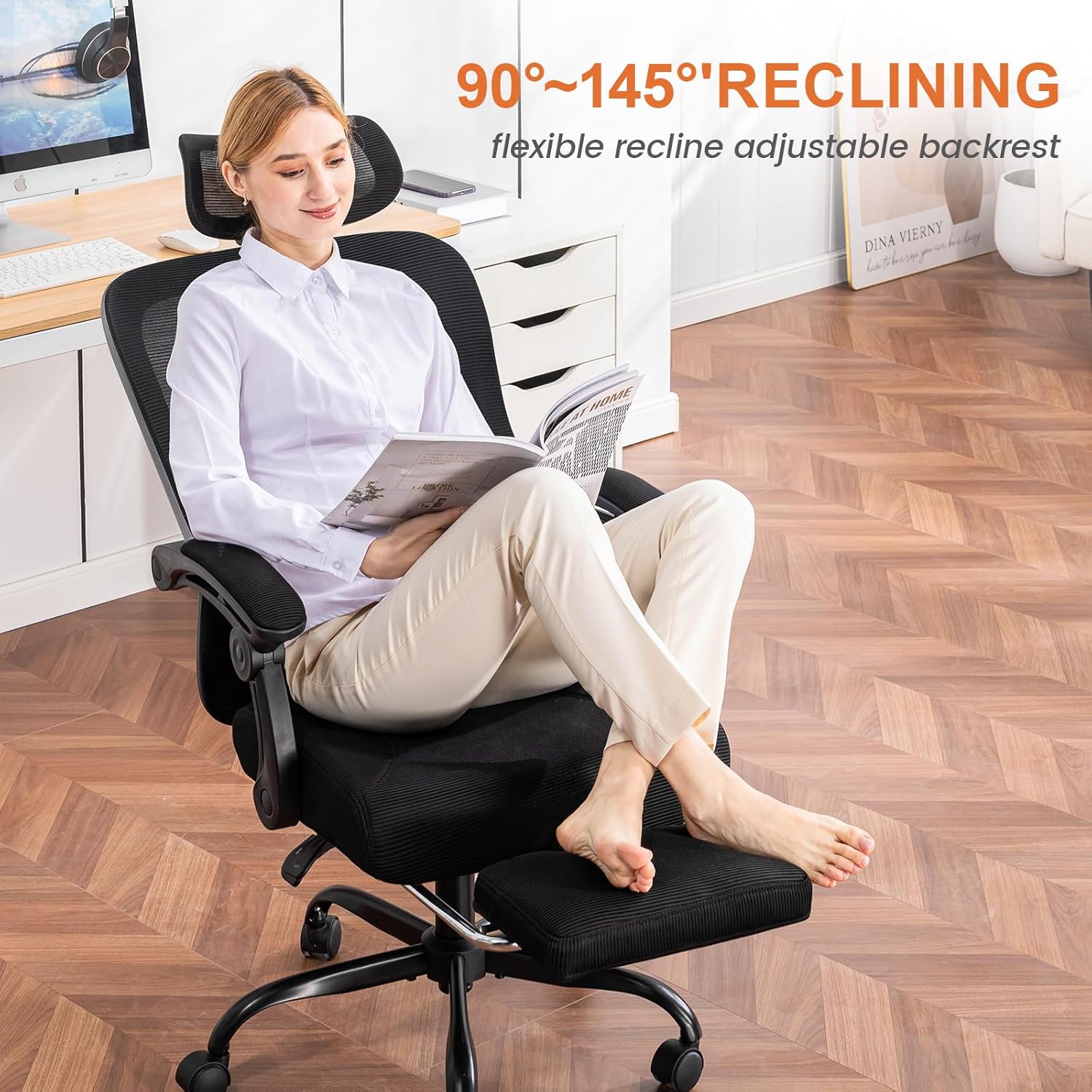
Figure 2: Lumbar support adjustment mechanism.

Figure 3: Chair in reclined position with footrest extended.
Video 2: GTRACING Gaming Chair Features. This video highlights the adjustable features and comfort aspects of the chair.
5. నిర్వహణ
Regular maintenance will help preserve the appearance and functionality of your GTRACING chair.
- Cleaning Mesh Fabric: For general cleaning, wipe the mesh with a soft, damp cloth. For deeper cleaning, use a mild soap solution and a soft brush, then rinse with a clean damp వస్త్రాన్ని ఒత్తి గాలిలో పూర్తిగా ఆరనివ్వండి. కఠినమైన రసాయనాలు లేదా రాపిడి క్లీనర్లను నివారించండి.
- ఫ్రేమ్ మరియు బేస్: Wipe metal and plastic parts with a soft, damp గుడ్డ.
- చక్రాలు: Periodically check and clean the wheels to remove any accumulated dust or hair that may hinder smooth movement.
- ఫాస్టెనర్లు: Occasionally check all screws and bolts to ensure they are tight. Retighten if necessary to maintain stability.
6. ట్రబుల్షూటింగ్
మీ కుర్చీతో మీకు ఏవైనా సమస్యలు ఎదురైతే, దయచేసి ఈ క్రింది సాధారణ పరిష్కారాలను చూడండి:
| సమస్య | సాధ్యమైన కారణం | పరిష్కారం |
|---|---|---|
| కుర్చీ ఎత్తు సర్దుబాటు చేయదు. | గ్యాస్ లిఫ్ట్ పనిచేయకపోవడం లేదా లివర్ పనిచేయకపోవడం. | ఎత్తు సర్దుబాటు లివర్ పూర్తిగా నిమగ్నమై ఉందని నిర్ధారించుకోండి. సమస్య కొనసాగితే, గ్యాస్ లిఫ్ట్ను మార్చాల్సి రావచ్చు. కస్టమర్ సపోర్ట్ను సంప్రదించండి. |
| Chair squeaks when moving. | Loose fasteners or friction between components. | అన్ని స్క్రూలు మరియు బోల్ట్లను బిగించండి. అవసరమైతే కదిలే భాగాలకు కొద్ది మొత్తంలో సిలికాన్ లూబ్రికెంట్ను వర్తించండి. |
| చక్రాలు సజావుగా తిరగడం లేదు. | Debris caught in castors or damaged wheels. | Remove any hair or debris from the castor wheels. If wheels are damaged, they may need replacement. |
| బ్యాక్రెస్ట్ వంగదు లేదా లాక్ అవ్వదు. | రిక్లైన్ మెకానిజం జామ్ అయింది లేదా లివర్ నిశ్చితార్థం కాలేదు. | Check if the recline lever is fully engaged or disengaged. Ensure no obstructions are preventing movement. |
If the problem persists after attempting these solutions, please contact GTRACING customer support for further assistance.
7. స్పెసిఫికేషన్లు
| ఫీచర్ | వివరాలు |
|---|---|
| బ్రాండ్ | GTRACING |
| మోడల్ పేరు | CH241 |
| రంగు | నలుపు |
| ఉత్పత్తి కొలతలు | 20.87"డి x 26.77"వా x 45.87"హ |
| సీటు లోతు | 18.5 అంగుళాలు |
| వస్తువు బరువు | 38.8 పౌండ్లు |
| బరువు సామర్థ్యం | 350 పౌండ్లు వరకు |
| మూలం దేశం | చైనా |
| ధృవపత్రాలు | SGS Certified, BIFMA Tested |
8. వారంటీ మరియు మద్దతు
GTRACING is committed to providing excellent support and quality products.
- వారంటీ: This product comes with a one-year warranty for quality repairs.
- కస్టమర్ మద్దతు: If you have any questions, concerns, or require assistance, please do not hesitate to reach out to GTRACING customer support.
- ఆన్లైన్ స్టోర్: మరిన్ని ఉత్పత్తులు మరియు సమాచారం కోసం, సందర్శించండి GTRACING Store.
Ask a question about this manual
Ask about setup, troubleshooting, compatibility, parts, safety, or missing instructions. Manuals+ will review the question and use this page’s manual context to help answer it.