
పరిచయం
Thank you for choosing the SONICAKE Sprint QAM-15 Electric Guitar Amplifier. This portable 15-watt combo amplifier is designed for practice, travel, and small gigs, offering versatile tone control and essential connectivity. This manual provides detailed instructions to help you get the most out of your ampజీవితకాలం.
ముఖ్య లక్షణాలు:
- Portable & Lightweight Design (approx. 7.45 lbs, 11.5"x11.5"x4.5")
- Dual-Channel Versatility (Clean and Overdrive)
- Enhanced Connectivity (3.5mm Headphone Output, 3.5mm AUX Input)
- Professional Sound Control (3-Band EQ: Treble, Mid, Bass, Gain, Volume)
- Closed-Back Design for High-Quality Audio Output
భద్రతా సూచనలు
Please read and understand these safety instructions before operating your ampలైఫైయర్. భవిష్యత్తు సూచన కోసం ఈ మాన్యువల్ని ఉంచండి.
- శక్తి మూలం: కనెక్ట్ చేయండి ampపేర్కొన్న విద్యుత్ సరఫరా వాల్యూమ్కు మాత్రమే లైఫైయర్tage యూనిట్లో సూచించిన విధంగా.
- వెంటిలేషన్: వెంటిలేషన్ ఓపెనింగ్లను నిరోధించవద్దు. చుట్టూ తగినంత గాలి ప్రవాహాన్ని నిర్ధారించుకోండి. ampవేడెక్కడం నిరోధించడానికి lifier.
- నీరు మరియు తేమ: బహిర్గతం చేయవద్దు ampవర్షం, తేమ లేదా ఏదైనా ద్రవాలకు లైఫైయర్. ద్రవాలతో నిండిన వస్తువులను దానిపై ఉంచవద్దు ampజీవితకాలం.
- ఉష్ణ మూలాలు: ఉంచండి ampరేడియేటర్లు, హీట్ రిజిస్టర్లు, స్టవ్లు లేదా ఇతర ఉపకరణాలు (సహా) వంటి ఉష్ణ వనరుల నుండి లైఫైయర్ దూరంగా ఉంటుంది ( ampలిఫైయర్లు) వేడిని ఉత్పత్తి చేస్తాయి.
- శుభ్రపరచడం: Clean only with a dry cloth. Avoid using liquid or aerosol cleaners.
- సర్వీసింగ్: ఈ ఉత్పత్తిని మీరే సేవ చేయడానికి ప్రయత్నించవద్దు. అర్హత కలిగిన సేవా సిబ్బందికి అన్ని సర్వీసులను చూడండి.
- కేబుల్స్: ప్రత్యేకించి ప్లగ్లు, కన్వీనియన్స్ రెసెప్టాకిల్స్ మరియు అవి ఉపకరణం నుండి నిష్క్రమించే ప్రదేశంలో నడవడం లేదా పించ్ చేయడం నుండి పవర్ కార్డ్ను రక్షించండి.
ఉత్పత్తి ముగిసిందిview

ముందు view of the SONICAKE Sprint QAM-15 Electric Guitar Ampలైఫైయర్, షోక్asing దాని కాంపాక్ట్ డిజైన్ మరియు కంట్రోల్ ప్యానెల్.
కంట్రోల్ ప్యానెల్ ఫీచర్లు:

వివరంగా view యొక్క amplifier's control panel, highlighting each knob and input for user reference.
- ఇన్పుట్: 1/4" (6.35mm) jack for connecting your electric guitar.
- గెయిన్: ముందస్తు మొత్తాన్ని నియంత్రిస్తుందిamplification or distortion. Higher settings increase saturation.
- OD (Overdrive) Button: Toggles between the clean channel and the overdrive channel. Press in for overdrive, out for clean.
- VOL (వాల్యూమ్): యొక్క మొత్తం అవుట్పుట్ వాల్యూమ్ను సర్దుబాటు చేస్తుంది ampజీవితకాలం.
- TRE (Treble): Adjusts the high-frequency response of the ampజీవితకాలం.
- MID (Middle): Adjusts the mid-range frequency response of the ampజీవితకాలం.
- బాస్: యొక్క తక్కువ-ఫ్రీక్వెన్సీ ప్రతిస్పందనను సర్దుబాటు చేస్తుంది ampజీవితకాలం.
- AUX (సహాయక) ఇన్పుట్: 3.5mm jack for connecting external audio devices (e.g., MP3 player, phone) to play along with backing tracks.
- PHONES (Headphone Output): 3.5mm jack for connecting headphones for silent practice. Mutes the main speaker when in use.
- పవర్ స్విచ్: తిరుగుతుంది ampజీవితకాలం ఆన్ లేదా ఆఫ్.
- POWER Indicator LED: ఎప్పుడు ప్రకాశిస్తుంది ampలైఫైయర్ ఆన్ చేయబడింది.
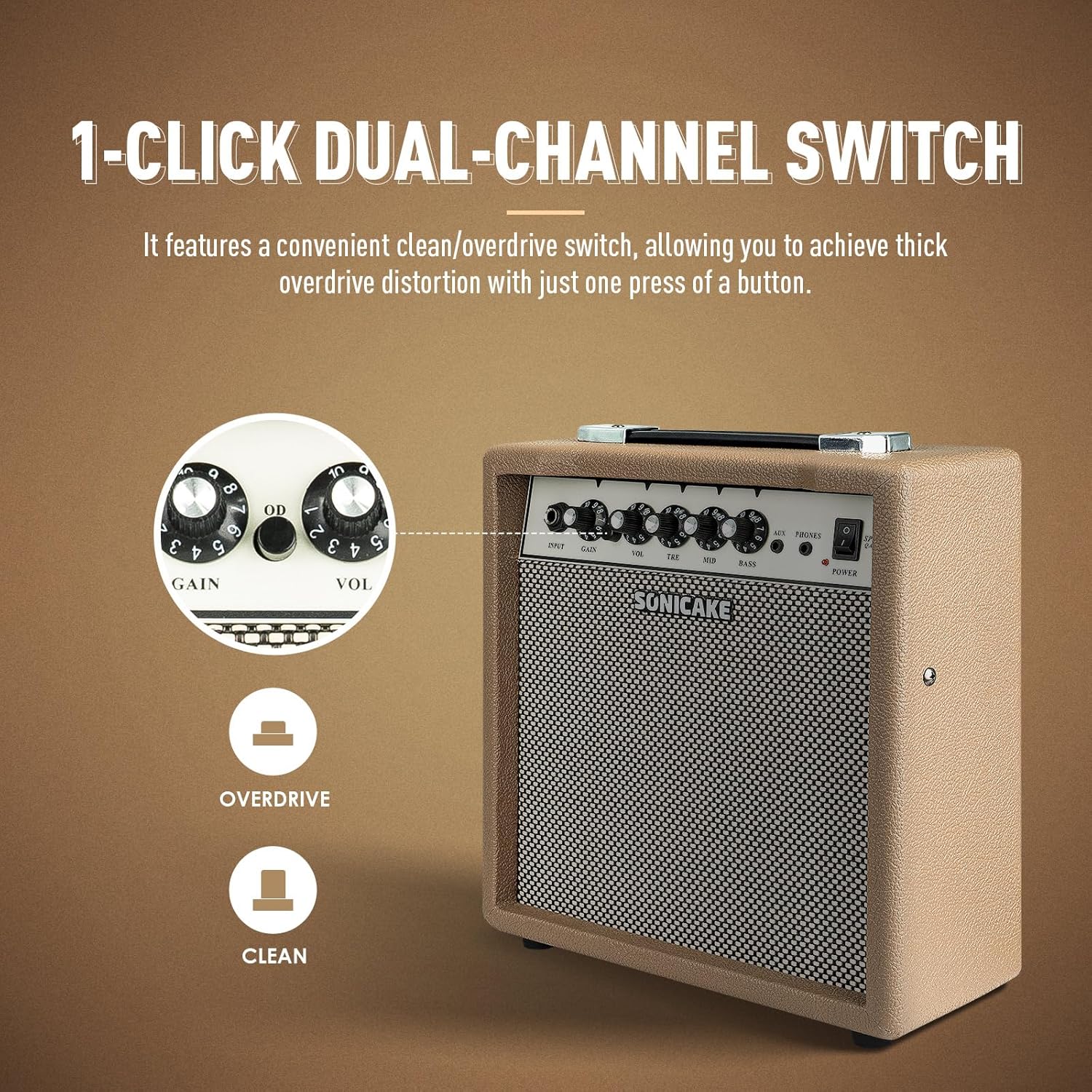
The OD button allows for instant switching between clean and overdrive tones.
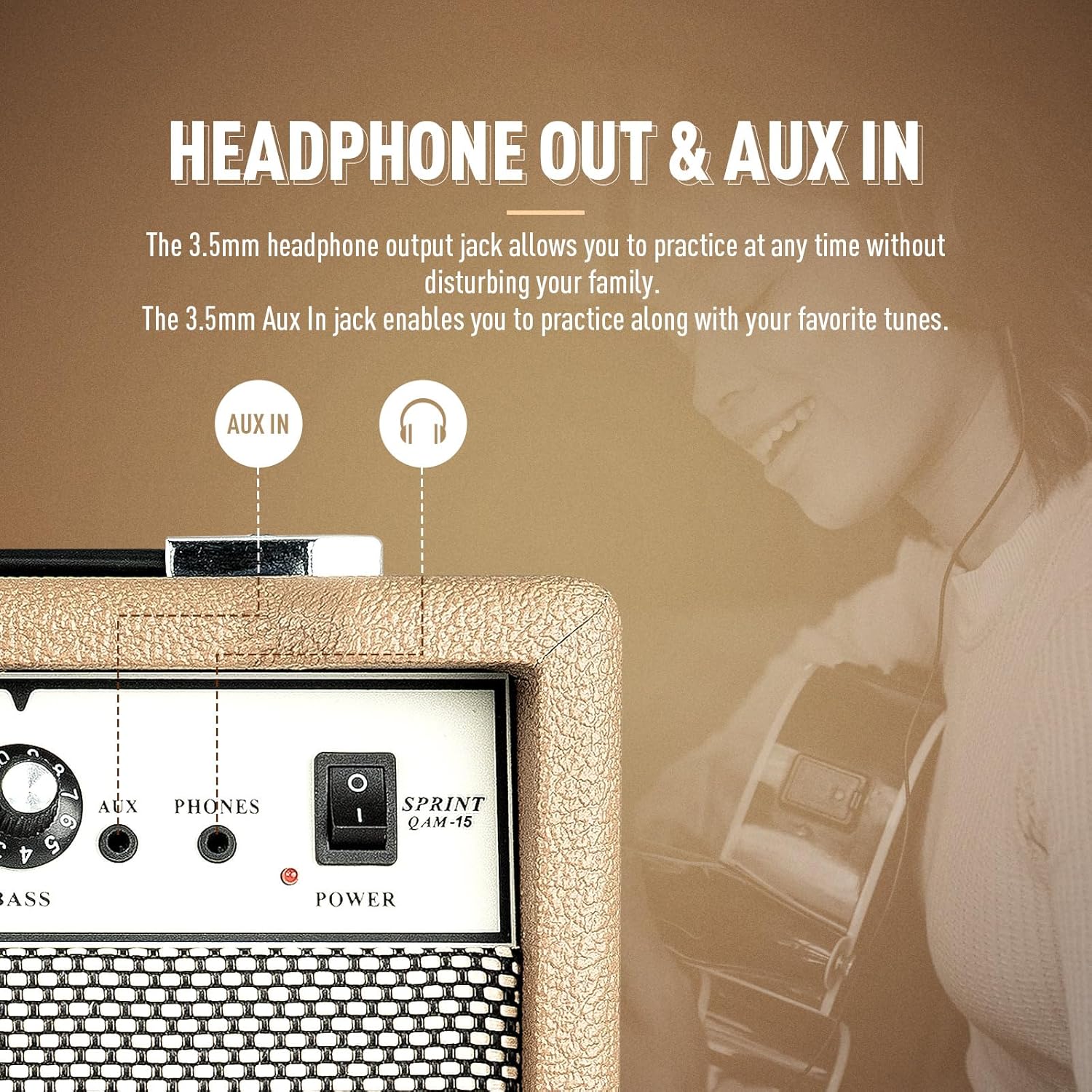
ది amplifier features dedicated AUX In and Headphone Out jacks for versatile practice options.
సెటప్
- అన్ప్యాకింగ్: జాగ్రత్తగా తొలగించండి amplifier from its packaging. Inspect for any signs of damage.
- ప్లేస్మెంట్: ఉంచండి amplifier on a stable, flat surface. Ensure there is adequate space around the unit for ventilation.
- పవర్ కనెక్షన్: అందించిన పవర్ కేబుల్ని కనెక్ట్ చేయండి amplifier's power input jack and then to a suitable electrical outlet. Ensure the power switch on the amplifier is in the 'OFF' position before connecting to power.
- గిటార్ కనెక్షన్: Connect your electric guitar to the 'INPUT' jack on the amplifier's front panel using a standard 1/4" (6.35mm) instrument cable.
- ప్రారంభ సెట్టింగ్లు: Before powering on, set the 'VOL' knob to its minimum position (fully counter-clockwise) and the 'GAIN' knob to a low setting. Set the 'TRE', 'MID', and 'BASS' knobs to their center (12 o'clock) positions.
ఆపరేటింగ్ సూచనలు
ప్రాథమిక ఆపరేషన్:
- పవర్ ఆన్: Flip the 'POWER' switch to the 'ON' position. The power indicator LED will illuminate.
- వాల్యూమ్ సర్దుబాటు: Slowly turn the 'VOL' knob clockwise to increase the overall output volume to your desired level.
- పవర్ ఆఫ్: When finished, turn the 'VOL' knob to its minimum position, then flip the 'POWER' switch to the 'OFF' position.
ఛానెల్ ఎంపిక:
The Sprint QAM-15 features two distinct channels: Clean and Overdrive.
- క్లీన్ ఛానెల్: With the 'OD' button in the 'OUT' position, the amplifier operates in the clean channel, providing a clear, uncolored tone.
- Overdrive Channel: Press the 'OD' button 'IN' to engage the overdrive channel. This adds distortion and sustain to your guitar tone. The 'GAIN' knob becomes more active in this mode.
Tone Control (3-Band EQ):
Use the 'TRE', 'MID', and 'BASS' knobs to shape your amplifier's tone:
- TRE (Treble): Adjusts the brightness and clarity of your sound. Turn clockwise for more sparkle, counter-clockwise for a warmer tone.
- MID (Middle): Controls the presence and punch of your sound. Adjust to cut through a mix or to create a scooped sound.
- బాస్: Adjusts the low-end fullness and depth of your sound. Turn clockwise for a thicker, heavier tone, counter-clockwise for a tighter sound.
నియంత్రణ సంపాదించు:
The 'GAIN' knob controls the amount of signal sent to the amplifier's pre-amp stage. Higher gain settings result in more distortion and sustain, particularly noticeable in the overdrive channel. Experiment with the 'GAIN' and 'VOL' knobs to find your desired balance of distortion and overall loudness.
కనెక్టివిటీ:
- AUX ఇన్పుట్: Connect an external audio device (e.g., smartphone, tablet, MP3 player) to the 'AUX' input using a 3.5mm stereo cable. This allows you to play along with backing tracks or your favorite music through the amplifier's speaker. The volume of the AUX input is controlled by your external device.
- హెడ్ఫోన్ అవుట్పుట్: Connect a pair of headphones to the 'PHONES' output using a 3.5mm stereo plug. This will mute the amplifier's main speaker, allowing for silent practice. The headphone volume is controlled by the amplifier's 'VOL' knob.
నిర్వహణ
- శుభ్రపరచడం: క్రమం తప్పకుండా తుడవండి amplifier's exterior with a soft, dry, lint-free cloth. Do not use abrasive cleaners, solvents, or waxes.
- నిల్వ: ఎక్కువ కాలం ఉపయోగంలో లేనప్పుడు, నిల్వ చేయండి ampలైఫైయర్ను చల్లని, పొడి ప్రదేశంలో, ప్రత్యక్ష సూర్యకాంతి మరియు తీవ్రమైన ఉష్ణోగ్రతలకు దూరంగా ఉంచండి.
- నిర్వహణ: Always carry the amplifier using its handle. Avoid dropping or subjecting the unit to strong impacts.
- వెంటిలేషన్: నిర్ధారించండి amplifier's ventilation openings remain clear of dust and debris.
ట్రబుల్షూటింగ్
If you encounter issues with your SONICAKE Sprint QAM-15 ampలిఫైయర్ కోసం, ఈ క్రింది సాధారణ సమస్యలు మరియు పరిష్కారాలను చూడండి:
| సమస్య | సాధ్యమైన కారణం | పరిష్కారం |
|---|---|---|
| నుండి శబ్దం లేదు ampజీవితకాలం. |
|
|
| Sound is distorted or noisy. |
|
|
| AUX ఇన్పుట్ పనిచేయడం లేదు. |
|
|
If the problem persists after trying these solutions, please contact SONICAKE customer support or a qualified technician.
స్పెసిఫికేషన్లు

Dimensions of the SONICAKE Sprint QAM-15 ampజీవితకాలం.
- మోడల్: QAM-15
- అవుట్పుట్ వాట్tage: 15 వాట్స్
- వస్తువు బరువు: సుమారు 7.94 పౌండ్లు (3.6 కిలోలు)
- ఉత్పత్తి కొలతలు: 4.53 x 11.42 x 11.42 అంగుళాలు (11.5 x 29 x 29 సెం.మీ.)
- అనుకూల పరికరాలు: ఎలక్ట్రిక్ గిటార్
- మెటీరియల్ రకం: ప్లాస్టిక్
- రంగు: లేత గోధుమరంగు
వారంటీ మరియు మద్దతు
For detailed warranty information, please refer to the warranty card included with your product or visit the official SONICAKE webవారంటీ క్లెయిమ్ల కోసం మీ కొనుగోలు రుజువును ఉంచండి.
For technical support, product registration, or further inquiries, please visit the official SONICAKE webవారి వద్ద అందించిన సంప్రదింపు సమాచారం ద్వారా వారి కస్టమర్ సేవా విభాగాన్ని సైట్ చేయండి లేదా సంప్రదించండి webసైట్.