
షియోమి రెడ్మి నోట్ 14 5G
Xiaomi Redmi Note 14 5G యూజర్ మాన్యువల్
మోడల్: 24094RAD4G
1. పరిచయం
This manual provides essential information for the safe and efficient use of your Xiaomi Redmi Note 14 5G smartphone. Please read this manual carefully before using the device to ensure proper operation and to maximize its features.
The Xiaomi Redmi Note 14 5G is a high-performance smartphone featuring a 108MP AI Triple Camera, a vibrant 6.67-inch 120Hz AMOLED display, and robust durability with Corning Gorilla Glass 5. It supports 5G connectivity and offers advanced imaging capabilities.
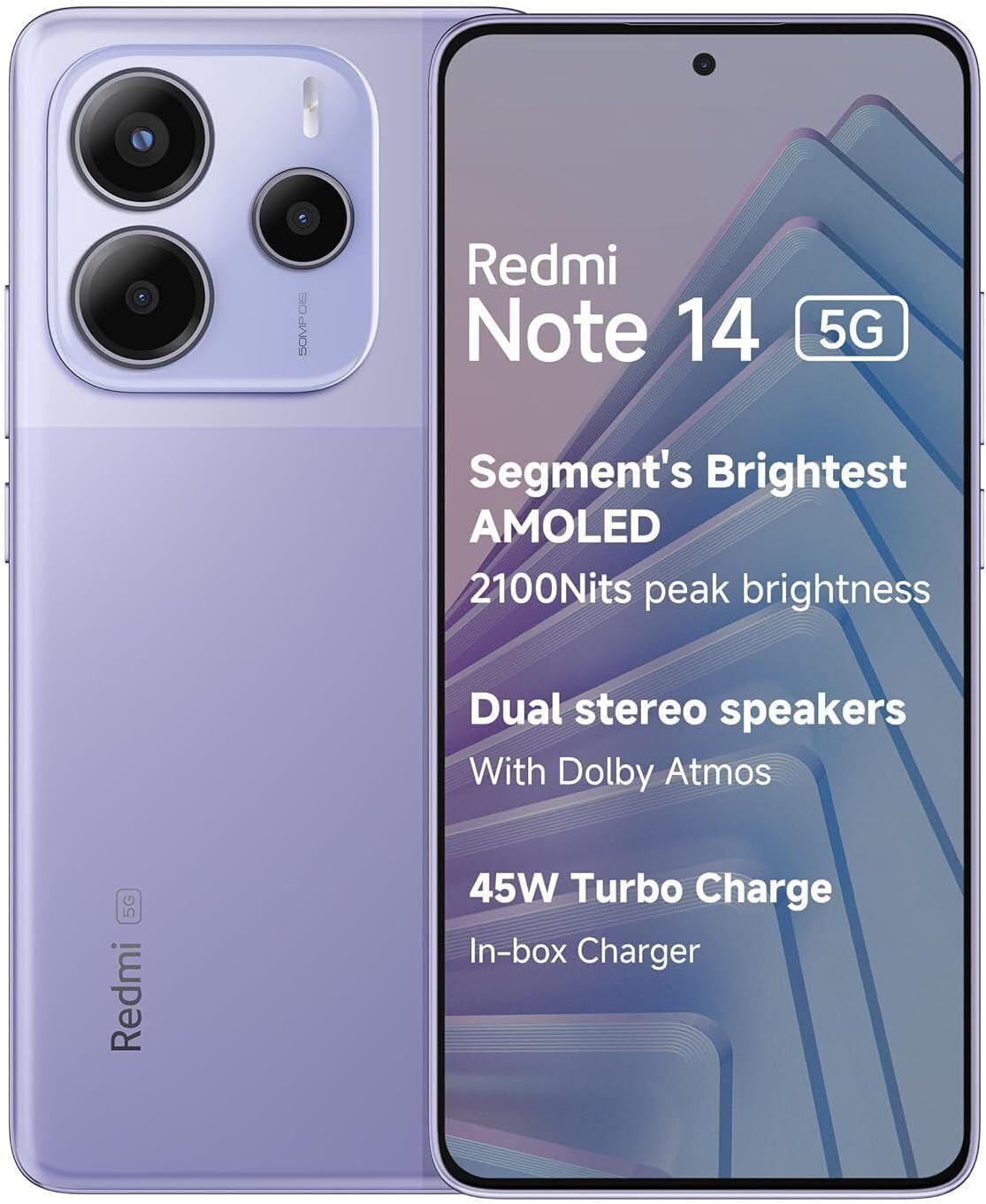
Figure 1.1: Xiaomi Redmi Note 14 5G in Lavender Purple. This image displays the phone's sleek design, highlighting the large AMOLED screen and the prominent rear camera array.
2. ప్రారంభించడం: సెటప్
2.1. ప్యాకేజీ విషయాలు
మీ ప్యాకేజీ కింది అంశాలను కలిగి ఉందని ధృవీకరించండి:
- Xiaomi Redmi Note 14 5G స్మార్ట్ఫోన్
- వాల్ అడాప్టర్
- USB కేబుల్
- SIM ట్రే ఎజెక్టర్
2.2. SIM కార్డ్ని చొప్పించడం
- మీ పరికరం వైపున SIM కార్డ్ ట్రేని గుర్తించండి.
- ట్రే పక్కన ఉన్న చిన్న రంధ్రంలోకి సిమ్ ట్రే ఎజెక్టర్ సాధనాన్ని చొప్పించి, ట్రే బయటకు వచ్చే వరకు సున్నితంగా నొక్కండి.
- Place your Nano-SIM card(s) into the designated slots on the tray. This model supports Dual SIM functionality (SIM1 + Hybrid* (SIM or MicroSD)).
- ట్రేని ఫోన్లోకి జాగ్రత్తగా తిరిగి చొప్పించండి, అది పరికర బాడీకి సరిగ్గా సరిపోతుందని నిర్ధారించుకోండి.
2.3. ప్రారంభ పవర్ ఆన్ మరియు సెటప్
- Xiaomi లోగో కనిపించే వరకు పవర్ బటన్ను నొక్కి పట్టుకోండి.
- మీ భాష, ప్రాంతాన్ని ఎంచుకోవడానికి మరియు Wi-Fi నెట్వర్క్కు కనెక్ట్ చేయడానికి స్క్రీన్పై కనిపించే ప్రాంప్ట్లను అనుసరించండి.
- Complete the setup wizard, which includes signing into your Google account and setting up security features like fingerprint or AI Face Unlock.
2.4. పరికరాన్ని ఛార్జ్ చేస్తోంది
Connect the USB cable to the wall adapter and then to your phone's USB-C port. Plug the wall adapter into a power outlet. The device supports fast charging. For optimal battery health, utilize the Smart Charging Engine feature.
3. ఆపరేటింగ్ సూచనలు
3.1. డిస్ప్లే మరియు నావిగేషన్
The device features a 6.67-inch AMOLED display with a 120Hz refresh rate for smooth visuals. Navigation can be done using on-screen gestures or traditional navigation buttons, configurable in settings. The display offers 2100 nits peak brightness and is protected by Corning Gorilla Glass 5. It also features TÜV Rheinland Low Blue Light, Circadian Friendly, and Flicker Free Certifications for eye comfort.
3.2. కెమెరా వినియోగం
Your Redmi Note 14 5G is equipped with a versatile camera system:
- వెనుక కెమెరా: 108MP main camera with Optical Image Stabilization (OIS), an 8MP ultra-wide camera, and a 2MP macro camera. Features include 3× lossless zoom, RAW domain algorithm for enhanced night photography, and a beautifying function for portraits. OIS and Electronic Image Stabilization (EIS) provide stable video recording.
- ముందు కెమెరా: 20MP front camera with beautify algorithms that preserve skin texture and automatically adjust for multiple people.
Advanced AI features include:
- AI ఎరేస్: Smart object selection for convenient removal of unwanted elements from photos.
- AI Sky: Effortlessly switch between different weather conditions in your photos.
3.3 కనెక్టివిటీ
ఈ పరికరం వివిధ కనెక్టివిటీ ఎంపికలకు మద్దతు ఇస్తుంది:
- నెట్వర్క్: Dual 5G (n1/2/3/5/7/8/12/20/26/28/38/40/41/48/66/77/78) and 4G LTE. Designed for T-Mobile, Mint, Tello, or any T-Mobile network in the USA. Global GSM carrier compatibility outside the USA.
- Wi-Fi: 802.11a/b/g/n/ac, 2.4GHz మరియు 5GHz Wi-Fi, Wi-Fi డైరెక్ట్కు మద్దతు ఇస్తుంది.
- బ్లూటూత్: వెర్షన్ 5.3.
- NFC: కాంటాక్ట్లెస్ చెల్లింపులు మరియు త్వరిత జత కోసం.
- GPS: L1, GLONASS G1, BDS B1I, Galileo E1.
3.4. భద్రతా లక్షణాలు
Your device offers multiple security options:
- ఇన్-స్క్రీన్ ఫింగర్ ప్రింట్ సెన్సార్: త్వరిత మరియు సురక్షితమైన అన్లాకింగ్ కోసం.
- AI ఫేస్ అన్లాక్: అన్లాక్ చేయడానికి అనుకూలమైన ముఖ గుర్తింపు.
3.5. ఆడియో
The Redmi Note 14 5G includes a 3.5mm audio jack for wired headphones and features dual stereo speakers with Dolby Atmos for an immersive audio experience.
4. నిర్వహణ
4.1. మీ పరికరాన్ని శుభ్రపరచడం
To clean your phone, use a soft, lint-free cloth. Avoid using abrasive cleaners, solvents, or aerosol sprays directly on the device. The screen features touch control with wet fingers, maintaining accuracy even with oil, water, or foam.
4.2. బ్యాటరీ సంరక్షణ
The device is equipped with a 5110 mAh battery and a Smart Charging Engine. This system learns your charging habits to slow down battery degradation, aiming to retain over 80% capacity after 4 years and 1600 cycles. Avoid exposing the device to extreme temperatures (below 0°C or above 35°C) as this can affect battery life.
4.3. సాఫ్ట్వేర్ నవీకరణలు
సరైన పనితీరు, భద్రత మరియు కొత్త ఫీచర్లకు యాక్సెస్ను నిర్ధారించుకోవడానికి సాఫ్ట్వేర్ అప్డేట్ల కోసం క్రమం తప్పకుండా తనిఖీ చేసి, ఇన్స్టాల్ చేయండి. అప్డేట్లు సాధారణంగా ఓవర్-ది-ఎయిర్ (OTA) ద్వారా డెలివరీ చేయబడతాయి.
4.4. నిల్వ నిర్వహణ
క్రమానుగతంగా రీview your device's storage to delete unnecessary files, apps, and media. This helps maintain smooth operation. The device comes with 256GB of internal storage and supports expandable storage via the hybrid SIM slot.
5. ట్రబుల్షూటింగ్
5.1. సాధారణ సమస్యలు మరియు పరిష్కారాలు
- పరికరం ఆన్ చేయడం లేదు: బ్యాటరీ ఛార్జ్ అయ్యిందని నిర్ధారించుకోండి. మళ్ళీ పవర్ ఆన్ చేయడానికి ప్రయత్నించే ముందు కనీసం 15 నిమిషాలు ఛార్జర్కు కనెక్ట్ చేయండి.
- నెట్వర్క్ కనెక్టివిటీ సమస్యలు: Check if your SIM card is properly inserted. Verify that mobile data is enabled in settings. If issues persist, restart the device or contact your network provider.
- యాప్లు క్రాష్ అవుతున్నాయి/స్తంభింపజేస్తున్నాయి: యాప్ను మూసివేసి తిరిగి తెరవండి. సెట్టింగ్లలో యాప్ కాష్ మరియు డేటాను క్లియర్ చేయండి. సమస్య కొనసాగితే, యాప్ను అన్ఇన్స్టాల్ చేసి, మళ్లీ ఇన్స్టాల్ చేయండి.
- నెమ్మదిగా పనితీరు: Close background apps. Clear cache. Ensure sufficient storage space is available. Restarting the device can often resolve temporary slowdowns.
5.2. ఫ్యాక్టరీ రీసెట్
మీరు నిరంతర సాఫ్ట్వేర్ సమస్యలను ఎదుర్కొంటే, ఫ్యాక్టరీ రీసెట్ అవసరం కావచ్చు. హెచ్చరిక: This will erase all data on your device. Back up important data before proceeding. Navigate to Settings > About phone > Factory reset.
6. స్పెసిఫికేషన్లు
Below are the key technical specifications for the Xiaomi Redmi Note 14 5G:
| ఫీచర్ | స్పెసిఫికేషన్ |
|---|---|
| మోడల్ పేరు | Redmi Note 14 5G (24094RAD4G) |
| ప్రదర్శించు | 6.67" AMOLED, 2400 x 1080 Resolution, 120Hz Refresh Rate, 2100 nits peak brightness, Corning Gorilla Glass 5 |
| ప్రాసెసర్ | Dimensity 7025-Ultra, Octa-core up to 2.5GHz |
| RAM | 8 GB |
| నిల్వ | 256 GB (మైక్రో SD ద్వారా విస్తరించవచ్చు) |
| వెనుక కెమెరా | 108MP Main (OIS) + 8MP Ultra-wide + 2MP Macro |
| ఫ్రంట్ కెమెరా | 20MP |
| బ్యాటరీ | 5110 mAh |
| ఆపరేటింగ్ సిస్టమ్ | ఆండ్రాయిడ్ 14 ఆధారిత హైపర్ OS |
| కనెక్టివిటీ | 5G, 4G, Wi-Fi (2.4GHz/5GHz), Bluetooth 5.3, NFC, GPS |
| ఆడియో జాక్ | 3.5 మి.మీ |
| కొలతలు | 6.39 x 2.98 x 0.31 అంగుళాలు |
| బరువు | 6.7 ఔన్సులు |

Figure 6.1: Regulatory Certifications. This image displays the phone's certification screen, indicating compliance with various international standards, including the FCC ID for the U.S. market.
7. వారంటీ మరియు మద్దతు
Your Xiaomi Redmi Note 14 5G comes with a standard manufacturer's warranty. For specific warranty terms and conditions, please refer to the warranty card included in your product packaging or visit the official Xiaomi webసైట్. పొడిగించిన కవరేజ్ కోసం రక్షణ ప్రణాళికలు కూడా అందుబాటులో ఉన్నాయి.
సాంకేతిక మద్దతు, ట్రబుల్షూటింగ్ సహాయం లేదా సేవా విచారణల కోసం, దయచేసి వారి అధికారిక ద్వారా Xiaomi కస్టమర్ సేవను సంప్రదించండి. website or authorized service centers. Keep your proof of purchase handy when seeking support.
Ask a question about this manual
Ask about setup, troubleshooting, compatibility, parts, safety, or missing instructions. Manuals+ will review the question and use this page’s manual context to help answer it.