
1. పరిచయం
The Wingtech Celero 5G smartphone is designed to provide reliable performance and connectivity. This manual offers comprehensive guidance on its features, setup, operation, and maintenance to ensure optimal use of your device.
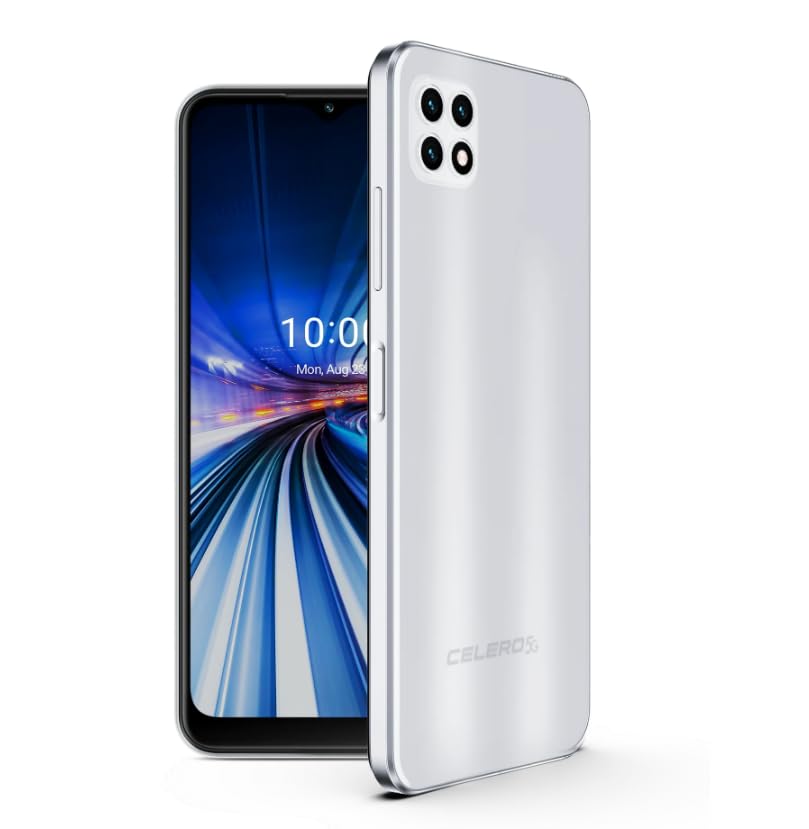
Figure 1: Wingtech Celero 5G Smartphone (Silver)
2. పెట్టెలో ఏముంది
ఉత్పత్తి ప్యాకేజింగ్లో అన్ని అంశాలు ఉన్నాయని నిర్ధారించుకోండి:
- Wingtech Celero 5G Smartphone
- USB కేబుల్
- SIM ట్రే ఎజెక్టర్
- త్వరిత ప్రారంభ మార్గదర్శిని (విడిగా చేర్చబడవచ్చు)
3. సెటప్
3.1. SIM కార్డ్ని చొప్పించడం
- మీ పరికరం వైపున SIM కార్డ్ ట్రేని గుర్తించండి.
- ట్రే పక్కన ఉన్న చిన్న రంధ్రంలోకి సిమ్ ట్రే ఎజెక్టర్ సాధనాన్ని చొప్పించి, ట్రే బయటకు వచ్చే వరకు సున్నితంగా నెట్టండి.
- మీ నానో-సిమ్ కార్డ్(లు) మరియు/లేదా మైక్రో SD కార్డ్ను ట్రేలో బంగారు కాంటాక్ట్లు క్రిందికి ఉండేలా ఉంచండి.
- పరికరంలోకి ట్రేని జాగ్రత్తగా మళ్లీ చొప్పించండి.
3.2. ప్రారంభ పవర్ ఆన్ మరియు సెటప్
- Press and hold the Power button until the device vibrates and the screen turns on.
- మీ భాషను ఎంచుకోవడానికి, Wi-Fi నెట్వర్క్కు కనెక్ట్ అవ్వడానికి మరియు మీ Google ఖాతాను సెటప్ చేయడానికి స్క్రీన్పై కనిపించే ప్రాంప్ట్లను అనుసరించండి.
- మీ పరికర సెట్టింగ్లను వ్యక్తిగతీకరించడానికి సెటప్ విజార్డ్ను పూర్తి చేయండి.
4. ఆపరేటింగ్
4.1. ప్రాథమిక నావిగేషన్
- హోమ్ స్క్రీన్: విభిన్న హోమ్ స్క్రీన్ ప్యానెల్లను యాక్సెస్ చేయడానికి ఎడమ లేదా కుడి వైపుకు స్వైప్ చేయండి.
- యాప్ డ్రాయర్: హోమ్ స్క్రీన్ నుండి పైకి స్వైప్ చేయండి view అన్ని ఇన్స్టాల్ చేసిన అప్లికేషన్లు.
- నోటిఫికేషన్ ప్యానెల్: నోటిఫికేషన్లు మరియు త్వరిత సెట్టింగ్లను యాక్సెస్ చేయడానికి స్క్రీన్ పై నుండి క్రిందికి స్వైప్ చేయండి.
4.2. కాల్స్ చేయడం మరియు సందేశాలు పంపడం
- నొక్కండి ఫోన్ icon to open the dialer and make calls.
- నొక్కండి సందేశాలు icon to send and receive text messages.
4.3. కెమెరా వినియోగం
- నొక్కండి కెమెరా icon to launch the camera application.
- Select different modes (Photo, Video, Portrait, etc.) by swiping across the screen.
- ఫోటోలను క్యాప్చర్ చేయడానికి లేదా వీడియో రికార్డింగ్ను ప్రారంభించడానికి/ఆపివేయడానికి షట్టర్ బటన్ను నొక్కండి.
5. స్పెసిఫికేషన్లు
| ఫీచర్ | వివరాలు |
|---|---|
| మోడల్ పేరు | సెలెరో 5G |
| అంశం మోడల్ సంఖ్య | DSH98123 |
| ఆపరేటింగ్ సిస్టమ్ | ఆండ్రాయిడ్ 11.0 |
| స్క్రీన్ పరిమాణం | 6.52 అంగుళాలు |
| రిజల్యూషన్ | 1920 x 1080 |
| మెమరీ స్టోరేజ్ కెపాసిటీ | 4 GB (RAM) |
| అంతర్గత నిల్వ | 64GB (as per product title, though description mentions 64GB built-in memory) |
| బ్యాటరీ కెపాసిటీ | 4000 మిల్లీamp గంటలు |
| కనెక్టివిటీ టెక్నాలజీ | 5G |
| రంగు | వెండి |
| తయారీదారు | Wingtech |
6. నిర్వహణ
- Keep your device clean using a soft, dry cloth.
- Avoid exposing the device to extreme temperatures, direct sunlight, or liquids.
- నష్టాన్ని నివారించడానికి మీ డేటాను క్రమం తప్పకుండా బ్యాకప్ చేయండి.
- Install software updates as they become available to ensure optimal performance and security.
7. ట్రబుల్షూటింగ్
7.1. పరికరం ఆన్ కావడం లేదు
- బ్యాటరీ ఛార్జ్ అయ్యిందని నిర్ధారించుకోండి. పరికరాన్ని ఛార్జర్కు కనెక్ట్ చేసి, పవర్ ఆన్ చేయడానికి ప్రయత్నించే ముందు కొన్ని నిమిషాలు వేచి ఉండండి.
- బలవంతంగా రీస్టార్ట్ చేయడానికి పవర్ బటన్ను కనీసం 10-15 సెకన్ల పాటు నొక్కి పట్టుకోండి.
7.2. పేలవమైన నెట్వర్క్ కనెక్టివిటీ
- మీ సిమ్ కార్డ్ సరిగ్గా చొప్పించబడిందో లేదో తనిఖీ చేయండి.
- Verify that mobile data is enabled in your device settings.
- Restart your device or toggle Airplane Mode on and off.
- Contact your wireless carrier to confirm service availability in your area.
7.3. యాప్లు క్రాష్ కావడం లేదా స్తంభించిపోవడం
- Clear the cache and data for the problematic app via Settings > Apps.
- యాప్ను అన్ఇన్స్టాల్ చేసి మళ్లీ ఇన్స్టాల్ చేయండి.
- మీ పరికరం యొక్క సాఫ్ట్వేర్ తాజాగా ఉందని నిర్ధారించుకోండి.
8. వారంటీ మరియు మద్దతు
This product is offered as an Amazon Renewed device. Amazon Renewed products are inspected, tested, and refurbished as necessary to be fully functional. Your purchase is eligible for Amazon Renewed coverage in conjunction with Amazon's Return Policy and the A-to-z Guarantee.
For specific warranty details, return policies, or technical support, please refer to the documentation provided with your purchase or visit the Amazon Renewed support page.