
Electronic Spices W88-B
Electroni Spices W88-B 20A Solar Charger Controller User Manual
Model: W88-B
1. పరిచయం
The Electronic Spices W88-B 20A Solar Charger Controller is designed to efficiently manage the charging and discharging of 12V/24V solar power systems. This controller optimizes battery performance and extends battery life by preventing overcharging, over-discharging, and short circuits. It features dual USB ports for charging mobile devices and other USB-powered gadgets directly from the solar system. Utilizing intelligent PWM charging technology, it enhances energy conversion efficiency, making it suitable for off-grid solar setups, RVs, boats, and small solar installations. The user-friendly LCD display provides real-time data for effective monitoring and management. Constructed with durable and heat-resistant materials, the W88-B controller offers reliable long-term performance in various environmental conditions.
2 కీ ఫీచర్లు
- మోడల్: W88-B
- వాల్యూమ్ రేట్ చేయబడిందిtage: 12V/24V automatic identification
- రేట్ చేయబడిన ప్రస్తుత: 20A
- గరిష్టంగా PV వాల్యూమ్tage: 50V
- గరిష్ట PV ఇన్పుట్ పవర్: 130W (for 12V system) / 260W (for 24V system)
- ప్రదర్శన రకం: LCD/LED display for real-time monitoring
- ఛార్జింగ్ టెక్నాలజీ: PWM battery charging
- USB పోర్ట్లు: పరికరం ఛార్జింగ్ కోసం డ్యూయల్ USB పోర్ట్లు
- రక్షణ లక్షణాలు: Overcharging, over-discharging, short circuit, over-current, over-voltage, overheating, and lightning protection.
- బ్యాటరీ అనుకూలత: Suitable for lead-acid battery, lithium iron battery, lithium battery.
- మెటీరియల్: Durable plastic and metal construction.
3. ఉత్పత్తి ముగిసిందిview మరియు కొలతలు
The W88-B solar charge controller features a compact design with clearly labeled terminals and an intuitive LCD display. Below are images illustrating the product's appearance and its key dimensions.

మూర్తి 3.1: ముందు view of the Electroni Spices W88-B Solar Charger Controller, showing the LCD display, control buttons, USB ports, and terminal connections.

Figure 3.2: Dimensions of the W88-B Solar Charger Controller, indicating a length of 131 mm and a width of 69 mm.
4. భద్రతా సమాచారం మరియు రక్షణ లక్షణాలు
Always observe safety precautions when working with electrical systems. Ensure all connections are secure and correct before applying power. The W88-B controller incorporates multiple protection features to ensure safe operation of your solar system:
- ఓవర్ కరెంట్ ప్రొటెక్షన్: అధిక విద్యుత్ ప్రవాహం నుండి నష్టాన్ని నివారిస్తుంది.
- ఓవర్ ఛార్జ్ రక్షణ: Stops charging when the battery is full to prevent overcharging.
- షార్ట్ సర్క్యూట్ రక్షణ: Automatically disconnects in case of a short circuit.
- పైగా వాల్యూమ్tagఇ రక్షణ: Protects against damage from excessively high voltage.
- ఓవర్ హీటింగ్ ప్రొటెక్షన్: Shuts down if internal temperature exceeds safe limits.
- మెరుపు రక్షణ: పిడుగుపాటుకు వ్యతిరేకంగా రక్షణను అందిస్తుంది.

Figure 4.1: Visual representation of the various protection features integrated into the W88-B Solar Charger Controller.
5. సెటప్ మరియు ఇన్స్టాలేషన్
Proper installation is crucial for the optimal performance and longevity of your solar charge controller. Follow these steps carefully:
- ముందుగా బ్యాటరీని కనెక్ట్ చేయండి: Connect the battery to the charge controller. Ensure correct polarity (+ to + and - to -). The controller will detect the battery voltage (12V or 24V) automatically.
- సోలార్ ప్యానెల్లను కనెక్ట్ చేయండి: Connect the solar panels to the charge controller. Again, observe correct polarity.
- Connect DC Load (Optional): Connect your DC load (e.g., DC lights) to the load terminals of the controller.
- Connect Inverter (Optional): If using an inverter for AC loads, connect it to the battery terminals (not directly to the controller's load terminals).
ముఖ్యమైన: Always connect the battery to the controller first, then the solar panels, and finally the load. Disconnect in the reverse order: load, then solar panels, then battery.
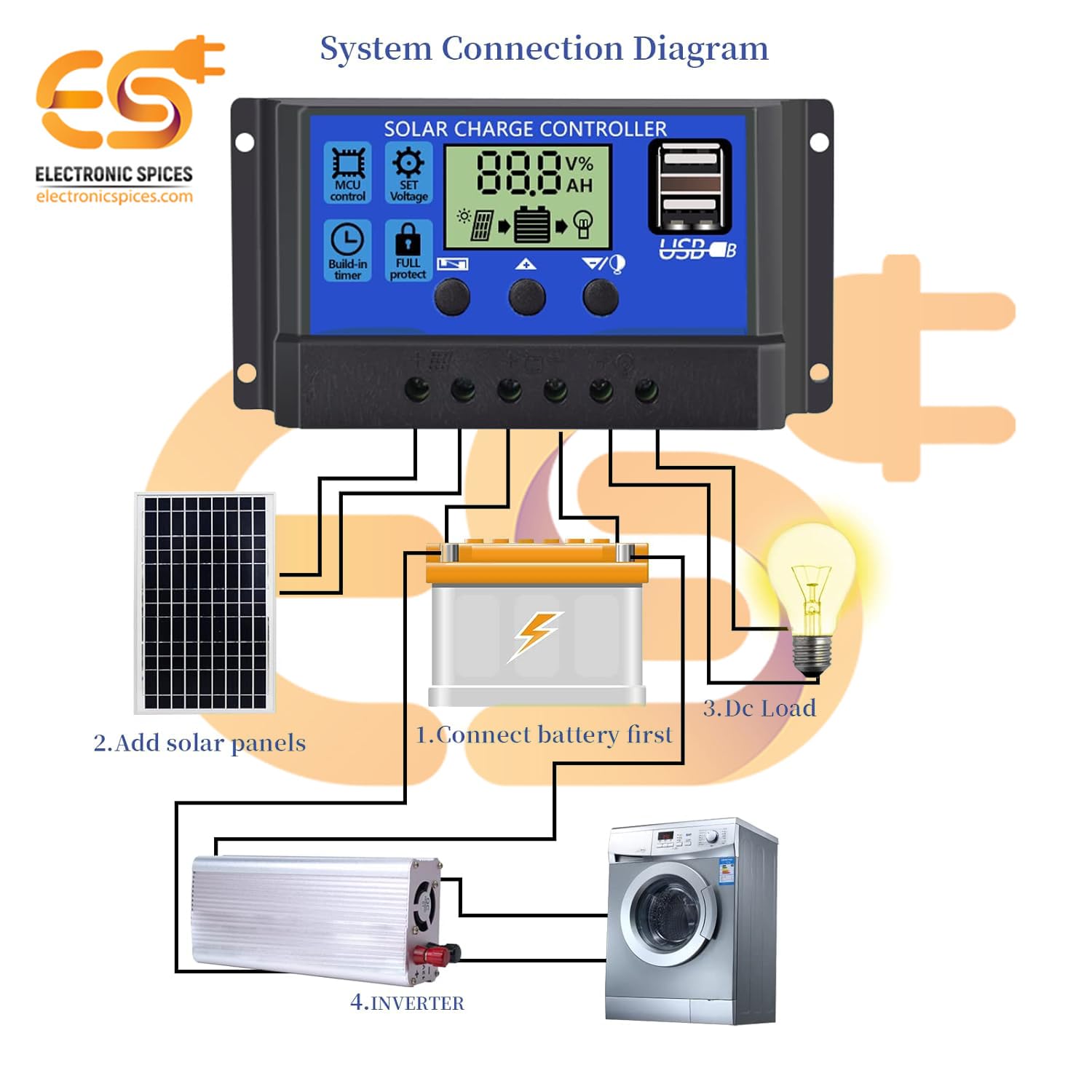
Figure 5.1: System connection diagram illustrating the proper sequence for connecting the battery, solar panels, DC load, and inverter to the solar charge controller.

Figure 5.2: A quick visual guide for connecting the solar panels, battery, and DC load to the W88-B controller.
6. ఆపరేటింగ్ సూచనలు
The W88-B controller features an LCD display that provides real-time information about your solar system's status.

Figure 6.1: Explanation of the digital display on the W88-B controller, showing indicators for solar panel charge, battery status, and load output.
6.1. డిస్ప్లే మోడ్లు
The LCD cycles through various display modes automatically. You can also manually cycle through them using the control buttons. Common displays include:
- బ్యాటరీ వాల్యూమ్tage: ప్రస్తుత వాల్యూమ్ను చూపుతుందిtagకనెక్ట్ చేయబడిన బ్యాటరీ యొక్క ఇ.
- Solar Panel Charge Status: Indicates if the solar panels are actively charging the battery.
- Load Output Status: Shows if the load output is active or inactive.
6.2. నియంత్రణ బటన్లు
The controller has three buttons for navigation and setting adjustments:
- మెనూ బటన్: సెట్టింగ్ మోడ్లలోకి ప్రవేశించడానికి మరియు నిష్క్రమించడానికి ఉపయోగించబడుతుంది.
- అప్ బటన్: Used to increase values or navigate upwards in menus.
- డౌన్ బటన్: Used to decrease values or navigate downwards in menus.
Refer to the specific icons on the controller for functions like MCU control, set voltage, build-in timer, and full protect indicators.
7. నిర్వహణ
To ensure the long-term reliability and performance of your W88-B solar charge controller, follow these maintenance guidelines:
- రెగ్యులర్ క్లీనింగ్: కంట్రోలర్ను శుభ్రంగా మరియు దుమ్ము మరియు చెత్త లేకుండా ఉంచండి. శుభ్రం చేయడానికి మృదువైన, పొడి వస్త్రాన్ని ఉపయోగించండి.
- కనెక్షన్లను తనిఖీ చేయండి: Periodically inspect all wiring connections to ensure they are tight and free from corrosion. Loose connections can lead to power loss or overheating.
- వెంటిలేషన్: Ensure the controller is installed in a well-ventilated area to prevent overheating. Do not block the ventilation holes.
- పర్యావరణ పరిస్థితులు: While designed for durability, avoid exposing the controller to extreme moisture or direct sunlight for prolonged periods if not rated for such exposure.
- బ్యాటరీ ఆరోగ్యం: Monitor your battery's health regularly. A failing battery can impact the controller's performance.
8. ట్రబుల్షూటింగ్
If you encounter issues with your W88-B solar charge controller, refer to the following common problems and their solutions:
| సమస్య | సాధ్యమైన కారణం | పరిష్కారం |
|---|---|---|
| డిస్ప్లే లేదా పవర్ లేదు | బ్యాటరీ కనెక్ట్ కాలేదు లేదా తక్కువ వాల్యూమ్ ఉందిtage; reversed polarity; loose connection. | బ్యాటరీ కనెక్షన్లు మరియు వాల్యూమ్ను తనిఖీ చేయండిtage. సరైన ధ్రువణతను నిర్ధారించుకోండి. అన్ని టెర్మినల్స్ను బిగించండి. |
| బ్యాటరీ ఛార్జ్ కావడం లేదు | Solar panels not connected; insufficient sunlight; faulty solar panel; controller fault. | Check solar panel connections. Ensure panels are receiving adequate sunlight. Test solar panel output. |
| లోడ్ పనిచేయడం లేదు | Load disconnected; battery voltage too low (low voltage disconnect); overload protection activated. | Check load connections. Charge battery. Reduce load or check for short circuit in load. |
| కంట్రోలర్ వేడెక్కడం | Poor ventilation; excessive load; short circuit. | Ensure adequate airflow around the controller. Reduce load. Check for short circuits in the system. |
ఈ పరిష్కారాలను ప్రయత్నించిన తర్వాత కూడా సమస్య కొనసాగితే, దయచేసి కస్టమర్ మద్దతును సంప్రదించండి.
9. స్పెసిఫికేషన్లు
| పరామితి | విలువ |
|---|---|
| మోడల్ | W88-B |
| వాల్యూమ్ రేట్ చేయబడిందిtage | 12V/24V (ఆటో) |
| రేటింగ్ కరెంట్ | 20A |
| గరిష్టంగా PV వాల్యూమ్tage | 50V |
| గరిష్ట PV ఇన్పుట్ పవర్ (12V) | 130W |
| గరిష్ట PV ఇన్పుట్ పవర్ (24V) | 260W |
| ప్రదర్శన రకం | LCD/LED |
| ఛార్జింగ్ పోర్ట్ రకం | USB (Dual) |
| వస్తువు బరువు | 150 గ్రాములు |
| కొలతలు (LxW) | 13.1 సెం.మీ x 6.9 సెం.మీ |
| మెటీరియల్ | ప్లాస్టిక్, మెటల్ |
| రంగు | నీలం |
| మూలం దేశం | భారతదేశం |
10. వారంటీ మరియు మద్దతు
This product is manufactured by Electronic Spices. For any technical assistance, troubleshooting beyond this manual, or warranty inquiries, please contact Electronic Spices customer support. Please have your product model number (W88-B) and purchase details ready when contacting support.
తయారీదారు: Electronic Spices
సంప్రదింపు సమాచారం: Refer to the contact details provided with your purchase or visit the official Electronic Spices webఅత్యంత తాజా మద్దతు సమాచారం కోసం సైట్.
Ask a question about this manual
Ask about setup, troubleshooting, compatibility, parts, safety, or missing instructions. Manuals+ will review the question and use this page’s manual context to help answer it.