
1. పరిచయం
The DJI Air 3S Drone with RC 2 Fly More Combo is an advanced aerial photography platform designed for capturing high-quality images and videos. It features a dual-camera system, extended flight time, and comprehensive safety mechanisms. This manual provides essential information for the safe and effective setup, operation, and maintenance of your DJI Air 3S drone.
2. పెట్టెలో ఏముంది
మీ ప్యాకేజీలో అన్ని భాగాలు ఉన్నాయని ధృవీకరించండి:
- DJI ఎయిర్ 3S డ్రోన్
- RC 2 రిమోట్ కంట్రోలర్
- 3 x ఇంటెలిజెంట్ ఫ్లైట్ బ్యాటరీ
- 128GB Extreme microSD Memory Card
- High USB Speed Memory Card Reader
- షోల్డర్ బ్యాగ్
- Drone Photography Backpack
- 3 x Extra Pair of Low-Noise Propellers
- గింబాల్ ప్రొటెక్టర్
- USB-C PD కేబుల్
- ND Filter Set (ND8, ND32 & ND128)
- బ్యాటరీ ఛార్జింగ్ హబ్
- Drone Landing Pad
- Camera Lens Cleaning Kit
- 6-Slot Memory Card Wallet
- CPS 2 Year Warranty
- బండిల్ ఇట్ బెటర్ లెన్స్ క్లాత్

Image: Contents of the DJI Air 3S Drone Fly More Combo package, including drone, controller, batteries, and accessories.
వీడియో: అన్బాక్సింగ్ మరియు అంతకంటే ఎక్కువview of the DJI Air 3S Fly More Combo components, demonstrating what is included in the package.
Video: A user's experience with the DJI Air 3S, showcasing దాని లక్షణాలు మరియు భాగాలు.
3. సెటప్
3.1 డ్రోన్ను విప్పడం
- Place the drone on a flat, stable surface.
- Gently unfold the front arms, then the rear arms, until they lock into position.
- Ensure all propellers are securely attached and free from damage.

Image: The DJI Air 3S Drone fully unfolded, ready for flight, showing its front camera and sensors.
Video: Demonstrates the process of unfolding the DJI Air 3S drone's arms and preparing it for flight.
3.2 Preparing the RC 2 Remote Controller
- Remove the control sticks from their storage slots on the controller.
- Screw the control sticks into the designated ports.
- Ensure the controller is fully charged using the provided USB-C PD cable.
Video: A demonstration of setting up the RC 2 remote controller, including attaching the control sticks.
3.3 బ్యాటరీ ఇన్స్టాలేషన్ మరియు ఛార్జింగ్
- Insert a fully charged Intelligent Flight Battery into the drone's battery compartment until it clicks into place.
- Use the Battery Charging Hub to charge multiple batteries efficiently. Connect the hub to a suitable power adapter (not included) and then to a power source.
3.4 ప్రారంభ పవర్ ఆన్ మరియు యాక్టివేషన్
- Press the power button on the drone once, then press and hold for two seconds to power on. Repeat for the remote controller.
- Follow the on-screen instructions on the RC 2 controller to activate the drone and link it to your DJI account. Ensure a stable internet connection for activation.
4. డ్రోన్ను ఆపరేట్ చేయడం
4.1 ప్రాథమిక విమాన నియంత్రణలు
Familiarize yourself with the RC 2 controller's joysticks and buttons. The left stick typically controls altitude and yaw, while the right stick controls forward, backward, and sideways movement. Always perform a pre-flight check before takeoff.
4.2 కెమెరా ఆపరేషన్
The DJI Air 3S features a dual-camera system: a 1" CMOS 24mm 50MP wide-angle camera and a 1/1.3" CMOS 70mm 48MP medium telephoto camera. It supports 4K/60fps HDR video recording and 48MP still images. Use the DJI Fly app on the RC 2 controller to switch between cameras, adjust settings, and initiate recording or photo capture.
- మాస్టర్షాట్లు: Automated flight and shooting sequences for cinematic results.
- క్విక్షాట్లు: Pre-programmed flight paths for dynamic video clips.
- 2.7K వర్టికల్ షూటింగ్: Available on both cameras for social media content.

Image: The DJI Air 3S Drone in mid-flight, showcasing its design and operational capabilities.
4.3 భద్రతా లక్షణాలు
The Air 3S is equipped with advanced safety features:
- Omnidirectional Obstacle Sensing (APAS): Detects obstacles in all directions, providing comprehensive protection.
- Advanced Return-to-Home (RTH): The drone can intelligently return to its takeoff point, utilizing a forward-facing LiDAR sensor for obstacle avoidance during nighttime RTH.
- Non-GPS RTH: If GPS is unavailable, the drone can retrace its flight path to return safely.
4.4 O4 HD వీడియో ట్రాన్స్మిషన్
The O4 HD video transmission system, with its six-antenna array, provides a stable 1080p/60fps live feed up to 20 km, ensuring clear and reliable communication between the drone and controller.
వీడియో: ఒక పునఃview of the DJI Air 3S Drone with RC 2 Fly More Combo, highlighting its operational features and performance.
5. నిర్వహణ
5.1 బ్యాటరీ సంరక్షణ
- Charge batteries fully before each flight.
- ఎక్కువసేపు ఉపయోగించకపోతే బ్యాటరీలను దాదాపు 50-60% ఛార్జ్తో నిల్వ చేయండి.
- ఛార్జింగ్ మరియు నిల్వ సమయంలో తీవ్రమైన ఉష్ణోగ్రతలను నివారించండి.
5.2 ప్రొపెల్లర్ తనిఖీ మరియు భర్తీ
- ప్రతి విమాన ప్రయాణానికి ముందు, పగుళ్లు, వంపులు లేదా నష్టం కోసం ప్రొపెల్లర్లను తనిఖీ చేయండి.
- Replace damaged propellers immediately using the extra pairs provided. Follow the drone's manual for correct installation.

చిత్రం: పైన view of the DJI Air 3S Drone, showing its propellers and overall design.
5.3 Gimbal and Lens Care
- Always attach the gimbal protector when transporting or storing the drone.
- Use the provided lens cleaning kit to keep the camera lenses free from dust and smudges.
5.4 ఫర్మ్వేర్ నవీకరణలు
Regularly check for and install firmware updates via the DJI Fly app to ensure optimal performance, new features, and enhanced safety.
6. ట్రబుల్షూటింగ్
This section addresses common issues you might encounter. For detailed troubleshooting, refer to the official DJI support resources.
- GPS సిగ్నల్ లేదు: మీరు ఎత్తైన భవనాలు లేదా బలమైన అయస్కాంత జోక్యం నుండి దూరంగా బహిరంగ ప్రదేశంలో ఎగురుతున్నారని నిర్ధారించుకోండి.
- Remote Controller Disconnection: Ensure the drone and controller are within range and there is no significant interference. Re-link the controller if necessary.
- అడ్డంకి నివారణ హెచ్చరికలు: Pay attention to on-screen warnings and adjust flight path. Ensure sensors are clean and unobstructed.
- గింబాల్ పనిచేయకపోవడం: Check for physical obstructions. Restart the drone and controller. If the issue persists, contact support.
- బ్యాటరీ ఛార్జింగ్ లేదు: Verify the charging cable and adapter are functioning correctly. Ensure batteries are inserted properly into the charging hub.
7. స్పెసిఫికేషన్లు
| ఫీచర్ | స్పెసిఫికేషన్ |
|---|---|
| బ్రాండ్ | DJI |
| మోడల్ పేరు | ఎయిర్ 3S |
| ప్రత్యేక లక్షణాలు | Omnidirectional Obstacle Sensing, Six-Antenna Array |
| వీడియో క్యాప్చర్ రిజల్యూషన్ | 4K |
| ఎఫెక్టివ్ స్టిల్ రిజల్యూషన్ | 50 MP (Wide-angle), 48 MP (Telephoto) |
| గరిష్ట విమాన సమయం | 45 నిమిషాల వరకు |
| గరిష్ట పరిధి | 20 Kilometers (O4 HD Transmission) |
| బ్యాటరీ రకం | లిథియం అయాన్ |
| వస్తువు బరువు | 151 Grams (Drone only, approximate) |
| అంశం కొలతలు (L x W x H) | 12.8"L x 10.5"W x 4.2"H (Unfolded, approximate) |
| కనెక్టివిటీ టెక్నాలజీ | USB, Wi-Fi |
| ఆప్టికల్ సెన్సార్ టెక్నాలజీ | CMOS |
8. వారంటీ
This product includes a CPS 2 Year Warranty, providing coverage for protection, repair, and replacement services. Please refer to the warranty documentation included in your package for full terms and conditions.
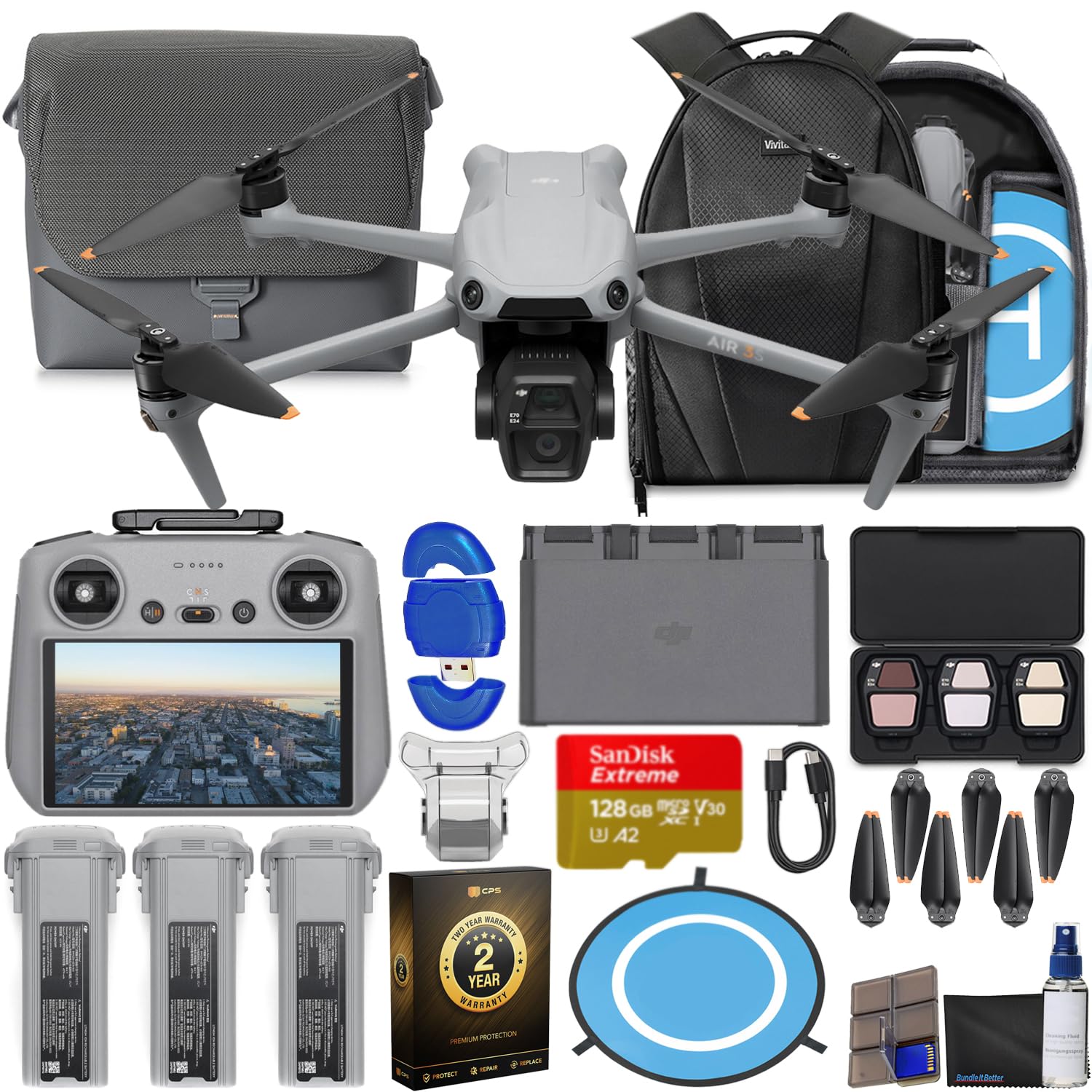
Image: The CPS 2 Year Warranty box, indicating premium protection, repair, and replacement services.
9. మద్దతు
For further assistance, detailed user guides, firmware downloads, and technical support, please visit the official DJI support webసైట్. అదనపు సహాయం కోసం మీరు తరచుగా అడిగే ప్రశ్నలు మరియు కమ్యూనిటీ ఫోరమ్లను కూడా కనుగొనవచ్చు.
అధికారిక DJI Webసైట్: www.dji.com/support