
1. పరిచయం
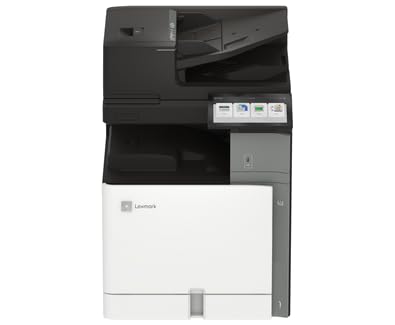
This manual provides essential information for the safe and efficient operation of your Lexmark CX962se MFP Color Laser Printer. Please read it thoroughly before using the device. The Lexmark CX962se is an A3 multifunction color laser printer designed for versatility and productivity, offering vivid prints up to 45 pages per minute, an intuitive 10-inch color touchscreen, and single-pass two-sided scanning capabilities.
2. భద్రతా సమాచారం
- విద్యుత్ భద్రత: Always connect the printer to a grounded power outlet. Do not use damaged power cords. Disconnect the power cord before cleaning or servicing.
- లేజర్ రేడియేషన్: This product uses a laser. Use of controls or adjustments or performance of procedures other than those specified herein may result in hazardous radiation exposure.
- వేడి ఉపరితలాలు: Internal components of the printer can become hot during operation. Avoid touching areas marked with a hot surface warning.
- వెంటిలేషన్: Ensure adequate space around the printer for proper ventilation to prevent overheating. Do not block ventilation openings.
- టోనర్ కాట్రిడ్జ్లు: Handle toner cartridges carefully. If toner comes into contact with skin or clothing, wash immediately with soap and cold water. Keep toner out of reach of children.
3. ప్యాకేజీ విషయాలు
ప్యాకేజీలో అన్ని అంశాలు ఉన్నాయని నిర్ధారించుకోండి:
- Lexmark CX962se MFP Color Laser Printer
- పవర్ కార్డ్
- స్టార్టర్ టోనర్ కార్ట్రిడ్జ్లు (నలుపు, సియాన్, మెజెంటా, పసుపు)
- సెటప్ గైడ్
- Software and Documentation (may be provided via download link)
4. సెటప్
Follow these steps to set up your Lexmark CX962se printer:
- అన్ప్యాకింగ్: Carefully remove the printer from its packaging. Remove all protective tapes, films, and packing materials from the exterior and interior of the printer. Refer to the Setup Guide for specific locations.
- ప్లేస్మెంట్: Place the printer on a stable, level surface with adequate space for ventilation and access to power and data ports.
- పవర్ కనెక్ట్ చేయండి: పవర్ కార్డ్ను ప్రింటర్కి కనెక్ట్ చేసి, ఆపై గ్రౌండెడ్ ఎలక్ట్రికల్ అవుట్లెట్కి కనెక్ట్ చేయండి.
- ప్రారంభ పవర్ ఆన్: Press the power button. Follow the on-screen instructions on the 10-inch color touchscreen to select language, region, and initial settings.
- టోనర్ కార్ట్రిడ్జ్లను ఇన్స్టాల్ చేయండి: If not pre-installed, open the front cover and insert the toner cartridges into their corresponding slots until they click into place.
- సాఫ్ట్వేర్ ఇన్స్టాలేషన్: Insert the software CD (if provided) into your computer or visit the official Lexmark support website to download the latest drivers and utilities for your operating system. Follow the on-screen instructions to complete the installation.
- కంప్యూటర్కు కనెక్ట్ చేయండి: Connect the printer to your computer using a USB cable (not included) or configure network connectivity as per the software instructions.
5. ఆపరేటింగ్ సూచనలు
This section covers basic operations of your printer.
- నియంత్రణ ప్యానెల్: The 10-inch color touchscreen provides access to all printer functions. Navigate through menus by tapping icons and swiping.
- పేపర్ లోడ్ అవుతోంది: Open the paper tray, adjust the paper guides to fit the paper size (up to 8.5 x 11 inch), and load up to 250 sheets of plain paper. Ensure the paper is not creased or bent.
- ప్రింటింగ్: From your computer, open the document you wish to print. Select "Print" from the application's menu, choose the Lexmark CX962se printer, adjust settings as needed (e.g., color, duplex), and click "Print."
- కాపీ చేస్తోంది: Place your document face-down on the scanner glass or face-up in the Automatic Document Feeder (ADF). On the printer's touchscreen, select "Copy," adjust settings like quantity, color, and duplex, then press "Start."
- స్కానింగ్: Place your document on the scanner glass or in the ADF. On the touchscreen, select "Scan." Choose your desired scan destination (e.g., computer, network folder, email) and adjust scan settings (e.g., resolution, file type), then press "Start."
6. నిర్వహణ
క్రమం తప్పకుండా నిర్వహణ మీ ప్రింటర్ యొక్క అత్యుత్తమ పనితీరును మరియు దీర్ఘాయువును నిర్ధారిస్తుంది.
- Replacing Toner Cartridges: When a toner cartridge is low or empty, a message will appear on the touchscreen. Open the front cover, press the release lever for the empty cartridge, pull it out, and insert a new Lexmark genuine toner cartridge until it clicks into place. Close the cover.
- ప్రింటర్ను శుభ్రపరచడం: Use a soft, lint-free cloth to wipe the exterior of the printer. For the scanner glass, use a glass cleaner applied to the cloth (not directly to the glass) to remove smudges. Periodically clean the interior of the printer as instructed in the full user guide available on the Lexmark webసైట్.
- ఫర్మ్వేర్ నవీకరణలు: Periodically check the Lexmark support website for firmware updates. Installing the latest firmware can improve performance and add new features. Follow the instructions provided with the update.
7. ట్రబుల్షూటింగ్
ఈ విభాగం మీరు ఎదుర్కొనే సాధారణ సమస్యలను పరిష్కరిస్తుంది.
- పేపర్ జామ్లు: If a paper jam occurs, the touchscreen will display instructions on how to clear it. Carefully open the indicated access points and remove any jammed paper, ensuring no torn pieces remain.
- ముద్రణ నాణ్యత సమస్యలు: If prints are faded, streaky, or have incorrect colors, check the toner levels. Perform a print quality diagnostic from the printer's control panel. Clean the print heads or transfer belt if recommended.
- కనెక్టివిటీ సమస్యలు: Ensure the USB cable is securely connected to both the printer and the computer. If using a network connection, verify network cables are connected and IP settings are correct. Restart both the printer and the computer.
- ఎర్రర్ కోడ్లు: If an error code appears on the display, note the code and refer to the Lexmark support website or the comprehensive user guide for detailed solutions.
8. స్పెసిఫికేషన్లు
| బ్రాండ్ | లెక్స్మార్క్ |
| మోడల్ పేరు | CX962se (20L8250) |
| ప్రింటింగ్ టెక్నాలజీ | లేజర్ |
| విధులు | ప్రింట్, కాపీ, స్కాన్ |
| గరిష్ట ముద్రణ వేగం (రంగు) | 15 ppm |
| గరిష్ట ముద్రణ వేగం (మోనోక్రోమ్) | 35 ppm |
| రిజల్యూషన్ | 600 x 600 dpi |
| కనెక్టివిటీ టెక్నాలజీ | USB |
| స్కానర్ రకం | ADF (ఆటోమేటిక్ డాక్యుమెంట్ ఫీడర్) |
| గరిష్ట షీట్ సామర్థ్యం | 250 షీట్లు |
| గరిష్ట మీడియా పరిమాణం | 8.5 x 11 అంగుళాలు |
| ఉత్పత్తి కొలతలు (D x W x H) | 29" x 43" x 31" |
| ఇంక్ కలర్ | నలుపు, సియాన్, మెజెంటా, పసుపు |
| ప్రత్యేక ఫీచర్ | ఆటో పవర్ ఆన్ |
9. వారంటీ మరియు మద్దతు
Your Lexmark CX962se MFP Color Laser Printer comes with a పరిమిత వారంటీ. For specific terms and conditions of the warranty, please refer to the documentation included with your product or visit the official Lexmark webసైట్.
For further assistance, technical support, driver downloads, and additional documentation, please visit the official Lexmark support webసైట్. మీరు అక్కడ కస్టమర్ సేవ కోసం సంప్రదింపు సమాచారాన్ని కూడా కనుగొనవచ్చు.
Lexmark Official Webసైట్: www.lexmark.com