
పరిచయం
ధన్యవాదాలు, ధన్యవాదాలు.asing the Intex Thunder 950-S Multimedia Tower Speaker. This speaker system is designed to provide powerful audio with versatile connectivity options, including Bluetooth v5.1, USB/TF, AUX, and FM radio. It also features a wireless karaoke microphone and dynamic RGB lights for an enhanced entertainment experience. Please read this manual carefully before operating the device to ensure proper use and to maximize its performance.
పెట్టెలో ఏముంది
అన్ప్యాక్ చేసిన తర్వాత, దయచేసి ఈ క్రింది అన్ని అంశాలు ఉన్నాయని నిర్ధారించుకోండి:
- Intex Thunder 950-S Tower Speaker
- వైర్లెస్ కచేరీ మైక్రోఫోన్
- రిమోట్ కంట్రోల్
- Audio Cable (RCA to RCA)
- పవర్ కార్డ్
- వినియోగదారు మాన్యువల్ (ఈ పత్రం)

Image: The Intex Thunder 950-S Tower Speaker with its included wireless microphone and remote control.
కీ ఫీచర్లు
- 95W హై పవర్ అవుట్పుట్: Delivers powerful sound with rich bass and clear treble.
- Wireless Karaoke Mic: For interactive singing and hosting events.
- RGB లైట్లు: Dynamic lighting that syncs with music.
- చెక్క క్యాబినెట్: Enhances acoustics by reducing vibrations for improved audio clarity.
- బహుళ కనెక్టివిటీ: Bluetooth v5.1 (10m range), USB/TF (up to 32GB), AUX, and FM radio.
- LED డిస్ప్లే: Provides clear information on current mode and settings.
- Full Remote Control: దూరం నుండి అనుకూలమైన ఆపరేషన్.

Image: The Intex Thunder 950-S Tower Speaker highlighting its 95W power output.
సెటప్ గైడ్
- ప్లేస్మెంట్: Place the tower speaker on a flat, stable surface. Ensure there is adequate space around the speaker for optimal sound dispersion and ventilation.
- పవర్ కనెక్షన్: Connect the power cord to the speaker's power input and then plug it into a standard electrical outlet.
- ప్రారంభ పవర్ ఆన్: Press the power button on the speaker or remote control to turn on the device. The LED display will illuminate.
- ఆడియో మూలాలను కనెక్ట్ చేస్తోంది:
- బ్లూటూత్: స్పీకర్ స్వయంచాలకంగా బ్లూటూత్ జత చేసే మోడ్లోకి ప్రవేశిస్తుంది. కోసం వెతకండి "Intex 950-S" on your device's Bluetooth settings and connect.
- AUX: Connect your audio device (e.g., smartphone, MP3 player) to the AUX input port using the provided audio cable. Select AUX mode on the speaker.
- USB/TF కార్డ్: సంబంధిత స్లాట్లో USB డ్రైవ్ లేదా TF కార్డ్ని చొప్పించండి. స్పీకర్ స్వయంచాలకంగా USB/TF మోడ్కి మారి ప్లేబ్యాక్ను ప్రారంభిస్తుంది.
- FM రేడియో: Switch to FM mode. The speaker will automatically scan and save available radio stations.

Image: The Intex Thunder 950-S Tower Speaker displaying its various connectivity ports and LED screen.
ఆపరేటింగ్ సూచనలు
రిమోట్ కంట్రోల్ విధులు
The included remote control allows for convenient operation of all speaker functions. Familiarize yourself with the buttons:
- శక్తి: Turn the speaker On/Off.
- మోడ్: Switch between Bluetooth, AUX, USB/TF, and FM modes.
- వాల్యూమ్ +/-: మాస్టర్ వాల్యూమ్ను సర్దుబాటు చేయండి.
- ప్లే/పాజ్: ఆడియో ప్లేబ్యాక్ను ప్లే చేయండి లేదా పాజ్ చేయండి.
- మునుపటి/తదుపరి: మునుపటి లేదా తదుపరి ట్రాక్/స్టేషన్కు వెళ్లండి.
- EQ: ఈక్వలైజర్ ప్రీసెట్ల ద్వారా సైకిల్ చేయండి.
- మ్యూట్: Mute or unmute the audio.
- కాంతి: Control RGB lighting effects.
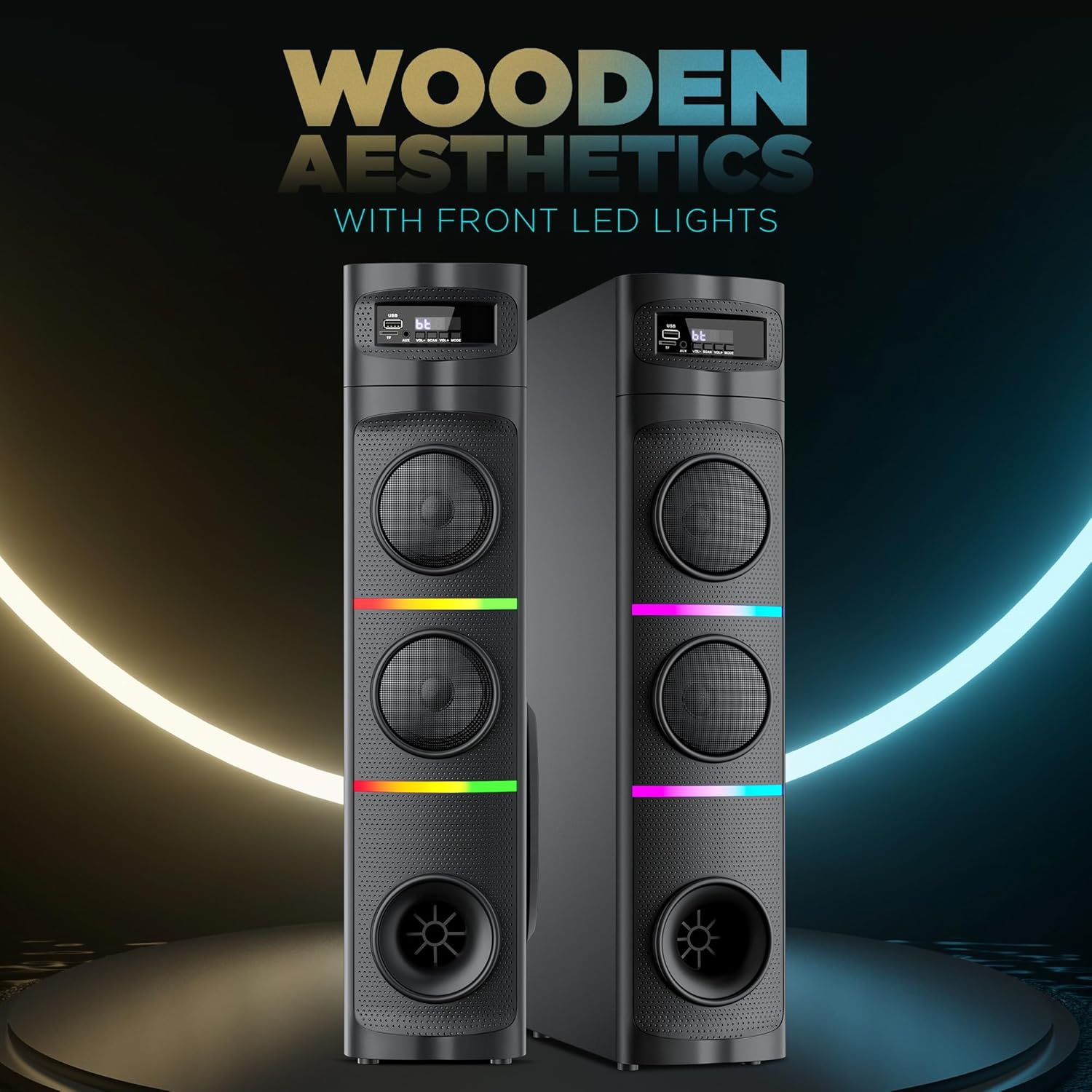
Image: Close-up of the remote control for the Intex Thunder 950-S Tower Speaker.
Using the Wireless Karaoke Mic
- Ensure the microphone has fresh batteries.
- Turn on the microphone. It will automatically pair with the speaker.
- Adjust the microphone volume using the dedicated controls on the speaker or remote, if available.
- Begin singing along to your music.

Image: The Intex Thunder 950-S Tower Speaker shown with its wireless karaoke microphone.
RGB లైటింగ్
The speaker features dynamic RGB lights. Use the "Light" button on the remote control to cycle through different lighting modes or turn them off.
నిర్వహణ
- శుభ్రపరచడం: Wipe the speaker's exterior with a soft, dry cloth. Do not use liquid cleaners or abrasive materials.
- వెంటిలేషన్: Ensure the speaker's vents are not blocked to prevent overheating.
- నిల్వ: ఎక్కువసేపు ఉపయోగంలో లేనప్పుడు, స్పీకర్ను ప్రత్యక్ష సూర్యకాంతి మరియు తీవ్రమైన ఉష్ణోగ్రతలకు దూరంగా చల్లని, పొడి ప్రదేశంలో నిల్వ చేయండి.
- నీటి నిరోధకత: The product is listed as "Water Resistant" but should not be submerged or exposed to heavy splashing. Avoid direct contact with water.
ట్రబుల్షూటింగ్
| సమస్య | సాధ్యమైన కారణం | పరిష్కారం |
|---|---|---|
| శక్తి లేదు | పవర్ కార్డ్ కనెక్ట్ కాలేదు; పవర్ అవుట్లెట్ లోపభూయిష్టంగా ఉంది | పవర్ కార్డ్ సురక్షితంగా ప్లగిన్ చేయబడిందని నిర్ధారించుకోండి; వేరే పవర్ అవుట్లెట్ను ప్రయత్నించండి. |
| శబ్దం లేదు | Volume too low; Incorrect input mode; Audio cable not connected properly | Increase volume; Select correct input mode (Bluetooth, AUX, USB/TF, FM); Check audio cable connections. |
| బ్లూటూత్ కనెక్ట్ కావడం లేదు | స్పీకర్ జత చేసే మోడ్లో లేదు; పరికరం చాలా దూరంగా ఉంది; జోక్యం | Ensure speaker is in Bluetooth mode; Move device closer (within 10m); Turn off other Bluetooth devices. |
| మైక్రోఫోన్ పని చేయడం లేదు | Microphone off; Low batteries; Not paired | Turn on microphone; Replace batteries; Ensure microphone is paired with the speaker. |
స్పెసిఫికేషన్లు
| ఫీచర్ | వివరాలు |
|---|---|
| బ్రాండ్ | ఇంటెక్స్ |
| మోడల్ పేరు | Thunder 950 - 95W |
| మోడల్ సంఖ్య | 1113-0000-038 |
| స్పీకర్ గరిష్ట అవుట్పుట్ పవర్ | 95 వాట్స్ |
| ఫ్రీక్వెన్సీ రెస్పాన్స్ | 20000 KHz |
| కనెక్టివిటీ టెక్నాలజీ | Bluetooth v5.1, AUX, USB, TF Card, FM Radio |
| ఆడియో అవుట్పుట్ మోడ్ | చుట్టుముట్టండి |
| మౌంటు రకం | ఫ్లోర్ స్టాండింగ్ |
| స్పీకర్ రకం | టవర్ |
| ఉత్పత్తి లక్షణాలు | Wireless karaoke mic, RGB Lights |
| నియంత్రణ పద్ధతి | రిమోట్ |
| నీటి నిరోధక స్థాయి | వాటర్ రెసిస్టెంట్ |
| బ్లూటూత్ రేంజ్ | 10 మీటర్లు |
| ఆడియో ఛానెల్ల సంఖ్య | 2.1 |
| అంశం కొలతలు (D x W x H) | 39D x 21.5W x 77H సెంటీమీటర్లు |
| వస్తువు బరువు | 8 కిలోలు |
| శక్తి మూలం | కార్డెడ్ ఎలక్ట్రిక్ |
| మూలం దేశం | భారతదేశం |
వారంటీ మరియు మద్దతు
వారంటీ వివరణ: 1 Year Warranty on Manufacturing Defect.
For support or warranty claims, please contact Intex Technologies (India) Ltd. customer service.