
పరిచయం
This manual provides detailed instructions for the setup, programming, and operation of your RESTMO Sprinkler Timer, Model O-HT-1AW. Please read this manual thoroughly before use to ensure proper function and longevity of the device.
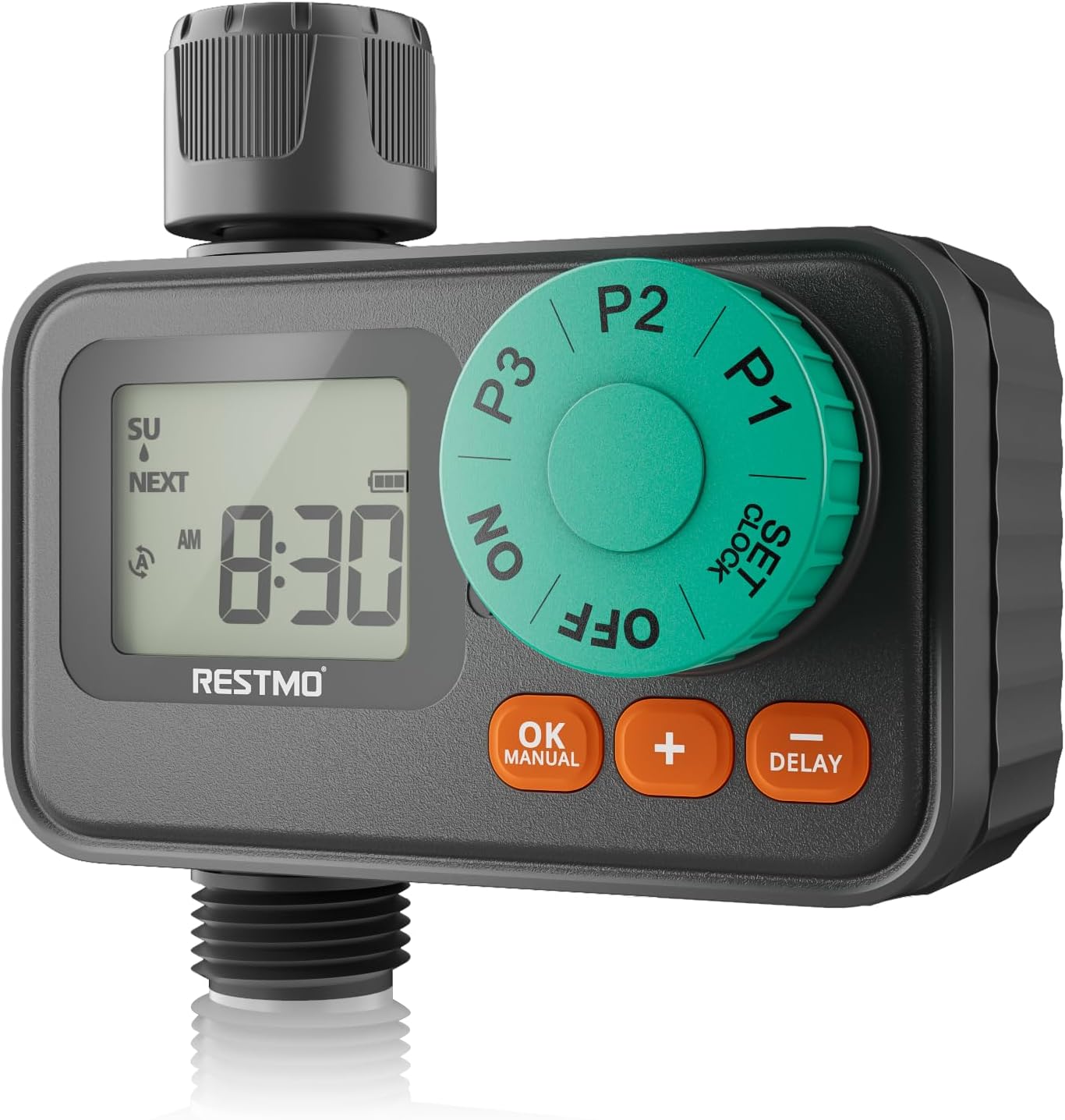
Image: RESTMO Sprinkler Timer, Model O-HT-1AW, connected to a garden faucet and hose, ready for use.
కీ ఫీచర్లు
- 3 Independent Programs: Customize start times, durations (1 min - 4 hrs 59 mins), and frequencies (specific days) for diverse watering needs.
- Weekly Schedule Mode: Set exact days and times for irrigation, ideal for specific plant care or local watering regulations.
- Upgraded Waterproof & Durability: Seamless embedded screen prevents water ingress, and a rugged textured panel ensures longevity. IP55 waterproof protection.
- వర్షం ఆలస్యం మోడ్: Suspend watering for 24, 48, or 72 hours without losing programmed settings.
- మాన్యువల్ నీరు త్రాగుటకు లేక మోడ్: Initiate immediate watering from 1 minute to 299 minutes.
- సులభమైన సెటప్: Oversized dial and large LCD screen for intuitive programming and monitoring.
- అనుకూలత: Single outlet with solenoid valve, fitting for 3/4" hose and faucet. Operates with 8-120 psi water pressure.

Image: Visual representation of the timer's main features, including timed watering, manual control, rain delay, and waterproof design.
సెటప్ గైడ్
1. బ్యాటరీ ఇన్స్టాలేషన్
The timer requires 2 x AAA Alkaline Batteries (not included). Ensure your hands are dry when handling batteries and the battery compartment to prevent moisture ingress.
- Open the waterproof battery compartment cover located on the back of the timer.
- Insert two fresh AAA alkaline batteries, observing the correct polarity (+/-).
- Securely close the battery compartment cover to maintain its waterproof seal.
Video: Official guide demonstrating battery installation and initial setup steps for the RESTMO Sprinkler Timer.
2. టైమర్ను కనెక్ట్ చేస్తోంది
Connect the timer to your outdoor faucet and garden hose.
- Screw the timer's inlet (top connection) onto a standard 3/4" outdoor faucet. Ensure the built-in metal filter is in place to prevent debris from entering the timer.
- Screw your garden hose onto the timer's outlet (bottom connection).
- Tighten all connections by hand to prevent leaks. Do not overtighten.

Image: The sprinkler timer installed on a faucet with hoses attached, illustrating proper connection.
3. గడియారాన్ని అమర్చుట
- డయల్ని దీనికి తిప్పండి గడియారాన్ని సెట్ చేయండి.
- ఉపయోగించండి + / - buttons to set the current time (hour and minute).
- నొక్కండి OK గంట మరియు నిమిషం సెట్ చేయడం మధ్య మారడానికి బటన్.
- Turn the dial to another position (e.g., ON) to save the changes.
ప్రోగ్రామింగ్ నీరు త్రాగుట షెడ్యూల్స్
The timer features three independent programs (P1, P2, P3). Each program can be set with a unique start time, duration, and watering days.
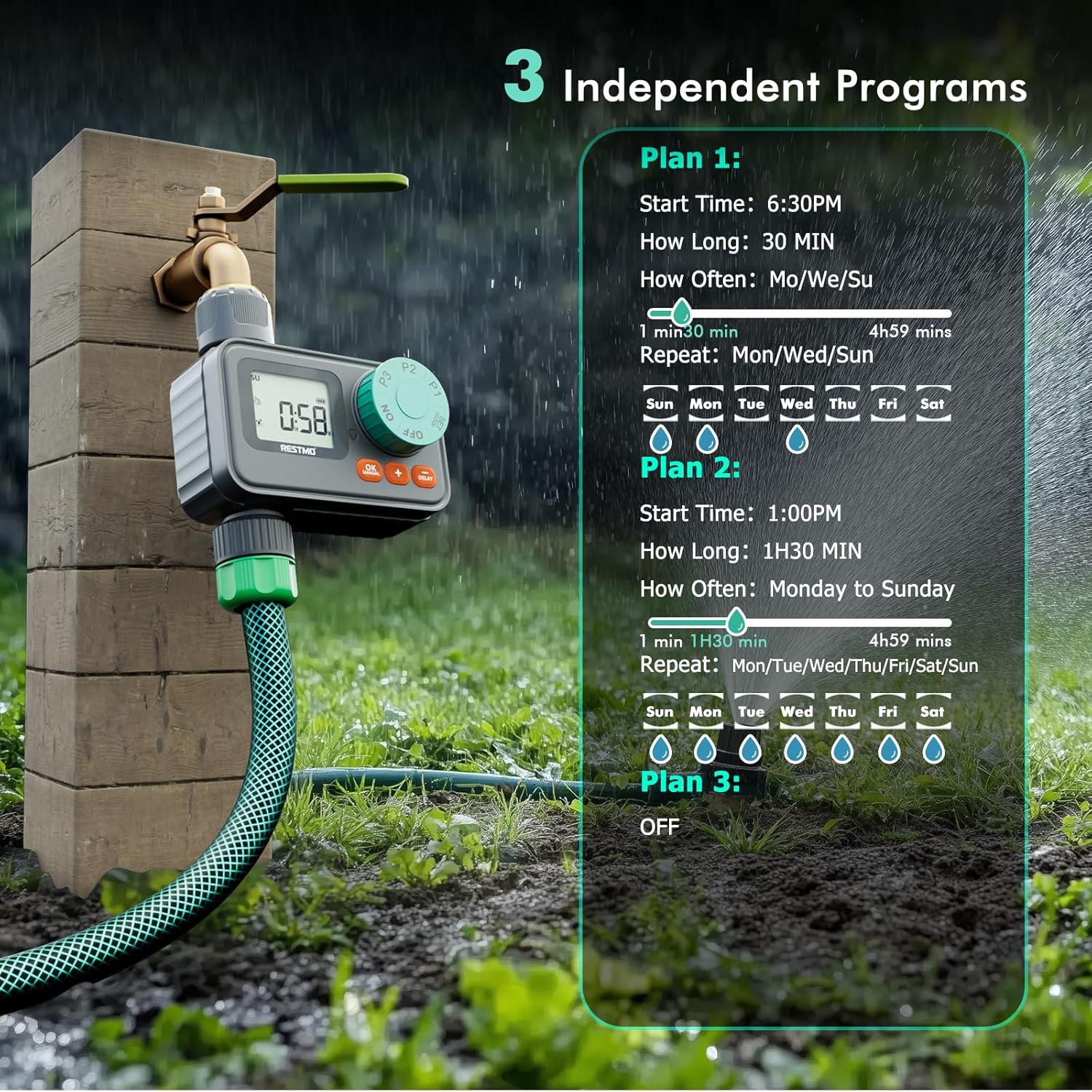
చిత్రం: ఒక ఓవర్view of the three independent programming options (P1, P2, P3) and their customizable settings.
Setting Program 1 (P1)
- డయల్ని దీనికి తిప్పండి P1.
- ఉపయోగించండి + / - సెట్ చేయడానికి బటన్లు ప్రారంభ సమయం. నొక్కండి OK to confirm and move to ఎంత కాలం.
- ఉపయోగించండి + / - buttons to set the watering ఎంత కాలం (duration). Press OK to confirm and move to WATER DAY.
- ఉపయోగించండి + button to select desired watering days and the - button to unselect days.
- Turn the dial to another position (e.g., ON) to save the changes.
Setting Program 2 (P2)
Follow the same steps as Program 1, but turn the dial to P2 to set its independent schedule.
Setting Program 3 (P3)
Follow the same steps as Program 1, but turn the dial to P3 to set its independent schedule. To turn P3 off, keep pressing the - button until 'OFF' is displayed for the watering days.
ఆపరేటింగ్ మోడ్లు
ఆటోమేటిక్ నీరు త్రాగుటకు లేక
Once programs are set, turn the dial to ON to activate automatic watering. The LCD screen will flash between the next watering start time and the current time when watering is OFF. When watering is ON, the LCD screen displays the remaining time of the current watering program.
మాన్యువల్ నీరు త్రాగుటకు లేక
To initiate manual watering:
- డయల్ తో ON and the timer not actively watering, long press the OK MANUAL 3 సెకన్ల పాటు బటన్.
- ఉపయోగించండి + / - buttons to select the desired watering duration (1 min to 299 mins).
- నొక్కండి OK button to start manual watering.
- మాన్యువల్ నీరు త్రాగుట రద్దు చేయడానికి, డయల్ను దీనికి తిప్పండి ఆఫ్ ఆపై తిరిగి ON.
వర్షం ఆలస్యం నీరు త్రాగుట
To temporarily pause scheduled watering due to rain:
- డయల్ తో ON and the timer not actively watering, long press the ఆలస్యం 3 సెకన్ల పాటు బటన్.
- ఉపయోగించండి + / - buttons to select a delay of 24, 48, or 72 hours.
- నొక్కండి OK button or wait for 3 seconds for the rain delay to start automatically.
- వర్షం ఆలస్యాన్ని రద్దు చేయడానికి, డయల్ను దీనికి తిప్పండి ఆఫ్ ఆపై తిరిగి ON.

Image: The timer's display showing the rain delay function, allowing selection of 24, 48, or 72-hour delays.
నిర్వహణ
Cleaning the Filter Washer
The timer includes a built-in metal filter to prevent debris from entering the system. Periodically check and clean this filter to ensure optimal water flow and prevent blockages.
- పీపాలో నుంచి నీళ్లు బయిటికి రావడమునకు వేసివుండే చిన్న గొట్టముకు నీటి సరఫరాను ఆపివేయండి.
- కుళాయి నుండి టైమర్ విప్పు.
- Remove the filter washer from the inlet.
- పేరుకుపోయిన చెత్తను తొలగించడానికి ఫిల్టర్ను నడుస్తున్న నీటిలో శుభ్రం చేసుకోండి.
- Reinsert the clean filter washer and reattach the timer to the faucet.
శీతాకాలపు నిల్వ
During freezing temperatures, remove the timer from the faucet and store it indoors to prevent damage from ice expansion.
ట్రబుల్షూటింగ్
- నీటి ప్రవాహం లేదు: Check if the faucet is fully open. Ensure the filter washer is clean and not blocked. Verify that the timer is set to ON and a program is active or manual watering is engaged.
- Timer not turning on/off: Check battery levels and replace if necessary. Ensure the battery compartment is securely closed. Verify that programs are correctly set and the dial is on ON.
- Leaks from connections: Ensure all connections are hand-tightened. Check if rubber washers are properly seated and not damaged. Replace washers if worn.
- డిస్ప్లే సమస్యలు: If the LCD screen is dim or unresponsive, replace batteries. If water intrusion is suspected, ensure the battery compartment is sealed and the screen is not damaged.
స్పెసిఫికేషన్లు
| మోడల్ సంఖ్య | O-HT-1AW |
| బ్రాండ్ | రెస్ట్మో |
| మెటీరియల్ | ప్లాస్టిక్ |
| ఉత్పత్తి కొలతలు | 5"డి x 3"వా x 5"హ |
| వస్తువు బరువు | 0.27 కిలోలు |
| నీరు త్రాగుటకు లేక వ్యవధి | 1-299 నిమిషాలు |
| నీరు త్రాగుట ఫ్రీక్వెన్సీ | Monday to Sunday (7-day programmable) |
| జలనిరోధిత రేటింగ్ | IP55 |
| పని ఒత్తిడి | 8-120 PSI (0.5-8.0 బార్) |
| ఇన్లెట్ థ్రెడ్ | 3/4" NH |
| మాక్స్. ప్రవాహం రేటు | 10 GPM (35 లీ/నిమిషం) |
| ఉష్ణోగ్రత పరిధి | 38 నుండి 120°F (3 నుండి 50°C) |

Image: Detailed diagram illustrating the timer's dimensions and key technical specifications.
వారంటీ మరియు మద్దతు
For warranty information or technical support, please refer to the contact details provided with your product packaging or visit the official Restmo webసైట్. వారంటీ క్లెయిమ్ల కోసం మీ కొనుగోలు రసీదుని ఉంచండి.