
1. పరిచయం
The WeHere KB503(L) Smart Key Lock Box is a wall-mountable outdoor key storage solution designed for secure access management. This device offers multiple unlocking methods, including Bluetooth via a companion application, remote Wi-Fi (requires a separately sold bridge), One-Time Passcode (OTP) or fixed passcodes, and a traditional physical key backup. Its robust construction and weatherproof design ensure reliable performance in various environments.
2. ఉత్పత్తి ముగిసిందిview
The WeHere KB503(L) Smart Key Lock Box is constructed from 0.8mm cold-rolled steel with rust-proof paint, providing durability against physical tampering. It features a smart lock mechanism with a protective waterproof cover.

మూర్తి 2.1: The WeHere KB503(L) Smart Key Lock Box, shown open with keys inside and a smartphone displaying the control application.
ముఖ్య లక్షణాలు:
- బహుళ అన్లాకింగ్ పద్ధతులు: Access via Bluetooth app, remote Wi-Fi (with WeHere W100 Bridge, sold separately), PIN codes (OTP/Fixed), and physical key.
- మన్నికైన నిర్మాణం: Made from 0.8mm cold-rolled steel with rust-proof paint, designed to resist hammering, sawing, and prying.
- వాతావరణ నిరోధక డిజైన్: The smart lock includes a protective cover to withstand rain and snow, suitable for outdoor installation.
- External Battery Compartment: Facilitates easy battery replacement without needing to access the main key storage area.
- బహుముఖ వినియోగం: Ideal for homes, realtors, apartments, garages, stores, and offices for secure key management.

మూర్తి 2.2: Dimensional diagram of the WeHere Smart Key Drop Box, illustrating its size and internal components including the smart lock, brass lock cylinder, and key unlock mechanism.
3. సెటప్
3.1 ప్యాకేజీ విషయాలు
ఇన్స్టాలేషన్కు ముందు, అన్ని భాగాలు ఉన్నాయని నిర్ధారించుకోండి:
- WeHere KB503(L) Smart Key Lock Box
- Physical Keys (2)
- మౌంటింగ్ హార్డ్వేర్ (స్క్రూలు, వాల్ యాంకర్లు)
- వినియోగదారు మాన్యువల్ (ఈ పత్రం)
3.2 వాల్ మౌంటు
The lock box is designed for secure wall mounting. Follow these steps for installation:
- ఒక స్థానాన్ని ఎంచుకోండి: Select a flat, sturdy surface for mounting. Consider accessibility and protection from direct elements, even with its weatherproof design.
- డ్రిల్లింగ్ పాయింట్లను గుర్తించండి: Hold the lock box against the wall at the desired height and use a pencil to mark the positions for the mounting screws.
- డ్రిల్ రంధ్రాలు: Using an appropriate drill bit for your wall type, drill pilot holes at the marked positions.
- వాల్ యాంకర్లను చొప్పించండి: If drilling into drywall or masonry, insert the provided wall anchors into the drilled holes.
- Secure Lock Box: Align the lock box with the holes and secure it firmly to the wall using the provided screws.
3.3 బ్యాటరీ ఇన్స్టాలేషన్
The WeHere KB503(L) operates on 2 AA alkaline batteries (not included). The external battery compartment allows for convenient replacement.
- Locate the external battery compartment on the side or bottom of the lock box.
- బ్యాటరీ కంపార్ట్మెంట్ కవర్ తెరవండి.
- సరైన ధ్రువణతను (+/-) నిర్ధారించుకుంటూ 2 కొత్త AA ఆల్కలీన్ బ్యాటరీలను చొప్పించండి.
- బ్యాటరీ కంపార్ట్మెంట్ కవర్ను సురక్షితంగా మూసివేయండి.
The lock box will resume operation immediately after battery replacement. A set of new batteries typically lasts for approximately six months.
4. యాప్ ఇన్స్టాలేషన్ మరియు జత చేయడం
To utilize the smart features of your WeHere Key Lock Box, download and install the companion mobile application.
4.1 Download the WeHere App
- కోసం వెతకండి "WeHere" in the Apple App Store (for iOS devices) or Google Play Store (for Android devices).
- Download and install the official WeHere application.
- కొత్త ఖాతా కోసం నమోదు చేసుకోండి లేదా మీకు ఇప్పటికే ఒకటి ఉంటే లాగిన్ అవ్వండి.
4.2 Pairing the Lock Box via Bluetooth
Ensure Bluetooth is enabled on your smartphone and that you are within close proximity to the lock box.
- Open the WeHere app.
- Follow the in-app instructions to add a new device. This typically involves selecting the device type and initiating a search for nearby Bluetooth devices.
- Select your WeHere KB503(L) from the list of discovered devices.
- The app will guide you through the pairing process, which may involve pressing a button on the lock box or entering a default pairing code.
- Once paired, you can manage the lock box settings and generate passcodes through the app.
5. ఆపరేటింగ్ సూచనలు
The WeHere KB503(L) offers several methods for unlocking and accessing your stored keys.
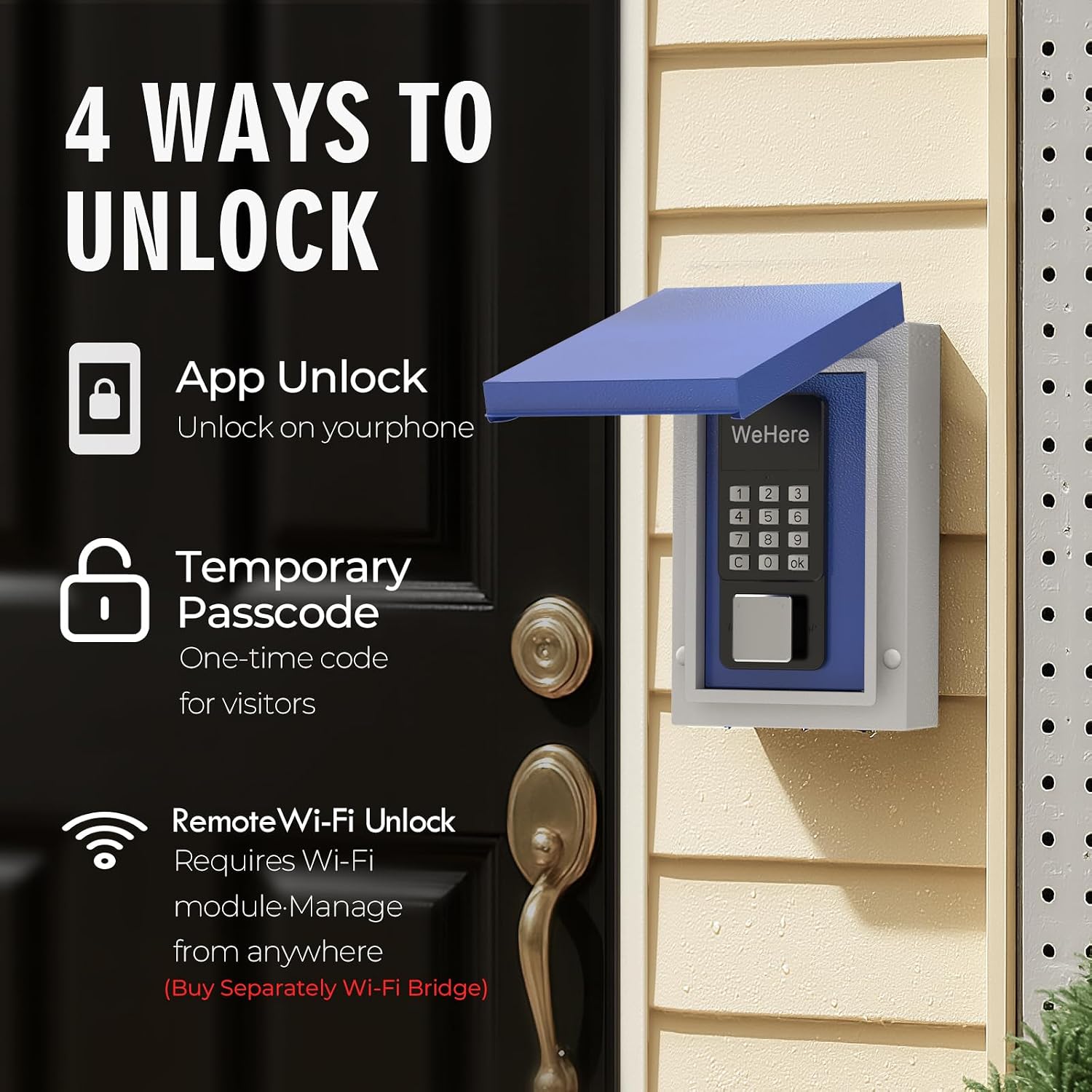
మూర్తి 5.1: పైగాview of the four primary unlocking methods: App Unlock, Temporary Passcode, Remote Wi-Fi Unlock, and Physical Key Unlock.
5.1 Bluetooth App Unlock
With your smartphone paired via Bluetooth, you can unlock the device directly through the WeHere app.
- Ensure Bluetooth is active on your phone and you are within range of the lock box.
- Open the WeHere app and select your lock box.
- Tap the "Unlock" button within the app interface. The lock box will open.
5.2 PIN Code Unlock (OTP/Fixed Passcode)
Passcodes are generated and managed through the WeHere app.
- పాస్కోడ్ని రూపొందించండి: In the WeHere app, navigate to the passcode management section. You can generate either a permanent passcode with custom validity periods or a one-time passcode (OTP).
- Enter Passcode: On the lock box keypad, enter the generated PIN code.
- నిర్ధారించండి: Press the 'OK' or '#' button on the keypad to confirm the entry. The lock box will open if the code is valid.
5.3 Remote Wi-Fi Unlock (Requires WeHere W100 Bridge)
For remote unlocking from anywhere, the WeHere W100 Wi-Fi Bridge (sold separately) is required.

మూర్తి 5.2: Illustration of remote unlocking functionality, showing the WeHere Key Lock Box, a Wi-Fi bridge, and a smartphone displaying the unlock interface.
- Bridge Setup: Install and configure the WeHere W100 Wi-Fi Bridge according to its separate instructions, ensuring it is connected to your home Wi-Fi network and linked to your WeHere account.
- రిమోట్ అన్లాక్: Open the WeHere app from any location with internet access.
- Select your lock box and tap the "Unlock" button. The command will be sent via the Wi-Fi bridge to the lock box.
5.4 Physical Key Unlock
A traditional key backup is provided for manual access.
- Insert the physical key into the keyhole on the side of the lock box.
- Turn the key to unlock the mechanism.
- Open the lock box door.
6. బ్యాటరీ నిర్వహణ
The WeHere KB503(L) is powered by 2 AA alkaline batteries, offering approximately 6 months of battery life under normal usage conditions.
6.1 Battery Life and Indicators
- The app will provide notifications regarding low battery status.
- A visual indicator on the lock box (if available) may also signal low battery.
6.2 బ్యాటరీలను మార్చడం
The external battery compartment is designed for easy access and replacement.
- Locate and open the external battery compartment cover.
- Remove the old AA alkaline batteries.
- సరైన ధ్రువణతను నిర్ధారిస్తూ, 2 కొత్త AA ఆల్కలీన్ బ్యాటరీలను చొప్పించండి.
- బ్యాటరీ కంపార్ట్మెంట్ కవర్ను సురక్షితంగా మూసివేయండి.
The lock box will immediately resume normal operation after battery replacement. This design allows for convenient battery changes by authorized individuals without needing to access the main key storage.
7. నిర్వహణ
Proper maintenance ensures the longevity and optimal performance of your WeHere KB503(L) Smart Key Lock Box.
7.1 శుభ్రపరచడం
- లాక్ బాక్స్ యొక్క బాహ్య భాగాన్ని మృదువైన, d వస్త్రంతో తుడవండి.amp గుడ్డ.
- రాపిడి క్లీనర్లు లేదా ద్రావకాలను ఉపయోగించడం మానుకోండి, ఎందుకంటే ఇవి ముగింపు లేదా ఎలక్ట్రానిక్ భాగాలను దెబ్బతీస్తాయి.
- Ensure the keypad and waterproof cover are free from dirt and debris to maintain functionality.
7.2 వాతావరణ రక్షణ

మూర్తి 7.1: The WeHere Key Lock Box is designed to allow key access even in wet conditions, thanks to its waterproof features.
- The smart lock is equipped with a protective waterproof cover. Ensure this cover is properly seated to protect against rain and snow.
- While designed for outdoor use, installing the lock box in a location with some overhead protection (e.g., under an awning) can further extend its lifespan.
8. ట్రబుల్షూటింగ్
If you encounter issues with your WeHere KB503(L) Smart Key Lock Box, refer to the following common troubleshooting steps:
| సమస్య | సాధ్యమైన కారణం | పరిష్కారం |
|---|---|---|
| Lock box does not respond to app unlock. | Bluetooth is off; phone is out of range; low battery; app issue. | Ensure Bluetooth is on and you are close to the lock box. Check battery level. Restart the app. |
| పిన్ కోడ్ పనిచేయడం లేదు. | Incorrect code entered; code expired (OTP); low battery. | Verify the PIN code in the app. Check if it's an OTP that has expired. Replace batteries. |
| Remote Wi-Fi unlock fails. | WeHere W100 Bridge not connected; Wi-Fi signal issue; low battery. | Check the status of your WeHere W100 Bridge and its Wi-Fi connection. Ensure the bridge is within range of the lock box. Replace lock box batteries. |
| Lock box is difficult to open/close. | Obstruction; mechanism dirty; physical damage. | Check for any foreign objects. Clean the locking mechanism. If damaged, contact support. |
| బ్యాటరీ లైఫ్ ఊహించిన దాని కంటే తక్కువగా ఉంది. | Frequent usage; extreme temperatures; non-alkaline batteries. | Ensure you are using high-quality AA alkaline batteries. Consider environmental factors. |
If these steps do not resolve the issue, please contact WeHere customer support for further assistance.
9. స్పెసిఫికేషన్లు
| ఫీచర్ | వివరాలు |
|---|---|
| బ్రాండ్ | మేము ఇక్కడ |
| మోడల్ పేరు | KB503(L) |
| కొలతలు (L x W x H) | 4 x 3 x 7.1 అంగుళాలు (10.16 x 7.62 x 18.03 సెం.మీ.) |
| వస్తువు బరువు | 3.3 పౌండ్లు (1.5 కిలోలు) |
| మెటీరియల్ | 0.8mm Cold-Rolled Steel with Rust-Proof Paint |
| లాక్ రకం | WeHere B100 Smart Lock |
| కనెక్టివిటీ | Bluetooth, Wi-Fi (via WeHere W100 Bridge, sold separately) |
| కంట్రోలర్ రకం | Android, iOS (via WeHere App) |
| శక్తి మూలం | 2 x AA ఆల్కలీన్ బ్యాటరీలు (చేర్చబడలేదు) |
| బ్యాటరీ లైఫ్ | సుమారు 6 నెలలు |
| ప్రత్యేక లక్షణాలు | Smart lock, Weatherproof, External Battery Compartment |
10. వారంటీ మరియు మద్దతు
For warranty information, technical support, and customer service inquiries, please refer to the official WeHere website or contact their customer support channels. Details can typically be found on the product packaging or the manufacturer's online resources.