
1. పరిచయం
Thank you for choosing the Generic HXQ908 Electronic Door Lock. This wireless security system provides convenient and enhanced access control for your home or office. Please read this manual thoroughly before installation and operation to ensure proper use and to maximize the lifespan of your product.
2. భద్రతా సమాచారం
- Do not attempt to disassemble or repair the lock unit yourself. Refer to qualified personnel for service.
- Keep remote key fobs away from water, high temperatures, and strong magnetic fields.
- Ensure proper battery installation and replacement to prevent damage to the device.
- This lock is designed for security; however, no lock can provide absolute security. Always take other necessary precautions.
- Keep all components, especially small parts and batteries, out of reach of children.
3. ప్యాకేజీ విషయాలు
మీ ప్యాకేజీలో అన్ని అంశాలు ఉన్నాయని ధృవీకరించండి:
- 1 x Electronic Lock Unit
- 5 x Remote Control Key Fobs
- 1 x Mounting Hardware Set (screws, anchors)
- 1 x స్ట్రైక్ ప్లేట్
- 1 x యూజర్ మాన్యువల్ (ఈ పత్రం)
4. ఉత్పత్తి ముగిసిందిview
4.1 భాగాలు
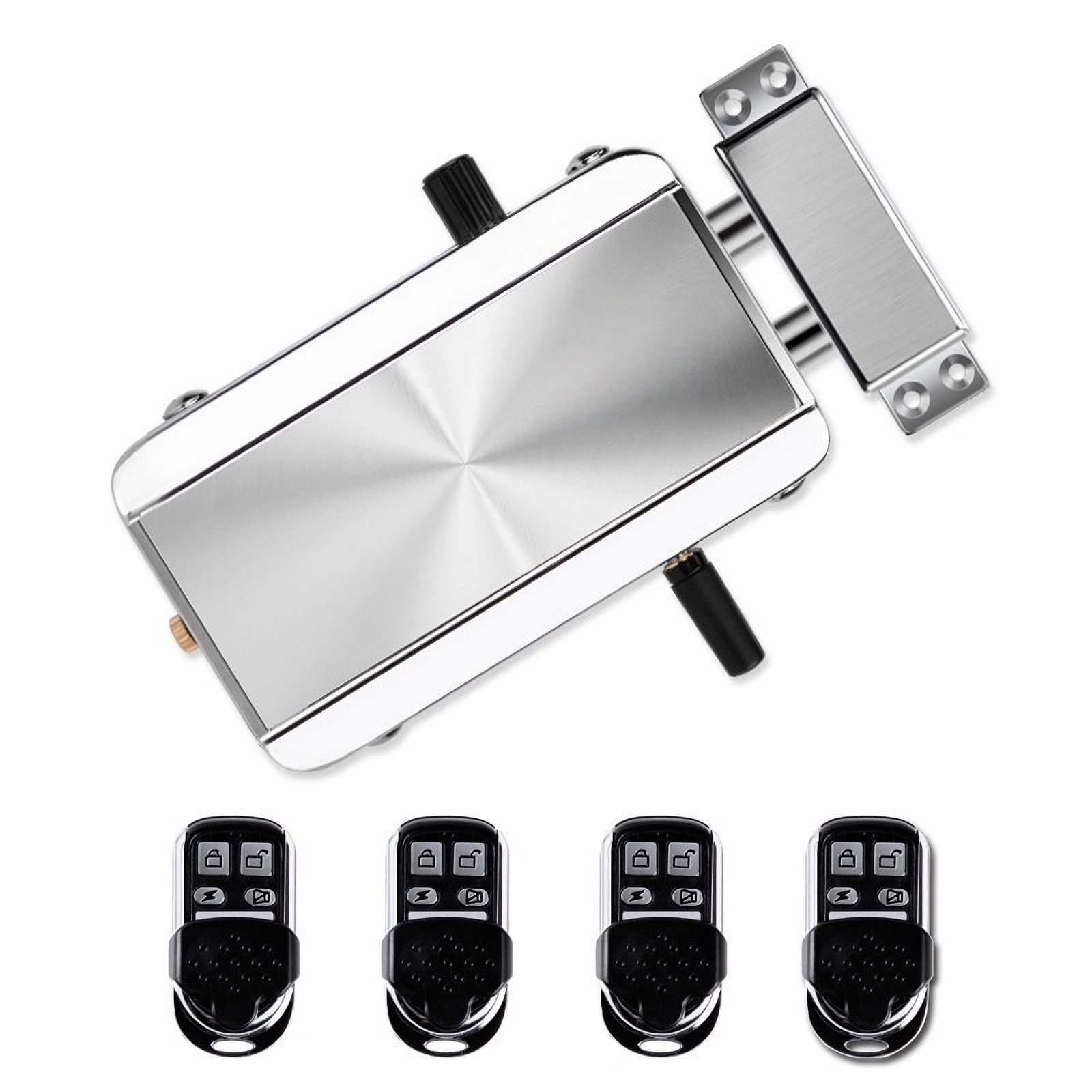
చిత్రం 4.1.1: The main electronic door lock unit. This unit houses the locking mechanism and electronic components.

చిత్రం 4.1.2: Five remote key fobs included with the lock system. Each fob allows for wireless control of the lock.

చిత్రం 4.1.3: క్లోజ్-అప్ view of the manual knob on the lock unit, used for manual operation from the inside.
4.2 లక్షణాలు
- వైర్లెస్ సెక్యూరిటీ: Electronic door lock system with remote control capability for keyless entry.
- బహుళ రిమోట్లు: Includes 5 programmable key fobs with lock/unlock buttons for convenient access control.
- సులభమైన సంస్థాపన: Sleek silver-finished lock mechanism with straightforward mounting hardware for most door types.
- రిమోట్ రేంజ్: Wireless remote controllers feature reliable signal transmission for operation from a distance.
- మన్నికైన డిజైన్: Constructed from durable metal with a modern brushed finish.
- అత్యవసర అన్లాక్: Features an emergency unlock mechanism for manual access.
5. సెటప్ మరియు ఇన్స్టాలేషన్
Before beginning installation, ensure you have the necessary tools (e.g., screwdriver, drill). Refer to the product dimensions to ensure compatibility with your door.

చిత్రం 5.1: Dimensions of the electronic lock unit and strike plate for installation planning.
5.1 బ్యాటరీ ఇన్స్టాలేషన్
- Locate the battery compartment on the electronic lock unit.
- కంపార్ట్మెంట్ కవర్ తెరవండి.
- Insert the required batteries (typically AA or AAA, check packaging for specifics) according to the polarity markings (+/-).
- బ్యాటరీ కంపార్ట్మెంట్ కవర్ను సురక్షితంగా మూసివేయండి.
5.2 Mounting the Lock Unit
- Determine the optimal position for the lock unit on your door frame, ensuring it aligns with the strike plate.
- మౌంటు స్క్రూల కోసం డ్రిల్లింగ్ పాయింట్లను గుర్తించండి.
- గుర్తించబడిన విధంగా పైలట్ రంధ్రాలు వేయండి.
- Secure the electronic lock unit to the door frame using the provided mounting hardware. Do not overtighten.
5.3 స్ట్రైక్ ప్లేట్ను ఇన్స్టాల్ చేస్తోంది
- Align the strike plate with the lock unit's bolts on the door jamb.
- Mark the drilling points for the strike plate screws.
- పైలట్ రంధ్రాలు వేయండి.
- Attach the strike plate securely with the provided screws.
6. ఆపరేటింగ్ సూచనలు
6.1 Using the Remote Key Fobs
Each remote key fob has dedicated buttons for locking and unlocking the door.
- కు తాళం వేయండి the door: Press the lock button on the remote fob. The lock unit will engage its bolts.
- కు అన్లాక్ చేయండి the door: Press the unlock button on the remote fob. The lock unit will retract its bolts.
- Ensure you are within the effective range of the lock for reliable operation.
6.2 Manual Operation (from inside)
The lock unit features a manual knob for operation from the interior side of the door.
- కు తాళం వేయండి: Turn the manual knob to the locked position.
- కు అన్లాక్ చేయండి: Turn the manual knob to the unlocked position.
6.3 Emergency Unlock
In case of electronic failure or dead batteries, an emergency unlock mechanism is available.

చిత్రం 6.3.1: Location of the emergency unlock screw on the lock unit.
- Locate the emergency unlock screw on the lock unit (refer to Image 6.3.1).
- Use a flathead screwdriver or similar tool to turn the screw, which will manually retract the lock bolts.
7. నిర్వహణ
7.1 బ్యాటరీ భర్తీ
When the batteries in the lock unit are low, you may notice a decrease in performance or an indicator light/sound (if applicable). Replace all batteries simultaneously with new ones of the same type.
- విభాగం 5.1 లో వివరించిన బ్యాటరీ ఇన్స్టాలేషన్ దశలను అనుసరించండి.
- స్థానిక నిబంధనల ప్రకారం పాత బ్యాటరీలను బాధ్యతాయుతంగా పారవేయండి.
7.2 శుభ్రపరచడం
- Wipe the lock unit and remote fobs with a soft, dry cloth.
- Do not use abrasive cleaners, solvents, or harsh chemicals, as these can damage the finish and electronic components.
8. ట్రబుల్షూటింగ్
| సమస్య | సాధ్యమైన కారణం | పరిష్కారం |
|---|---|---|
| లాక్ రిమోట్కు స్పందించదు. | Low batteries in lock unit or remote fob. Remote out of range. Interference. | Replace batteries in both the lock and remote. Move closer to the lock. Check for sources of interference. |
| Lock mechanism is stiff or jammed. | Misalignment during installation. Obstruction. | Check alignment of lock unit and strike plate. Ensure no debris is obstructing the bolts. |
| Remote signal is weak or intermittent. | Low remote battery. Obstacles between remote and lock. | Replace remote battery. Reduce obstacles between remote and lock. |
9. స్పెసిఫికేషన్లు
| ఫీచర్ | వివరాలు |
|---|---|
| బ్రాండ్ | సాధారణమైనది |
| మోడల్ సంఖ్య | HXQ908 |
| కొలతలు (L x W x H) | 5.12 x 2.95 x 1.3 అంగుళాలు |
| మెటీరియల్ | మెటల్, ప్లాస్టిక్ |
| లాక్ రకం | Electronic Lock, Remote Control Lock, Wireless Lock |
| ప్రత్యేక లక్షణాలు | Electronic Access, Multiple Remote Fobs, Remote Control Operation, Wireless Security |
| చేర్చబడిన భాగాలు | Electronic Lock Unit, 5 Remote Control Key Fobs, Mounting Hardware, Strike Plate |
| కనెక్టివిటీ ప్రోటోకాల్ | RF, Wireless |
| నియంత్రణ పద్ధతి | రిమోట్ |
| రంగు | వెండి |
| ముగింపు రకం | Chrome పూత |
10. వారంటీ సమాచారం
This product comes with a limited warranty. Please refer to the product packaging or contact the manufacturer/seller for specific warranty terms and conditions. Keep your purchase receipt as proof of purchase.
11. కస్టమర్ మద్దతు
If you encounter any issues or have questions not covered in this manual, please contact your retailer or the manufacturer for assistance. Provide your product model number (HXQ908) and a detailed description of the issue when seeking support.