
1. ఉత్పత్తి ముగిసిందిview
The atomberg Studio Nexus 1200mm BLDC Ceiling Fan is designed for efficient air circulation and modern aesthetics. It features a Brushless Direct Current (BLDC) motor for energy savings, a BEE 5-star rating, and quiet operation. This fan includes a remote control for convenient adjustments and a unique Moonbeam Light function.
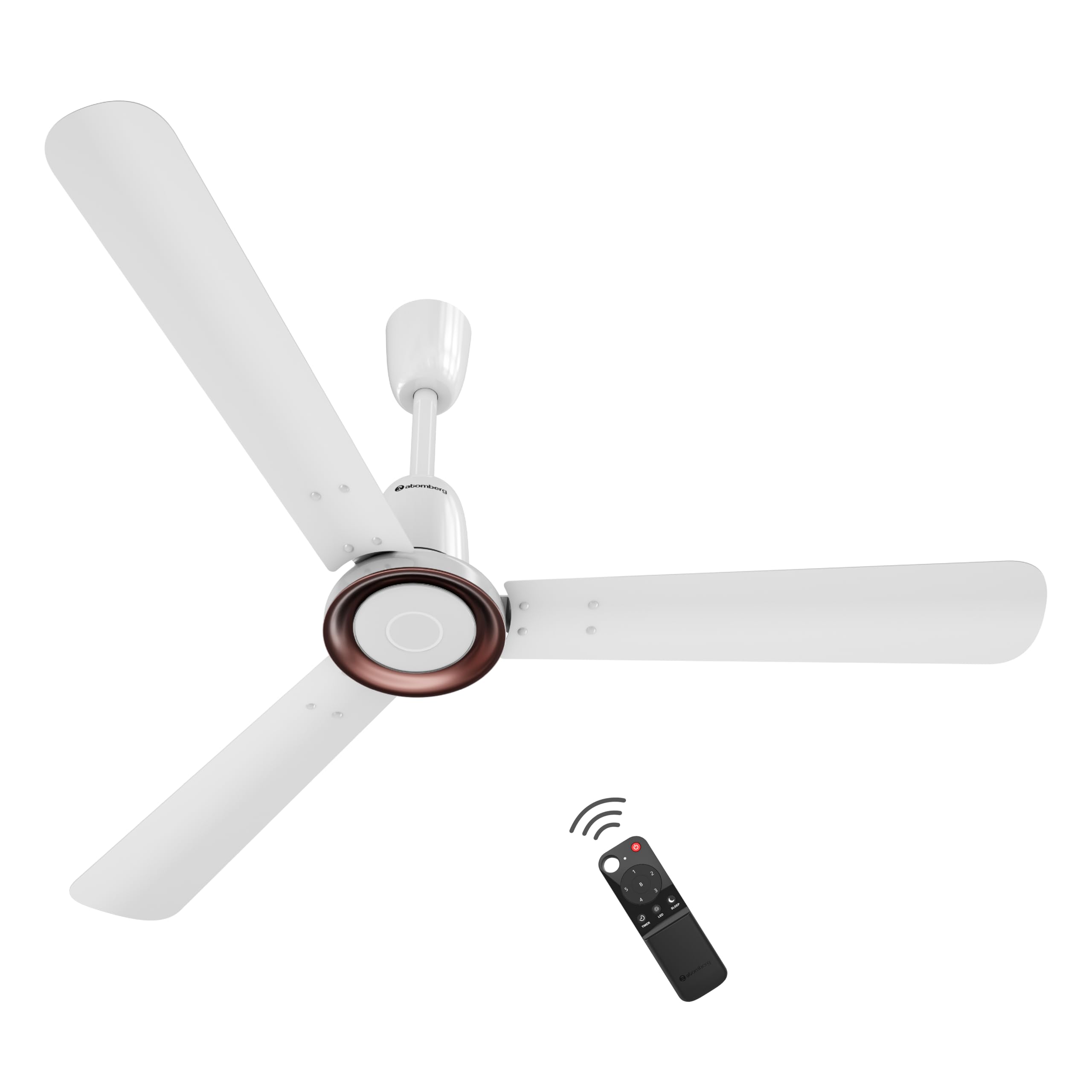
Figure 1: atomberg Studio Nexus 1200mm BLDC Ceiling Fan (Gloss White)
ముఖ్య లక్షణాలు:
- శక్తి-సమర్థవంతమైన BLDC మోటార్: Consumes only 35W at top speed, saving up to 65% electricity compared to unrated fans.
- BEE 5-Star Rated: Certified for high energy efficiency.
- High Air Delivery: Provides 230 CMM (Cubic Meters Per Minute) for optimal airflow.
- తక్కువ నాయిస్ ఆపరేషన్: 57 dB కంటే తక్కువ వద్ద పనిచేస్తుంది, నిశ్శబ్ద వాతావరణాన్ని నిర్ధారిస్తుంది.
- Smart IR Remote Control: Allows adjustment of speed, Boost Mode, Timer, and Sleep Mode.
- Moonbeam Light: Integrated night light with two intensity levels, providing visual feedback for remote commands.
- IoT కనెక్టివిటీ: Supports smart control (details for app control are typically provided in a separate IoT guide).
- ఆధునిక మినిమలిస్ట్ డిజైన్: Features a premium metallic body trim and wide designer curved blades.

Figure 2: Advanced Air+ Technology for enhanced air delivery and comfort.

చిత్రం 3: పైగాview of best-in-class performance, including remote operation, high air delivery, and low noise.
2. భద్రతా సమాచారం
దయచేసి ఇన్స్టాలేషన్ మరియు వినియోగానికి ముందు అన్ని భద్రతా సూచనలను జాగ్రత్తగా చదవండి. భవిష్యత్తు సూచన కోసం ఈ మాన్యువల్ని ఉంచండి.
- సంస్థాపన, శుభ్రపరచడం లేదా నిర్వహణకు ముందు విద్యుత్ సరఫరా డిస్కనెక్ట్ చేయబడిందని నిర్ధారించుకోండి.
- స్థానిక విద్యుత్ కోడ్లకు అనుగుణంగా అర్హత కలిగిన ఎలక్ట్రీషియన్ ద్వారా ఇన్స్టాలేషన్ నిర్వహించాలి.
- Mount the fan securely to a ceiling structure capable of supporting its weight.
- ఆపరేషన్ సమయంలో చేతులు, జుట్టు మరియు దుస్తులను ఫ్యాన్ బ్లేడ్ల నుండి దూరంగా ఉంచండి.
- Do not attempt to repair or modify the fan yourself. Contact customer support for assistance.
3. ప్యాకేజీ విషయాలు
ఇన్స్టాలేషన్తో కొనసాగే ముందు అన్ని భాగాలు ప్యాకేజీలో ఉన్నాయని ధృవీకరించండి:
- బ్లేడ్ సెట్ (1 యూనిట్)
- రిమోట్ (1 యూనిట్)
- మోటార్ బాక్స్ (1 యూనిట్)
- పందిరి సెట్ (1 యూనిట్)
- డౌన్రోడ్ (1 యూనిట్)
- సంకెళ్ల కిట్ (1 యూనిట్)
- మాన్యువల్ కరపత్రం & వారంటీ కార్డ్ (1 యూనిట్)
4. సంస్థాపన
The atomberg Studio Nexus fan is designed for versatile installation, accommodating both standard and false/low ceilings.
సీలింగ్ అనుకూలత:
- For Standard Ceilings: Use both the bottom and top canopy for a complete finish.
- For Low Height or False Ceilings: An additional ceiling plate is provided. Use this ceiling plate with the bottom canopy for a flush installation.
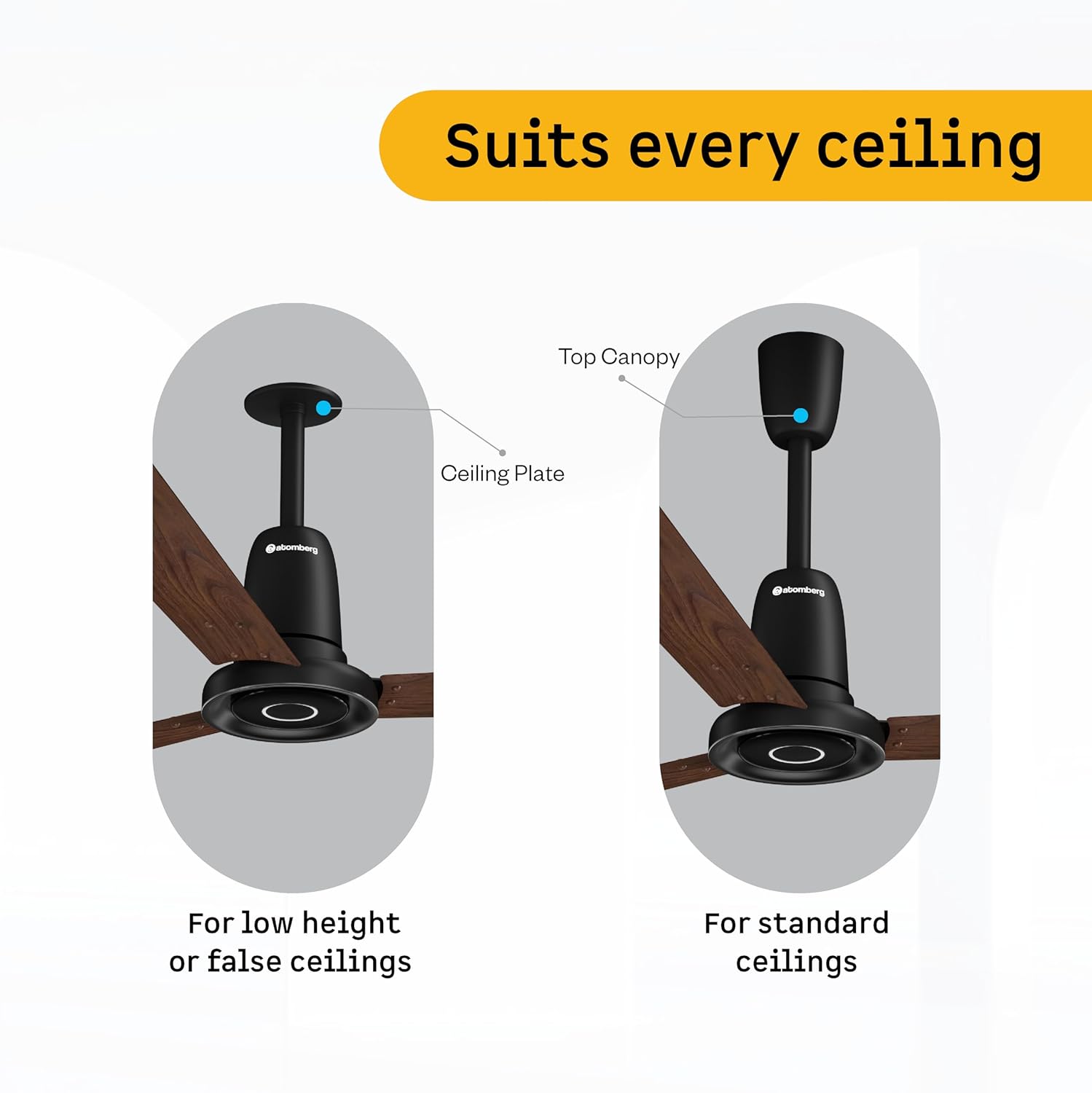
Figure 4: Illustration of ceiling fan installation for different ceiling types.
Detailed installation steps are provided in the included manual leaflet. It is recommended to have the fan installed by a professional.
5. ఆపరేషన్
Control your atomberg Studio Nexus fan using the included Smart IR Remote or through IoT connectivity.
రిమోట్ కంట్రోల్ ఉపయోగించడం:
The universal IR remote allows for easy control of various fan functions. No pairing is required.

Figure 5: Smart IR Remote Control for the Studio Nexus fan.
- పవర్ ఆన్/ఆఫ్: ఫ్యాన్ను ఆన్ లేదా ఆఫ్ చేయడానికి పవర్ బటన్ను నొక్కండి.
- వేగం సర్దుబాటు: Use the numbered buttons (1-6) to select your desired fan speed.
- బూస్ట్ మోడ్: Activates the highest fan speed for rapid cooling.
- టైమర్ మోడ్: ముందుగా సెట్ చేసిన గంటల తర్వాత ఫ్యాన్ స్వయంచాలకంగా స్విచ్ ఆఫ్ అయ్యేలా సెట్ చేయండి.
- స్లీప్ మోడ్: Gradually decreases the fan's speed every two hours for comfortable sleep.
- LED లైట్ కంట్రోల్: Turn the Moonbeam Light ON or OFF.
Moonbeam Light Function:
The integrated Moonbeam Light serves as a night light and provides visual feedback.
- It has two intensity levels, adjustable via the remote.
- The light blinks in response to remote commands (e.g., power on/off, speed change, timer, sleep mode) to confirm action.
IoT and App Control:
For advanced control and smart home integration, refer to the dedicated IoT setup guide or the atomberg app for instructions on connecting and controlling your fan via a smart device.
6. నిర్వహణ
క్రమం తప్పకుండా నిర్వహణ మీ ఫ్యాన్ యొక్క ఉత్తమ పనితీరును మరియు దీర్ఘాయువును నిర్ధారిస్తుంది.
- శుభ్రపరచడం: కాలానుగుణంగా ఫ్యాన్ బ్లేడ్లు మరియు మోటార్ హౌసింగ్ను మృదువైన, d తో తుడవండి.amp గుడ్డ. రాపిడి క్లీనర్లు లేదా ద్రావకాలు ఉపయోగించవద్దు.
- బ్లేడ్ తనిఖీ: Check blades for any damage or warping. Damaged blades can cause imbalance and noise.
- సురక్షిత మౌంటు: Ensure all mounting hardware remains tight and secure.
- సరళత: BLDC మోటార్ నిర్వహణ రహిత ఆపరేషన్ కోసం రూపొందించబడింది మరియు దీనికి లూబ్రికేషన్ అవసరం లేదు.
ఏదైనా శుభ్రపరచడం లేదా నిర్వహణ చేసే ముందు ఎల్లప్పుడూ పవర్ డిస్కనెక్ట్ చేయండి.
7. ట్రబుల్షూటింగ్
If you encounter issues with your atomberg Studio Nexus fan, refer to the following common troubleshooting tips:
- ఫ్యాన్ ఆన్ చేయదు:
- Check if the main power supply to the fan is on.
- రిమోట్ కంట్రోల్ బ్యాటరీలు అయిపోకుండా చూసుకోండి.
- Verify that the remote control is pointed directly at the fan's receiver.
- అభిమానుల అలజడి:
- అన్ని బ్లేడ్ స్క్రూలు సురక్షితంగా బిగించబడ్డాయని నిర్ధారించుకోండి.
- Check that the downrod and mounting bracket are firmly attached to the ceiling.
- బ్లేడ్లు వంగి లేదా దెబ్బతినకుండా చూసుకోండి.
- రిమోట్ కంట్రోల్ స్పందించడం లేదు:
- రిమోట్ కంట్రోల్ బ్యాటరీలను భర్తీ చేయండి.
- రిమోట్ మరియు ఫ్యాన్ మధ్య ఎటువంటి అడ్డంకులు లేవని నిర్ధారించుకోండి.
- Moonbeam Light Not Working:
- Check if the light function is enabled via the remote.
- సమస్య కొనసాగితే, కస్టమర్ సపోర్ట్ని సంప్రదించండి.
For issues not covered here, please contact atomberg customer support.
8. స్పెసిఫికేషన్లు
Detailed technical specifications for the atomberg Studio Nexus 1200mm BLDC Ceiling Fan:
| ఫీచర్ | స్పెసిఫికేషన్ |
|---|---|
| బ్రాండ్ | ఆటంబెర్గ్ |
| మోడల్ పేరు | Studio Nexus |
| రంగు | గ్లోస్ వైట్ |
| ఎలక్ట్రిక్ ఫ్యాన్ డిజైన్ | సీలింగ్ ఫ్యాన్ |
| శక్తి మూలం | కార్డెడ్ ఎలక్ట్రిక్ |
| ఉత్పత్తి కొలతలు (D x W x H) | 57D x 29W x 25.5H సెంటీమీటర్లు |
| గది రకం | Bedroom, Dining Room, Home Office, Living Room, Study Room |
| ప్రత్యేక లక్షణాలు | BLDC Motor with Remote, Low noise, Boost Mode, Timer, Moonbeam Light |
| మౌంటు రకం | సీలింగ్ మౌంట్ |
| కంట్రోలర్ రకం | Button Control, Remote Control, App |
| వేగాల సంఖ్య | 6 |
| శబ్దం స్థాయి | 57 డెసిబెల్స్ |
| వాట్tage | 35 వాట్స్ |
| బ్లేడ్ల సంఖ్య | 3 |
| గాలి ప్రవాహ సామర్థ్యం | 230 Cubic Meters Per Minute |
| వేగం | 360 RPM |
| వాల్యూమ్tage | 220 వోల్ట్లు |
| ఇండోర్ అవుట్డోర్ వినియోగం | ఇండోర్ |
| మెటీరియల్ రకం | అల్యూమినియం |
| బ్లేడ్ మెటీరియల్ | అల్యూమినియం |
| స్పెసిఫికేషన్ మెట్ | BEE 5 Star |
| బ్లేడ్ పొడవు | 1200 మిల్లీమీటర్లు |
| వస్తువు బరువు | 4.2 కిలోలు |
| మూలం దేశం | భారతదేశం |
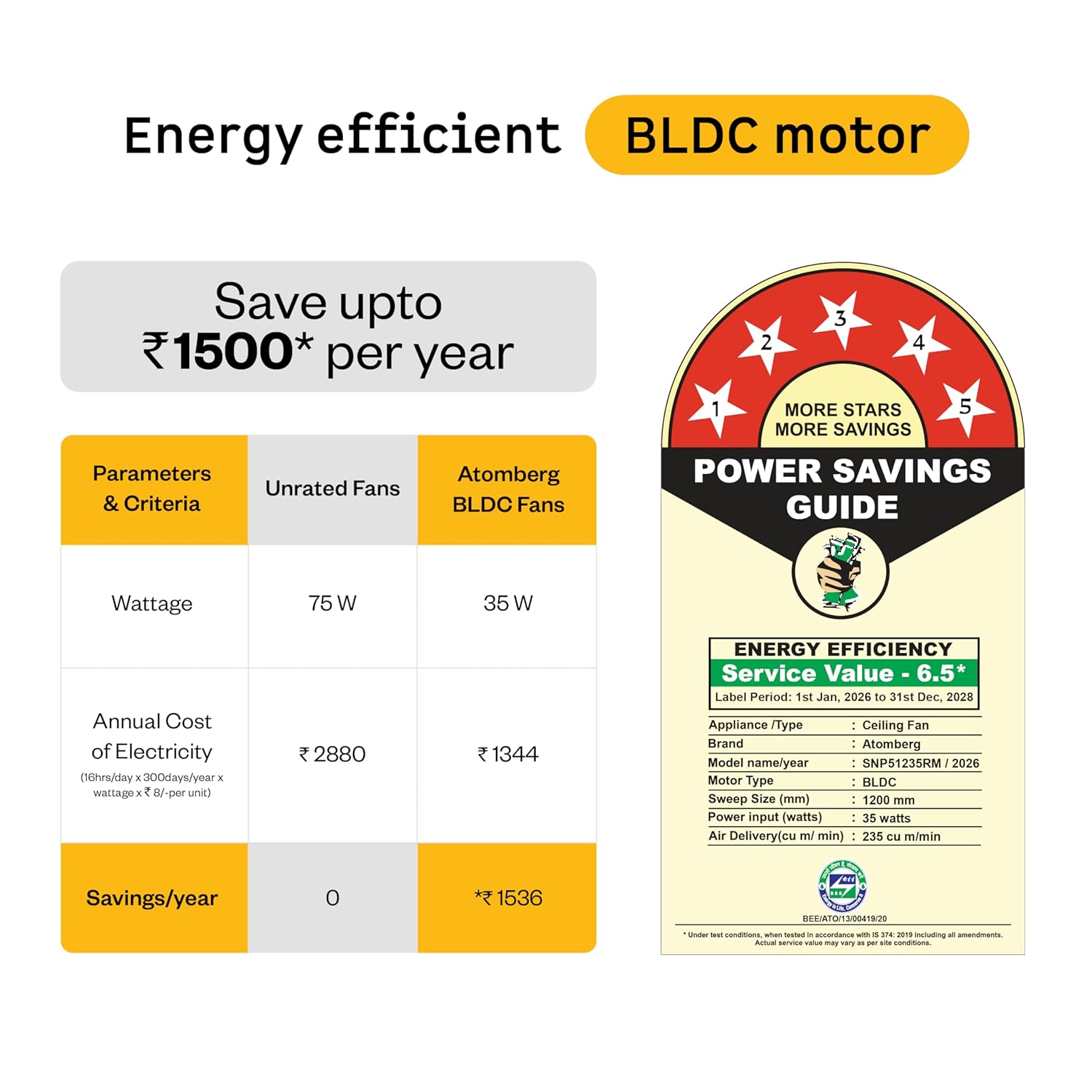
Figure 6: Energy Efficiency Guide for atomberg BLDC motor, highlighting 5-star rating and electricity savings.
9. వారంటీ మరియు మద్దతు
Your atomberg Studio Nexus ceiling fan comes with comprehensive warranty coverage and dedicated customer support.
వారంటీ సమాచారం:
- ప్రామాణిక వారంటీ: మీ కొనుగోలుతో 3 సంవత్సరాల వారంటీ చేర్చబడింది.
- పొడిగించిన వారంటీ: An additional 2-year warranty can be availed by registering your product on the official atomberg website. This extends the total warranty period to 5 years.

Figure 7: Warranty details and registration process for extended coverage.
కస్టమర్ మద్దతు:
For any queries, technical assistance, or warranty claims, please contact atomberg customer support:
- ఇమెయిల్: support@atomberg.com
- ఫోన్: 08448449442
- Webసైట్: Visit the official atomberg website for product registration and further information.