
పరిచయం
This manual provides essential information for setting up, operating, and maintaining your HOTWAV R10 Pro Rugged Tablet. Designed for durability and high performance, this tablet is equipped with advanced features suitable for various environments and tasks. Please read this manual thoroughly to ensure optimal use and longevity of your device.
పెట్టెలో ఏముంది
- 1x R10 Pro Rugged Tablet
- 1x Charger & Type-C Data Cable
- 1x Explosion-proof Film
- 1x Card Safety Pin
- 1x మాన్యువల్

Figure 1: Included items with the HOTWAV R10 Pro Rugged Tablet.
ఉత్పత్తి ముగిసిందిview
The HOTWAV R10 Pro features a robust design with a 10.1-inch display. It includes a rear camera module and a front-facing camera. The device is equipped with a USB-C port for charging and data transfer, and a SIM/TF card slot for expanded connectivity and storage. Its armored body ensures durability.

మూర్తి 2: ముందు view of the HOTWAV R10 Pro.

చిత్రం 3: వెనుక view of the HOTWAV R10 Pro.
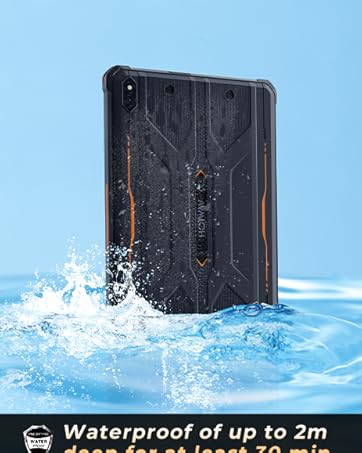
చిత్రం 4: సైడ్ ప్రోfile of the HOTWAV R10 Pro.
సెటప్
- ప్రారంభ ఛార్జ్: Connect the tablet to the charger using the provided Type-C cable and charge it fully before first use.
- పవర్ ఆన్: Press and hold the power button until the HOTWAV logo appears.
- భాష & ప్రాంతం: మీకు నచ్చిన భాష మరియు ప్రాంతాన్ని ఎంచుకోవడానికి స్క్రీన్పై కనిపించే ప్రాంప్ట్లను అనుసరించండి.
- Wi-Fi కనెక్షన్: Connect to a stable Wi-Fi network to complete the setup process and download necessary updates.
- Google ఖాతా: Google Play Store మరియు ఇతర సేవలను యాక్సెస్ చేయడానికి మీ Google ఖాతాతో సైన్ ఇన్ చేయండి లేదా కొత్తదాన్ని సృష్టించండి.
- SIM/TF Card Installation: Use the card safety pin to open the SIM/TF card slot. Insert your 4G-LTE SIM card(s) and/or a MicroSD card (up to 1TB) for expanded storage. Ensure the tray is securely closed to maintain water resistance.
ఆపరేటింగ్ సూచనలు
డిస్ప్లే & ఇంటర్ఫేస్
The tablet features a 10.1-inch HD+ display with a resolution of 800x1200 pixels, offering clear and vibrant visuals. The screen supports wet touch, allowing for operation even when wet. It runs on the latest Android 14 operating system, providing a smooth and intuitive user experience with access to a vast array of applications.

Figure 5: The 10.1-inch HD+ display of the HOTWAV R10 Pro.
ప్రదర్శన
Powered by a Unisoc T606 octa-core processor and 20GB RAM (8GB physical + 12GB virtual expansion), the R10 Pro ensures seamless multitasking and efficient performance for demanding applications and games. The 256GB internal storage is expandable up to 1TB via a MicroSD card, providing ample space for all your data.

Figure 6: Internal components highlighting RAM, ROM, and processor.
కెమెరా వినియోగం
The tablet is equipped with a 13MP rear camera and a 5MP front camera, allowing for crisp photos and clear video calls. Its waterproof design enables underwater photography, perfect for capturing moments in aquatic environments.

Figure 7: Camera features and underwater photography capability.
కనెక్టివిటీ
The R10 Pro supports dual SIM 4G-LTE for global cellular connectivity, high-speed 2.4G/5G Wi-Fi, Bluetooth 5.0, and a comprehensive GPS positioning system (Beidou, Galileo, GLONASS, GPS) for accurate navigation. Face ID is available for secure and quick unlocking.

Figure 8: GPS positioning system features.
బ్యాటరీ నిర్వహణ
Equipped with a 10800mAh high-capacity battery, the tablet offers extended usage times: up to 1000 hours standby, 400 hours talk time, and 200 hours music playback. It also supports OTG reverse charging, allowing it to function as a power bank for other devices.

Figure 9: Battery capacity and usage times.
మన్నిక లక్షణాలు
The HOTWAV R10 Pro is built to withstand harsh conditions, meeting IP68, IP69K, and MIL-STD-810G standards. It offers:
- నీటి నిరోధకత: 30 నిమిషాల పాటు 1.5 మీటర్ల వరకు.
- డ్రాప్ ప్రొటెక్షన్: Resistant to drops from up to 1.2 meters.
- డస్ట్ ప్రూఫ్: 360° dustproof capability.

Figure 10: Durability testing of the HOTWAV R10 Pro.
సాఫ్ట్వేర్
The HOTWAV R10 Pro runs on the Android 14 operating system, offering enhanced security, privacy features, and a customizable user interface. Users can access a wide range of applications through the Google Play Store.

Figure 11: Android 14 operating system on the HOTWAV R10 Pro.
ట్రబుల్షూటింగ్
సాధారణ సమస్యలు & పరిష్కారాలు
- పరికరం ఆన్ చేయడం లేదు: బ్యాటరీ ఛార్జ్ అయ్యిందని నిర్ధారించుకోండి. ఛార్జర్కు కనెక్ట్ చేసి, మళ్లీ పవర్ ఆన్ చేయడానికి ప్రయత్నించే ముందు కొన్ని నిమిషాలు వేచి ఉండండి.
- నెమ్మదిగా పనితీరు: Close unnecessary background applications. Clear cache regularly. Consider performing a factory reset if issues persist (back up data first).
- Connectivity Problems (Wi-Fi/4G): Check network settings. Restart the tablet and your router/modem. Ensure SIM card is correctly inserted and activated.
- టచ్స్క్రీన్ స్పందించడం లేదు: Restart the device. If the issue is intermittent, ensure the screen is clean and dry.
స్పెసిఫికేషన్లు
| ఫీచర్ | స్పెసిఫికేషన్ |
|---|---|
| ప్రదర్శన పరిమాణం | 10.1 అంగుళాలు |
| స్క్రీన్ రిజల్యూషన్ | 800x1200 పిక్సెల్స్ |
| ఆపరేటింగ్ సిస్టమ్ | ఆండ్రాయిడ్ 14 |
| ప్రాసెసర్ | యూనిసోక్ T606 ఆక్టా-కోర్ |
| RAM | 20GB (8GB భౌతిక + 12GB వర్చువల్) |
| అంతర్గత నిల్వ | 256GB (Expandable up to 1TB via MicroSD) |
| వెనుక కెమెరా | 13MP |
| ఫ్రంట్ కెమెరా | 5MP |
| బ్యాటరీ కెపాసిటీ | 10800mAh |
| జలనిరోధిత రేటింగ్ | IP68 & IP69K |
| డ్రాప్ ప్రొటెక్షన్ | MIL-STD-810G (1.2 meters) |
| వైర్లెస్ కనెక్టివిటీ | 4G-LTE, 5G Wi-Fi (802.11ax), Bluetooth 5.0 |
| నావిగేషన్ | GPS, బీడౌ, గెలీలియో, గ్లోనాస్ |
| కొలతలు (LxWxH) | 10.59 x 7.17 x 0.67 అంగుళాలు |
| వస్తువు బరువు | 2.99 పౌండ్లు |
అధికారిక ఉత్పత్తి వీడియోలు
అధికారిక ఉత్పత్తి వీడియో ప్రదర్శనasing the HOTWAV R10 Pro Rugged Tablet's design and key features, including its robust build and user interface.
Official product video highlighting the HOTWAV R10 Pro Tablet's performance, durability, and user experience.
వారంటీ మరియు మద్దతు
HOTWAV is committed to providing excellent customer service. The R10 Pro Rugged Tablet comes with:
- 30-day no-reason returns
- Two-year free warranty
- జీవితకాల సాంకేతిక మద్దతు
- 24 గంటల ఆన్లైన్ కస్టమర్ సేవ
For any inquiries or support, please contact HOTWAV Official After-Sales Service.