
పరిచయం
Welcome to the user manual for your new Reflex Active Series 50 Smart Calling Watch. This guide provides essential information on setting up, operating, maintaining, and troubleshooting your device. Please read this manual thoroughly to ensure optimal performance and longevity of your watch.
The Reflex Active Series 50 is designed to keep you connected and active, offering hands-free calling, comprehensive health monitoring, and multi-sport tracking capabilities.
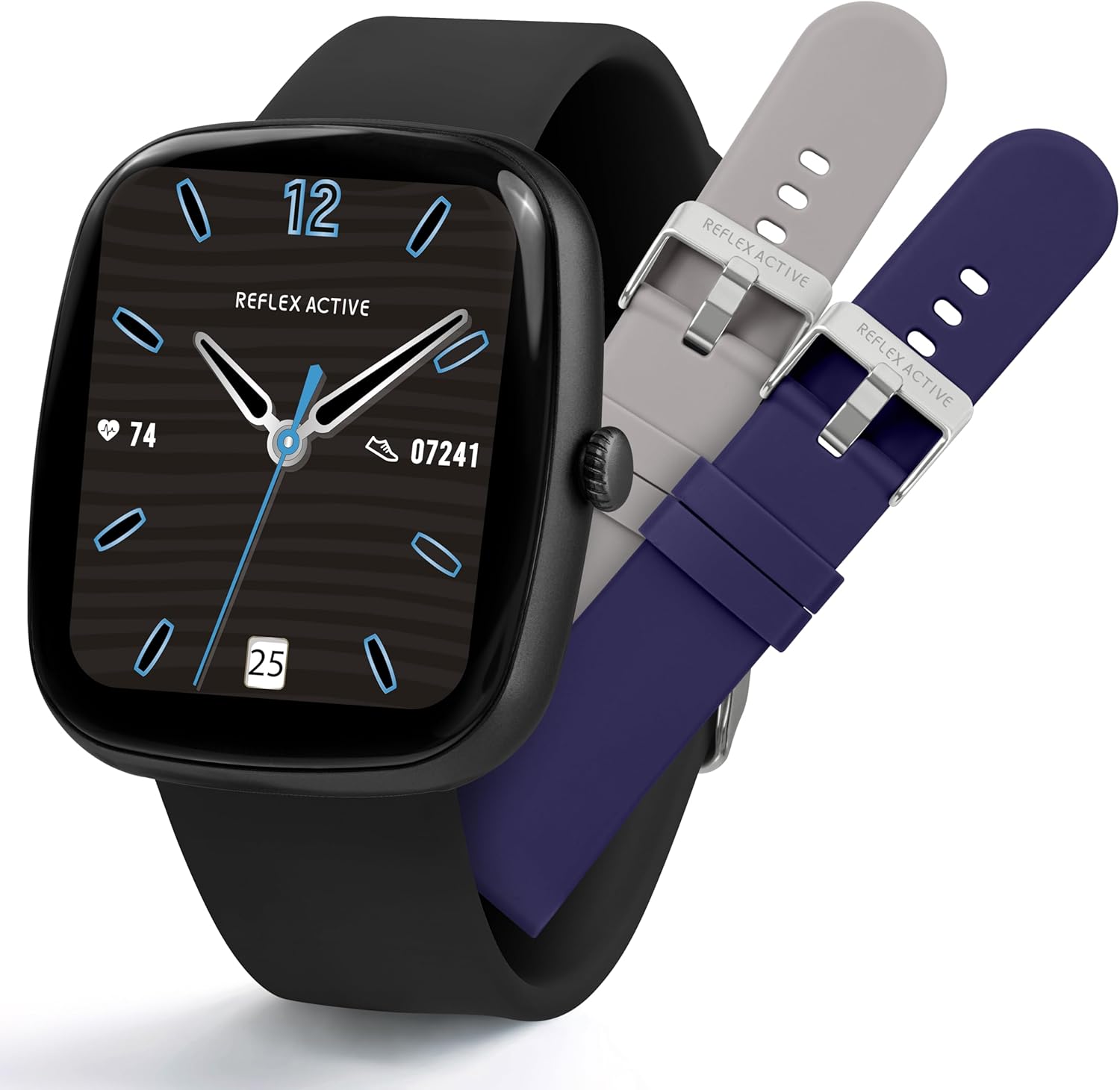
Image: The Reflex Active Series 50 Smart Calling Watch shown with its black strap and two additional interchangeable straps in grey and blue.
పెట్టెలో ఏముంది
Upon opening your Reflex Active Series 50 Smart Calling Watch package, you should find the following items:
- Reflex Active Series 50 Smart Calling Watch
- సూచనల మాన్యువల్ (ఈ పత్రం)
- ఛార్జింగ్ కేబుల్
- 2x Spare Interchangeable Straps (in addition to the pre-attached strap)

Image: The complete package contents of the Reflex Active Series 50 Smart Calling Watch, including the watch, instruction manual, charging cable, and two additional straps.
సెటప్
1. వాచ్ ఛార్జింగ్
Before first use, fully charge your Reflex Active Series 50 Smart Calling Watch. Connect the provided charging cable to the charging port on the back of the watch and plug the USB end into a compatible USB power adapter (not included) or a computer's USB port.
- పూర్తిగా ఛార్జ్ కావడానికి సాధారణంగా దాదాపు 2 గంటలు పడుతుంది.
- వాచ్ డిస్ప్లే ఛార్జింగ్ స్థితిని సూచిస్తుంది.

Image: The watch screen showing a charging icon, highlighting its exceptional battery life.
2. Installing the Reflex Active Red App
To unlock the full functionality of your watch, download and install the Reflex Active Red app on your smartphone. The app is compatible with Android 9.0+ and iOS 12+.
- Scan the QR code in the instruction manual or search for "Reflex Active Red" in your device's app store (Google Play Store for Android, Apple App Store for iOS).
- యాప్ను డౌన్లోడ్ చేసి, ఇన్స్టాల్ చేయండి.
- ఖాతాను సృష్టించడానికి మరియు మీ ప్రోని సెటప్ చేయడానికి స్క్రీన్పై సూచనలను అనుసరించండి.file.

Image: Visual representation of the Reflex Active Red app interface on a smartphone, with icons for downloading from Google Play and Apple App Store.
3. మీ గడియారాన్ని జత చేయడం
Once the app is installed and your watch is charged, proceed with pairing:
- మీ స్మార్ట్ఫోన్లో బ్లూటూత్ ప్రారంభించబడిందని నిర్ధారించుకోండి.
- Open the Reflex Active Red app.
- Navigate to the "Add Device" or "Pair Device" section within the app.
- Select "Reflex Active Series 50" from the list of available devices.
- ప్రాంప్ట్ చేయబడితే మీ వాచ్ మరియు స్మార్ట్ఫోన్ రెండింటిలోనూ జత చేసే అభ్యర్థనను నిర్ధారించండి.
Your watch is now connected and ready for use.
ఆపరేటింగ్ సూచనలు
ప్రాథమిక నావిగేషన్
- టచ్స్క్రీన్: మెనూలు మరియు ఫీచర్లను నావిగేట్ చేయడానికి ఎడమ/కుడి, పైకి/క్రిందికి స్వైప్ చేయండి. ఎంచుకోవడానికి నొక్కండి.
- సైడ్ బటన్: Press to wake/sleep the screen, return to the home screen, or access the app list (functionality may vary based on context).
కాలింగ్ ఫీచర్లు
The Series 50 allows you to make and receive calls directly from your watch when connected to your smartphone via Bluetooth.
- కాల్స్ చేయడం: కాల్ ప్రారంభించడానికి మీ వాచ్లోని డయలర్ లేదా కాంటాక్ట్ల జాబితాను యాక్సెస్ చేయండి.
- కాల్లను స్వీకరించడం: When a call comes in, you can answer or decline directly from the watch screen.

Image: A user interacting with the watch to manage a phone call, illustrating the hands-free calling feature.
నోటిఫికేషన్లు మరియు సందేశం
Receive notifications for calls, messages, and social media alerts directly on your watch. Configure notification settings within the Reflex Active Red app.

Image: Two watches displaying incoming message notifications from popular social media platforms.
ఆరోగ్యం మరియు సంరక్షణ ట్రాకింగ్
The Series 50 offers comprehensive health monitoring features:
- దశల కౌంటర్: Tracks your daily steps. Set personal targets in the app.
- హార్ట్ రేట్ మానిటర్: Provides real-time heart rate readings.
- రక్త ఆక్సిజన్ మానిటర్: మీ రక్త ఆక్సిజన్ సంతృప్త స్థాయిలను కొలుస్తుంది.
- నిద్ర విశ్లేషణ: Monitors your sleep patterns, including sleep length and phases.
- కేలరీల ట్రాకింగ్: కార్యాచరణ ఆధారంగా ఖర్చయ్యే కేలరీలను అంచనా వేస్తుంది.
- సైకిల్ ట్రాకింగ్: మహిళల ఆరోగ్య పర్యవేక్షణ కోసం.
- హైడ్రేషన్ హెచ్చరికలు: Reminders to drink water.
- సెడెంటరీ రిమైండర్లు: నిష్క్రియాత్మక కాలాల తర్వాత కదలమని మిమ్మల్ని హెచ్చరిస్తుంది.

Image: A collage demonstrating the watch's capabilities in step counting, sleep analysis, and multi-sport tracking, including heart rate and calorie display.
Multi-Sport Tracking
Track various activities with dedicated sport modes. The watch can monitor walking, running, swimming, and more. Data is synced to the Reflex Active Red app for detailed analysis.

Image: Individuals participating in various sports, showcasing the watch's multi-sport tracking feature.
అనుకూలీకరణ
- Interchangeable Dials: Personalize your watch face from a variety of pre-installed designs or use your own photos via the app.
- మార్చుకోగల పట్టీలు: Easily swap the silicone straps to match your style.

Image: A selection of different watch faces available for customization on the Reflex Active Series 50.
నిర్వహణ
మీ గడియారాన్ని శుభ్రం చేయడం
Regularly clean your watch and straps to ensure hygiene and proper functioning. Use a soft, damp cloth to wipe the screen and watch body. For silicone straps, mild soap and water can be used, then rinse thoroughly and dry completely before reattaching to the watch.
- కఠినమైన రసాయనాలు, రాపిడి క్లీనర్లు లేదా ద్రావకాలను ఉపయోగించడం మానుకోండి.
- ఛార్జింగ్ చేసే ముందు ఛార్జింగ్ కాంటాక్ట్లు శుభ్రంగా మరియు పొడిగా ఉన్నాయని నిర్ధారించుకోండి.
నీటి నిరోధకత (IP68)
The Reflex Active Series 50 is IP68 water resistant, meaning it is protected against continuous immersion in water up to 1.5 meters for up to 30 minutes. This makes it suitable for surface swimming and everyday use like hand washing or rain exposure.
- డైవింగ్, స్నార్కెలింగ్ లేదా అధిక పీడన నీటి కార్యకలాపాలకు గడియారాన్ని ఉపయోగించవద్దు.
- Avoid exposing the watch to hot water, steam, or sudden temperature changes.
- నీటికి, ముఖ్యంగా ఉప్పునీటికి గురైన తర్వాత, గడియారాన్ని మంచినీటితో శుభ్రం చేసి, పూర్తిగా ఆరబెట్టండి.

Image: The watch partially submerged in water, illustrating its water resistance capabilities.
ట్రబుల్షూటింగ్
| సమస్య | సాధ్యమైన పరిష్కారం |
|---|---|
| గడియారం ఆన్/ఛార్జింగ్ కావడం లేదు. | Ensure the charging cable is securely connected to both the watch and a working USB power source. Clean the charging contacts. Try a different USB port or adapter. Allow the watch to charge for at least 30 minutes before attempting to turn it on. |
| స్మార్ట్ఫోన్తో జత చేయడం సాధ్యం కాదు. | Ensure Bluetooth is enabled on your phone. Make sure the watch is charged and within range. Restart both the watch and your smartphone. Forget the device in your phone's Bluetooth settings and try pairing again through the Reflex Active Red app. |
| నోటిఫికేషన్లు కనిపించడం లేదు. | Check notification settings within the Reflex Active Red app. Ensure app notifications are enabled on your smartphone for the Reflex Active Red app and the specific apps you want notifications from. Keep the watch connected via Bluetooth. |
| సరికాని ఆరోగ్య డేటా. | Ensure the watch is worn snugly on your wrist, about one finger's width above the wrist bone. Avoid excessive movement during measurements. Clean the sensor on the back of the watch. |
| తక్కువ బ్యాటరీ జీవితం. | Reduce screen brightness. Limit frequent screen wake-ups. Turn off unnecessary notifications. Close background apps on the watch if applicable. Ensure the watch is fully charged. |
స్పెసిఫికేషన్లు
| ఫీచర్ | వివరాలు |
|---|---|
| మోడల్ సంఖ్య | 7ef58457-62be-4e3f-a64f-c168c5c37ad2 |
| ప్రదర్శన రకం | Digital, Round |
| స్క్రీన్ పరిమాణం | 1.83 అంగుళాలు (కనిపించే స్క్రీన్ వికర్ణం: 2" / 5 సెం.మీ) |
| ఆపరేటింగ్ సిస్టమ్ | Wear OS 2.x |
| కనెక్టివిటీ | బ్లూటూత్, సెల్యులార్ |
| బ్యాటరీ రకం | 1 Nonstandard Battery (Lithium Polymer, included) |
| నీటి నిరోధకత | IP68 |
| కేస్ మెటీరియల్ | ప్లాస్టిక్ |
| బ్యాండ్ మెటీరియల్ | సిలికాన్ |
| రంగు | నలుపు |
| తయారీదారు | పీర్స్ హార్డీ |
| మూలం దేశం | చైనా |
| ప్యాకేజీ కొలతలు | 16.1 x 12.6 x 2.6 సెం.మీ; 70.03 గ్రా |
వారంటీ మరియు మద్దతు
For warranty information and detailed support, please visit the official Reflex Active support webసైట్. మీరు అక్కడ తరచుగా అడిగే ప్రశ్నలు మరియు అదనపు వనరులను కూడా కనుగొనవచ్చు.
అధికారిక మద్దతు Webసైట్: https://www.reflex-active.com/pages/support
For any issues not covered in this manual, please contact Reflex Active customer service through the support webసైట్.