
TOA Electronics BG-2060
TOA Electronics BG-2060 Mixer Ampజీవితకాల వినియోగదారు మాన్యువల్
Model: BG-2060 | Brand: TOA Electronics
1. పరిచయం
This manual provides detailed instructions for the safe and efficient operation of the TOA Electronics BG-2060 5-Input Mixer Amplifier. The BG-2060 is designed for background music and general announcement applications, suitable for various commercial environments such as bars, retail stores, and banquet rooms. It features multiple inputs, flexible output options, and robust controls for optimal audio management.
2. భద్రతా సమాచారం
యూనిట్ను ఆపరేట్ చేసే ముందు దయచేసి ఈ భద్రతా సూచనలను జాగ్రత్తగా చదవండి. భవిష్యత్తు సూచన కోసం ఈ మాన్యువల్ని ఉంచండి.
- శక్తి మూలం: Connect the unit only to the specified power supply (120 V AC, 60 Hz).
- వెంటిలేషన్: తగినంత వెంటిలేషన్ ఉండేలా చూసుకోండి. వెంటిలేషన్ ఓపెనింగ్లను బ్లాక్ చేయవద్దు.
- తేమ: అగ్ని లేదా విద్యుత్ షాక్ను నివారించడానికి యూనిట్ను వర్షం లేదా తేమకు గురిచేయవద్దు.
- సర్వీసింగ్: అన్ని సర్వీసింగ్లను అర్హత కలిగిన సేవా సిబ్బందికి సూచించండి. ఈ ఉత్పత్తిని మీరే సర్వీసింగ్ చేయడానికి ప్రయత్నించవద్దు.
- ప్లేస్మెంట్: యూనిట్ను స్థిరమైన, సమతల ఉపరితలంపై ఉంచండి. వేడి వనరుల దగ్గర లేదా ప్రత్యక్ష సూర్యకాంతిలో ఉంచకుండా ఉండండి.
- గ్రౌండింగ్: విద్యుత్ షాక్ను నివారించడానికి సరైన గ్రౌండింగ్ను నిర్ధారించుకోండి.
3. ప్యాకేజీ విషయాలు
క్రింద జాబితా చేయబడిన అన్ని అంశాలు ప్యాకేజీలో చేర్చబడ్డాయని నిర్ధారించుకోండి:
- TOA Electronics BG-2060 Mixer Ampజీవితకాలం
- 5x Volume control cover YA-920
- 4x Removable terminal plug (2 pins)
- 2x Removable terminal plug (3 pins)
- 1x Removable terminal plug (4 pins)
- 1x Removable terminal plug (5 pins)
- వినియోగదారు మాన్యువల్ (ఈ పత్రం)
4. ఉత్పత్తి ముగిసిందిview
4.1 ఫ్రంట్ ప్యానెల్

చిత్రం 4.1: ముందు ప్యానెల్ నియంత్రణలు
This image displays the front panel of the TOA BG-2060 Mixer Amplifier. Key features visible include five input volume knobs (Mic, Line 1/Tel, Line 2, Line 3, Module), Bass and Treble tone controls, Signal, Peak, and Power LED indicators, and the main power switch. The overall design is a sleek black chassis.
- Input Volume Controls (MIC, LINE 1/TEL, LINE 2, LINE 3, MODULE): Adjust the volume level for each corresponding input channel.
- BASS నియంత్రణ: Adjusts the low-frequency response of the audio output.
- ట్రెబుల్ నియంత్రణ: Adjusts the high-frequency response of the audio output.
- సిగ్నల్ LED: ఆడియో సిగ్నల్ ఉన్నప్పుడు వెలుగుతుంది.
- పీక్ LED: అవుట్పుట్ సిగ్నల్ క్లిప్ అవుతున్నప్పుడు లేదా వక్రీకరణకు దగ్గరగా ఉన్నప్పుడు వెలుగుతుంది.
- పవర్ LED: Indicates the power status of the unit (blue when ON).
- పవర్ స్విచ్: యూనిట్ని ఆన్ లేదా ఆఫ్ చేస్తుంది.
4.2 వెనుక ప్యానెల్
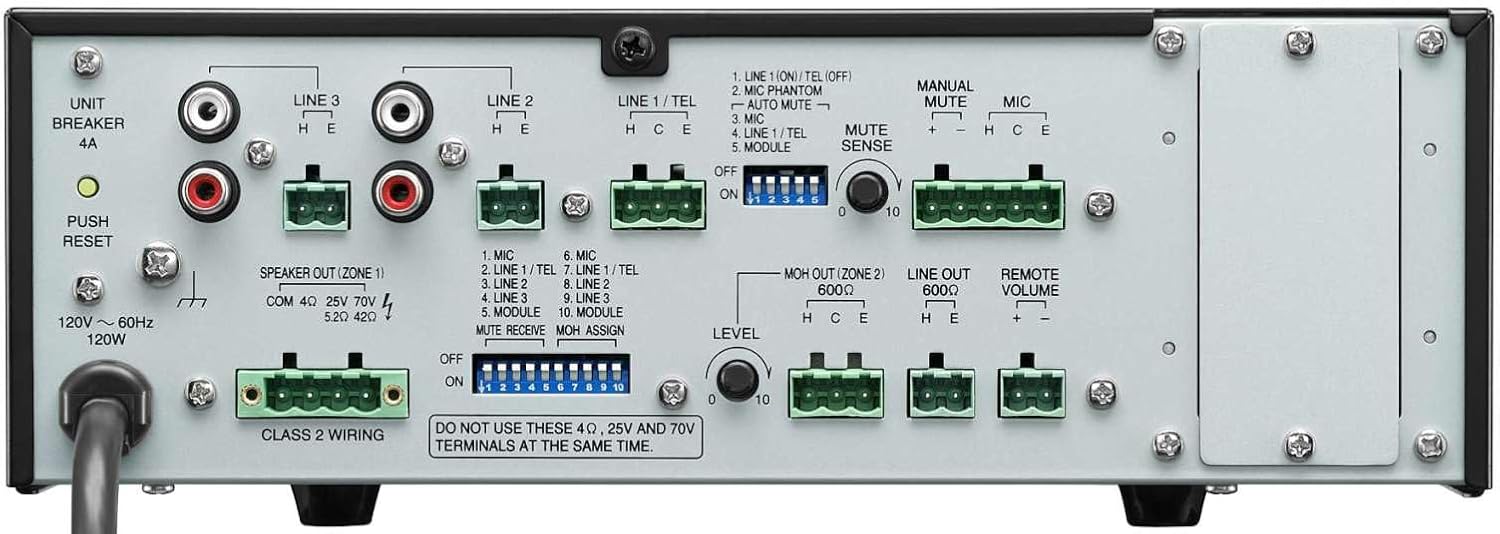
చిత్రం 4.2: వెనుక ప్యానెల్ కనెక్షన్లు
This image shows the rear panel of the TOA BG-2060 Mixer Amplifier, detailing its connectivity options. Visible are the power input, speaker outputs (4 Ohms, 25V, 70V), various input terminals (Mic, Line 1/Tel, Line 2, Line 3, Module), MOH output, Line output, Remote Volume control, and DIP switches for configuration.
- పవర్ ఇన్పుట్: AC పవర్ కార్డ్ కనెక్షన్.
- UNIT BREAKER: Resettable circuit breaker.
- Speaker Output (ZONE 1): Terminals for connecting speakers (4 Ohms, 25V, or 70V). Note: Do not use 4 Ohms, 25V, and 70V terminals at the same time.
- ఇన్పుట్ టెర్మినల్స్:
- MIC: Balanced input for microphones, with +24V DC phantom power option.
- LINE 1/TEL: Selectable input for line-level devices or telephone paging.
- LINE 2, LINE 3: Unbalanced inputs for line-level devices (e.g., CD players, media players).
- మాడ్యూల్: Input for optional modules.
- MOH OUT (ZONE 2): Music On Hold output, also assignable as a second zone output.
- గీత భయట: Unbalanced line-level output for connecting to external ampలైఫైయర్లు లేదా రికార్డింగ్ పరికరాలు.
- రిమోట్ వాల్యూమ్: Terminals for connecting an optional remote volume control.
- DIP స్విచ్లు: Configure various settings such as phantom power, input sensitivity, muting functions, and MOH assignment.
5. సెటప్
Follow these steps for initial setup of your BG-2060 Mixer Ampజీవితకాలం.
- పవర్ ఆఫ్: Ensure the unit's power switch is in the OFF position and the power cord is disconnected.
- స్పీకర్ కనెక్షన్: Connect your speakers to the appropriate speaker output terminals (4 Ohms, 25V, or 70V) on the rear panel. Ensure correct polarity. Do not connect speakers to multiple output types simultaneously.
- ఇన్పుట్ పరికర కనెక్షన్: Connect your audio sources (microphones, music players, etc.) to the desired input terminals (MIC, LINE 1/TEL, LINE 2, LINE 3, MODULE) using appropriate cables and terminal plugs.
- DIP స్విచ్ కాన్ఫిగరేషన్: Refer to the rear panel diagram and the detailed instructions in the full manual for setting the DIP switches according to your specific needs (e.g., phantom power for microphones, mute settings).
- ఐచ్ఛిక కనెక్షన్లు: If using, connect to the MOH OUT, LINE OUT, or REMOTE VOLUME terminals.
- పవర్ కనెక్షన్: Once all connections are secure, plug the power cord into a suitable AC outlet.
6. ఆపరేషన్
Operating the BG-2060 is straightforward.
- పవర్ ఆన్: Turn the POWER switch on the front panel to the ON position. The POWER LED will illuminate blue.
- ఇన్పుట్ వాల్యూమ్ సర్దుబాటు: Slowly turn up the volume knob for the input channel you wish to use (MIC, LINE 1/TEL, etc.).
- మాస్టర్ వాల్యూమ్ సర్దుబాటు: Adjust the master volume control (if applicable, or use individual input volumes) to achieve the desired overall output level.
- టోన్ కంట్రోల్: Use the BASS and TREBLE controls to fine-tune the audio's low and high frequencies to your preference.
- పర్యవేక్షణ: Observe the SIGNAL and PEAK LEDs. The SIGNAL LED indicates audio presence. If the PEAK LED illuminates frequently or stays lit, reduce the input volume to prevent distortion.
- మ్యూటింగ్ ఫంక్షన్: If configured via DIP switches, utilize the manual or automatic mute functions as needed for paging or announcements.
7. నిర్వహణ
Proper maintenance ensures the longevity and optimal performance of your mixer ampజీవితకాలం.
- శుభ్రపరచడం: మెత్తటి, పొడి గుడ్డతో యూనిట్ను తుడవండి. రాపిడి క్లీనర్లు, మైనపులు లేదా ద్రావకాలను ఉపయోగించవద్దు.
- వెంటిలేషన్: వెంటిలేషన్ ఓపెనింగ్లు దుమ్ము మరియు చెత్త లేకుండా ఉన్నాయో లేదో కాలానుగుణంగా తనిఖీ చేయండి.
- కనెక్షన్లు: అన్ని కేబుల్ కనెక్షన్లు సురక్షితంగా మరియు తుప్పు పట్టకుండా ఉన్నాయని నిర్ధారించుకోండి.
- నిల్వ: యూనిట్ను ఎక్కువ కాలం నిల్వ ఉంచినట్లయితే, దానిని పవర్ నుండి డిస్కనెక్ట్ చేసి, చల్లని, పొడి ప్రదేశంలో నిల్వ చేయండి.
8. ట్రబుల్షూటింగ్
సాధారణ సమస్యలు మరియు వాటి పరిష్కారాల కోసం క్రింది పట్టికను చూడండి.
| సమస్య | సాధ్యమైన కారణం | పరిష్కారం |
|---|---|---|
| శక్తి లేదు | Power cord disconnected; Unit breaker tripped; Power outlet issue. | Check power cord connection; Press UNIT BREAKER button on rear panel; Test power outlet with another device. |
| సౌండ్ అవుట్పుట్ లేదు | Input volume too low; Speaker connections incorrect; Mute function active; Incorrect input selected. | Increase input and master volumes; Verify speaker wiring and impedance; Check DIP switch settings for mute; Ensure correct input source is active. |
| వక్రీకరించిన ధ్వని | Input signal too high (PEAK LED on); Incorrect impedance matching; Faulty cable. | Reduce input volume; Ensure speaker impedance matches amplifier output; Replace cables. |
| హమ్మింగ్ లేదా బజ్జింగ్ శబ్దం | Ground loop; Loose connections; Interference from other electronics. | Ensure proper grounding; Check all cable connections; Move unit away from other electronic devices. |
9. స్పెసిఫికేషన్లు
| ఫీచర్ | వివరాలు |
|---|---|
| శక్తి మూలం | 120 వి ఎసి, 60 హెర్ట్జ్ |
| రేట్ చేయబడిన అవుట్పుట్ | 60W |
| ఇన్పుట్లు | Mic: -60 dB, 600 Ohms, balanced; Line 1/TEL: -10 dB/-20 dB, 10 kOhms, balanced; Line 2, 3: -10 dB, 10 kOhms, unbalanced; Modules |
| అవుట్పుట్లు | Speaker: 4 Ohms, 25 V (10 Ohms), 70 V (83 Ohms), balanced; MOH: 0 dB, 600 Ohms, balanced; Line: 0 dB, 600 Ohms, unbalanced |
| అవుట్పుట్ నియంత్రణ | 2 dB or less, no load to full load (1 kHz) |
| ఫాంటమ్ పవర్ | On/Off switch for Mic, +24 V DC |
| టోన్ నియంత్రణ | Bass: +/- 10 dB at 100 Hz; Treble: +/- 10 dB at 10 kHz |
| మ్యూటింగ్ | Manual mute/Automatic mute |
| సూచికలు | పవర్ LED, సిగ్నల్ స్థాయి LED, పీక్ LED |
| కొలతలు (WxHxD) | 10.39 x 3.71 x 10.52 అంగుళాలు |
| బరువు | 11.68 పౌండ్లు |
10. వారంటీ మరియు మద్దతు
For warranty information and technical support, please refer to the documentation provided with your purchase or visit the official TOA Electronics webసైట్.
Ask a question about this manual
Ask about setup, troubleshooting, compatibility, parts, safety, or missing instructions. Manuals+ will review the question and use this page’s manual context to help answer it.