
MONODEAL 8818
MONODEAL CD Player Model 8818 User Manual
Desktop Portable CD Player with Bluetooth, Wireless Charging, Alarm Clock, and FM Radio
పరిచయం
The MONODEAL Model 8818 is a versatile desktop portable CD player designed to provide a comprehensive audio experience. It integrates multiple functions including a CD player, Bluetooth 5.0 HiFi speaker, FM radio, USB flash drive player, and 3.5mm audio player. Additionally, it features wireless charging, an intelligent dual alarm clock, and a sleep timer, making it an ideal companion for various settings from home to office.

Image: The MONODEAL Model 8818 CD Player, showcasing its sleek black design, digital display, control buttons, and included remote control. A CD is visible in the player, and two vinyl records are placed next to it.
పెట్టెలో ఏముంది
- CD ప్లేయర్
- వినియోగదారు మాన్యువల్
- రిమోట్ కంట్రోల్
- పవర్ కార్డ్
ఉత్పత్తి ముగిసిందిview
Familiarize yourself with the various components and controls of your MONODEAL CD Player.
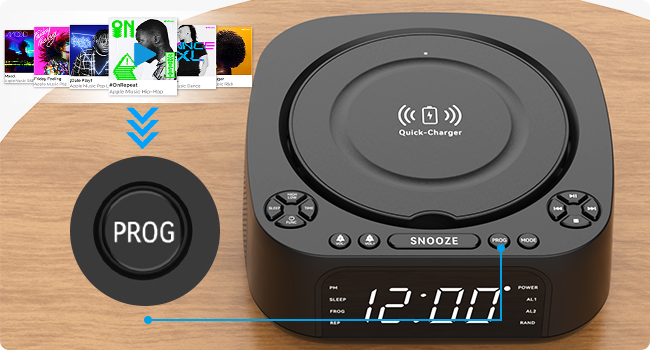
Image: A detailed diagram of the MONODEAL CD Player, highlighting its various buttons, ports, and features with corresponding numbers for easy identification.
| నం. | ఫీచర్ | వివరణ |
|---|---|---|
| 1 | High/Low Brightness | ప్రదర్శన ప్రకాశాన్ని సర్దుబాటు చేస్తుంది. |
| 2 | స్లీప్ బటన్ | Activates/sets sleep timer. |
| 3 | సమయం సెట్ | ప్రస్తుత సమయాన్ని సెట్ చేస్తుంది. |
| 4 | Function/Shutdown | Switches modes or powers off. |
| 5 | Alarm Clock 1 / Volume - | Sets Alarm 1 or decreases volume. |
| 6 | Alarm Clock 2 / Volume + | Sets Alarm 2 or increases volume. |
| 7 | ఛార్జర్ బేస్ | వైర్లెస్ ఛార్జింగ్ ప్యాడ్. |
| 8 | తాత్కాలికంగా ఆపివేయి బటన్ | Snoozes active alarm. |
| 9 | ప్రోగ్ (కార్యక్రమం) | Programs CD tracks or FM presets. |
| 10 | మోడ్ బటన్ | Switches between playback modes (CD, Bluetooth, FM, USB, AUX). |
| 11 | ప్లే / పాజ్ చేయండి | ప్లేబ్యాక్ను ప్రారంభిస్తుంది లేదా పాజ్ చేస్తుంది. |
| 12 | తదుపరి / ఫాస్ట్ ఫార్వర్డ్ | Skips to next track or fast forwards. |
| 13 | మునుపటి / రివైండ్ | Skips to previous track or rewinds. |
| 14 | ఆపు బటన్ | ప్లేబ్యాక్ను ఆపివేస్తుంది. |
| 15 | USB Port (Data/Playback) | USB ఫ్లాష్ డ్రైవ్ ప్లేబ్యాక్ కోసం. |
| 16 | USB పోర్ట్ (ఛార్జింగ్) | For charging external devices (5V/1A). |
| 17 | 3.5 మిమీ ఇన్పుట్ | Audio input jack. |
| 18 | AUX పోర్ట్ | సహాయక ఆడియో ఇన్పుట్. |
| 19 | డిస్ప్లే స్క్రీన్ | Shows time, mode, and playback information. |
సెటప్
1. పవర్ కనెక్షన్
Connect the provided power cord to the DC IN port on the back of the CD player and plug the other end into a standard wall outlet. The display will light up.
2. సమయాన్ని నిర్ణయించడం
- నొక్కండి TIME button (3) on the unit.
- ఉపయోగించండి మునుపటి / రివైండ్ (13) మరియు తదుపరి / ఫాస్ట్ ఫార్వర్డ్ (12) గంటను సర్దుబాటు చేయడానికి బటన్లు.
- నొక్కండి TIME again to confirm the hour and move to minutes.
- ఉపయోగించండి మునుపటి / రివైండ్ (13) మరియు తదుపరి / ఫాస్ట్ ఫార్వర్డ్ (12) నిమిషాలను సర్దుబాటు చేయడానికి బటన్లు.
- నొక్కండి TIME once more to save the time setting.
3 ప్రదర్శన ప్రకాశం సర్దుబాటు
నొక్కండి High/Low Brightness button (1) to toggle between high and low brightness modes for the display screen (19).

Image: Comparison of the display screen's brightness in daylight and night settings, demonstrating the high and low brightness modes.
ఆపరేటింగ్ సూచనలు
CD ప్లేబ్యాక్
- CD కంపార్ట్మెంట్ కవర్ను తెరవండి.
- Insert a CD (compatible with CD, CD-R, CD-RW, MP3, WMA formats) with the label side facing up.
- CD కంపార్ట్మెంట్ కవర్ను మూసివేయండి.
- నొక్కండి Function/Shutdown button (4) to power on the unit, then press the మోడ్ button (10) until "CD" mode is selected.
- నొక్కండి ప్లే / పాజ్ చేయండి ప్లేబ్యాక్ ప్రారంభించడానికి బటన్ (11).
- ఉపయోగించండి మునుపటి / రివైండ్ (13) మరియు తదుపరి / ఫాస్ట్ ఫార్వర్డ్ (12) to navigate tracks.
- నొక్కండి ఆపు (14) to stop playback.

Image: The MONODEAL CD Player with a CD being inserted, illustrating the CD playback function.
Bluetooth Function (RX & TX)
The unit supports both Bluetooth reception (RX) to play audio from your phone/tablet and Bluetooth transmission (TX) to send audio to Bluetooth headphones/speakers.

Image: A visual representation of the two Bluetooth modes (RX and TX), showing the CD player receiving audio from a laptop and transmitting audio to headphones and a portable speaker.
Bluetooth Reception (RX Mode)
- నొక్కండి మోడ్ button (10) until "BT" (Bluetooth) mode is selected. The display will show "BT" and flash, indicating pairing mode.
- On your smartphone or tablet, enable Bluetooth and search for "MONODEAL 8818".
- Select the device to pair. Once connected, "BT" will stop flashing.
- You can now play audio from your device through the CD player's speakers.

Image: A user connecting their smartphone to the MONODEAL CD Player via Bluetooth reception, illustrating how to stream music from a mobile device.
Bluetooth Transmission (TX Mode)
This feature allows you to transmit audio from the CD player (e.g., CD playback, FM radio) to external Bluetooth headphones or speakers.
- మీ బ్లూటూత్ హెడ్ఫోన్లు/స్పీకర్ జత చేసే మోడ్లో ఉన్నాయని నిర్ధారించుకోండి.
- On the CD player, while in CD, FM, or USB mode, press and hold the మోడ్ button (10) for a few seconds to activate TX mode. The display will show "TX" and flash.
- The CD player will automatically search for and connect to nearby Bluetooth audio devices.
- Once connected, audio will be routed to your external Bluetooth device.
Note: This device does not support car Bluetooth connections.

Image: A user wearing Bluetooth headphones, connected wirelessly to the MONODEAL CD Player, demonstrating the Bluetooth transmission feature for private listening.
FM రేడియో
- నొక్కండి మోడ్ button (10) until "FM" mode is selected.
- మెరుగైన రిసెప్షన్ కోసం యాంటెన్నాను పొడిగించండి.
- నొక్కండి మరియు పట్టుకోండి ప్లే / పాజ్ చేయండి button (11) to auto-scan and save available stations. The unit can store up to 40 stations.
- ఉపయోగించండి మునుపటి / రివైండ్ (13) మరియు తదుపరి / ఫాస్ట్ ఫార్వర్డ్ (12) buttons to cycle through saved stations.
- To manually tune, briefly press మునుపటి / రివైండ్ (13) లేదా తదుపరి / ఫాస్ట్ ఫార్వర్డ్ (12)
- The unit supports FM stereo/mono switching.

Image: A woman and a child listening to the FM radio on the MONODEAL CD Player, with icons indicating various FM frequencies for different environments.
USB ప్లేబ్యాక్
- MP3/WMA ఆడియో ఉన్న USB ఫ్లాష్ డ్రైవ్ను చొప్పించండి files into the USB data port (15).
- నొక్కండి మోడ్ button (10) until "USB" mode is selected.
- ప్లేబ్యాక్ స్వయంచాలకంగా ప్రారంభమవుతుంది.
- ఉపయోగించండి మునుపటి / రివైండ్ (13) మరియు తదుపరి / ఫాస్ట్ ఫార్వర్డ్ (12) to navigate tracks.

Image: The MONODEAL CD Player with a USB flash drive inserted for music playback and a tablet connected to the charging USB port, demonstrating simultaneous charging and playback.
AUX ఇన్పుట్
- Connect an external audio device (e.g., MP3 player, mobile phone) to the AUX port (18) or 3.5mm input (17) using a 3.5mm audio cable.
- నొక్కండి మోడ్ button (10) until "AUX" mode is selected.
- Audio from your connected device will now play through the CD player's speakers. Control playback from your external device.

Image: A smartphone connected to the MONODEAL CD Player via a 3.5mm audio cable, demonstrating the AUX-IN mode for playing audio from external devices.
వైర్లెస్ ఛార్జింగ్
The top of the CD player features a built-in wireless charging panel (7) for compatible smartphones.
- Place your wireless charging compatible smartphone directly on the charger base (7) on top of the unit.
- Ensure the phone is centered on the charging area.
- The phone should indicate that it is charging.
Note: For optimal charging, remove any thick phone cases. Charging time may vary (3-8 hours).

Image: A smartphone wirelessly charging on top of the MONODEAL CD Player, with an indicator showing the charging process and estimated time.
అలారం క్లాక్ ఫంక్షన్
The unit features a dual alarm clock function, allowing you to set two separate alarms.
- నొక్కి పట్టుకోండి అలారం గడియారం 1 (5) లేదా అలారం గడియారం 2 (6) button. The hour will flash.
- ఉపయోగించండి మునుపటి / రివైండ్ (13) మరియు తదుపరి / ఫాస్ట్ ఫార్వర్డ్ (12) to adjust the hour, then press the corresponding alarm button again to confirm.
- Adjust the minutes similarly and press the alarm button to confirm.
- Select the alarm source (CD, FM radio, USB, Bluetooth) using the మోడ్ button (10) and confirm with the alarm button.
- To activate/deactivate an alarm, briefly press the corresponding alarm button. An alarm icon will appear/disappear on the display.
- అలారం మోగినప్పుడు, నొక్కండి తాత్కాలికంగా ఆపివేయండి button (8) for a temporary pause, or press any other button to turn off the alarm.

Image: Two scenes depicting the sleep timer and morning alarm clock functions. One shows a person sleeping with the display showing 23:58, and the other shows a person waking up with the display showing 08:00.
స్లీప్ టైమర్ ఫంక్షన్
The sleep timer allows the unit to play music for a set duration before automatically turning off.
- While playing audio (CD, FM, USB, Bluetooth), press the నిద్రించు button (2) repeatedly to cycle through sleep timer options (e.g., 15, 30, 45, 60, 90, 120 minutes).
- The unit will automatically power off after the selected time.
రిమోట్ కంట్రోల్ ఆపరేషన్
The included remote control allows convenient operation from a distance of up to 5 meters.
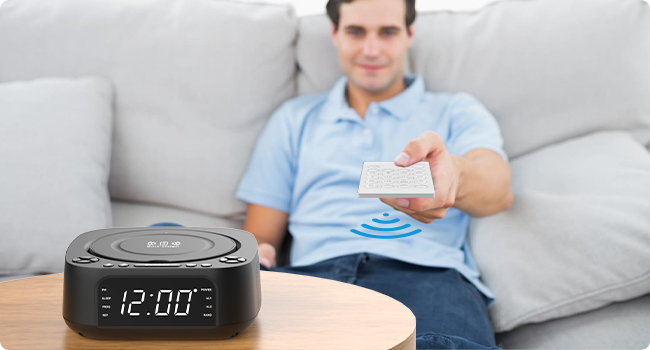
Image: A person using the remote control to operate the MONODEAL CD Player from a distance, highlighting the convenience of remote operation.
Most functions available on the unit's control panel are also accessible via the remote control. Refer to the remote control's button labels for specific functions (e.g., Mute, EQ, Repeat, etc.).
నిర్వహణ
- శుభ్రపరచడం: యూనిట్ వెలుపలి భాగాన్ని శుభ్రం చేయడానికి మృదువైన, పొడి వస్త్రాన్ని ఉపయోగించండి. రాపిడి క్లీనర్లు లేదా ద్రావకాలను ఉపయోగించవద్దు.
- CD కేర్: CD లను వాటి అంచుల దగ్గర పట్టుకోండి. వాటిని శుభ్రంగా మరియు గీతలు లేకుండా ఉంచండి. CD లను మధ్య నుండి బయటికి తుడవడానికి మృదువైన, మెత్తటి వస్త్రాన్ని ఉపయోగించండి.
- నిల్వ: When not in use for extended periods, unplug the unit and store it in a cool, dry place.
- వెంటిలేషన్: వేడెక్కకుండా ఉండటానికి యూనిట్ చుట్టూ సరైన వెంటిలేషన్ ఉండేలా చూసుకోండి. వెంటిలేషన్ ఓపెనింగ్లను బ్లాక్ చేయవద్దు.
ట్రబుల్షూటింగ్
| సమస్య | సాధ్యమైన కారణం | పరిష్కారం |
|---|---|---|
| యూనిట్ పవర్ ఆన్ చేయదు. | విద్యుత్ కనెక్షన్ లేదు. | Ensure power cord is securely plugged into the unit and a working wall outlet. |
| స్పీకర్ల నుండి శబ్దం లేదు. | Volume too low; incorrect mode; mute activated. | Increase volume; ensure correct mode (CD, BT, FM, USB, AUX); check if mute is on (remote). |
| CD స్కిప్ అవుతుంది లేదా ప్లే అవ్వదు. | CD మురికిగా, గీతలుగా లేదా తప్పుగా చొప్పించబడి ఉంది. | Clean CD; try a different CD; ensure CD is inserted label-side up. |
| బ్లూటూత్ జత చేయడం విఫలమైంది. | Device too far; not in pairing mode; interference. | Ensure unit is in BT mode and flashing; bring devices closer; restart both devices. |
| FM రేడియో స్పందన సరిగా లేదు. | యాంటెన్నా విస్తరించబడలేదు; బలహీనమైన సిగ్నల్. | Fully extend the FM antenna; try repositioning the unit. |
| వైర్లెస్ ఛార్జింగ్ పనిచేయడం లేదు. | Phone not compatible; phone case too thick; phone not centered. | Ensure phone supports wireless charging; remove thick cases; reposition phone on the charging pad. |
స్పెసిఫికేషన్లు
| ఫీచర్ | వివరాలు |
|---|---|
| మోడల్ సంఖ్య | 8818 |
| ఉత్పత్తి కొలతలు (L x W x H) | 7.32 x 7.32 x 2.89 అంగుళాలు (186 x 186.5 x 73.5 మిమీ) |
| వస్తువు బరువు | 2.4 పౌండ్లు |
| కనెక్టివిటీ టెక్నాలజీ | బ్లూటూత్, ఆక్సిలరీ, USB |
| స్పీకర్ రకం | Stereo (2 x 1W speakers) |
| మద్దతు ఉన్న డిస్క్ ఫార్మాట్లు | CD, CD-R, CD-RW, MP3, WMA |
| FM రేడియో ఫ్రీక్వెన్సీ | 87.5-108 MHz (up to 40 presets) |
| USB ప్లేబ్యాక్ | Supports MP3/WMA from USB flash drives |
| వైర్లెస్ ఛార్జింగ్ అవుట్పుట్ | 5W/10W |
| USB ఛార్జింగ్ అవుట్పుట్ | 5V/1A |
| అలారం గడియారం విధులు | Dual alarm, 4 wake-up modes (CD, FM, USB, Bluetooth) |
| స్లీప్ టైమర్ | 15-120 నిమిషాలు |
| రిమోట్ కంట్రోల్ రేంజ్ | 5 మీటర్ వరకు |
| తయారీదారు | మోనోడీల్ |
| మూలం దేశం | చైనా |

Image: The MONODEAL CD Player with its dimensions (length, width, height) indicated in millimeters, showcasing దాని కాంపాక్ట్ డిజైన్.
వారంటీ మరియు మద్దతు
MONODEAL is committed to providing quality products and customer satisfaction.
- 12-నెలల భర్తీ: Your product is covered by a 12-month replacement policy for manufacturing defects.
- జీవితకాల మద్దతు: MONODEAL offers lifetime technical support for this product.
For any questions or problems, please contact MONODEAL customer support. Contact information can typically be found on the product packaging or the official MONODEAL webసైట్.
Ask a question about this manual
Ask about setup, troubleshooting, compatibility, parts, safety, or missing instructions. Manuals+ will review the question and use this page’s manual context to help answer it.