
పరిచయం
ధన్యవాదాలు, ధన్యవాదాలు.asing the FunFlix P1 Android 4K Supported Bluetooth 5G Wi-Fi LED Full HD Projector. This manual provides essential information for setting up, operating, and maintaining your projector. Please read it thoroughly before use to ensure optimal performance and safety.
భద్రతా సమాచారం
- విద్యుత్ సరఫరా: Use only the specified power adapter. Ensure the power outlet matches the projector's voltagఇ అవసరాలు.
- వెంటిలేషన్: వెంటిలేషన్ ఓపెనింగ్లను బ్లాక్ చేయవద్దు. వేడెక్కకుండా నిరోధించడానికి సరైన గాలి ప్రవాహం కోసం ప్రొజెక్టర్ చుట్టూ తగినంత స్థలం ఉండేలా చూసుకోండి.
- కంటి రక్షణ: l ఉన్నప్పుడు ప్రొజెక్టర్ లెన్స్లోకి నేరుగా చూడకండిamp ఆన్లో ఉంది. ప్రకాశవంతమైన కాంతి కంటికి హాని కలిగించవచ్చు.
- ప్లేస్మెంట్: Place the projector on a stable, level surface. Avoid placing it in direct sunlight, near heat sources, or in environments with high humidity or dust.
- శుభ్రపరచడం: Disconnect the power before cleaning. Use a soft, dry cloth for the exterior and a lens cleaning cloth for the lens.
- పిల్లలు మరియు పెంపుడు జంతువులు: ప్రమాదాలను నివారించడానికి ప్రొజెక్టర్ను పిల్లలు మరియు పెంపుడు జంతువులకు అందుబాటులో లేకుండా ఉంచండి.
ప్యాకేజీ విషయాలు
ప్యాకేజీలో అన్ని అంశాలు ఉన్నాయని నిర్ధారించుకోండి:
- FunFlix P1 Projector
- పవర్ కేబుల్
- HDMI కేబుల్
- AV కేబుల్
- రిమోట్ కంట్రోల్
- Projector Lens Cap
ఉత్పత్తి ముగిసిందిview
Familiarize yourself with the components of your FunFlix P1 projector.
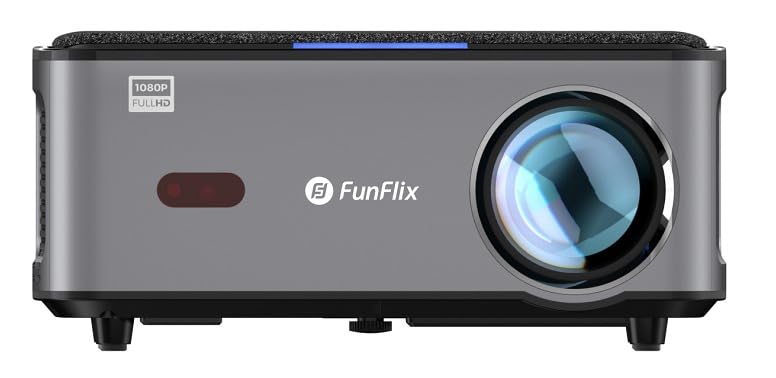
మూర్తి 1: ముందు view of the FunFlix P1 Projector, showing the main lens and ventilation grilles.

మూర్తి 2: Rear panel of the FunFlix P1 Projector, featuring the power input, RJ45 Ethernet port, IR receiver, two USB ports, AV input, and two HDMI inputs (HDMI1, HDMI2).

మూర్తి 3: టాప్ view of the FunFlix P1 Projector, displaying the integrated control panel with power, return, OK, and navigation buttons.

మూర్తి 4: దిగువన view of the FunFlix P1 Projector, showing the adjustable feet and mounting points for ceiling or wall installation.
సెటప్
1. ప్లేస్మెంట్
Position the projector on a flat, stable surface or mount it to the ceiling/wall. Ensure the lens is perpendicular to the projection surface for the best image quality. The projector supports a maximum image size of 300 inches and a throw distance between 1.5 and 10 meters.
2. పవర్ కనెక్షన్
Connect the power cable to the projector's power input port and then plug it into a power outlet.
3. ప్రారంభ పవర్ ఆన్
Press the power button on the projector or the remote control to turn on the device. The projector will perform automatic focus and keystone correction upon startup.
4. ఇమేజ్ సర్దుబాటు
- Automatic Focus & Keystone: The FunFlix P1 features automatic focus and keystone correction for quick setup.
- Manual Four-Corner Correction: For detailed adjustments, navigate to the settings menu to manually correct each corner of the image.
- జూమ్ ఫంక్షన్: Adjust the image size by up to 50% using the zoom function in the settings, without moving the projector.
5. నెట్వర్క్ కనెక్షన్ (వై-ఫై)
Navigate to the Wi-Fi settings in the Android interface. Select your 5GHz Wi-Fi network and enter the password to connect to the internet.
6. బ్లూటూత్ పెయిరింగ్
To connect external Bluetooth speakers or headphones, go to the Bluetooth settings. Enable Bluetooth, search for your device, and pair it.
ఆపరేటింగ్ సూచనలు
1. Android Smart Interface
The FunFlix P1 runs on an Android operating system, providing access to various applications. Navigate the interface using the remote control. You can download additional applications from the app store.
2. వైర్లెస్ స్క్రీన్ మిర్రరింగ్
The projector supports wireless screen mirroring (AirPlay and Miracast) from Android, iOS (Apple), and Windows devices. Select the appropriate mirroring function from the projector's menu and follow the on-screen instructions on your device.
3. USB మీడియా ప్లేబ్యాక్
Insert a USB flash drive or hard disk into one of the two USB ports. The projector supports 4K video playback and can display documents such as Word, Excel, PowerPoint, and PDF files directly from the USB storage.
4. HDMI Input Usage
Connect external devices like gaming consoles, satellite receivers, or media sticks to the HDMI1 or HDMI2 ports. Use the input source selection on the remote control to switch to the desired HDMI input.
5. ఆడియో అవుట్పుట్
The projector has a built-in 5W speaker. For enhanced audio, connect external speakers via Bluetooth 5.0 as described in the setup section.
6 మౌంటు ఐచ్ఛికాలు
The FunFlix P1 can be used on a tabletop or mounted to a ceiling or wall using compatible mounting brackets. The bottom of the projector includes mounting holes for this purpose.
నిర్వహణ
1. లెన్స్ శుభ్రపరచడం
Use a professional lens cleaning cloth or soft, lint-free cloth to gently wipe the projector lens. Avoid using abrasive cleaners or excessive force.
2. బాహ్య క్లీనింగ్
ప్రొజెక్టర్ యొక్క బాహ్య భాగాన్ని మృదువైన, పొడి వస్త్రంతో తుడవండి. మొండి ధూళి కోసం, కొద్దిగా damp వస్త్రాన్ని ఉపయోగించవచ్చు, తరువాత పొడి వస్త్రాన్ని ఉపయోగించవచ్చు.
3. HEPA Filter Maintenance
The projector is equipped with a removable and replaceable high-efficiency HEPA filter. Regularly check and clean the filter to maintain optimal performance and prevent dust buildup. Refer to the filter compartment for removal and replacement instructions.
4. ఎల్amp జీవితం
The LED light source has an estimated operating life of 50,000 hours, requiring minimal lamp భర్తీ.
ట్రబుల్షూటింగ్
| సమస్య | సాధ్యమైన కారణం | పరిష్కారం |
|---|---|---|
| శక్తి లేదు | పవర్ కేబుల్ కనెక్ట్ కాలేదు; పవర్ అవుట్లెట్ లోపభూయిష్టంగా ఉంది. | Ensure power cable is securely connected. Test the power outlet with another device. |
| చిత్రం లేదు లేదా అస్పష్టమైన చిత్రం | Lens cap on; focus not adjusted; keystone not corrected; incorrect input source. | Remove lens cap. Use automatic focus or adjust manually. Perform keystone correction. Select the correct input source (HDMI, USB). |
| శబ్దం లేదు | Volume too low; external audio device not connected or selected; internal speaker disabled. | Increase volume. Check Bluetooth connection for external speakers. Ensure internal speaker is enabled in settings. |
| Wi-Fi కనెక్షన్ సమస్యలు | Incorrect password; out of range; router issues; temporary software glitch. | Verify Wi-Fi password. Move projector closer to router. Restart router and projector. Check for system updates. |
| Certain apps (e.g., Netflix) not working or low quality | Outdated Android OS; app compatibility issues; DRM limitations (L3 license). | Ensure apps are updated. For optimal streaming quality on platforms like Netflix, Max, or Prime, consider connecting an external L1 licensed TV Box (e.g., Amazon Fire Stick) via HDMI. The projector's internal Android system may have L3 DRM limitations. |
| Fan noise is noticeable | Normal operation; ventilation blocked; dust buildup. | Some fan noise is normal for cooling. Ensure ventilation is not blocked. Clean the HEPA filter. |
స్పెసిఫికేషన్లు
| ఫీచర్ | వివరాలు |
|---|---|
| బ్రాండ్ | ఫన్ఫ్లిక్స్ |
| సిఫార్సు చేసిన ఉపయోగాలు | హోమ్ సినిమా |
| కీ ఫీచర్ | ఆటోమేటిక్ ఫోకస్ |
| కనెక్టివిటీ టెక్నాలజీ | ఈథర్నెట్, HDMI, USB, Wi-Fi |
| Display Resolution (Standard) | 1920 x 1080 (పూర్తి HD) |
| గరిష్ట డిస్ప్లే రిజల్యూషన్ | 3840 x 2160 (4K Supported) |
| ప్రదర్శన రకం | LED |
| ఫారమ్ ఫ్యాక్టర్ | పోర్టబుల్ |
| మౌంటు రకం | టేబుల్టాప్ మౌంట్, సీలింగ్ మౌంట్ |
| ప్రకాశం | 8000 ల్యూమెన్స్ (8000 ANSI ల్యూమెన్స్) |
| అనుకూల పరికరాలు | Smartphone, Laptop, Game Console, Tablet |
| గరిష్ట త్రో దూరం | 10.0 మీటర్లు |
| లైట్ సోర్స్ ఆపరేటింగ్ లైఫ్ | 50,000 గంటలు |
| గరిష్ట చిత్ర పరిమాణం | 300 అంగుళాలు |
| కాంతి మూలం వాట్tage | 150 వాట్స్ |
| హార్డ్వేర్ ఇంటర్ఫేస్ | HDMI, USB |
| కనిష్ట త్రో దూరం | 1.5 మీటర్లు |
| వీడియో ఎన్కోడింగ్ | H.265 |
| చేర్చబడిన భాగాలు | AV Cable, Power Cable, HDMI Cable, Projector Lens Cap, Remote Control |
| తయారీదారు | ఫన్ఫ్లిక్స్ |
వారంటీ సమాచారం
The FunFlix P1 Projector comes with a 2-year importer warranty. Please retain your proof of purchase for warranty claims. The warranty covers manufacturing defects under normal use conditions. It does not cover damage caused by misuse, accidents, unauthorized modifications, or improper maintenance.
కస్టమర్ మద్దతు
If you encounter any issues or have questions regarding your FunFlix P1 Projector that are not addressed in this manual, please contact your retailer or the FunFlix customer support team. Refer to your purchase documentation for specific contact details.