
JEYI PCIe 5.0 NVMe Heatsink
JEYI PCIe 5.0 M.2 NVMe Adapter Card with Aluminum Heatsink User Manual
Model: PCIe 5.0 NVMe Heatsink | Brand: JEYI
పరిచయం
This manual provides comprehensive instructions for the installation, operation, and maintenance of the JEYI PCIe 5.0 M.2 NVMe Adapter Card with Aluminum Heatsink. This adapter is designed to expand high-speed storage capabilities in desktop, workstation, and server PCs by utilizing PCIe 5.0 slots for M.2 NVMe SSDs.
భద్రతా సమాచారం
- ఇన్స్టాలేషన్కు ముందు మీ కంప్యూటర్ పవర్ ఆఫ్ చేయబడిందని మరియు అన్ప్లగ్ చేయబడిందని నిర్ధారించుకోండి.
- Discharge any static electricity from your body before handling components.
- Handle the adapter card and SSDs with care to avoid damage to sensitive electronic components.
- Refer to your motherboard's manual for specific PCIe slot information and compatibility.
ప్యాకేజీ విషయాలు
ప్యాకేజీలో అన్ని అంశాలు ఉన్నాయని నిర్ధారించుకోండి:
- JEYI PCIe 5.0 to M.2 NVMe Adapter Card
- ప్రామాణిక ఎత్తు బ్రాకెట్
- తక్కువ ప్రోfile బ్రాకెట్
- స్క్రూడ్రైవర్
- Thermal Pads (3 pieces)
- మౌంటు స్క్రూలు (8 ముక్కలు)
- Heatsink Securing Screw
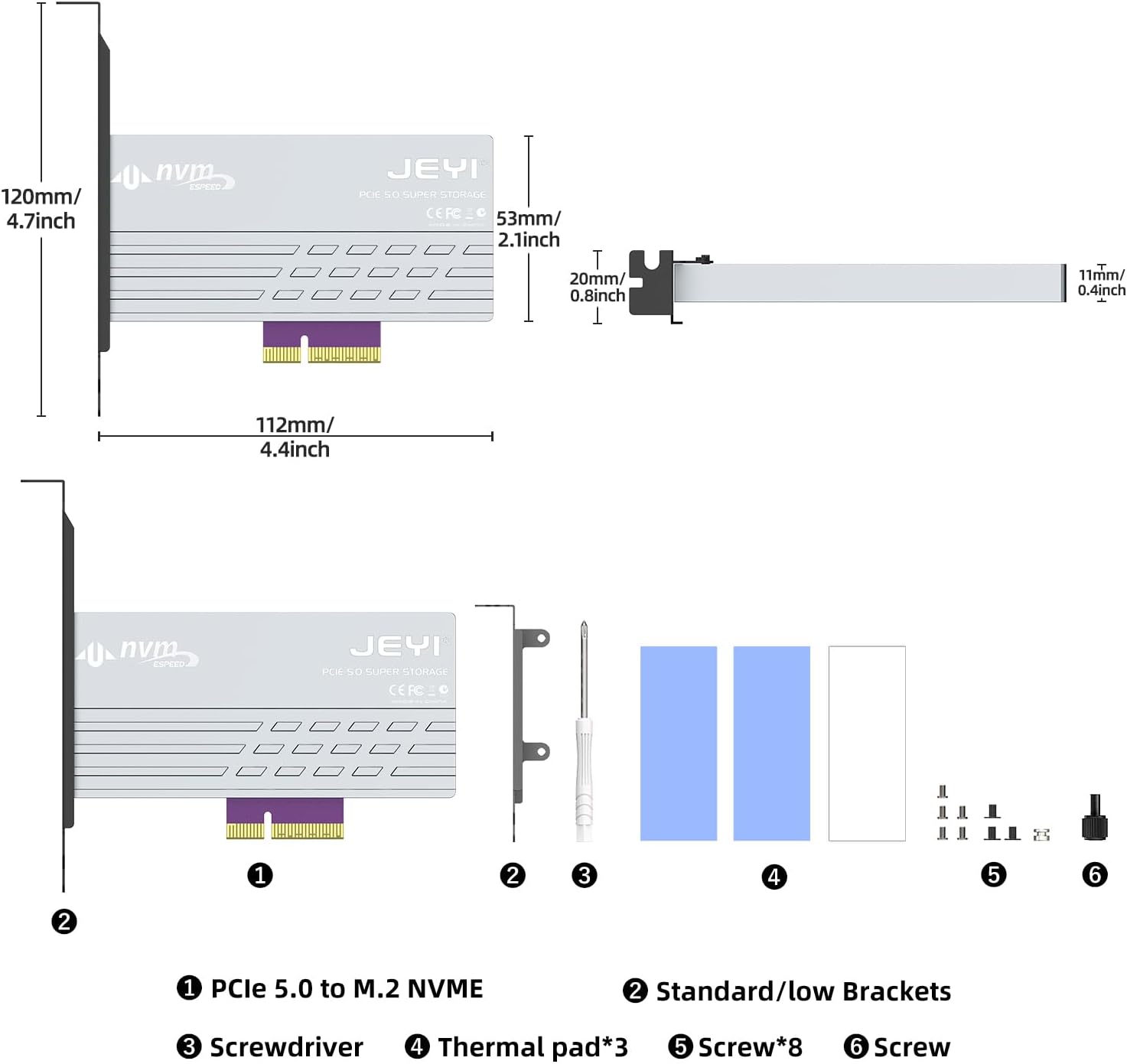
Image: Contents of the JEYI PCIe 5.0 M.2 NVMe Adapter Card package. It includes the adapter card, standard and low-profile brackets, a screwdriver, thermal pads, and various screws for installation.
సెటప్ మరియు ఇన్స్టాలేషన్
Follow these steps to install your M.2 NVMe SSD onto the adapter card and then install the card into your computer.
1. SSD Installation onto Adapter Card
- Remove Heatsink Screws: Locate and remove the screws securing the aluminum heatsink to the adapter card. Carefully detach the heatsink.
Video: This video demonstrates the unboxing and installation process for the JEYI PCIe 5.0 M.2 NVMe Adapter Card. It shows how to remove the heatsink, install an M.2 SSD, and secure the bracket.
- Insert M.2 NVMe SSD: Gently insert your M.2 NVMe SSD into the M.2 slot on the adapter card. Ensure it is fully seated.

Image: Step-by-step visual guide for installing the M.2 SSD onto the adapter card, including inserting the SSD and securing it with a screw.
- సురక్షితమైన SSD: Use the provided screw to secure the M.2 NVMe SSD in place on the adapter card.
- థర్మల్ ప్యాడ్లను వర్తించండి: Place the thermal pads onto the M.2 NVMe SSD, ensuring good contact with the SSD's chips.
- Reattach Heatsink: Carefully place the aluminum heatsink back onto the adapter card, aligning it with the screw holes. Secure it with the previously removed screws.
- బ్రాకెట్ను అటాచ్ చేయండి: Choose the appropriate bracket (standard or low-profile) for your PC case. Attach it to the adapter card using the provided screws.
2. Adapter Card Installation into PC
- పిసి పవర్ ఆఫ్ చేయండి: Shut down your computer completely and unplug the power cord.
- PC కేసును తెరవండి: మీ కంప్యూటర్ కేసు యొక్క సైడ్ ప్యానెల్ను తీసివేయండి.
- PCIe స్లాట్ను గుర్తించండి: Identify an available PCIe 5.0/4.0 x4, x8, or x16 slot on your motherboard.

Image: The JEYI PCIe 5.0 M.2 NVMe Adapter Card shown installed within a desktop computer's PCIe slot.
- Insert Adapter Card: Carefully align the adapter card with the chosen PCIe slot and press down firmly until it is securely seated.
- సురక్షిత బ్రాకెట్: Secure the adapter card's bracket to the PC case with the appropriate screw.
- PC కేస్ మూసివేయండి: Replace the side panel of your computer case and reconnect the power cord.
ఆపరేటింగ్ సూచనలు
The JEYI PCIe 5.0 M.2 NVMe Adapter Card is designed for plug-and-play functionality, requiring no additional drivers for most modern operating systems.
- మొదటి ఉపయోగం: Upon booting your computer, the operating system (Windows 10/11, Linux, macOS) should automatically detect the newly installed M.2 NVMe SSD.
- Disk Initialization: For a new SSD, you may need to initialize and format the drive through your operating system's Disk Management utility before it appears as usable storage. Refer to your OS documentation for specific steps.
- పనితీరు: To achieve maximum throughput (up to 128Gbps or 16GB/s), ensure your motherboard and CPU support PCIe 5.0, and the entire data path adheres to PCIe 5.0 specifications. The adapter is backward compatible with PCIe 4.0/3.0/2.0 slots, operating at the speed of the lowest common denominator.

Image: A visual representation comparing the bandwidth of PCIe 5.0 (10000+ MB/s) with PCIe 4.0 (6000+ MB/s), highlighting the ultra-high speed capability of Gen5.

Image: A screenshot of CrystalDiskMark benchmark results, illustrating read and write speeds exceeding 10000 MB/s, demonstrating the high performance of the adapter with a compatible SSD.
- బూట్ డ్రైవ్: The adapter card can support an M.2 NVMe SSD as a boot drive, provided your motherboard's BIOS/UEFI supports booting from PCIe NVMe devices. Consult your motherboard manual for details.
నిర్వహణ
The JEYI PCIe 5.0 M.2 NVMe Adapter Card is designed for minimal maintenance. However, periodic checks can ensure optimal performance and longevity.
- దుమ్ము తొలగింపు: Periodically open your PC case and use compressed air to gently remove any dust accumulation from the adapter card and heatsink. Dust can impede heat dissipation.
- Thermal Pad Integrity: If you notice unusual temperatures or performance degradation, inspect the thermal pads for wear or damage. Replace them if necessary.
- సురక్షిత కనెక్షన్లు: Ensure all screws and connections remain tight. Loose components can lead to intermittent issues.

Image: A diagram showing the effective multiple heatsink method, illustrating how the heavy-duty aluminum heatsink with thermal compound pads and airflow notches dissipates heat from the M.2 NVMe SSD.
ట్రబుల్షూటింగ్
| సమస్య | సాధ్యమైన కారణం | పరిష్కారం |
|---|---|---|
| SSD not detected by OS. |
|
|
| నెమ్మదిగా పనితీరు. |
|
|
| System instability/crashes. |
|
|
స్పెసిఫికేషన్లు
| ఫీచర్ | వివరాలు |
|---|---|
| మోడల్ సంఖ్య | PCIe 5.0 NVMe Heatsink |
| హార్డ్వేర్ ఇంటర్ఫేస్ | PCI Express 16 GB/s (PCIe 5.0 x4) |
| డేటా బదిలీ రేటు | Up to 128 Gigabits Per Second (16GB/s) |
| PCIe Slot Compatibility | PCIe 5.0/4.0 x4, x8, x16 (backward compatible) |
| M.2 SSD Support | 2280, 2260, 2242, 2230 M.2 NVMe SSDs (M Key) |
| హీట్సింక్ మెటీరియల్ | Aluminum with Thermal Pads |
| ఆపరేటింగ్ సిస్టమ్ అనుకూలత | Windows 10/11, Linux, macOS |
| ఉత్పత్తి కొలతలు | 4.72"L x 2.09"W x 4.41"H (approx. 120mm x 53mm x 112mm) |
| వస్తువు బరువు | 5.7 ఔన్సులు (0.16 కిలోగ్రాములు) |

Image: Detailed diagram illustrating the dimensions of the JEYI PCIe 5.0 M.2 NVMe Adapter Card and its included components, such as brackets, screwdriver, thermal pads, and screws.
వారంటీ మరియు మద్దతు
JEYI products are designed for reliability and performance. For warranty information and technical support, please refer to the official JEYI webసైట్ లేదా వారి కస్టమర్ సేవను నేరుగా సంప్రదించండి.
- రిటర్న్ పాలసీ: This product is eligible for a refund or replacement within 30 days of purchase.
- తయారీదారు: JEYI
- సంప్రదించండి: మరింత సహాయం కోసం, సందర్శించండి JEYI Store on Amazon లేదా మీ ఉత్పత్తి ప్యాకేజింగ్లో అందించిన సంప్రదింపు సమాచారాన్ని సంప్రదించండి.
Ask a question about this manual
Ask about setup, troubleshooting, compatibility, parts, safety, or missing instructions. Manuals+ will review the question and use this page’s manual context to help answer it.