
1. ఉత్పత్తి ముగిసిందిview
The Sodola 10Gbps 6-Port Web Managed Ethernet Switch (Model SL510S-4T2XS-JP) is designed for high-speed network environments. It features 4x10G RJ45 ports and 2x10G SFP+ ports, enabling advanced network connectivity for devices such as NAS, servers, and 4K streaming setups. This switch incorporates a robust metal casing with efficient fan cooling for reliable and stable operation.
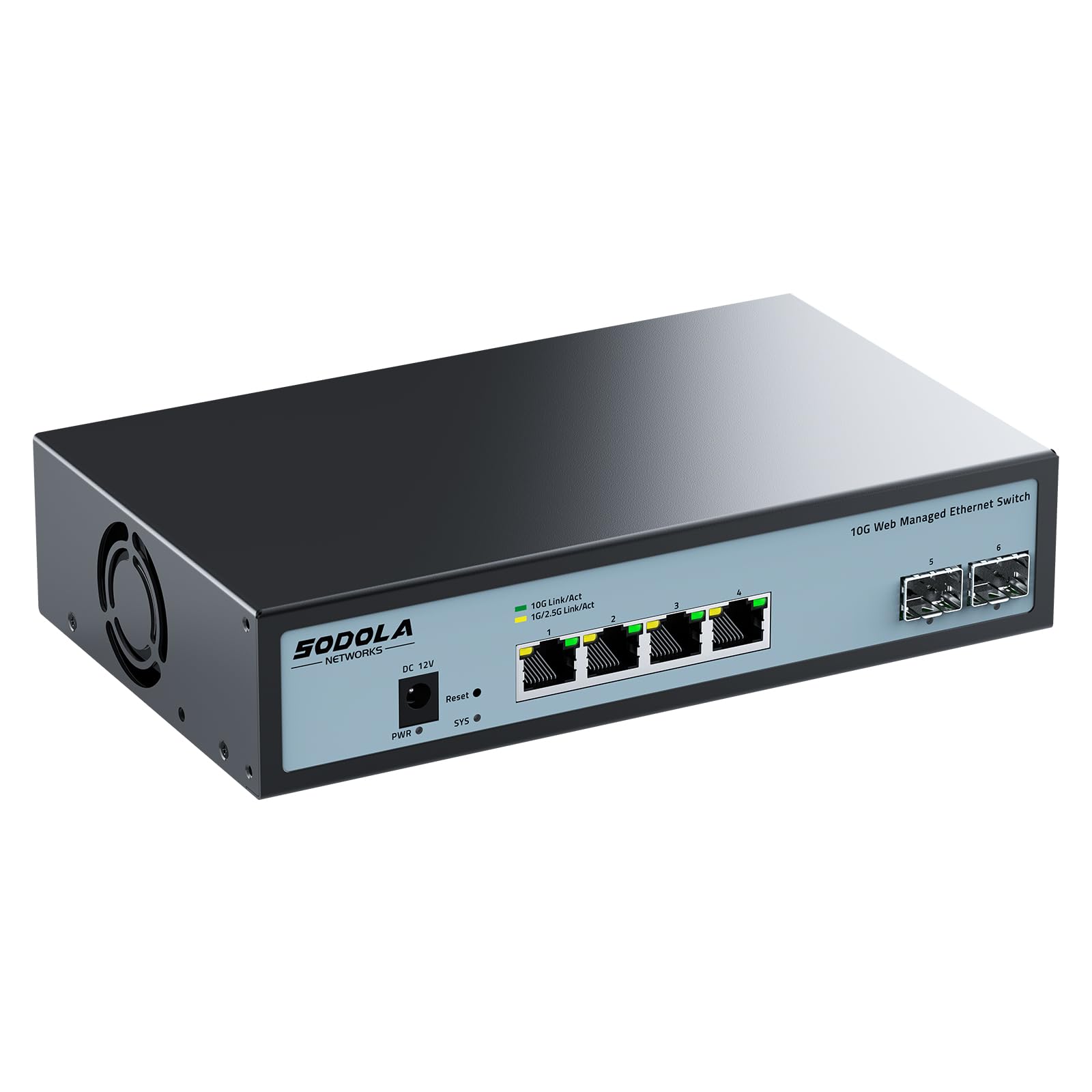
Figure 1: Sodola 10Gbps 6-Port Web Managed Ethernet Switch.
2 కీ ఫీచర్లు
- 10G High-Speed Connectivity: Equipped with Realtek RTL9303+RTL8264B chipset, this switch provides 10G high-speed network connections, suitable for high-load network environments like NAS, servers, and 4K streaming.
- Comprehensive Management Functions: Supports LACP (Link Aggregation), QoS, VLAN, IGMP, Port Mirroring, STP/RSTP, DHCP Snooping, SNMP, Flow Control, MAC Filtering, and Multicast. Note: Manually set the IPv4 address before logging in to the web ఇంటర్ఫేస్.
- రోబస్ట్ మెటల్ సిasing డిజైన్: The 10Gbps switch features a durable metal casing with additional heat dissipation holes on the sides and a built-in cooling fan to ensure device longevity and stable, reliable operation.
- మెరుగైన ఉష్ణ వెదజల్లడం: The internal fan provides reliable cooling even under full load. The fan can be removed if necessary (requires disassembling the casing) for noise-sensitive environments.
- మెరుపు రక్షణ: Designed with 4KV lightning protection to effectively prevent damage from sudden power surges.

Figure 2: High-speed performance and capacity of the Sodola 10Gbps switch, featuring 120Gbps switching capacity and 89.28Mpps packet forwarding rate.

మూర్తి 3: Web management interface illustrating comprehensive network management functions.
3. ప్యాకేజీ విషయాలు
Verify that all items listed below are included in your package. If any item is missing or damaged, please contact customer support.
- Sodola 10Gbps 6-Port Web Managed Ethernet Switch (Model SL510S-4T2XS-JP) x 1
- పవర్ అడాప్టర్ x 1
- రబ్బరు అడుగులు x 4
- ఉత్పత్తి మాన్యువల్ x 1
- Inspection Certificate x 1

చిత్రం 4: ఉత్పత్తి ప్యాకేజీలోని విషయాలు.
4. సెటప్ సూచనలు
4.1 భౌతిక సంస్థాపన
The switch supports both desktop placement and wall-mounting. Choose the installation method that best suits your environment.

Figure 5: Desktop and wall-mount installation options.
Ensure proper ventilation around the device, especially if operating under heavy load, to maintain optimal performance and prevent overheating.
4.2 స్విచ్ను కనెక్ట్ చేస్తోంది
Connect your network devices (NAS, PCs, routers, etc.) to the RJ45 or SFP+ ports on the switch using appropriate Ethernet cables or SFP+ transceivers.

చిత్రం 6: ముందు మరియు వెనుక ప్యానెల్ పైకిview with port labels and indicators.
- DC ఇన్పుట్: అందించిన పవర్ అడాప్టర్ను ఇక్కడ కనెక్ట్ చేయండి.
- రీసెట్ బటన్: పరికరాన్ని ఫ్యాక్టరీ డిఫాల్ట్లకు రీసెట్ చేయడానికి ఉపయోగించబడుతుంది.
- 4x10G RJ45 Ports: Connect standard Ethernet cables for 10Gbps, 1Gbps, or 2.5Gbps connections.
- 2x10G SFP+ Ports: Insert SFP+ modules for fiber optic or direct attach copper (DAC) connections.
- శక్తి సూచిక: పరికరం ఆన్ చేసినప్పుడు వెలుగుతుంది.
- సిస్టమ్ సూచిక: సిస్టమ్ స్థితిని సూచిస్తుంది.
- గ్రౌండింగ్ స్క్రూ: For grounding the device to protect against electrical surges.
- ఫ్యాన్ కూలింగ్: Integrated fan for heat dissipation.
4.3 ప్రారంభ Web నిర్వహణ యాక్సెస్
యాక్సెస్ చేయడానికి web management interface, follow these steps:
- క్లియర్ మీ web browser's cache to ensure a fresh connection.
- Adjust your PC's network settings. You may need to manually set your PC's IPv4 address to be in the same subnet as the switch (e.g., if the switch's default IP is 192.168.2.1, set your PC's IP to 192.168.2.X, where X is not 1, and subnet mask to 255.255.255.0).
- తెరవండి a web బ్రౌజర్లోకి వెళ్లి డిఫాల్ట్ IP చిరునామాకు నావిగేట్ చేయండి: http://192.168.2.1.
- Enter the default login credentials:
- వినియోగదారు పేరు: నిర్వాహకుడు
- పాస్వర్డ్: నిర్వాహకుడు

మూర్తి 7: Web management login method and IP address configuration example.
5. ఆపరేషన్
5.1 Configuring Port Settings
ది web management interface allows you to configure various settings for each port, including transmission speed.
- లోనికి లాగిన్ అవ్వండి web ఇంటర్ఫేస్.
- Navigate to the "Port Setting" section.
- Select the desired port and choose the appropriate speed (e.g., 10M, 100M, 1G, 2.5G, 5G, 10G) and duplex mode (Auto, Full, Half).
- Click "Apply" to save the changes.
- After applying settings, ensure you save the configuration and reboot the switch for changes to take effect.

Figure 8: Port speed configuration and saving settings.
5.2 Advanced Management Functions
ది web interface provides access to advanced features such as VLAN configuration, QoS settings, Link Aggregation (LACP), Port Mirroring, and SNMP for network monitoring and control. Refer to the detailed online help or the full product manual for specific instructions on configuring these advanced features.

చిత్రం 9: ఉదాample 10G LAN setup for home or office use.
6. నిర్వహణ
6.1 శీతలీకరణ వ్యవస్థ
The switch is equipped with an internal cooling fan to maintain optimal operating temperatures. Ensure that the ventilation holes are not obstructed to allow for proper airflow. Regularly check for dust accumulation and clean as needed to prevent overheating.

Figure 10: Integrated cooling fan for efficient heat dissipation.
6.2 మెరుపు రక్షణ
The device includes 4KV lightning protection. For enhanced safety, especially in areas prone to electrical storms, ensure the grounding screw is properly connected to an earth ground.

Figure 11: 4KV Lightning Protection feature.
7. ట్రబుల్షూటింగ్
- శక్తి లేదు: Ensure the power adapter is securely connected to both the switch and a working power outlet. Check the power indicator light on the switch.
- నెట్వర్క్ కనెక్షన్ లేదు:
- Verify that Ethernet cables are properly connected to both the switch and your devices.
- Check the link/activity LEDs on the ports. If they are off, try a different cable or port.
- Ensure your device's network adapter is enabled and configured correctly.
- యాక్సెస్ చేయలేరు Web నిర్వహణ ఇంటర్ఫేస్:
- Confirm your PC's IP address is in the same subnet as the switch (default 192.168.2.1).
- మీ బ్రౌజర్ కాష్ను క్లియర్ చేయడానికి లేదా వేరే బ్రౌజర్ను ఉపయోగించడానికి ప్రయత్నించండి.
- మీ నెట్వర్క్లో IP చిరునామా వైరుధ్యాలు లేవని నిర్ధారించుకోండి.
- If the default IP has been changed and forgotten, a factory reset may be necessary (refer to the reset button in Section 4.2).
- నెమ్మదించిన నెట్వర్క్ వేగం:
- Verify that all connected devices and cables support the desired speed (e.g., 10Gbps).
- Check port speed settings in the web management interface (Section 5.1).
- Ensure the switch is adequately cooled and not overheating.
- పరికరం పనిచేయకపోవడం: If the switch exhibits unusual behavior, try rebooting it. If the issue persists, perform a factory reset. If problems continue, contact customer support.
8. స్పెసిఫికేషన్లు
| ఫీచర్ | వివరాలు |
|---|---|
| బ్రాండ్ | Sodola |
| మోడల్ సంఖ్య | SL510S-4T2XS-JP |
| పోర్ట్ కాన్ఫిగరేషన్ | 4x10G RJ45, 2x10G SFP+ |
| Total Port Count | 6 |
| స్విచ్ రకం | Managed (Web-ఆధారిత) |
| డేటా బదిలీ రేటు | 10 Gigabits per second (per port) |
| ఇంటర్ఫేస్ | RJ45, SFP+ |
| అనుకూల పరికరాలు | NAS, Desktop, Laptop, Router |
| కేస్ మెటీరియల్ | మెటల్ |
| శీతలీకరణ | ఇంటిగ్రేటెడ్ ఫ్యాన్ |
| మెరుపు రక్షణ | 4KV |
| చేర్చబడిన భాగాలు | 10Gbps Switching Hub, Power Adapter, Rubber Feet, Product Manual, Inspection Certificate |
9. వారంటీ మరియు మద్దతు
This Sodola product comes with a 1 సంవత్సరాల వారంటీ from the date of purchase. The warranty covers defects in materials and workmanship under normal use.
For technical support, warranty claims, or any questions regarding the product, please contact Sodola customer service through the retailer where you purchased the product or visit the official Sodola webసంప్రదింపు సమాచారం కోసం సైట్.
దయచేసి వారంటీ సేవ కోసం మీ కొనుగోలు రుజువును ఉంచుకోండి.