
1. పరిచయం
This manual provides detailed instructions for the proper use and care of your Altec Lansing Nanophones ANC 2.0 Wireless Over-Ear Bluetooth Headphones. Please read this manual thoroughly before using the product to ensure optimal performance and longevity.

Image 1.1: Altec Lansing Nanophones ANC 2.0 in Silver.
2. ప్యాకేజీ విషయాలు
మీ ప్యాకేజీలో అన్ని అంశాలు ఉన్నాయని ధృవీకరించండి:
- Altec Lansing Nanophones ANC 2.0 Wireless Over-Ear Headphones
- USB-C ఛార్జింగ్ కేబుల్
- 3.5mm ఆడియో కేబుల్
- వినియోగదారు మాన్యువల్ (ఈ పత్రం)

Image 2.1: Included USB-C charging cable and 3.5mm audio cable.
3. ఉత్పత్తి ముగిసిందిview
హెడ్ఫోన్ భాగాలు మరియు నియంత్రణలతో మిమ్మల్ని మీరు పరిచయం చేసుకోండి.
3.1 Headphone Features
- యాక్టివ్ నాయిస్ క్యాన్సిలేషన్ (ANC): లీనమయ్యే శ్రవణ అనుభవం కోసం పరిసర శబ్దాన్ని తగ్గిస్తుంది.
- ఫోల్డబుల్ డిజైన్: కాంపాక్ట్ నిల్వ మరియు పోర్టబిలిటీని అనుమతిస్తుంది.
- Adjustable Headband & Soft Ear Cushions: Ensures a comfortable fit for extended wear.
- ఇంటిగ్రేటెడ్ మైక్రోఫోన్: హ్యాండ్స్-ఫ్రీ కాల్స్ మరియు వాయిస్ అసిస్టెంట్ ఆదేశాల కోసం.
- USB-C ఛార్జింగ్: For fast and convenient power replenishment.
- వాయిస్ అసిస్టెంట్ అనుకూలత: Access Siri or Google Voice with ease.

Image 3.1: Key features of the Nanophones ANC 2.0 headphones.
3.2 నియంత్రణలు మరియు పోర్ట్లు
Locate the following controls on your headphones:
- పవర్ బటన్: ఆన్/ఆఫ్, ప్లే/పాజ్, కాల్కు సమాధానం/ముగించు.
- వాల్యూమ్ పెంచు/తదుపరి ట్రాక్ బటన్: వాల్యూమ్ పెంచడానికి షార్ట్ ప్రెస్ చేయండి, తదుపరి ట్రాక్ కోసం లాంగ్ ప్రెస్ చేయండి.
- వాల్యూమ్ డౌన్/మునుపటి ట్రాక్ బటన్: వాల్యూమ్ తగ్గించడానికి షార్ట్ ప్రెస్ చేయండి, మునుపటి ట్రాక్ కోసం లాంగ్ ప్రెస్ చేయండి.
- ANC బటన్: Activates/Deactivates Active Noise Cancellation.
- USB-C ఛార్జింగ్ పోర్ట్: ఛార్జింగ్ కేబుల్ను కనెక్ట్ చేయడానికి.
- 3.5mm ఆడియో జాక్: వైర్డు కనెక్షన్ కోసం.
- LED సూచిక: పవర్, జత చేయడం మరియు ఛార్జింగ్ స్థితిని ప్రదర్శిస్తుంది.

చిత్రం 3.2: వైపు view illustrating the location of controls and ports.
4. సెటప్
4.1 హెడ్ఫోన్లను ఛార్జ్ చేయడం
- Connect the small end of the USB-C charging cable to the USB-C port on the headphones.
- Connect the large end of the USB-C charging cable to a USB power source (e.g., wall adapter, computer USB port).
- ఛార్జింగ్ చేస్తున్నప్పుడు LED సూచిక ఎరుపు రంగులో మెరుస్తుంది మరియు పూర్తిగా ఛార్జ్ అయినప్పుడు ఆపివేయబడుతుంది.
- పూర్తిగా ఛార్జ్ చేయడానికి సుమారు 2-3 గంటలు పడుతుంది.
గమనిక: Ensure the headphones are fully charged before first use for optimal battery life.
4.2 పవర్ చేయడం ఆన్/ఆఫ్
- పవర్ ఆన్ చేయడానికి: పవర్ బటన్ను 3 సెకన్ల పాటు నొక్కి పట్టుకోండి. LED సూచిక నీలం రంగులో మెరుస్తుంది.
- పవర్ ఆఫ్ చేయడానికి: పవర్ బటన్ను 3 సెకన్ల పాటు నొక్కి పట్టుకోండి. LED సూచిక ఆపివేయబడుతుంది.
4.3 బ్లూటూత్ జత చేయడం
- హెడ్ఫోన్లు పవర్ ఆఫ్లో ఉన్నాయని నిర్ధారించుకోండి.
- LED సూచిక ఎరుపు మరియు నీలం రంగుల్లో ప్రత్యామ్నాయంగా మెరిసే వరకు పవర్ బటన్ను 5-7 సెకన్ల పాటు నొక్కి పట్టుకోండి. ఇది జత చేసే మోడ్ను సూచిస్తుంది.
- మీ పరికరంలో (స్మార్ట్ఫోన్, టాబ్లెట్, కంప్యూటర్), బ్లూటూత్ను ప్రారంభించి, అందుబాటులో ఉన్న పరికరాల కోసం శోధించండి.
- Select "Nanophones ANC 2.0" from the list of devices.
- జత చేసిన తర్వాత, LED సూచిక నెమ్మదిగా నీలం రంగులో మెరుస్తుంది.
- పాస్వర్డ్ అడిగితే, "0000" ఎంటర్ చేయండి.
గమనిక: హెడ్ఫోన్లు పవర్ ఆన్ చేసినప్పుడు చివరిగా జత చేసిన పరికరానికి స్వయంచాలకంగా తిరిగి కనెక్ట్ అవ్వడానికి ప్రయత్నిస్తాయి.
5. ఆపరేటింగ్ సూచనలు
5.1 మ్యూజిక్ ప్లేబ్యాక్
- ప్లే/పాజ్: పవర్ బటన్ను షార్ట్ ప్రెస్ చేయండి.
- ధ్వని పెంచు: వాల్యూమ్ అప్ బటన్ను చిన్నగా నొక్కండి.
- వాల్యూమ్ డౌన్: వాల్యూమ్ డౌన్ బటన్ను చిన్నగా నొక్కండి.
- తదుపరి ట్రాక్: వాల్యూమ్ అప్ బటన్ను ఎక్కువసేపు నొక్కండి.
- మునుపటి ట్రాక్: వాల్యూమ్ డౌన్ బటన్ను ఎక్కువసేపు నొక్కండి.
5.2 ఫోన్ కాల్స్
- సమాధానం/ముగింపు కాల్: పవర్ బటన్ను షార్ట్ ప్రెస్ చేయండి.
- కాల్ని తిరస్కరించండి: పవర్ బటన్ను ఎక్కువసేపు నొక్కండి.
- చివరి నంబర్ని మళ్లీ డయల్ చేయండి: పవర్ బటన్ను రెండుసార్లు నొక్కండి.
5.3 యాక్టివ్ నాయిస్ క్యాన్సిలేషన్ (ANC)
- ANCని సక్రియం చేయండి: Press the ANC Button. The ANC LED indicator will light up.
- ANCని నిష్క్రియం చేయండి: Press the ANC Button again. The ANC LED indicator will turn off.
గమనిక: Using ANC will reduce battery life. The headphones provide up to 20 hours of playtime with ANC active, and up to 30 hours without ANC.
5.4 వాయిస్ అసిస్టెంట్
- వాయిస్ అసిస్టెంట్ను సక్రియం చేయండి: Triple-press the Power Button to activate Siri or Google Voice (depending on your connected device).
- You can then issue commands through the headphone's microphone.
5.5 వైర్డు కనెక్షన్
- Insert one end of the 3.5mm audio cable into the headphone's audio jack.
- Insert the other end into your audio device's 3.5mm output.
- బ్యాటరీ అయిపోయినప్పటికీ హెడ్ఫోన్లను వైర్డు మోడ్లో ఉపయోగించవచ్చు.
6. నిర్వహణ
6.1 శుభ్రపరచడం
- హెడ్ఫోన్లను మృదువైన, పొడి వస్త్రంతో తుడవండి.
- రాపిడి క్లీనర్లు, ఆల్కహాల్ లేదా రసాయన ద్రావకాలను ఉపయోగించవద్దు.
- ఏదైనా రంధ్రాలలోకి తేమ రాకుండా చూసుకోండి.
6.2 నిల్వ
- హెడ్ఫోన్లను తీవ్రమైన ఉష్ణోగ్రతలకు దూరంగా చల్లని, పొడి ప్రదేశంలో నిల్వ చేయండి.
- When not in use, fold the headphones to protect them and save space.
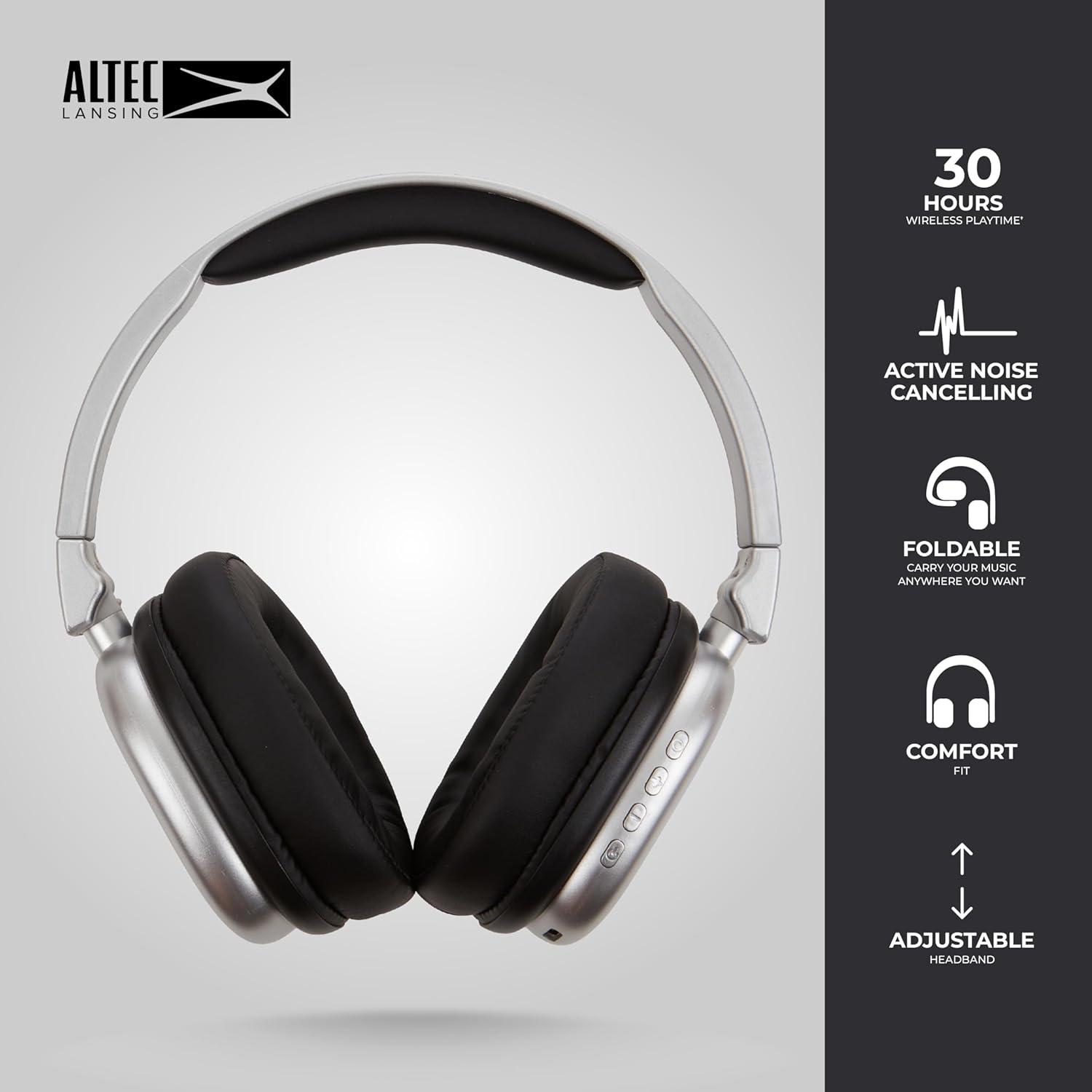
Image 6.1: The foldable design aids in compact storage.
7. ట్రబుల్షూటింగ్
| సమస్య | పరిష్కారం |
|---|---|
| హెడ్ఫోన్లు పవర్ ఆన్ చేయవు. | హెడ్ఫోన్లు ఛార్జ్ అయ్యాయని నిర్ధారించుకోండి. USB-C కేబుల్ ఉపయోగించి పవర్ సోర్స్కి కనెక్ట్ చేయండి. |
| బ్లూటూత్ ద్వారా జత చేయడం సాధ్యం కాదు. |
|
| శబ్దం లేదు లేదా తక్కువ వాల్యూమ్ ఉంది. |
|
| యాక్టివ్ నాయిస్ క్యాన్సిలేషన్ పనిచేయడం లేదు. | Ensure the ANC button has been pressed and the ANC LED indicator is lit. |
8. స్పెసిఫికేషన్లు
| మోడల్ పేరు | Nanophones ANC 2.0 |
| మోడల్ సంఖ్య | MZX5501-MSIL-STK-6 |
| బ్రాండ్ | ఆల్టెక్ లాన్సింగ్ |
| కనెక్టివిటీ | Wireless (Bluetooth 4.1), Wired (3.5mm) |
| చెవి ప్లేస్మెంట్ | ఓవర్-ఇయర్ |
| నాయిస్ కంట్రోల్ | యాక్టివ్ నాయిస్ రద్దు |
| బ్యాటరీ లైఫ్ | Up to 30 hours (wireless), Up to 20 hours (with ANC) |
| ఛార్జింగ్ పోర్ట్ | USB-C |
| ఆడియో డ్రైవర్ రకం | Dynamic Driver (1.5" Neodymium) |
| ఫ్రీక్వెన్సీ రేంజ్ | 20Hz - 20,000Hz |
| బరువు | 7.05 ఔన్సులు |
| మెటీరియల్ | ప్లాస్టిక్ |
9. వారంటీ మరియు మద్దతు
9.1 తయారీదారు వారంటీ
This product is covered by a manufacturer's warranty. Please refer to the warranty card included in your package or visit the official Altec Lansing webవివరణాత్మక వారంటీ నిబంధనలు మరియు షరతుల కోసం సైట్.
9.2 కస్టమర్ మద్దతు
For technical assistance, troubleshooting, or product inquiries, please contact Altec Lansing customer support through their official webసైట్ లేదా మీ ఉత్పత్తి ప్యాకేజింగ్లో అందించిన సంప్రదింపు సమాచారం.
Webసైట్: www.alteclansing.com