
cistern water level monitor
Generic Wireless Ultrasonic Water Level Monitor Instruction Manual
మోడల్: cistern water level monitor
1. ఉత్పత్తి ముగిసిందిview
The Generic Wireless Ultrasonic Water Level Monitor is designed for comprehensive monitoring and automatic control of liquid levels in various containers such as tanks and cisterns. This device provides real-time data on liquid depth, indoor temperature, and tank temperature, ensuring you are always informed about your water system's status. It features solar charging capabilities for the transmitter and offers flexible installation options.

Image: Wireless Ultrasonic Water Level Monitor with its display unit and sensor.
ముఖ్య లక్షణాలు:
- సమగ్ర పర్యవేక్షణ: Tracks minimum and maximum liquid levels, supports high/low level, and empty tank alarms.
- ఉష్ణోగ్రత ప్రదర్శన: Integrates indoor temperature and tank temperature measurements.
- సోలార్ ఛార్జింగ్: Transmitter features a solar panel for power supply and rechargeable battery charging (NiMH batteries recommended).
- బహుముఖ సంస్థాపన: Receiver can stand on a desk or be wall-mounted.
- Ultrasonic Level Gauge: Utilizes ultrasonic technology for accurate liquid level measurement.
2. సెటప్ సూచనలు
2.1 అన్బాక్సింగ్ మరియు భాగాలు
సెటప్తో కొనసాగడానికి ముందు, అన్ని భాగాలు ఉన్నాయని నిర్ధారించుకోండి:
- Wireless Ultrasonic Transmitter (with solar panel)
- Receiver Display Unit
- మౌంటు స్క్రూలు
- Type-C Power Cord (for receiver, optional)
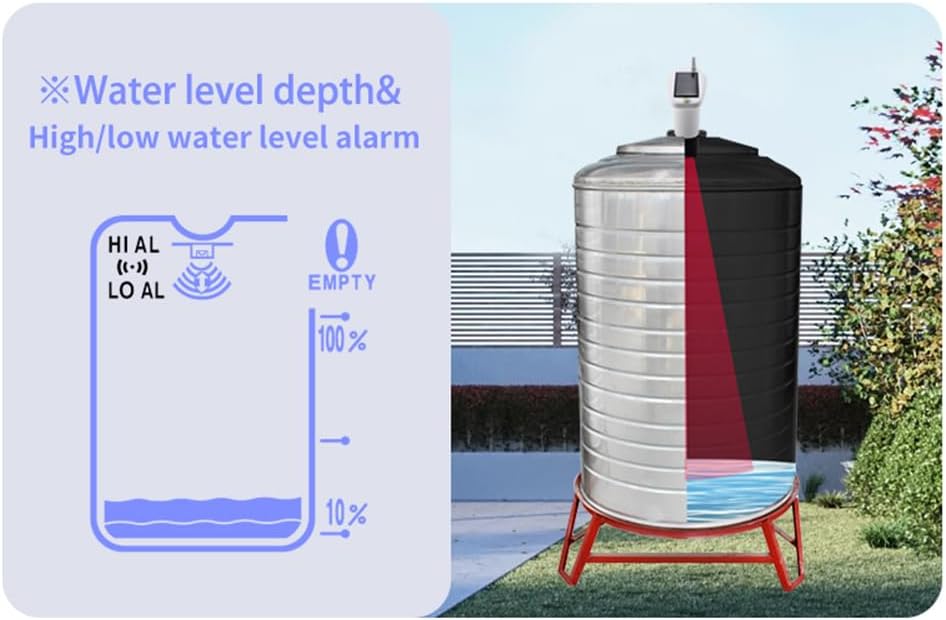
Image: The wireless ultrasonic transmitter and the receiver display unit.
2.2 పరికరాలకు శక్తినివ్వడం
- రిసీవర్: Insert 3 AAA batteries into the battery compartment on the back of the receiver, or connect it using a Type-C power cord.
- ట్రాన్స్మిటర్: The transmitter is powered by 6 rechargeable AAA nickel-metal hydride batteries (included). Remove the insulating tabs from the battery compartment before first use. The solar panel will charge these batteries.
చిత్రం: వెనుక view of the receiver showing the battery compartment.
2.3 ట్రాన్స్మిటర్ ఇన్స్టాలేషన్
The transmitter needs to be mounted in the center of the top of the tank. Ensure the solar panels are facing the sun for optimal charging.

Image: Close-up of the transmitter unit with its solar charging panel.
2.4 Initial Settings (Before Use)
- Set Tank Height: Use the '+' and '-' buttons on the receiver to set the height of your water tank. The range is 0.5 to 5 meters.
- Set Air Gap: Press the 'SET' button to set the air gap value. This is the distance from the sensor bottom to the highest water surface. The setting range is 0.5 to 5 meters.

Image: Visual representation of water level depth and alarm settings.
2.5 యాప్ కనెక్షన్ (ఐచ్ఛికం)
For enhanced monitoring and alerts, you can connect the sensor to a mobile application:
- డౌన్లోడ్ చేయండి "Tuya Smart" or "స్మార్ట్ లైఫ్" app from your mobile app store.
- Ensure Bluetooth is enabled on your mobile phone and connect to the same Wi-Fi network as the sensor.
- Open the app and click "Add Device". The app will search for the ultrasonic sensor.
- If connection fails, short press the button on the sensor twice and try adding it again.
- Enter your Wi-Fi password and click "Next" to complete the connection. A blue LED on the sensor indicates successful connection.
- In the app, you can set data according to your tank's actual situation and create scenes for alarms.
Video: Instructions for connecting the liquid level sensor to the Tuya Smart or Smart Life app for remote monitoring and alarm setup.
3. ఆపరేటింగ్ సూచనలు
3.1 Display Unit Functions

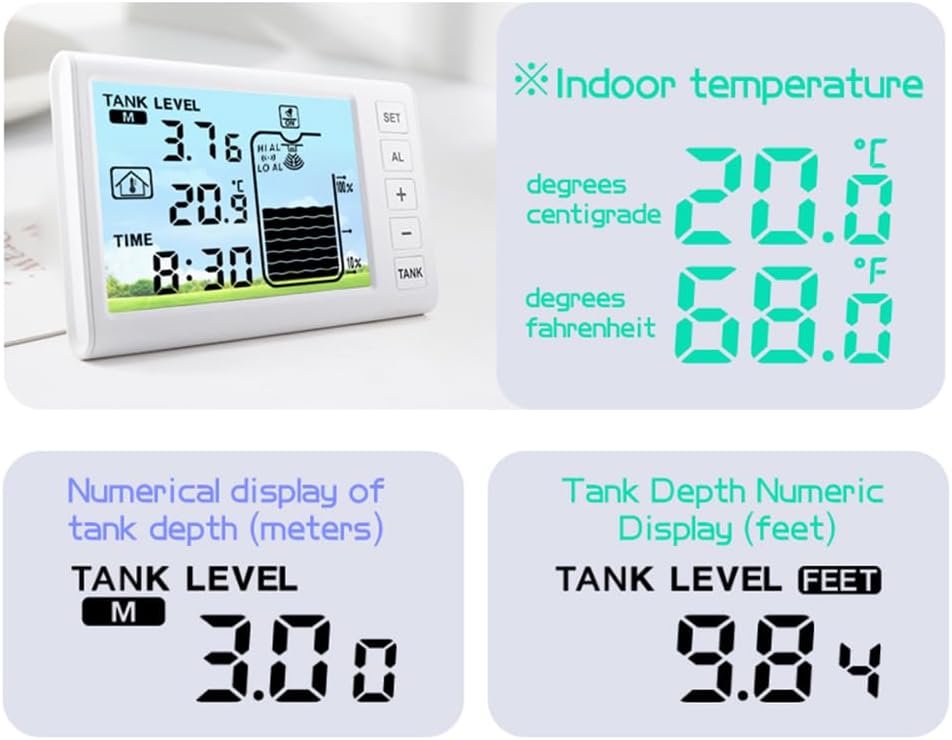
Image: The receiver display unit showing tank level, temperatures, and time.
- Tank Level: Displays current liquid depth.
- ఇండోర్ ఉష్ణోగ్రత: Shows the ambient temperature around the receiver.
- ట్యాంక్ ఉష్ణోగ్రత: Shows the temperature of the liquid in the tank.
- సమయం: ప్రస్తుత సమయ ప్రదర్శన.
- అలారాలు: Indicators for high/low water level and empty tank.
3.2 సమయం మరియు అలారాలను సెట్ చేయడం
- సమయాన్ని సెట్ చేయండి: In normal mode, press and hold the "SET" button to enter time setting. Use '+' and '-' to adjust values. Press "SET" again to switch between 12/24 hour display, hour, and minutes.
- Set the Alarm Clock: In normal mode, briefly press the "AL" key to switch to the alarm clock display interface. Press and hold "SET" to set the alarm hour, then press "SET" again for minutes. Press "SET" again to turn the alarm clock on or off.
- Set Water Level Alarms:
- Maximum Water Level Alarm: Press the "SET" key to set the maximum water level alarm value as a percentage of the maximum water depth (range: 60% to 100%).
- Minimum Water Level Alarm: Press the "SET" key to set the minimum water level alarm value as a percentage of the lowest water depth (range: 10% to 40%).
- Turn Buzzer On/Off: In normal mode, press and hold the "AL" key for 3 seconds to toggle the buzzer on or off.
3.3 ఇతర విధులు
- Receive Signal: In normal mode, press and hold the "TANK" key to re-accept the transmitter signal.
- Light the Screen: In normal mode, press and hold the "+" button for 3 seconds. After hearing a "BI" sound, the backlight will turn on or off.
- Choose Temperature C/F Display: In normal mode, press the "-" button briefly to switch between Celsius (°C) and Fahrenheit (°F) temperature units.
Video: Demonstrates basic setup and operation of the water level monitor, including setting time, alarms, and unit display.
4. నిర్వహణ
- సోలార్ ప్యానెల్: Regularly clean the solar panel on the transmitter to ensure efficient charging of the internal NiMH batteries.
- Receiver Batteries: Replace the 3 AAA batteries in the receiver unit as needed.
- సెన్సార్ ప్రాంతం: Periodically check the ultrasonic sensor on the transmitter for any debris or obstructions that might interfere with accurate readings.
5. ట్రబుల్షూటింగ్
- Connection Failure/Device Not Found (App): If the app fails to connect or find the device, short press the button on the sensor twice and attempt to add it again. Ensure your phone is on the same Wi-Fi network and Bluetooth is enabled.
- No Signal from Transmitter: Press and hold the "TANK" key on the receiver to re-accept the transmitter signal. Ensure the transmitter is within effective range (up to 30 meters, 100 meters in open areas) and has sufficient power.
- అలారం వినిపించడం లేదు: Check the alarm clock settings and ensure the buzzer is turned on (press and hold "AL" for 3 seconds).
- సరికాని రీడింగ్లు: Verify that the tank height and air gap settings are correctly configured on the receiver. Ensure the sensor is free from obstructions and properly mounted in the center of the tank.
6. స్పెసిఫికేషన్లు
| ఫీచర్ | వివరాలు |
|---|---|
| బ్రాండ్ | సాధారణమైనది |
| మోడల్ సంఖ్య | cistern water level monitor |
| రంగు | తెలుపు |
| పవర్ సోర్స్ (ట్రాన్స్మిటర్) | Solar Powered (NiMH rechargeable batteries) |
| పవర్ సోర్స్ (రిసీవర్) | 3 x AAA batteries or Type-C power cord |
| సెన్సార్ టెక్నాలజీ | అల్ట్రాసోనిక్ సెన్సార్ |
| Maximum Range (Sensor) | 5 మీటర్లు |
| వైర్లెస్ ట్రాన్స్మిషన్ దూరం | Open distance: 100 meters, Effective distance: 30 meters |
| Transmitter Waterproof Rating | IP65 |
| రిసీవర్ కొలతలు (L x W x H) | 16.7L x 10.9W x 2.6H సెంటీమీటర్లు |
| ట్రాన్స్మిటర్ పరిమాణం | 167 * 109 * 68మి.మీ |
| నియంత్రణ పద్ధతి | టచ్ |
| మౌంటు రకం | Wall Mount (for receiver) |
| ఇండోర్ ఉష్ణోగ్రత పరిధి | 0°C ~ 50°C (32°F ~ 122°F) |
| Water Tank Temperature Range | -40°C ~ 60°C (-40°F ~ 140°F) |
| అనుకూల పరికరాలు | Smartphone, Tablet (for app functionality) |
7. వారంటీ మరియు మద్దతు
Specific warranty information for this product is not available in the provided data. Please refer to the product packaging or contact the retailer for details regarding warranty coverage and customer support.
Ask a question about this manual
Ask about setup, troubleshooting, compatibility, parts, safety, or missing instructions. Manuals+ will review the question and use this page’s manual context to help answer it.