
TABWEE T80
TABWEE T80 10-inch Android Tablet User Manual
మోడల్: T80
1. పరిచయం
Thank you for choosing the TABWEE T80 10-inch Android Tablet. This manual provides essential information for setting up, operating, and maintaining your device. Please read it thoroughly before use to ensure optimal performance and safety.
The TABWEE T80 is a versatile Wi-Fi tablet featuring the latest Android 15 operating system with integrated AI capabilities. It boasts a vibrant 10.5-inch Incell IPS display, ample storage with 12GB RAM and 64GB ROM (expandable up to 2TB), and a long-lasting 6000mAh battery. With GMS certification, dual-band Wi-Fi, Bluetooth 5.0, and GPS, it is designed for both productivity and entertainment.
2. భద్రతా సమాచారం
- పరికరాన్ని తీవ్రమైన ఉష్ణోగ్రతలు, ప్రత్యక్ష సూర్యకాంతి లేదా అధిక తేమకు గురిచేయవద్దు.
- టాబ్లెట్ను పడవేయడం లేదా బలమైన ప్రభావాలకు గురిచేయడం మానుకోండి.
- అందించిన ఛార్జర్ మరియు ఉపకరణాలను మాత్రమే ఉపయోగించండి.
- పరికరాన్ని విడదీయడానికి లేదా మరమ్మతు చేయడానికి ప్రయత్నించవద్దు. సహాయం కోసం కస్టమర్ సపోర్ట్ని సంప్రదించండి.
- Keep the tablet away from children and pets to prevent damage or injury.
3. ప్యాకేజీ విషయాలు
దయచేసి ఈ క్రింది అంశాల కోసం ప్యాకేజీని తనిఖీ చేయండి:
- TABWEE T80 Tablet
- AC అడాప్టర్
- USB టైప్-సి కేబుల్
- వినియోగదారు మాన్యువల్
4. ఉత్పత్తి ముగిసిందిview
Familiarize yourself with the components of your TABWEE T80 tablet.

చిత్రం 4.1: ముందు మరియు వెనుక view of the TABWEE T80 tablet, highlighting its sleek design and rear camera module.
భౌతిక భాగాలు:
- 10.5-inch Incell IPS Display: High-definition screen for vivid visuals.
- ముందు కెమెరా (2MP): Located on the top bezel for video calls and selfies.
- వెనుక కెమెరా (5MP): Located on the back for capturing photos and videos.
- పవర్ బటన్: On the side, used to turn the tablet on/off or wake/sleep the screen.
- వాల్యూమ్ బటన్లు: On the side, to adjust audio volume.
- USB టైప్-సి పోర్ట్: ఛార్జింగ్ మరియు డేటా బదిలీ కోసం.
- 3.5mm హెడ్ఫోన్ జాక్: For connecting wired headphones or external speakers.
- మైక్రో SD కార్డ్ స్లాట్: For storage expansion up to 2TB.
- ద్వంద్వ స్పీకర్లు: Located on the bottom edge for enhanced audio experience.
5. సెటప్
5.1 ప్రారంభ ఛార్జింగ్
Before first use, fully charge your tablet. Connect the USB Type-C cable to the tablet's charging port and the AC adapter to a power outlet. The battery indicator on the screen will show charging status.
5.2 పవర్ ఆన్/ఆఫ్
- పవర్ ఆన్ చేయడానికి: Press and hold the Power button until the TABWEE logo appears.
- పవర్ ఆఫ్ చేయడానికి: పవర్ ఆప్షన్స్ మెను కనిపించే వరకు పవర్ బటన్ను నొక్కి పట్టుకోండి, ఆపై "పవర్ ఆఫ్" ఎంచుకోండి.
- నిద్రించడానికి/మేల్కొలపడానికి: పవర్ బటన్ని క్లుప్తంగా నొక్కండి.
5.3 Wi-Fi కనెక్షన్
ఇంటర్నెట్కి కనెక్ట్ చేయడానికి:
- వెళ్ళండి సెట్టింగ్లు > నెట్వర్క్ & ఇంటర్నెట్ > Wi-Fi.
- Turn on Wi-Fi. The tablet will scan for available networks.
- జాబితా నుండి మీకు కావలసిన నెట్వర్క్ను ఎంచుకోండి.
- ప్రాంప్ట్ చేయబడితే పాస్వర్డ్ను నమోదు చేయండి, ఆపై నొక్కండి కనెక్ట్ చేయండి.
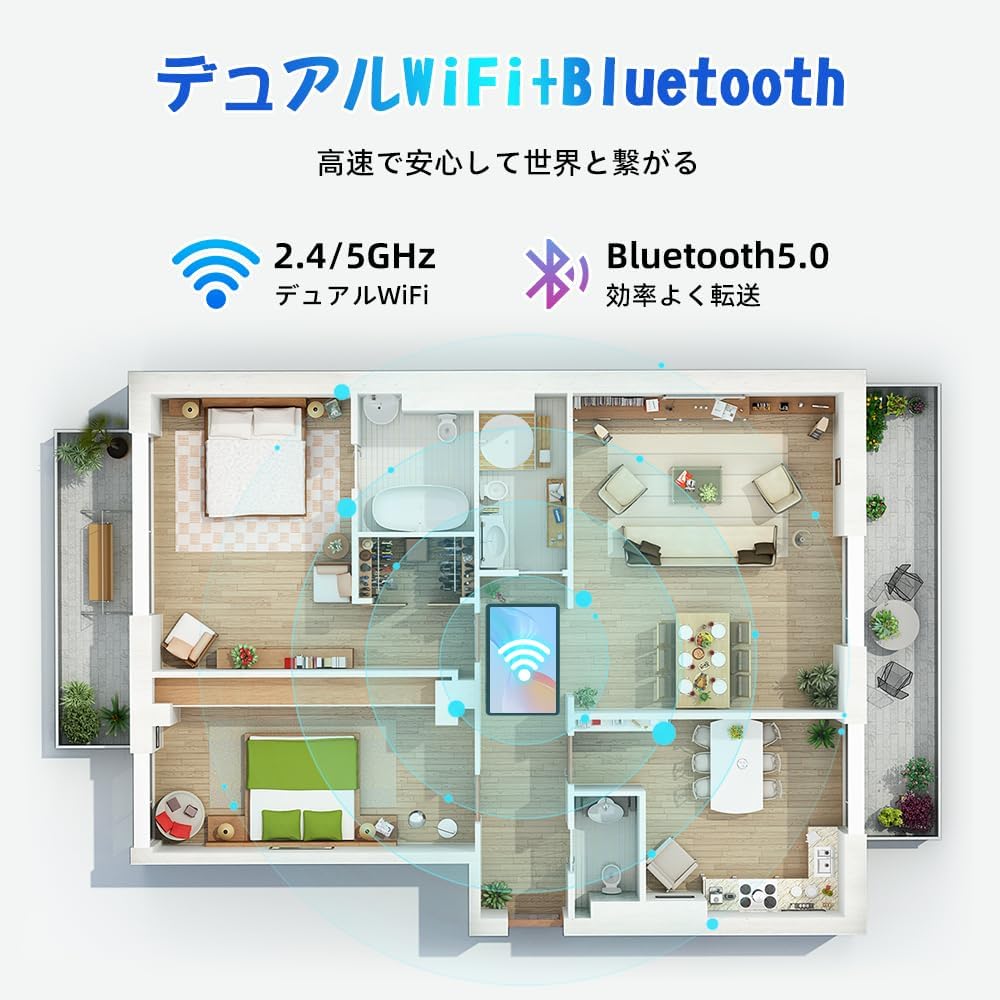
Figure 5.1: Diagram illustrating the tablet's dual-band 2.4G/5G Wi-Fi and Bluetooth 5.0 connectivity, ensuring fast and reliable connections throughout your home or office.
5.4 Google ఖాతా సెటప్
As a GMS certified device, you can access Google Play Store and other Google services. During initial setup, you will be prompted to sign in with your Google account or create a new one. This is essential for downloading apps and syncing data.
5.5 మైక్రో SD కార్డ్ ఇన్స్టాలేషన్
To expand storage up to 2TB:
- టాబ్లెట్ వైపున మైక్రో SD కార్డ్ స్లాట్ను గుర్తించండి.
- Insert the MicroSD card into the slot with the gold contacts facing down until it clicks into place.
- You may be prompted to format the card for use with the tablet.

Figure 5.2: Visual representation of the tablet's 12GB RAM and 64GB ROM, with support for up to 2TB MicroSD card expansion, allowing for vast storage of photos, videos, and music.
6. ఆపరేటింగ్ సూచనలు
6.1 ఆండ్రాయిడ్ 15 ఫీచర్లు
Your tablet runs on Android 15, offering an intuitive and enhanced user experience with improved security, customization, and AI capabilities.

చిత్రం 6.1: పైగాview of Android 15 features, including enhanced security and privacy, expanded customization options, improved AI functions, and new gesture controls for a smoother operation.
6.2 డిస్ప్లే మరియు Viewమోడ్లు
The 10.5-inch Incell IPS display provides vibrant colors and wide viewing angles. Optimize your viewing experience and reduce eye strain with various display modes:

Figure 6.2: The 10.5-inch Incell IPS display offers a 1280x800 resolution and a 16:10 aspect ratio for a wide and efficient viewing అనుభవం.

Figure 6.3: The tablet supports 1080P Full HD content, providing an immersive visual experience for movies and dramas from platforms like YouTube, Prime Video, Hulu, and HBO.

చిత్రం 6.4: విజువల్ ఎక్స్amples of different screen modes: Night mode for reduced blue light, Dark mode for eye comfort in low light, and Reader mode for a black-and-white paper-like display.
- రాత్రి మోడ్: Reduces blue light emissions for comfortable viewing in low light conditions. Access via Quick Settings or Display settings.
- డార్క్ మోడ్: Changes the system UI and supported apps to a dark theme, reducing eye strain and saving battery on OLED screens. Access via Display settings.
- రీడర్ మోడ్: Optimizes the display for reading, often by converting to grayscale and adjusting contrast. Access via Display settings or specific reading apps.
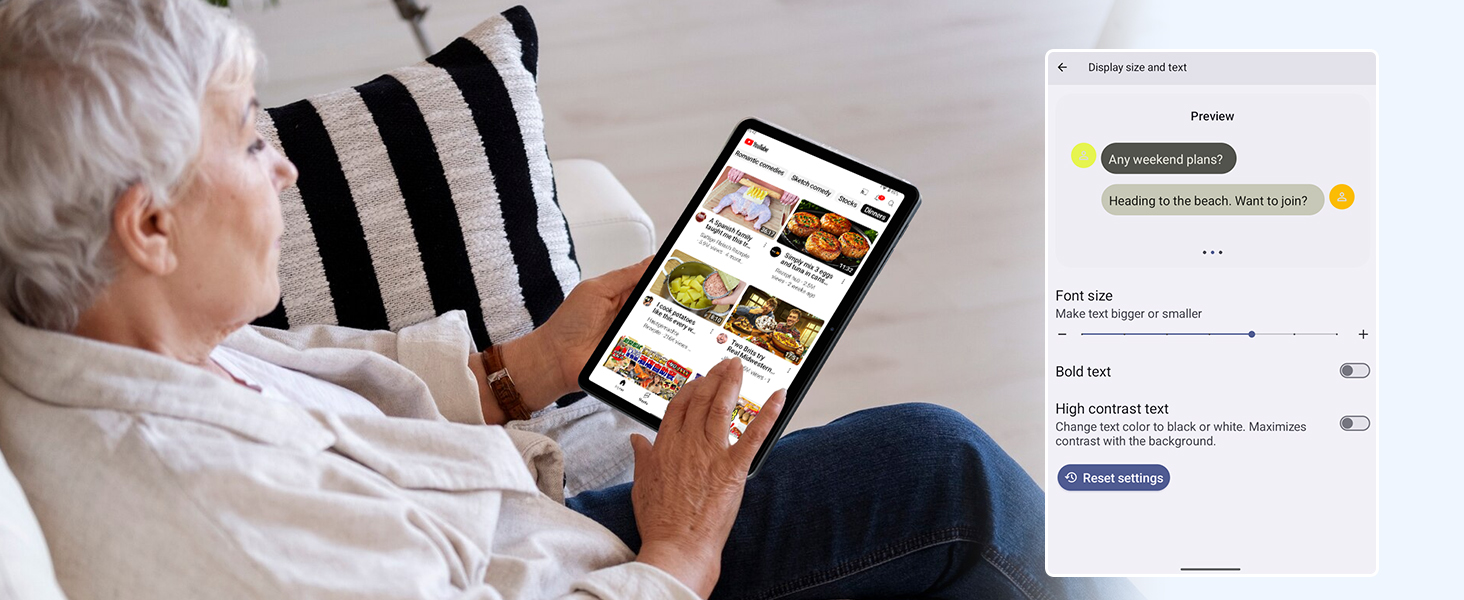
Figure 6.5: Screenshot showing display settings for adjusting text size and bold text, allowing users to customize readability.
6.3 పనితీరు
The TABWEE T80 is powered by a Unisoc T310 processor, ensuring smooth operation for daily tasks and multimedia consumption.
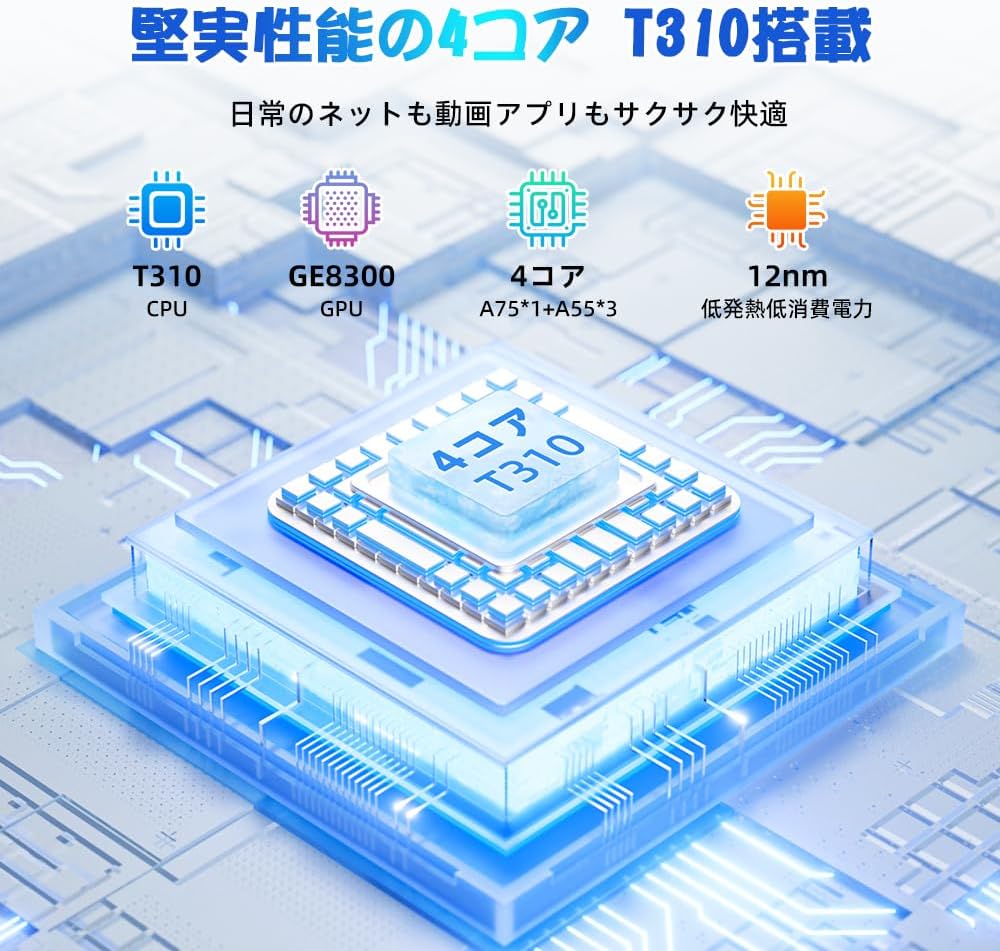
Figure 6.6: Diagram illustrating the T310 quad-core CPU architecture, featuring A75 and A55 cores, designed for efficient performance and low power consumption.

Figure 6.7: Comparison showing the Unisoc T310 processor's improved speed (up to 2.0 GHz) and lower power consumption compared to previous generation products.
6.4 మల్టీ టాస్కింగ్ మరియు స్ప్లిట్ స్క్రీన్
For enhanced productivity, the tablet supports split-screen mode, allowing you to run two applications side-by-side.

Figure 6.8: Demonstration of the split-screen feature, allowing users to comfortably multitask by viewing two applications simultaneously, such as reading an e-book while checking messages.
- To activate split screen: Open an app, then swipe up slightly from the bottom and hold to reveal recent apps. Drag one app to the top or bottom of the screen, then select another app for the remaining space.
6.5 AI Features (Gemini AI)
Leverage the power of Gemini AI for enhanced productivity and convenience.

Figure 6.9: Visuals demonstrating Gemini AI 2.0 capabilities, including AI text-to-image generation, AI voice response, AI smart control, AI real-time conversation, and AI full-screen smart assistance.
Gemini AI can assist with real-time translation, smart text suggestions, and optimizing performance based on your usage habits. Explore AI-enhanced multi-tasking for learning, office work, and entertainment.
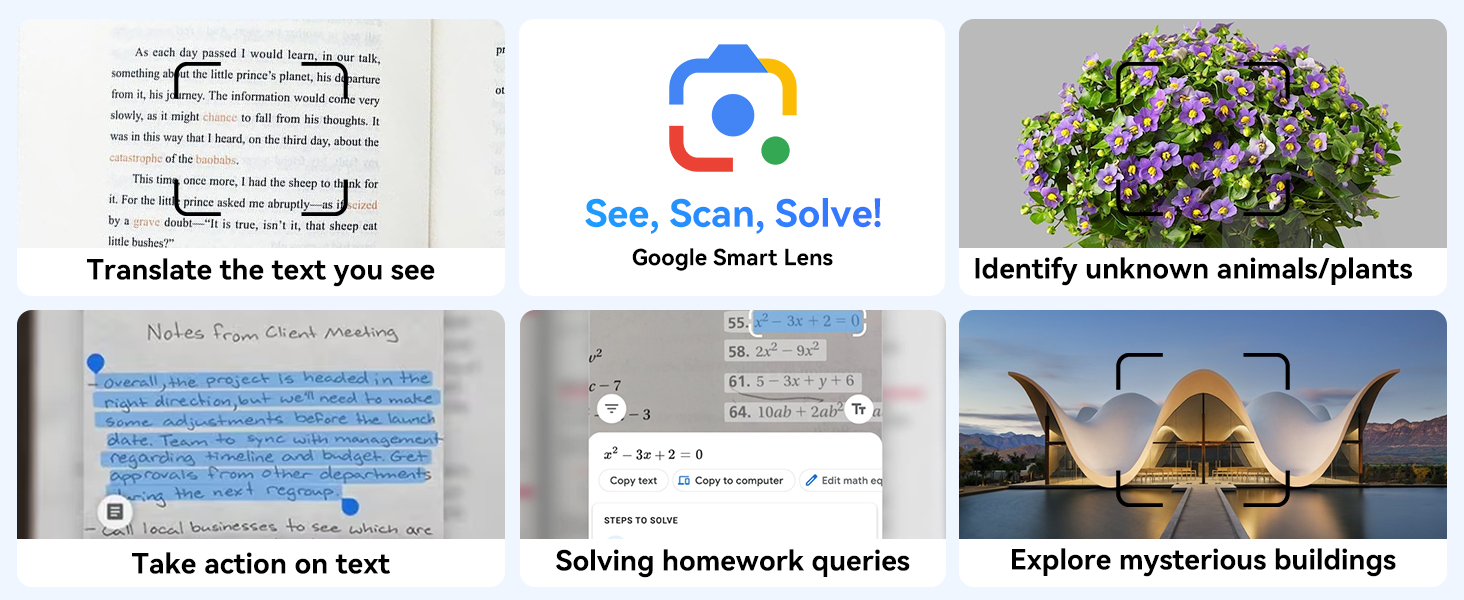
చిత్రం 6.10: ఉదాamples of Google Smart Lens functions: translating text, identifying unknown objects/plants, taking action on text, solving homework queries, and exploring mysterious buildings.
6.6 Parental Controls (Kids Mode)
The tablet includes parental control features to ensure a safe environment for children.

Figure 6.11: Icons representing parental control features: usage time limits, break time settings, app usage restrictions, and content restrictions, all designed to protect children.
You can set time limits, restrict app access, and filter content. Navigate to సెట్టింగ్లు > డిజిటల్ శ్రేయస్సు & తల్లిదండ్రుల నియంత్రణలు to configure these features.
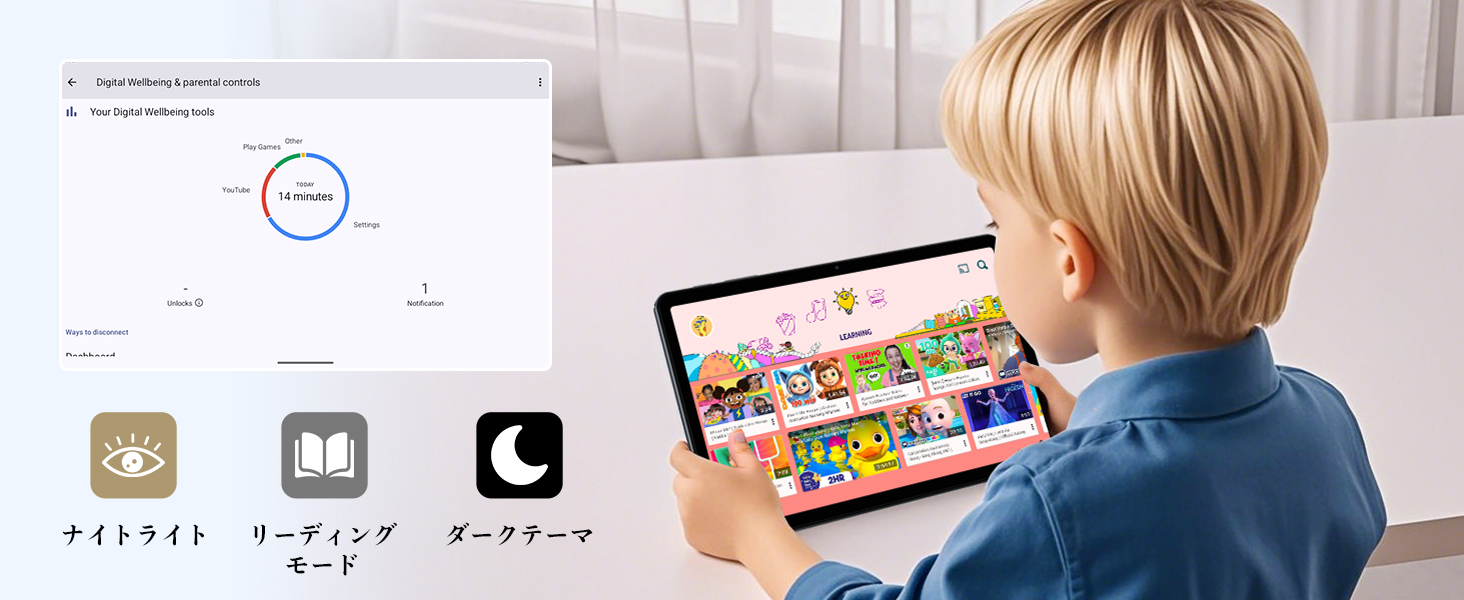
Figure 6.12: Screenshot of the Digital Wellbeing and parental controls interface, showing usage statistics and options for managing screen time and app access for children.
6.7 వైర్లెస్ ప్రొజెక్షన్
Mirror your tablet's screen to a compatible TV or monitor wirelessly.
- Ensure your TV/monitor supports wireless display (e.g., Miracast, Chromecast built-in).
- మీ టాబ్లెట్లో, ఇక్కడికి వెళ్లండి సెట్టింగ్లు > కనెక్ట్ చేయబడిన పరికరాలు > కనెక్షన్ ప్రాధాన్యతలు > తారాగణం.
- Select your display device from the list to begin mirroring.
6.8 కెమెరా వినియోగం
The tablet is equipped with a 2MP front camera and a 5MP rear camera.

Figure 6.13: Illustration of the tablet's 2-megapixel front camera and 5-megapixel rear camera, capable of autofocus for clear photos and video calls.
Open the Camera app to take photos or record videos. Tap the shutter button to capture an image or the record button to start/stop video recording. You can switch between front and rear cameras using the camera switch icon.
6.9 ఆడియో
The tablet features dual speakers for an immersive audio experience and a 3.5mm headphone jack for private listening.

Figure 6.14: Diagram showing the location of the two powerful speakers on the TABWEE T80, providing a deep and immersive audio experience.
Adjust volume using the physical volume buttons on the side of the tablet or through the on-screen volume slider.
6.10 GPS నావిగేషన్
The integrated GPS system allows for accurate location tracking and navigation. Use pre-installed map applications or download your preferred navigation app from the Google Play Store.
7. నిర్వహణ
7.1 శుభ్రపరచడం
Use a soft, lint-free cloth to clean the screen and body of the tablet. Do not use abrasive cleaners or solvents, as they may damage the surface.
7.2 సాఫ్ట్వేర్ నవీకరణలు
Regularly check for system updates to ensure your tablet has the latest features and security patches. Go to సెట్టింగ్లు > వ్యవస్థ > సిస్టమ్ నవీకరణ.
7.3 బ్యాటరీ సంరక్షణ
బ్యాటరీ జీవితాన్ని పొడిగించడానికి:
- బ్యాటరీని తరచుగా పూర్తిగా డిశ్చార్జ్ చేయడాన్ని నివారించండి.
- టాబ్లెట్ నిండిన తర్వాత ఎక్కువసేపు ఛార్జింగ్లో ఉంచవద్దు.
- Store the tablet in a cool, dry place when not in use for long periods.

Figure 7.1: Battery life estimates for the 6000mAh battery: 5 hours of web browsing, 4 hours of video playback, 4 hours of gaming, 21 hours of music, and 648 hours of standby time, supported by AI power-saving algorithms.
8. ట్రబుల్షూటింగ్
| సమస్య | సాధ్యమైన కారణం | పరిష్కారం |
|---|---|---|
| టాబ్లెట్ ఆన్ అవ్వదు. | బ్యాటరీ తక్కువగా ఉంది; సిస్టమ్ క్రాష్ అయింది. | టాబ్లెట్ను కనీసం 30 నిమిషాలు ఛార్జ్ చేయండి. రీస్టార్ట్ చేయమని బలవంతం చేయడానికి పవర్ బటన్ను 10-15 సెకన్ల పాటు నొక్కి ఉంచండి. |
| Wi-Fiకి కనెక్ట్ చేయడం సాధ్యపడదు. | Incorrect password; router issue; out of range. | Verify Wi-Fi password. Restart your router. Move closer to the Wi-Fi router. |
| యాప్లు నెమ్మదిగా లేదా క్రాష్ అవుతున్నాయి. | చాలా యాప్లు రన్ అవుతున్నాయి; తక్కువ నిల్వ. | Close background apps. Clear app cache. Free up storage space. |
| స్క్రీన్ స్పందించడం లేదు. | తాత్కాలిక సాఫ్ట్వేర్ లోపం. | Force restart the tablet by holding the Power button. |
9. స్పెసిఫికేషన్లు
| ఫీచర్ | వివరాలు |
|---|---|
| బ్రాండ్ | TABWEE |
| మోడల్ పేరు | T80 Tablet Tabwee |
| ఆపరేటింగ్ సిస్టమ్ | ఆండ్రాయిడ్ 15 (GMS సర్టిఫైడ్) |
| ప్రదర్శన పరిమాణం | 10.5 inches Incell IPS |
| డిస్ప్లే రిజల్యూషన్ | 1280x800 పిక్సెల్స్ |
| CPU బ్రాండ్ | యూనిసోక్ |
| CPU వేగం | 2 GHz |
| GPU బ్రాండ్ | ARM మాలి- G57 |
| RAM | 12GB (4GB+8GB expansion) |
| అంతర్గత నిల్వ | 64GB |
| విస్తరించదగిన నిల్వ | మైక్రో SD కార్డ్ ద్వారా 2TB వరకు |
| బ్యాటరీ కెపాసిటీ | 6000mAh లిథియం-అయాన్ పాలిమర్ |
| ఫ్రంట్ కెమెరా | 2 ఎంపీ |
| వెనుక కెమెరా | 5 ఎంపీ |
| కనెక్టివిటీ | 2.4G/5G Wi-Fi (802.11ac), Bluetooth 5.0, GPS |
| ఓడరేవులు | USB Type-C, 3.5mm Headphone Jack |
| కొలతలు | 32.79 x 19.9 x 4.1 సెం.మీ |
| బరువు | 910 గ్రా |
10. వారంటీ మరియు మద్దతు
Your TABWEE T80 tablet comes with a 2-సంవత్సరం తయారీదారు వారంటీ.
If you encounter any issues with your product, please contact us via email. We strive to respond promptly to ensure your satisfaction.
మద్దతును ఎలా సంప్రదించాలి:
- Through your Amazon account: Go to ఆర్డర్ చరిత్ర > Select the relevant order > Click విక్రేతను సంప్రదించండి.
- Through the product page: On the product page, click on the seller's name (TABWEE Official Store) below the "Add to Cart" button, then click "Ask a question" on the top right.
Support hours: 9:00 AM - 6:00 PM (excluding holidays). We will reply as soon as possible.

Figure 10.1: Image representing customer support availability for assistance.
Ask a question about this manual
Ask about setup, troubleshooting, compatibility, parts, safety, or missing instructions. Manuals+ will review the question and use this page’s manual context to help answer it.