
1. పరిచయం
This manual provides detailed instructions for the installation, operation, and maintenance of your WINFREE Smart Lock Model 02T. This smart lock is designed for sliding doors and windows, offering multiple entry methods for enhanced security and convenience. Please read this manual thoroughly before installation and use to ensure proper function and safety.
2. ఉత్పత్తి లక్షణాలు
- 5-in-1 Entry Methods: Unlock using Fingerprint, Password, RFID Card, Mechanical Key, or the Tuya/Smart Life App.
- పునర్వినియోగపరచదగిన బ్యాటరీ: Equipped with a long-lasting rechargeable lithium-ion battery.
- తీవ్ర ఉష్ణోగ్రత నిరోధకత: Operates reliably in temperatures ranging from -20℃ to 60℃.
- Tuya/Smart Life App Integration: Remote control, temporary password generation, and access history tracking via smartphone app.
- సులభమైన సంస్థాపన: Designed for straightforward setup on compatible sliding doors and windows.
- మెరుగైన భద్రత: Advanced locking mechanisms and multiple authentication options.
- Semi-automatic Operation: Requires manual push/pull of the plunger simultaneously with electronic unlock for secure engagement.
3. ప్యాకేజీ విషయాలు
ఇన్స్టాలేషన్ ప్రారంభించే ముందు అన్ని భాగాలు ప్యాకేజీలో ఉన్నాయని నిర్ధారించుకోండి.

Image: WINFREE Smart Lock 02T package contents, showing the main lock unit, mechanical keys, RFID cards, and various installation accessories.
- WINFREE Smart Lock Unit (Front and Rear Panels)
- మెకానికల్ కీలు
- RFID కార్డ్లు
- Installation Screws and Hardware
- పునర్వినియోగపరచదగిన లిథియం-అయాన్ బ్యాటరీ
- వినియోగదారు మాన్యువల్
4. స్పెసిఫికేషన్లు
| ఫీచర్ | స్పెసిఫికేషన్ |
|---|---|
| బ్రాండ్ | విన్ఫ్రీ |
| మోడల్ పేరు | 02T |
| లాక్ రకం | బయోమెట్రిక్, కాంబినేషన్ లాక్, డెడ్బోల్ట్ |
| మెటీరియల్ | అల్యూమినియం |
| కొలతలు (L x W x H) | 9.63 x 1.73 x 1.38 అంగుళాలు |
| వస్తువు బరువు | 1.55 పౌండ్లు |
| కనెక్టివిటీ ప్రోటోకాల్ | Bluetooth (for App control) |
| శక్తి మూలం | 1 లిథియం అయాన్ బ్యాటరీ (చేర్చబడింది) |
| ఆపరేటింగ్ ఉష్ణోగ్రత | -20℃ నుండి 60℃ |
| సిఫార్సు ఉపయోగం | Sliding Doors and Windows in Home and Office |

Image: Detailed technical drawing illustrating the precise dimensions of the WINFREE Smart Lock 02T unit.
5. ఇన్స్టాలేషన్ గైడ్
Proper installation is crucial for the optimal performance and security of your smart lock. Ensure your door meets the specified thickness requirements.
5.1 Door Thickness Compatibility
The WINFREE Smart Lock 02T is compatible with various door thicknesses. Different accessories are provided to accommodate these variations. Please refer to the diagram below to select the correct accessories for your door.
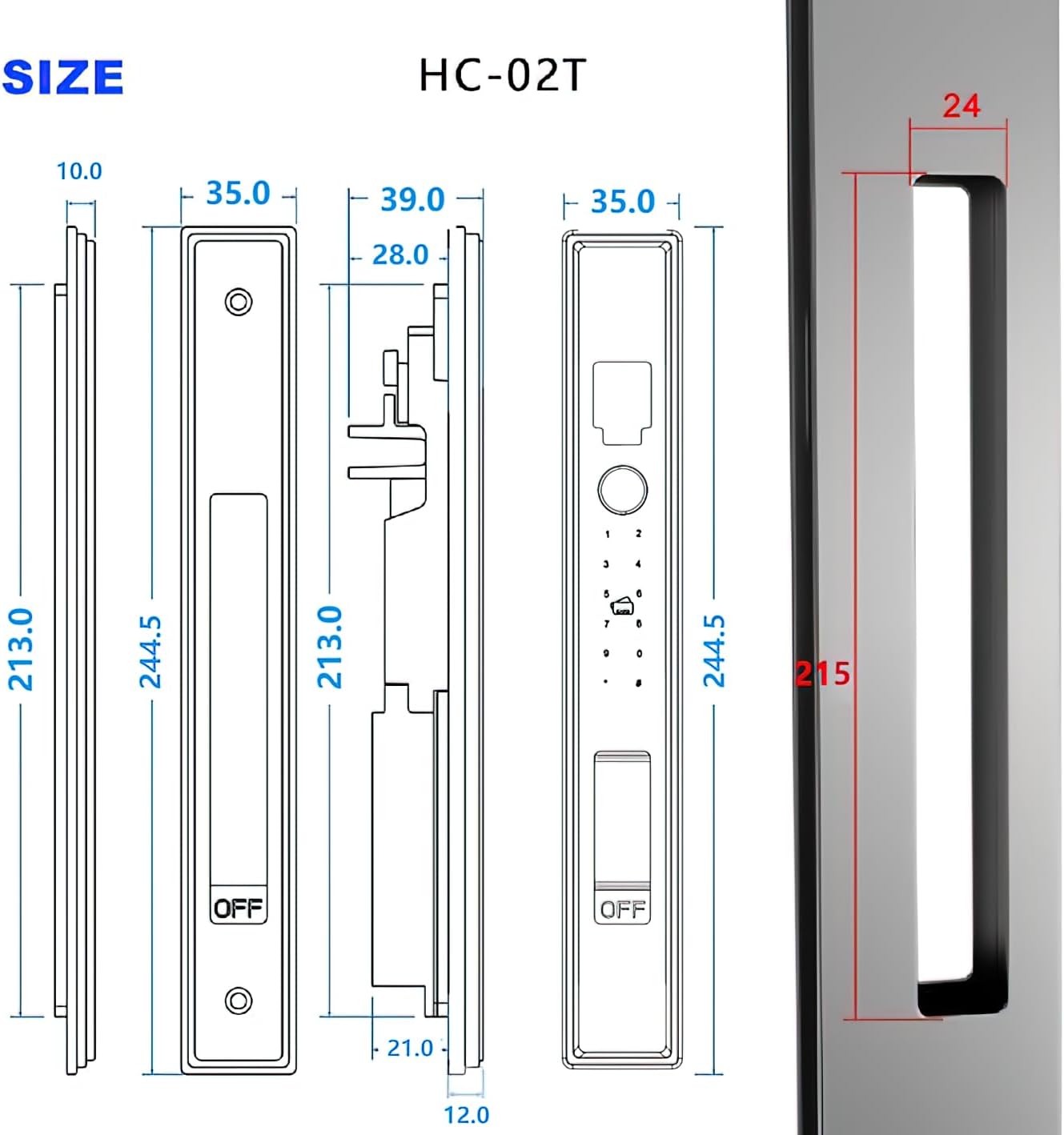
Image: Diagram illustrating the different latch accessories and their corresponding applicable door thicknesses for installation.

Image: Visual guide for determining the correct door thickness for smart lock installation.

Image: Technical drawing detailing the lock body dimensions and the necessary door hole size for proper installation.
5.2 సాధారణ సంస్థాపనా దశలు
- తలుపును సిద్ధం చేయండి: Ensure the door frame and the door itself are clean and free of obstructions. Verify that the door thickness and existing holes (if any) match the lock's requirements.
- Install the Mortise/Latch: Insert the mortise or latch mechanism into the door edge. Secure it with screws.
- ముందు ప్యానెల్ను ఇన్స్టాల్ చేయండి: Route the cable through the door and attach the front panel, ensuring it aligns correctly with the mortise.
- Install the Rear Panel: Connect the cable from the front panel to the rear panel. Secure the rear panel to the door using the provided screws.
- బ్యాటరీని చొప్పించండి: Open the battery compartment on the rear panel and insert the rechargeable lithium-ion battery.
- పరీక్ష కార్యాచరణ: After installation, test all unlocking methods (key, fingerprint, password, card, app) to ensure the lock operates smoothly.

Image: Step-by-step guide for installing the smart lock accessories.
6. ఆపరేటింగ్ సూచనలు
The WINFREE Smart Lock 02T offers multiple ways to unlock your door. Remember that this is a semi-automatic lock, requiring a manual push or pull of the plunger simultaneously with the electronic unlock action.
6.1 ఫింగర్ప్రింట్ అన్లాక్
Register your fingerprints through the Tuya/Smart Life app or directly on the lock. To unlock, place your registered finger on the fingerprint sensor. The lock will verify your fingerprint and unlock. Simultaneously, push or pull the plunger to open the door.
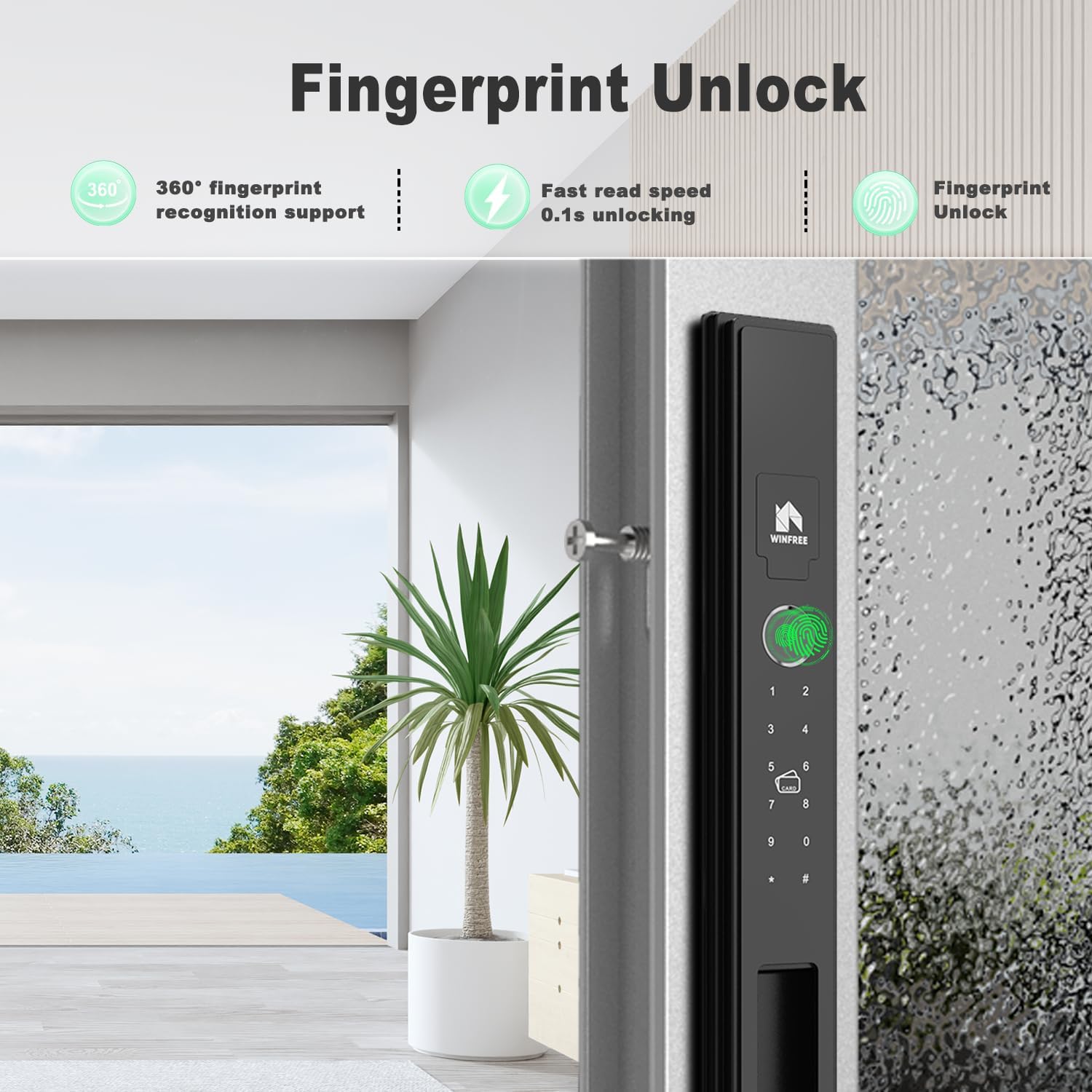
Image: A hand placing a finger on the biometric sensor of the WINFREE Smart Lock for fingerprint recognition.

Image: Visual representation of the fingerprint unlock feature, highlighting 360-degree recognition and fast unlocking.
6.2 పాస్వర్డ్ అన్లాక్
Enter your registered password on the keypad. The lock supports virtual passwords to prevent peeping. After entering the correct password, the lock will disengage. Simultaneously, push or pull the plunger to open the door.

Image: A hand interacting with the keypad of the WINFREE Smart Lock to enter a password.

Image: Illustration of both passcode entry and mechanical key usage for unlocking the smart lock.
6.3 RFID Card Unlock
Present a registered RFID card to the card reader area on the lock. The lock will verify the card and unlock. Simultaneously, push or pull the plunger to open the door.

Image: Visual guide demonstrating the use of an encrypted induction card to unlock the smart lock.
6.4 మెకానికల్ కీ అన్లాక్
In case of emergency or battery depletion, use the mechanical key provided. Insert the key into the keyhole and turn to unlock. Simultaneously, push or pull the plunger to open the door.
Image: Illustration of both passcode entry and mechanical key usage for unlocking the smart lock.
6.5 App Unlock (Tuya/Smart Life)
Download the Tuya or Smart Life app on your smartphone. Pair the lock with the app via Bluetooth. You can then unlock the door remotely, generate temporary passwords, and view access logs. Simultaneously, push or pull the plunger to open the door.

Image: Visual representation of the Tuya/Smart Life app interface for smart lock control, showing features like temporary password, remote unlock, and unlock history.
6.6 Lock and Unlock Operation
The WINFREE Smart Lock 02T operates semi-automatically. To lock, ensure the door is closed and slide the switch to the OFF position. To unlock, perform one of the electronic unlock methods (fingerprint, password, card, app) and then slide the switch to the ON position while simultaneously pushing or pulling the door plunger.

Image: Detailed diagram explaining the semi-automatic lock and unlock operation, including the plunger and switch positions.
Video: Demonstration of the WINFREE Smart Lock 02T in operation, showcasing the locking and unlocking process using various methods.
7. నిర్వహణ
Regular maintenance ensures the longevity and reliable performance of your WINFREE Smart Lock.
7.1 బ్యాటరీ నిర్వహణ
The lock is powered by a rechargeable lithium-ion battery. When the battery level is low, the lock will provide an indicator or audible alert. Recharge the battery using the Type-C power port located on the lock unit.

Image: Illustration indicating the location of the rechargeable battery and the Type-C charging port on the smart lock.
7.2 శుభ్రపరచడం
Clean the lock's surface with a soft, dry cloth. Avoid using abrasive cleaners, solvents, or harsh chemicals, as these can damage the finish and electronic components. Keep the fingerprint sensor and keypad free from dirt and moisture.
8. ట్రబుల్షూటింగ్
If you encounter issues with your WINFREE Smart Lock, refer to the following common problems and solutions:
- లాక్ స్పందించడం లేదు: Check battery level. If low, recharge the battery. If fully charged, try using the mechanical key.
- వేలిముద్ర గుర్తించబడలేదు: Ensure your finger is clean and dry. Try re-registering your fingerprint.
- పాస్వర్డ్ పనిచేయడం లేదు: Verify the correct password is being entered. Ensure the keypad is clean.
- యాప్ కనెక్టివిటీ సమస్యలు: Ensure Bluetooth is enabled on your phone and the lock is within range. Restart the app and the lock if necessary.
- Lock mechanism not engaging/disengaging: Ensure the door is properly aligned and there are no obstructions. Remember to manually push or pull the plunger simultaneously with the electronic unlock action.
9. వారంటీ మరియు మద్దతు
WINFREE is committed to providing quality products and customer service. For any quality problems or installation issues, please refer to this instruction manual. Our professional customer service team is available to assist you.
For further assistance, please contact WINFREE customer support through the retailer where you purchased the product or visit the official WINFREE webసంప్రదింపు సమాచారం కోసం సైట్.