
1. పరిచయం
This manual provides detailed instructions for the installation, operation, and maintenance of your GIGABYTE GA-B760M D3HP WIFI6 motherboard. Designed for optimal performance and reliability, this motherboard supports Intel Core 14th, 13th, and 12th generation CPUs and features DDR5 memory support, PCIe 4.0 M.2 connectors, and Wi-Fi 6 connectivity. Please read this manual thoroughly before beginning installation to ensure proper setup and to maximize the lifespan of your product.
2 కీ ఫీచర్లు
- CPU మద్దతు: Compatible with Intel Core 14th, 13th, and 12th generation processors.
- పవర్ డిజైన్: Features a 4+1+1 phase hybrid digital VRM solution for stable power delivery.
- మెమరీ: Supports Dual Channel DDR5 memory with 4 DIMM slots and XMP memory module support.
- నిల్వ: Equipped with 2 PCIe 4.0 x4 M.2 connectors for high-speed storage.
- నెట్వర్కింగ్: Includes GbE LAN and Wi-Fi 6 802.11ax for fast and reliable network connectivity.
3. సెటప్ మరియు ఇన్స్టాలేషన్
Before installing the motherboard, ensure your system is powered off and disconnected from the power source. Handle the motherboard by its edges to avoid static discharge.
3.1 మదర్బోర్డ్ లేఅవుట్
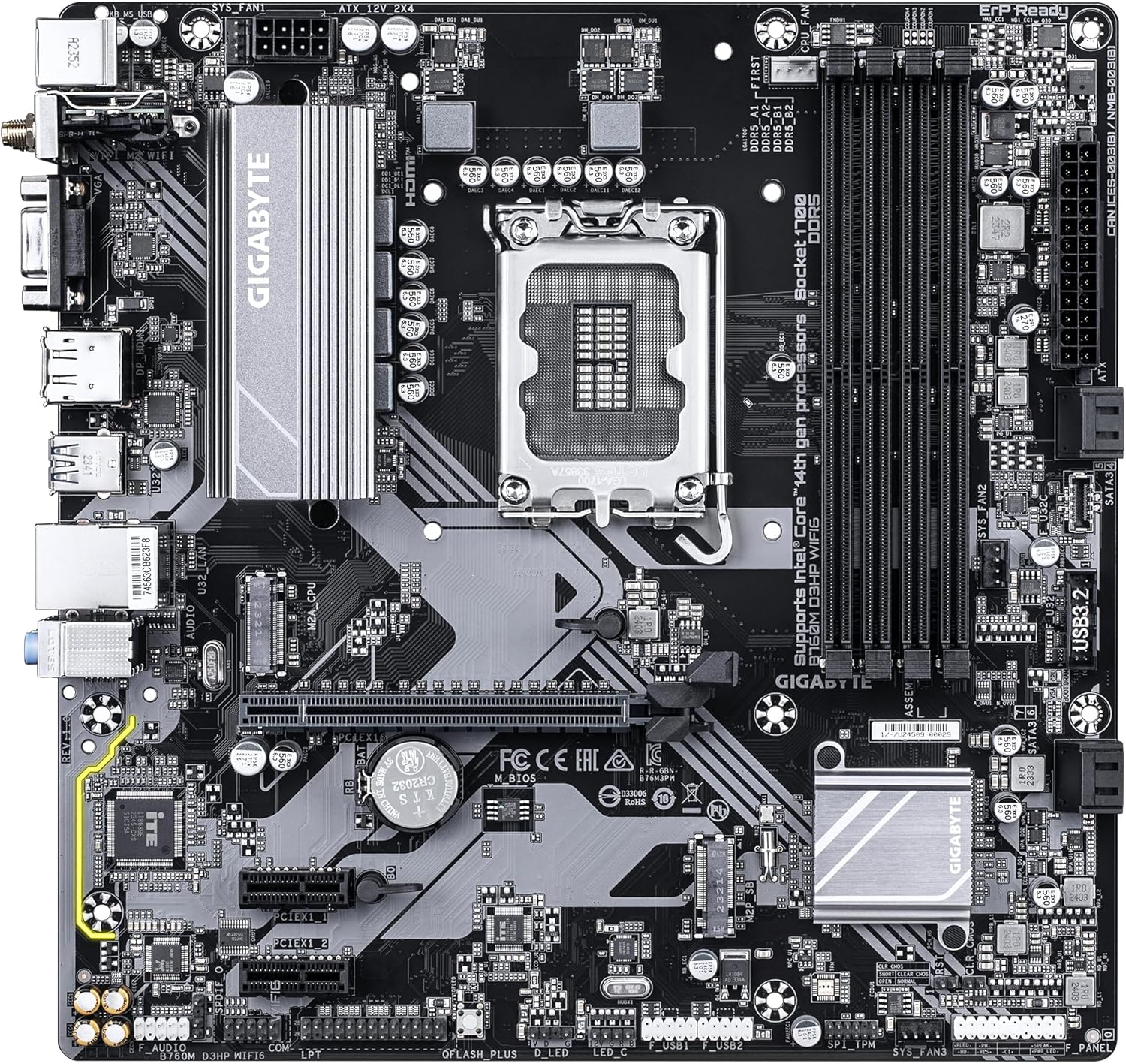
Familiarize yourself with the layout of the motherboard components before proceeding with installation.

మూర్తి 1: పై నుండి క్రిందికి view of the GIGABYTE GA-B760M D3HP WIFI6 motherboard, showing the CPU socket, DIMM slots, PCIe slots, and various headers.
మూర్తి 2: కోణీయ view of the GIGABYTE GA-B760M D3HP WIFI6 motherboard, highlighting the heatsinks and overall component placement.
3.2 CPU ఇన్స్టాలేషన్
- మదర్బోర్డుపై LGA 1700 CPU సాకెట్ను గుర్తించండి.
- CPU సాకెట్ లివర్ తెరిచి లోడ్ ప్లేట్ ఎత్తండి.
- Carefully align the CPU with the socket, ensuring the triangular mark on the CPU matches the mark on the socket. Do not force the CPU into the socket.
- లోడ్ ప్లేట్ను కిందకి దించి, లివర్తో బిగించండి.
- CPU కి థర్మల్ పేస్ట్ రాసి, తయారీదారు సూచనల ప్రకారం CPU కూలర్ను ఇన్స్టాల్ చేయండి.
3.3 మెమరీ (RAM) సంస్థాపన
- నాలుగు DDR5 DIMM స్లాట్లను గుర్తించండి.
- DIMM స్లాట్ యొక్క రెండు చివర్లలో క్లిప్లను తెరవండి.
- DIMM స్లాట్లోని కీతో DDR5 మెమరీ మాడ్యూల్లోని నాచ్ను సమలేఖనం చేయండి.
- క్లిప్లు సరిగ్గా అమర్చబడే వరకు మెమరీ మాడ్యూల్ను స్లాట్లోకి గట్టిగా చొప్పించండి. రెండు క్లిప్లు మూసివేయబడ్డాయని నిర్ధారించుకోండి.
- For dual-channel configuration, refer to the motherboard's specific manual for recommended slot pairing.
3.4 Storage Device Installation (M.2 SSDs and SATA Drives)
- M.2 SSD: Locate the M.2 connectors. Remove the M.2 screw/standoff. Insert the M.2 SSD into the slot at a 30-degree angle. Push down the SSD and secure it with the screw/standoff.
- SATA డ్రైవ్లు: Connect SATA data cables from your storage drives (HDDs/SSDs) to the SATA ports on the motherboard. Connect power cables from your power supply to the drives.
3.5 పవర్ కనెక్షన్లు
- మీ విద్యుత్ సరఫరా నుండి 24-పిన్ ATX ప్రధాన విద్యుత్ కనెక్టర్ను మదర్బోర్డ్లోని సంబంధిత పోర్ట్కు కనెక్ట్ చేయండి.
- Connect the 8-pin ATX 12V CPU power connector to the port near the CPU socket.
3.6 ఫ్రంట్ ప్యానెల్ మరియు పెరిఫెరల్ కనెక్షన్లు
Connect your case's front panel connectors (power button, reset button, USB ports, audio jacks, LED indicators) to the corresponding headers on the motherboard. Refer to the motherboard's detailed manual for exact pin layouts.

మూర్తి 3: Rear I/O panel of the GIGABYTE GA-B760M D3HP WIFI6 motherboard, showing USB ports, display outputs, audio jacks, Ethernet, and Wi-Fi antenna connectors.
4. ఆపరేటింగ్ సూచనలు
4.1 BIOS సెటప్
Upon first boot, you may need to enter the BIOS (Basic Input/Output System) to configure settings such as boot order, date/time, and enable specific features. To enter BIOS, press the DEL key repeatedly during startup. The GIGABYTE UEFI BIOS provides an intuitive graphical interface for configuration.
4.2 డ్రైవర్ ఇన్స్టాలేషన్
After installing your operating system, install the necessary drivers for the motherboard's components (chipset, audio, LAN, Wi-Fi, etc.). These drivers are typically provided on a support DVD or can be downloaded from the official GIGABYTE webమీ మదర్బోర్డ్ మోడల్ కోసం సైట్.
5. నిర్వహణ
- శుభ్రపరచడం: Regularly clean dust from the motherboard and case fans using compressed air. Ensure the system is powered off and unplugged before cleaning.
- BIOS నవీకరణలు: GIGABYTE ని కాలానుగుణంగా తనిఖీ చేయండి website for BIOS updates. BIOS updates can improve system stability, compatibility, and performance. Follow the instructions provided by GIGABYTE carefully when updating the BIOS.
- డ్రైవర్ నవీకరణలు: కొత్త సాఫ్ట్వేర్ మరియు హార్డ్వేర్తో సరైన పనితీరు మరియు అనుకూలతను నిర్ధారించడానికి మీ డ్రైవర్లను నవీకరించండి.
6. ట్రబుల్షూటింగ్
- శక్తి లేదు:
- అన్ని విద్యుత్ కనెక్షన్లను తనిఖీ చేయండి (24-పిన్ ATX, 8-పిన్ CPU).
- విద్యుత్ సరఫరా స్విచ్ ఆన్ చేయబడిందని నిర్ధారించుకోండి.
- మరొక వ్యవస్థ లేదా విద్యుత్ సరఫరా టెస్టర్తో విద్యుత్ సరఫరాను పరీక్షించండి.
- ప్రదర్శన లేదు:
- Ensure the monitor is connected to the graphics card (or integrated graphics port if no discrete GPU is used).
- గ్రాఫిక్స్ కార్డ్ మరియు మెమరీ మాడ్యూళ్ళను తిరిగి అమర్చండి.
- ఒకే ఒక RAM స్టిక్ తో బూట్ చేయడానికి ప్రయత్నించండి.
- సిస్టమ్ అస్థిరత/క్రాష్లు:
- CPU మరియు GPU ఉష్ణోగ్రతలను తనిఖీ చేయండి.
- Ensure all components are properly seated.
- RAM లోపాలను తనిఖీ చేయడానికి మెమరీ డయాగ్నస్టిక్ సాధనాలను అమలు చేయండి.
- BIOS మరియు డ్రైవర్లను నవీకరించండి.
- నెట్వర్క్ కనెక్టివిటీ సమస్యలు:
- For wired LAN, check the Ethernet cable and router connection.
- For Wi-Fi, ensure antennas are securely attached and drivers are installed.
- Verify network settings in the operating system.
7. స్పెసిఫికేషన్లు
| ఫీచర్ | వివరాలు |
|---|---|
| బ్రాండ్ | గిగాబైట్ |
| మోడల్ పేరు | B760M D3HP WIFI6 |
| CPU సాకెట్ | LGA 1700 |
| అనుకూల ప్రాసెసర్లు | Intel Core 14th Gen, Intel Core 13th Gen, Intel Core 12th Gen |
| చిప్సెట్ రకం | ఇంటెల్ B760 |
| RAM మెమరీ టెక్నాలజీ | DDR5 |
| మెమరీ క్లాక్ స్పీడ్ | 5600 MHz |
| అనుకూల పరికరాలు | Personal Computer, Desktop Computer |
| వేదిక | విండోస్ 10, విండోస్ 11 |
| ఉత్పత్తి కొలతలు | 9.61 x 9.61 x 1.38 అంగుళాలు |
| వస్తువు బరువు | 2.2 పౌండ్లు |
8. వారంటీ మరియు మద్దతు
For warranty information and technical support, please refer to the official GIGABYTE website or contact GIGABYTE customer service. Keep your proof of purchase for warranty claims.
GIGABYTE అధికారికం Webసైట్: www.gigabyte.com