
1. పరిచయం
This manual provides detailed instructions for the SONICAKE Pocket Master Multi-Effects Pedal (Model QME-10PK). It covers product features, setup procedures, operational guidelines, maintenance tips, troubleshooting, and technical specifications. Please read this manual thoroughly before using the device to ensure proper operation and to maximize its capabilities.
The SONICAKE Pocket Master is a portable multi-effects processor designed for guitar, bass, and acoustic instruments. It features advanced digital modeling technology, a wide range of built-in effects, amp models, IR cabinet simulations, and a USB audio interface with OTG support. Its compact size and rechargeable battery make it suitable for musicians on the go.
2. ఉత్పత్తి ముగిసిందిview
2.1 ప్యాకేజీ విషయాలు
- SONICAKE Pocket Master Multi-Effects Pedal
- USB ఛార్జింగ్ కేబుల్
- వినియోగదారు మాన్యువల్ (ఈ పత్రం)
2.2 పరికర లేఅవుట్
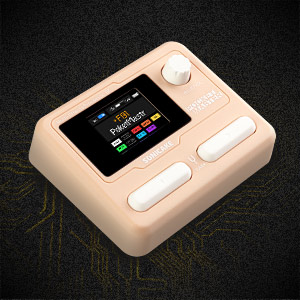
The SONICAKE Pocket Master features a clear LCD color screen, control knob, and two footswitches for navigation and effect control. Input and output jacks, along with USB ports, are located on the side.

మూర్తి 2.2.1: ముందు view of the SONICAKE Pocket Master, showing the LCD screen, control knob, and footswitches.

మూర్తి 2.2.2: వైపు view of the SONICAKE Pocket Master, illustrating the input (IN), output (OUT), headphones (PHONES), and USB ports (USB-C for data/power, USB-A for OTG).
కీలక భాగాలు:
- LCD స్క్రీన్: Displays current preset, effect chain, battery status, and other operational information.
- VALUE/VOL Knob: Used for navigating menus, adjusting parameters, and controlling output volume.
- ఫుట్ స్విచ్లు: For preset changes, looper control, tuner activation, and other functions.
- జాక్లో: 1/4" input for connecting your instrument (guitar, bass, acoustic).
- OUT/PHONES Jack: 1/4" output for connecting to an ampలైఫైయర్, మిక్సర్ లేదా హెడ్ఫోన్లు.
- USB-C పోర్ట్: For charging the device, firmware updates, and USB audio interface functionality.
- USB-A (OTG) Port: For connecting to mobile devices (iOS/Android) for direct audio streaming and app control.
3. సెటప్
3.1 ప్రారంభ ఛార్జింగ్
Before first use, fully charge the SONICAKE Pocket Master. Connect the supplied USB cable to the USB-C port (6) on the device and to a standard USB power adapter (not included) or a computer USB port. The battery indicator on the LCD screen will show charging status. A full charge provides approximately 4 hours of operation.
మూర్తి 3.1.1: The Pocket Master features an internal rechargeable battery providing up to 4 hours of use.
3.2 Connecting Your Instrument and Output Device
- Connect your guitar, bass, or acoustic instrument to the IN jack (4) using a 1/4" instrument cable.
- కనెక్ట్ చేయండి అవుట్/ఫోన్లు jack (5) to your amplifier, audio interface, or headphones using a 1/4" cable.
3.3 పవర్ చేయడం ఆన్/ఆఫ్
To power on the device, press and hold one of the footswitches until the LCD screen illuminates. To power off, press and hold one of the footswitches again until the screen turns off.
3.4 సాఫ్ట్వేర్ ఇన్స్టాలేషన్ (ఐచ్ఛికం)
For advanced sound editing and preset management, download the free SONICAKE software for Mac/Windows/iOS/Android from the official SONICAKE website. This software allows for deeper customization of effects and settings.

మూర్తి 3.4.1: The Pocket Master supports connection to mobile devices and computers for software control and audio interface functions.
4. ఆపరేషన్
4.1 ప్రీసెట్లను నావిగేట్ చేయడం
Use the footswitches to cycle through the 100 available presets. The LCD screen will display the current preset number and name.
4.2 Adjusting Effects and Parameters
The Pocket Master features an adjustable signal chain with up to 9 simultaneous effect blocks. Use the VALUE/VOL knob (2) to select and adjust parameters for individual effects. The LCD screen provides a visual representation of the effect chain and current settings.

మూర్తి 4.2.1: Diagram showing the versatile effects matrix with up to 9 effect modules including Noise Reduction (NR), FX1, Drive (DRV), Amp, IR, EQ, FX2, Delay (DLY), and Reverb (RVB).
The device includes over 100 built-in guitar, bass, and acoustic effects, 20 legendary amp models, and 3rd party IR support (5 user slots).
4.3 ట్యూనర్ ఉపయోగించడం
Press and hold both footswitches simultaneously to activate the built-in tuner. The LCD screen will display the note and tuning accuracy. Press either footswitch again to exit tuner mode.
4.4 Drum Rhythms and Looper
The Pocket Master includes 99 built-in drum rhythms and a looper function. Refer to the on-screen interface for controls related to recording, playback, and drum pattern selection.

మూర్తి 4.4.1: The LCD screen displaying the tuner, drum machine, and looper interfaces.
4.5 USB Audio Interface and OTG Function
Connect the device to a computer via the USB-C port (6) to use it as a stereo USB audio interface for recording or playback. The OTG (On-The-Go) function allows direct connection to iOS/Android mobile devices via the USB-A port (7) for audio streaming and app control.
4.6 బ్లూటూత్ కనెక్టివిటీ
The Pocket Master supports Bluetooth audio connection. Activate Bluetooth on the device and pair it with your smartphone or tablet to stream backing tracks or control settings via the dedicated app.
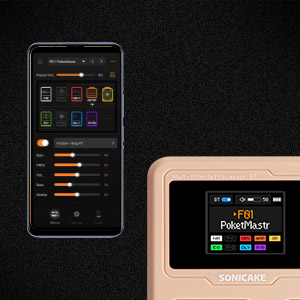
మూర్తి 4.6.1: The companion app provides a user-friendly interface for deep editing and managing presets.
5. నిర్వహణ
5.1 శుభ్రపరచడం
Wipe the device with a soft, dry cloth. Do not use liquid cleaners or abrasive materials, as these can damage the finish or internal components.
5.2 నిల్వ
Store the Pocket Master in a cool, dry place away from direct sunlight and extreme temperatures. If storing for an extended period, ensure the battery is partially charged (around 50%) to prolong its lifespan.
5.3 ఫర్మ్వేర్ నవీకరణలు
Periodically check the official SONICAKE website for firmware updates. Updates can introduce new features, improve performance, or fix bugs. Follow the instructions provided with the firmware update package carefully.
6. ట్రబుల్షూటింగ్
| సమస్య | సాధ్యమైన కారణం | పరిష్కారం |
|---|---|---|
| సౌండ్ అవుట్పుట్ లేదు. |
|
|
| పరికరం పవర్ ఆన్ చేయదు. |
|
|
| బ్లూటూత్ కనెక్షన్ సమస్యలు. |
|
|
| Software/App not connecting. |
|
|
7. స్పెసిఫికేషన్లు
| ఫీచర్ | వివరాలు |
|---|---|
| మోడల్ సంఖ్య | QME-10PK |
| కొలతలు | 2.44 x 4.13 x 2.44 అంగుళాలు (6.2 x 10.5 x 6.2 సెం.మీ.) |
| వస్తువు బరువు | 7.3 ఔన్సులు (208 గ్రాములు) |
| ప్రభావాలు | 100+ Built-in Guitar/Bass/Acoustic Effects, 20 Amp Models, 5 User IR Slots |
| సిగ్నల్ ప్రాసెసింగ్ | 24-బిట్ 44.1kHz |
| డ్రమ్ రిథమ్స్ | 99 అంతర్నిర్మిత |
| లూపర్ | Yes (duration not specified in input, but reviews mention 10s) |
| ప్రీసెట్లు | 100 |
| Simultaneous Effect Blocks | గరిష్టం 9 |
| ఆడియో ఇంటర్ఫేస్ | Stereo USB Audio Interface, OTG function for mobile devices |
| కనెక్టివిటీ | Bluetooth 5, USB-C, USB-A (OTG) |
| బ్యాటరీ లైఫ్ | 4 గంటల వరకు (రీఛార్జ్ చేసుకోవచ్చు) |
| వాల్యూమ్tage | 5 వోల్ట్లు |
| సాఫ్ట్వేర్ మద్దతు | Mac/Windows/iOS/Android for sound editing and preset management |
8. వారంటీ మరియు మద్దతు
8.1 వారంటీ సమాచారం
SONICAKE products typically come with a limited manufacturer's warranty. For specific details regarding your product's warranty period and terms, please refer to the warranty card included with your purchase or visit the official SONICAKE webవారంటీ క్లెయిమ్ల కోసం మీ కొనుగోలు రుజువును ఉంచండి.
8.2 కస్టమర్ మద్దతు
For technical assistance, troubleshooting not covered in this manual, or other inquiries, please contact SONICAKE customer support. Contact information can usually be found on the official SONICAKE webసైట్ లేదా ఉత్పత్తి ప్యాకేజింగ్లో.
You can also refer to the official SONICAKE webఅదనపు వనరులు మరియు తరచుగా అడిగే ప్రశ్నల కోసం సైట్: www.sonicake.com