
1. పరిచయం
Thank you for choosing the BAMEOS RGB LED Floating Shelves. This manual provides detailed instructions for the safe installation, operation, and maintenance of your new wall-mounted shelves. These shelves feature integrated RGB LED lighting, offering customizable ambiance for various rooms such as bedrooms, living rooms, kitchens, and studies. Please read this manual thoroughly before installation and retain it for future reference.
2. భద్రతా సమాచారం
సురక్షితమైన ఆపరేషన్ను నిర్ధారించడానికి మరియు నష్టాన్ని నివారించడానికి, దయచేసి ఈ క్రింది వాటిని గమనించండి:
- ఎల్లప్పుడూ ఇన్స్టాలేషన్ సూచనలను జాగ్రత్తగా పాటించండి.
- బరువు పరిమితిని మించకూడదు 22 పౌండ్లు (10 కిలోలు) per shelf.
- Always ensure the shelf is securely mounted to the wall before placing items on it.
- Avoid using the LED strips in humid environments to prolong their lifespan.
- చిన్న భాగాలు మరియు ప్యాకేజింగ్ సామగ్రిని పిల్లలకు దూరంగా ఉంచండి.
3. ప్యాకేజీ విషయాలు
ఇన్స్టాలేషన్ ప్రారంభించే ముందు అన్ని భాగాలు ఉన్నాయని నిర్ధారించుకోండి:
- 2 x Floating Shelves (35 x 7 inches, Black)
- 2 x RGB LED Light Strips
- 2 x Battery Boxes (AA batteries not included)
- 2 x 3M Adhesive Tape sets (for LED strips)
- Invisible Brackets (pre-installed or included for assembly)
- మౌంటింగ్ హార్డ్వేర్ (స్క్రూలు, వాల్ యాంకర్లు)
- వినియోగదారు మాన్యువల్
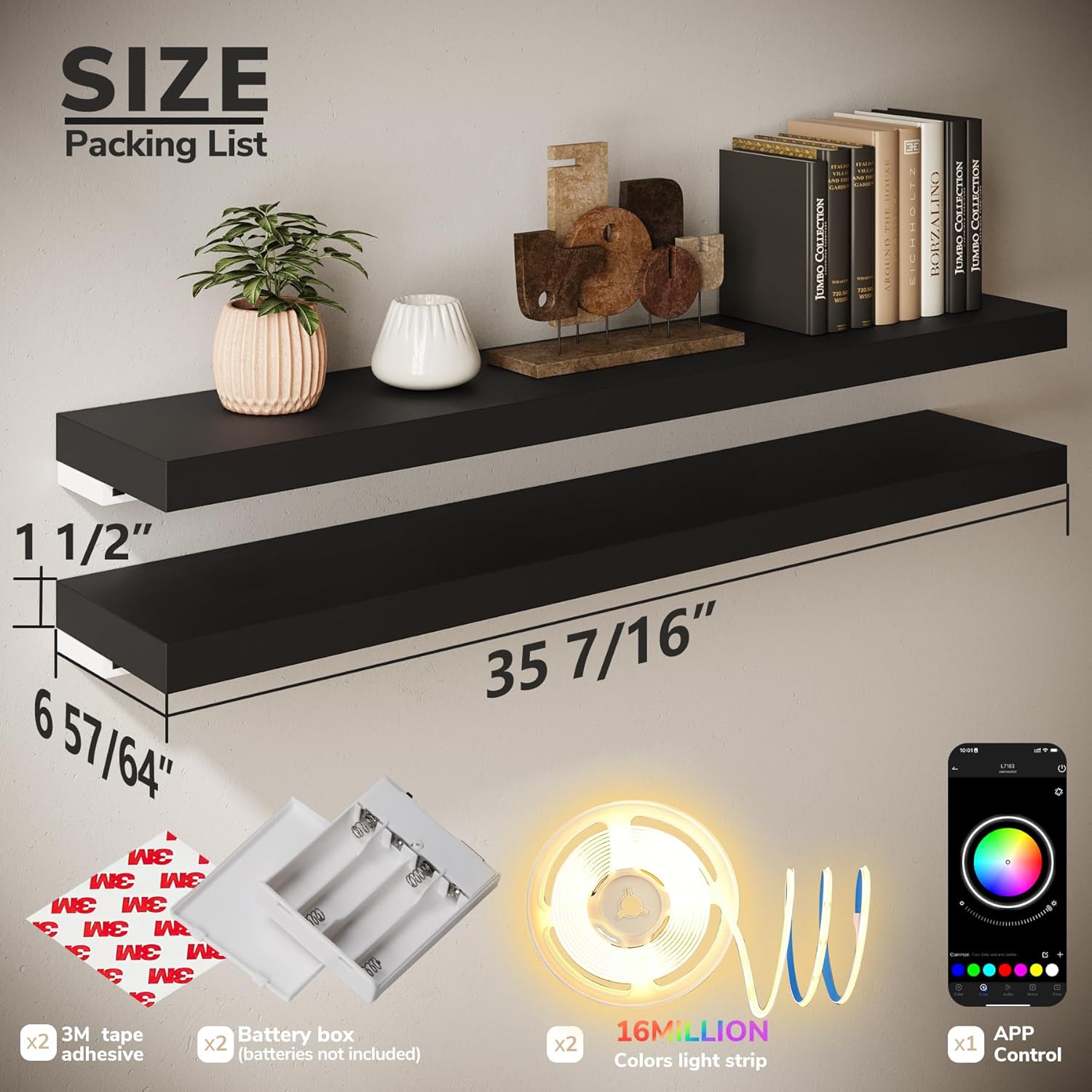
చిత్రం 3.1: ప్యాకేజీ కంటెంట్లు మరియు కొలతలు
4. స్పెసిఫికేషన్లు
| మోడల్ పేరు | CFSBR027USBE03 |
| మెటీరియల్ | Medium-Density Fiberboard (MDF) |
| రంగు | నలుపు |
| Dimensions (each shelf) | 35.43" W x 6.89" D x 1.5" H (90cm x 17.5cm x 3.8cm) |
| Weight Capacity (each shelf) | 22 పౌండ్లు (10 కిలోలు) వరకు |
| మౌంటు రకం | Wall Mount (Invisible Brackets) |
| LED కోసం పవర్ సోర్స్ | AA Batteries (not included) or USB connection |
| LED ఫీచర్లు | RGB (16 Million Colors), Music Sync, App Control, Timer Function |
5. ఇన్స్టాలేషన్ సూచనలు
సురక్షిత సంస్థాపన కోసం ఈ దశలను అనుసరించండి:
5.1 Prepare the Wall
- Choose a suitable wall location. Ensure the wall material is appropriate for mounting (Concrete Wall, Wood Stud, Drywall are generally suitable; Plasterboard Wall is not recommended).

Figure 5.1: Applicable Wall Types
- Use a level and pencil to mark the desired height and position for your shelves. Mark the drill points for the invisible brackets.
5.2 Mount the Brackets
- Drill pilot holes at the marked points. Insert wall anchors if necessary (for drywall).
- Attach the invisible brackets to the wall using the provided screws. Ensure they are firmly secured and level.
5.3 Install the Shelves
- Slide the shelves onto the mounted brackets. The shelves are designed to fit snugly over the invisible brackets.
- Secure the shelf to the support rod using the additional securing screw at the bottom to prevent slippage and wear.

Figure 5.2: Installed Floating Shelf Example
5.4 Attach LED Strips
- Clean the underside of the shelf where the LED strip will be attached.
- Peel the backing from the 3M adhesive tape on the LED strip and firmly press the strip along the underside of the shelf.
- Connect the LED strip to the battery box (insert AA batteries, not included) or a USB power source.

Figure 5.3: Shelf Features and Power Options
6. Operating Instructions (RGB LED Lighting)
Your BAMEOS RGB LED Floating Shelves offer versatile lighting options controlled via a mobile application.
6.1 మొబైల్ యాప్ నియంత్రణ
- Download the free mobile app (available for iOS and Android devices). Refer to the packaging or a QR code on the product for the specific app name.
- Ensure your phone's Bluetooth is enabled. Open the app and follow the on-screen instructions to pair with your LED shelves.

Figure 6.1: Mobile App Interface for LED Control
6.2 ముఖ్య లక్షణాలు
- 16 మిలియన్ రంగులు: Select from a vast spectrum of colors and adjust brightness to create your desired ambiance.
- సంగీతం సమకాలీకరణ మోడ్: Activate Sound Sync Mode to synchronize the LED lights with your music, creating dynamic light shows that pulse with the rhythm.
- టైమర్ ఫంక్షన్: Set schedules for the lights to turn on or off automatically at specific times, such as sunrise, sunset, or custom intervals.
- అనుకూల దృశ్యాలు: Create and save custom lighting scenes for different moods or occasions.
Video 6.1: Demonstration of RGB LED color changing and effects on BAMEOS floating shelves.

Figure 6.2: RGB LED Features Overview
7. నిర్వహణ
To keep your BAMEOS RGB LED Floating Shelves in optimal condition:
- For daily cleaning, simply wipe the shelves with a damp వస్త్రం. కఠినమైన రసాయనాలు లేదా రాపిడి క్లీనర్లను నివారించండి.
- Ensure the LED strips remain dry. Avoid using the shelves in excessively humid environments to prevent damage to the electronics.
- మౌంటు స్క్రూలు బిగుతుగా మరియు సురక్షితంగా ఉన్నాయని నిర్ధారించుకోండి.
8. ట్రబుల్షూటింగ్
If you encounter issues with your shelves, refer to the following common solutions:
| సమస్య | సాధ్యమైన కారణం | పరిష్కారం |
| LED లైట్లు ఆన్ చేయవు. | కరెంటు లేదు, కనెక్షన్ లేదు, బ్యాటరీలు డెడ్ అయ్యాయి. | Check if batteries are correctly inserted or replaced. Ensure USB cable is securely connected to a power source. Verify LED strip connection to the power source. |
| యాప్ LED లైట్లకు కనెక్ట్ కాలేదు. | Bluetooth off, app issue, lights not powered. | Ensure your device's Bluetooth is enabled. Restart the app and try pairing again. Confirm the LED lights are powered on. |
| లైట్లు ఊహించని విధంగా మిణుకుమిణుకుమంటాయి లేదా రంగులు మారుతాయి. | Loose connection, power fluctuation, app setting. | Check all connections. Try a different power source. Verify app settings for any active effects or music sync modes. |
| Shelf feels unstable after installation. | Improper mounting, loose screws. | Re-check installation steps. Ensure all screws are tightened and wall anchors are properly seated. Do not exceed the weight capacity. |
9. వారంటీ మరియు మద్దతు
BAMEOS products are designed for quality and durability. For warranty information, technical support, or any questions not covered in this manual, please contact BAMEOS customer service through the retailer's platform or the official BAMEOS website. Please have your model number (CFSBR027USBE03) and purchase date available when contacting support.