
TOPTRO TP1
TOPTRO TP1 స్మార్ట్ ప్రొజెక్టర్ యూజర్ మాన్యువల్
మోడల్: TP1
1. పరిచయం
This manual provides detailed instructions for the setup, operation, and maintenance of your TOPTRO TP1 Smart Projector. The TP1 is designed to deliver a high-quality home cinema experience with its native 1080P resolution, 4K decoding support, integrated smart system with licensed streaming applications, Dolby Audio, and advanced connectivity options.
2. ఉత్పత్తి ముగిసిందిview
2.1 ప్యాకేజీ విషయాలు
- TOPTRO TP1 స్మార్ట్ ప్రొజెక్టర్
- పవర్ కార్డ్
- HDMI కేబుల్
- రిమోట్ కంట్రోల్
- వినియోగదారు మాన్యువల్
- క్లీనింగ్ కిట్
2.2 ముఖ్య లక్షణాలు
- Officially Licensed Streaming Apps: Access Netflix, Prime Video, YouTube, and more directly.
- డాల్బీ ఆడియో సపోర్ట్: Enhanced sound experience with built-in 2*10W speakers.
- నేటివ్ 1080P రిజల్యూషన్: Full HD display with 4K video decoding capability.
- 800 ANSI ల్యూమెన్స్: Bright and clear image projection.
- 360° Adjustable Stand: Flexible projection angles for various surfaces.
- Auto Focus & Auto Keystone: Automatic image correction for quick setup.
- WiFi 6 & Two-Way Bluetooth 5.2: Fast wireless connectivity and versatile audio options.
- బహుళ సంస్థాపనా పద్ధతులు: Supports ceiling, desktop, tripod, and wall mounting.

Image 2.1: The TOPTRO TP1 Smart Projector, showcasing its compact design and integrated stand. Key features such as Netflix, 1080P, Dolby Audio, and Auto Focus are visually represented around the projector.
3. సెటప్ గైడ్
3.1 పవర్ కనెక్షన్
- ప్రొజెక్టర్ యొక్క పవర్ ఇన్పుట్ పోర్ట్కు పవర్ కార్డ్ను కనెక్ట్ చేయండి.
- పవర్ కార్డ్ యొక్క మరొక చివరను తగిన ఎలక్ట్రికల్ అవుట్లెట్లోకి ప్లగ్ చేయండి.
- పరికరాన్ని ఆన్ చేయడానికి ప్రొజెక్టర్ లేదా రిమోట్ కంట్రోల్లోని పవర్ బటన్ను నొక్కండి.
3.2 ప్రారంభ నియామకం
Position the projector on a stable surface. The 360° adjustable stand allows for flexible placement, including projecting onto walls or ceilings. Ensure the projection path is clear of obstructions.
3.3 రిమోట్ కంట్రోల్
Insert two AAA batteries (not included) into the remote control. Point the remote control towards the projector's IR receiver for optimal response.
3.4 నెట్వర్క్ కనెక్షన్
- Upon first startup, follow the on-screen prompts to select your language and region.
- Navigate to the network settings and select your desired Wi-Fi network.
- Enter the Wi-Fi password to establish a connection. The projector supports Wi-Fi 6 (5G/2.4G dual-band) for stable streaming.
4. ఆపరేటింగ్ సూచనలు
4.1 Smart System Navigation
The TOPTRO TP1 features an intelligent system with pre-installed applications. Use the remote control's directional buttons and 'OK' button to navigate the interface. The home screen provides access to streaming services, apps, and settings.

Image 4.1: The projector displaying its smart interface, featuring icons for Netflix, YouTube, Prime Video, Hulu, Plex, and an open browser, accessible via the remote control.
4.2 స్ట్రీమింగ్ అప్లికేషన్లు
Directly access officially licensed applications such as Netflix, Prime Video, and YouTube. Log in with your existing accounts to enjoy a wide range of content. Ensure a stable internet connection for optimal streaming performance.
4.3 మీడియా ప్లేబ్యాక్
The projector supports playback from various sources:
- USB డ్రైవ్: Insert a USB drive into the USB port to play local media files.
- HDMI ఇన్పుట్: Connect external devices like laptops, gaming consoles (PS5), or TV sticks via the HDMI port.
- వైర్లెస్ స్క్రీన్ మిర్రరింగ్: Connect iOS and Android smartphones or iPads wirelessly (Google phones are not supported for direct mirroring).
5 కనెక్టివిటీ
5.1 Wi-Fi 6
The TP1 is equipped with the latest Wi-Fi 6 technology, supporting both 5G and 2.4G dual-band frequencies. This ensures a smoother and more stable wireless connection for streaming and online activities.
5.2 Two-Way Bluetooth 5.2
The two-way Bluetooth 5.2 functionality allows the projector to:
- Connect to External Speakers: Pair with Bluetooth-enabled speakers for enhanced audio output.
- Act as a Bluetooth Speaker: Stream audio from your phone or laptop to the TP1, utilizing its built-in speakers.

Image 5.1: The TOPTRO TP1 Projector demonstrating its Wi-Fi 6 and two-way Bluetooth 5.2 capabilities, showing wireless connection to external speakers and a smartphone for gaming.
5.3 Physical Ports
The projector includes the following ports:
- HDMI పోర్ట్: For connecting devices like Fire TV Stick, Roku, laptops, and gaming consoles.
- USB పోర్ట్: USB డ్రైవ్లను కనెక్ట్ చేయడానికి.
- 3.5mm హెడ్ఫోన్ జాక్: For connecting wired headphones or external speakers.
5.4 CEC & ARC Functions
The HDMI port supports CEC (Consumer Electronics Control) and ARC (Audio Return Channel) functions:
- CEC: Allows you to control connected HDMI devices (e.g., a TV stick) using the projector's remote control. To enable, select the HDMI signal source, enter settings via the remote's menu button, and turn on CEC.
- ARC: Enables audio output from the projector to an ARC-compatible speaker or soundbar connected via HDMI. Ensure the external audio device is set to HDMI ARC mode.
6. ఆడియో లక్షణాలు
The TOPTRO TP1 is equipped with advanced audio capabilities to enhance your viewing అనుభవం.
6.1 Dolby Audio Support
Experience rich and clear sound effects with Dolby Audio support, providing an immersive audio environment for movies and music.
6.2 అంతర్నిర్మిత స్పీకర్లు
The projector features two integrated 10W speakers, delivering robust sound output suitable for most environments. For larger spaces or enhanced audio, external speakers can be connected via Bluetooth or the 3.5mm audio jack.

Image 6.1: The TOPTRO TP1 Projector creating an immersive audio experience with Dolby Audio, projecting an image of a cellist with sound waves illustrating the audio output.
7. ఇమేజ్ సర్దుబాటు
The TP1 projector offers several features for optimizing image quality and projection alignment.
7.1 ఆటో ఫోకస్
The projector automatically adjusts the focus to ensure a sharp and clear image. This feature activates upon startup or when the projector is moved.
7.2 ఆటో కీస్టోన్ దిద్దుబాటు
The auto keystone function automatically corrects vertical image distortion, ensuring a rectangular screen even when the projector is placed at an angle.
7.3 4-Point Correction
For precise image alignment, the 4-point correction feature allows manual adjustment of each corner of the projected image to achieve a perfect rectangular shape.
7.4 Digital Zoom (50%-100%)
Adjust the size of the projected image from 100% down to 50% without physically moving the projector, providing flexibility for various screen sizes and distances.

Image 7.1: Visual representation of the projector's Auto Focus, Auto Vertical Keystone, 4-Point Correction, and Digital Zoom capabilities, ensuring a clear and properly aligned image.
7.5 Projection Throw Ratio
With a 1.1:1 projection throw ratio, the TP1 can project a large screen even in small spaces, making it suitable for various room sizes.
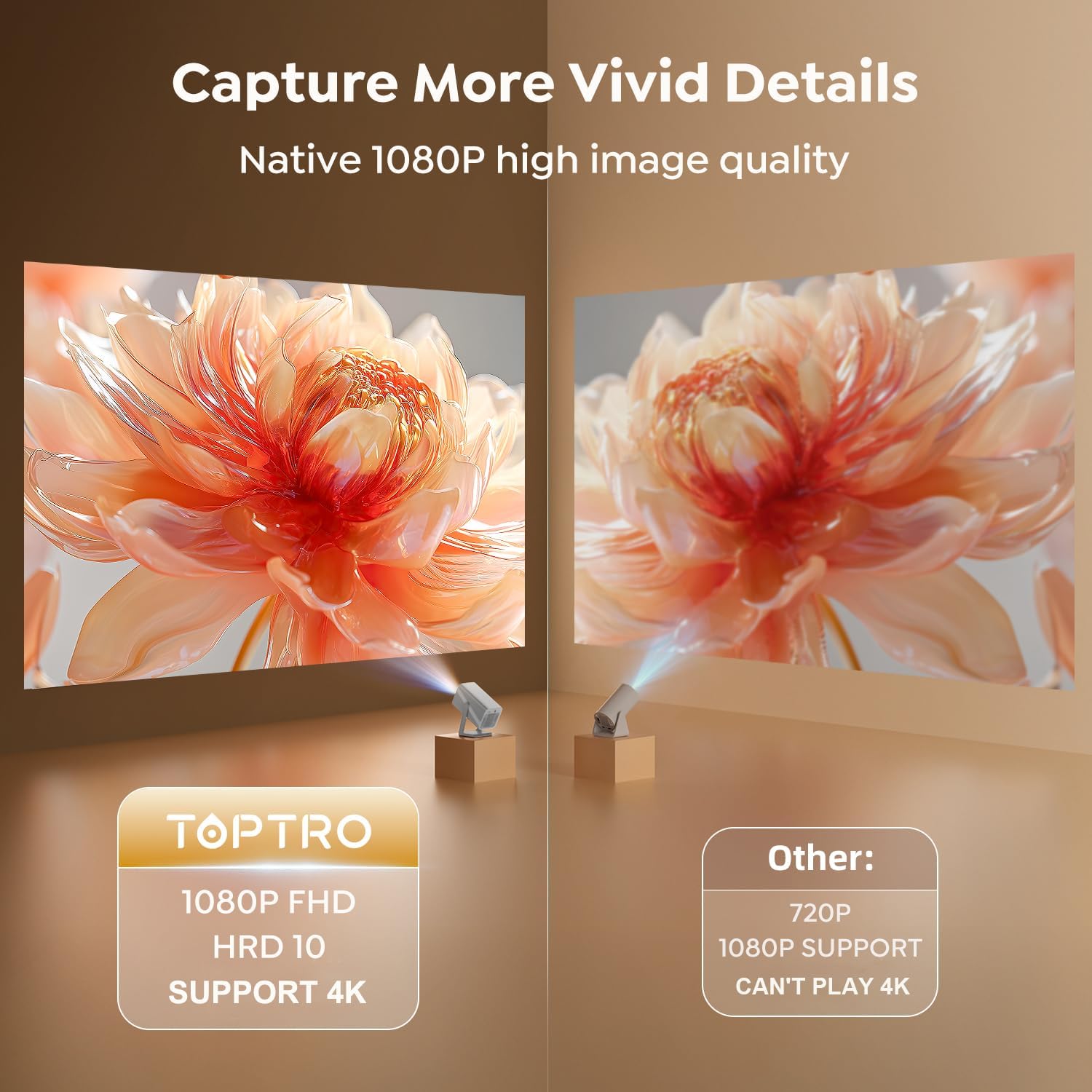
Image 7.2: A side-by-side comparison illustrating the superior clarity and detail of the TOPTRO TP1's native 1080P FHD image quality compared to a standard 720P projector.
8. సంస్థాపనా పద్ధతులు
The TOPTRO TP1 projector offers versatile installation options to suit different environments and preferences.
8.1 360° Rotatable Stand
The integrated 360° rotatable stand allows you to easily adjust the projection angle, enabling projection onto walls, ceilings, or floors without additional accessories.

Image 8.1: The TOPTRO TP1 Projector positioned to project an image onto the ceiling, highlighting the flexibility of its 360° adjustable stand.
8.2 మౌంటు ఐచ్ఛికాలు
The projector supports various mounting configurations:
- Desktop/Tabletop: ప్రొజెక్టర్ను చదునైన ఉపరితలంపై ఉంచండి.
- త్రిపాద: Utilize the 1/4'' screw hole on the base to mount the projector on a tripod.
- సీలింగ్ మౌంట్: Secure the projector to the ceiling using a compatible mount (sold separately).
- వాల్ మౌంట్: Attach the projector to a wall using a compatible mount (sold separately).
9. స్పెసిఫికేషన్లు
| ఫీచర్ | స్పెసిఫికేషన్ |
|---|---|
| బ్రాండ్ | టాప్ |
| మోడల్ సంఖ్య | TP1 |
| ఉత్పత్తి కొలతలు | 24 x 12.2 x 11.6 సెం.మీ |
| వస్తువు బరువు | 1.1 కిలోలు |
| రంగు | వెండి |
| ఫారమ్ ఫ్యాక్టర్ | పోర్టబుల్ |
| Native Screen Resolution | 1920 x 1080 (FHD) |
| గరిష్ట డిస్ప్లే రిజల్యూషన్ | 3840 x 2160 (4K Decoding) |
| ప్రకాశం | 800 ANSI లుమెన్స్ |
| ప్రదర్శన రకం | LCD |
| కనెక్టివిటీ టెక్నాలజీ | 3.5mm Jack, Bluetooth 5.2, HDMI, USB, Wi-Fi 6 (5G/2.4G) |
| వాల్యూమ్tage | 110 వోల్ట్లు |
| వాట్tage | 60 వాట్స్ |
| ప్రత్యేక లక్షణాలు | 360° Rotatable Stand, Auto Keystone Correction, Precise Focus, Digital Zoom, Built-in Officially-Licensed Apps (Netflix/Prime Video/YouTube), Dolby Audio, Built-In 2*10W Speakers, Two-way Bluetooth 5.2 |
| సిఫార్సు చేసిన ఉపయోగాలు | విద్య, గేమింగ్, హోమ్ సినిమా |
| మౌంటు రకం | Ceiling/Floor/Tabletop/Wall Mount |
10. ట్రబుల్షూటింగ్
This section addresses common issues you might encounter with your TOPTRO TP1 projector.
10.1 చిత్రం లేదు లేదా అస్పష్టమైన చిత్రం
- శక్తిని తనిఖీ చేయండి: ప్రొజెక్టర్ సరిగ్గా పవర్కు కనెక్ట్ చేయబడి, ఆన్ చేయబడిందని నిర్ధారించుకోండి.
- ఆటో ఫోకస్: Allow the projector a few seconds to perform auto-focus. If still blurry, manually adjust focus via settings.
- కీస్టోన్ దిద్దుబాటు: Verify auto keystone correction is active or perform 4-point correction manually if the image is distorted.
- లెన్స్ శుభ్రత: Use the provided cleaning kit to gently clean the projector lens.
10.2 ధ్వని లేదు
- వాల్యూమ్ స్థాయి: Check the projector's volume settings and ensure it is not muted.
- బాహ్య ఆడియో: If using external speakers, ensure they are properly connected (Bluetooth or 3.5mm jack) and their volume is adjusted. For ARC, confirm the external device is set to HDMI ARC mode.
- ఆడియో మూలం: Verify the audio output settings on your connected source device (e.g., laptop, TV stick).
10.3 Wi-Fi కనెక్షన్ సమస్యలు
- నెట్వర్క్ లభ్యత: మీ Wi-Fi నెట్వర్క్ యాక్టివ్గా ఉందని మరియు పరిధిలో ఉందని నిర్ధారించుకోండి.
- పాస్వర్డ్: ఖచ్చితత్వం కోసం Wi-Fi పాస్వర్డ్ను ఒకటికి రెండుసార్లు తనిఖీ చేయండి.
- రూటర్ పునఃప్రారంభం: మీ Wi-Fi రూటర్ను పునఃప్రారంభించడానికి ప్రయత్నించండి.
- సిగ్నల్ జోక్యం: Move the projector closer to the router or away from potential interference sources.
10.4 రిమోట్ కంట్రోల్ స్పందించడం లేదు
- బ్యాటరీలు: రిమోట్ కంట్రోల్లో బ్యాటరీలను భర్తీ చేయండి.
- దృష్టి రేఖను: Ensure there is a clear line of sight between the remote and the projector's IR receiver.
11. వారంటీ మరియు మద్దతు
TOPTRO is committed to providing reliable products and excellent customer service.
11.1 వారంటీ సమాచారం
- 1-Year Money-Back Guarantee: If you are not satisfied with your purchase, you may be eligible for a full refund within one year.
- 3-Year Free Replacement Warranty: The projector is covered by a three-year warranty for free replacement in case of manufacturing defects.
- జీవితకాల సాంకేతిక మద్దతు: TOPTRO provides professional technical support for the lifetime of the product.
11.2 మద్దతును సంప్రదించండి
Should you encounter any issues or require assistance, please refer to the quick guide included in your package for contact details. TOPTRO aims to provide a solution within 24 hours of your inquiry.
Ask a question about this manual
Ask about setup, troubleshooting, compatibility, parts, safety, or missing instructions. Manuals+ will review the question and use this page’s manual context to help answer it.