
1. పరిచయం
This manual provides essential instructions for the safe and effective use of your Hello Kitty Kuromi Wireless Bluetooth Earbuds. Please read this manual thoroughly before using the product and retain it for future reference.
2. ప్యాకేజీ విషయాలు
ప్యాకేజీలో అన్ని అంశాలు ఉన్నాయని నిర్ధారించుకోండి:
- Hello Kitty Kuromi Wireless Bluetooth Earbuds (2)
- Rotating Charging Case
- USB కేబుల్
- వినియోగదారు మాన్యువల్ (ఈ పత్రం)
3. ఉత్పత్తి ముగిసిందిview
3.1 భాగాలు
The Hello Kitty Kuromi Wireless Bluetooth Earbuds system consists of two earbuds and a rotating charging case. The charging case features a unique flip-face design, allowing you to change Kuromi's expression.
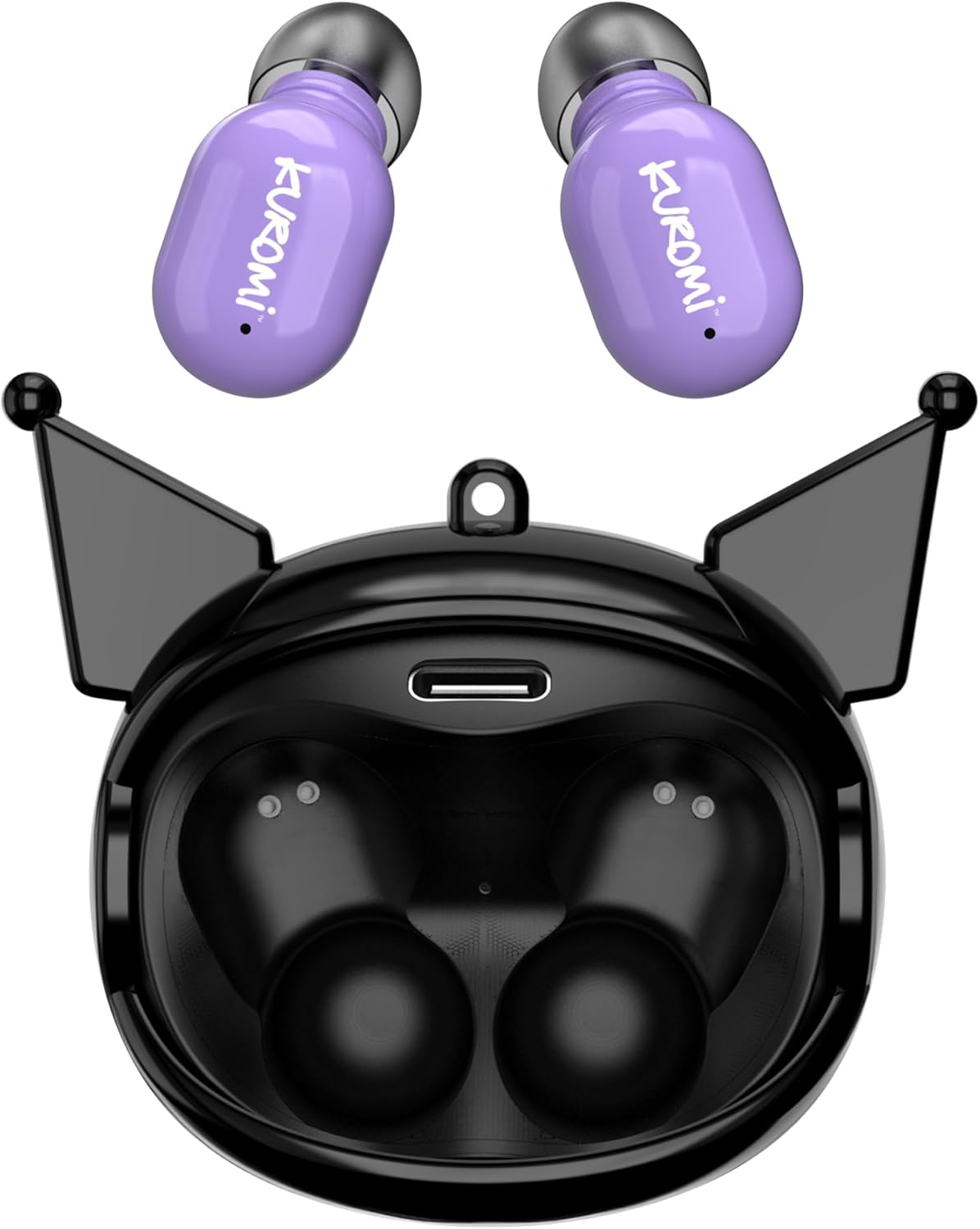
This image displays the two purple Kuromi wireless earbuds positioned above their open black charging case. The charging case features the Kuromi character design with pointed ears and an open compartment for the earbuds, revealing the charging contacts and a USB-C port.

The closed black charging case is shown, featuring Kuromi's default facial expression with a pink skull on her forehead and a neutral mouth.

The closed black charging case displays Kuromi's winking facial expression, with one eye closed and a small pink heart near her mouth.

The closed black charging case features Kuromi's heart-eyes facial expression, with two pink hearts replacing her eyes and an open-mouthed smile.
3.2 నియంత్రణలు
The earbuds feature touch controls for various functions. Specific touch gestures may vary; refer to the 'Operating Instructions' section for details.
4. సెటప్
4.1 ప్రారంభ ఛార్జింగ్
మొదటిసారి ఉపయోగించే ముందు, ఇయర్బడ్లు మరియు ఛార్జింగ్ కేసును పూర్తిగా ఛార్జ్ చేయండి.
- అందించిన USB కేబుల్ను కేస్లోని ఛార్జింగ్ పోర్ట్కు మరియు అనుకూలమైన USB పవర్ సోర్స్కి కనెక్ట్ చేయండి.
- రెండు ఇయర్బడ్లను ఛార్జింగ్ కేసులో ఉంచండి. అవి సరిగ్గా అమర్చబడ్డాయని నిర్ధారించుకోండి.
- The charging indicator lights (if present) will illuminate to show charging status. A full charge typically takes approximately 1 hour.
4.2 బ్లూటూత్ జత చేయడం
మీ ఇయర్బడ్లను పరికరానికి కనెక్ట్ చేయడానికి:
- ఇయర్బడ్లు ఛార్జ్ అయ్యాయని మరియు ఛార్జింగ్ కేస్ నుండి తీసివేయబడ్డాయని నిర్ధారించుకోండి. అవి స్వయంచాలకంగా జత చేసే మోడ్లోకి ప్రవేశించాలి.
- మీ పరికరంలో (స్మార్ట్ఫోన్, టాబ్లెట్, మొదలైనవి), బ్లూటూత్ను ప్రారంభించండి.
- కోసం వెతకండి అందుబాటులో ఉన్న బ్లూటూత్ పరికరాలు.
- Select "HKTWSRKU" or a similar name from the list of devices.
- Once connected, the earbuds will indicate successful pairing (e.g., a voice prompt or LED change).
- పరికరంలో బ్లూటూత్ ప్రారంభించబడితే, ఇయర్బడ్లను కేస్ నుండి తీసివేసినప్పుడు అవి చివరిగా జత చేసిన పరికరానికి స్వయంచాలకంగా తిరిగి కనెక్ట్ అవుతాయి.
5. ఆపరేటింగ్ సూచనలు
5.1 పవర్ ఆన్/ఆఫ్
- పవర్ ఆన్: ఛార్జింగ్ కేస్ నుండి ఇయర్బడ్లను తీసివేయండి. అవి ఆటోమేటిక్గా పవర్ ఆన్ అవుతాయి.
- పవర్ ఆఫ్: Place the earbuds back into the charging case. They will power off and begin charging automatically.
5.2 మ్యూజిక్ ప్లేబ్యాక్
Use the touch controls on the earbuds:
- ప్లే/పాజ్: ఇయర్బడ్పై ఒకసారి నొక్కండి.
- తదుపరి ట్రాక్: కుడి ఇయర్బడ్ను రెండుసార్లు నొక్కండి.
- మునుపటి ట్రాక్: ఎడమ ఇయర్బడ్ను రెండుసార్లు నొక్కండి.
- వాల్యూమ్ నియంత్రణ: వాల్యూమ్ సాధారణంగా మీ కనెక్ట్ చేయబడిన పరికరం ద్వారా నియంత్రించబడుతుంది.
5.3 కాల్ నిర్వహణ
అంతర్నిర్మిత మైక్రోఫోన్ హ్యాండ్స్-ఫ్రీ కాలింగ్ను అనుమతిస్తుంది:
- సమాధానం కాల్: Tap once on either earbud when a call comes in.
- కాల్ ముగించు: Tap once on either earbud during a call.
- కాల్ని తిరస్కరించండి: Press and hold either earbud for approximately 2 seconds.
5.4 Flip-Face Feature
The charging case features a rotating mechanism to change Kuromi's facial expression. Gently rotate the front panel of the case to cycle through the available expressions.
6. ఛార్జింగ్
6.1 ఇయర్బడ్లను ఛార్జ్ చేస్తోంది
Place the earbuds into the charging case. They will automatically begin to charge from the case's internal battery.
6.2 కేసును ఛార్జ్ చేయడం
When the charging case battery is low, connect it to a power source using the provided USB cable. The case's indicator lights will show charging status. A full charge for the case typically takes about 1 hour.
7. నిర్వహణ మరియు సంరక్షణ
- శుభ్రపరచడం: ఇయర్బడ్లు మరియు ఛార్జింగ్ కేసును శుభ్రం చేయడానికి మృదువైన, పొడి వస్త్రాన్ని ఉపయోగించండి. కఠినమైన రసాయనాలు లేదా రాపిడి పదార్థాలను ఉపయోగించవద్దు.
- నిల్వ: ఇయర్బడ్లను ఉపయోగించనప్పుడు వాటిని రక్షించడానికి మరియు ఛార్జ్లో ఉంచడానికి వాటి ఛార్జింగ్ కేసులో నిల్వ చేయండి. తీవ్రమైన ఉష్ణోగ్రతలను నివారించండి.
- నీటి బహిర్గతం: ఈ ఇయర్బడ్లు వాటర్ప్రూఫ్ కావు. నీటికి లేదా అధిక తేమకు గురికాకుండా ఉండండి.
- ప్రభావం: Handle the earbuds and case with care to prevent damage from drops or impacts.
8. ట్రబుల్షూటింగ్
If you encounter issues, refer to the following table:
| సమస్య | సాధ్యమైన పరిష్కారం |
|---|---|
| ఇయర్బడ్లు జత చేయడం లేదు | Ensure earbuds are charged. Turn off and on Bluetooth on your device. Forget the device in your Bluetooth settings and re-pair. |
| ఇయర్బడ్స్ నుండి శబ్దం లేదు | పరికర వాల్యూమ్ను తనిఖీ చేయండి. ఇయర్బడ్లు కనెక్ట్ అయ్యాయని నిర్ధారించుకోండి. వేరే ఆడియోను ప్లే చేయడానికి ప్రయత్నించండి. |
| ఇయర్బడ్లు ఛార్జ్ కావడం లేదు | Ensure earbuds are correctly seated in the case. Check if the charging cable is securely connected to the case and power source. |
| మైక్రోఫోన్ పని చేయడం లేదు | Ensure earbuds are properly connected. Check microphone permissions on your device. |
9. స్పెసిఫికేషన్లు
Key technical details for the Hello Kitty Kuromi Wireless Bluetooth Earbuds:
| ఫీచర్ | వివరాలు |
|---|---|
| మోడల్ పేరు | Wireless Earbuds (HKTWSRKU) |
| కనెక్టివిటీ టెక్నాలజీ | బ్లూటూత్ 5.3 |
| బ్యాటరీ లైఫ్ (ప్లేటైమ్) | Up to 4 Hours per charge |
| ఛార్జింగ్ సమయం | సుమారు 1 గంట |
| నియంత్రణ పద్ధతి | టచ్ |
| చెవి ప్లేస్మెంట్ | చెవిలో |
| ప్రత్యేక ఫీచర్ | Rotating Charging Case with Flip-Face Feature |
| చేర్చబడిన భాగాలు | Rotating Charging Case, USB Cable, User Manual |
| తయారీదారు | దక్షిణ టెలికాం |
| వస్తువు బరువు | 3.52 ఔన్సులు |
10. వారంటీ సమాచారం
For warranty details, please refer to the documentation included with your purchase or contact the retailer where the product was acquired. Warranty terms and conditions may vary by region and retailer.
11. మద్దతు
If you require further assistance or have questions not covered in this manual, please contact the manufacturer or your retailer's customer support. Keep your purchase receipt and product model number (HKTWSRKU) available when seeking support.