
పరిచయం
The Mondeer Electric Height Adjustable Standing Desk (Model FSDK17) is designed to provide a versatile and ergonomic workspace, allowing users to easily switch between sitting and standing positions. This manual provides detailed instructions for the assembly, operation, maintenance, and troubleshooting of your desk to ensure safe and efficient use.
భద్రతా సూచనలు
- Read all instructions carefully before assembly and initial use.
- గాయాన్ని నివారించడానికి ఆపరేషన్ సమయంలో పిల్లలు మరియు పెంపుడు జంతువులను డెస్క్ నుండి దూరంగా ఉంచండి.
- Ensure all connections, including power cables and frame components, are securely fastened before operating the desk.
- Do not overload the desk. The maximum load capacity is 80 kg (176 lbs).
- ద్రవాలను నేరుగా కంట్రోల్ ప్యానెల్పై లేదా ఎలక్ట్రికల్ భాగాల దగ్గర ఉంచడం మానుకోండి.
- ఏదైనా నిర్వహణ లేదా శుభ్రపరిచే ముందు డెస్క్ను పవర్ అవుట్లెట్ నుండి అన్ప్లగ్ చేయండి.
- Operate the desk only on a level and stable surface.
- Do not attempt to modify or disassemble the motor or control system. Contact customer support for service.
ప్యాకేజీ విషయాలు
దయచేసి అసెంబ్లీని ప్రారంభించే ముందు అన్ని భాగాలు ఉన్నాయని ధృవీకరించండి. ఏవైనా భాగాలు తప్పిపోయినా లేదా దెబ్బతిన్నా, కస్టమర్ సేవను సంప్రదించండి.
- Desk Tabletop (2 sections)
- Desk Frame (Legs, Crossbar, Feet)
- ఎలక్ట్రిక్ మోటార్ మరియు కంట్రోల్ బాక్స్
- Control Panel with Memory Functions
- పవర్ అడాప్టర్ మరియు కేబుల్
- Assembly Hardware (Screws, Bolts, Washers)
- అసెంబ్లీ సాధనం (అలెన్ రెంచ్)
- Cable Management Grommet
- హెడ్ఫోన్ హుక్
- కప్ హోల్డర్
- వినియోగదారు మాన్యువల్
సెటప్ మరియు అసెంబ్లీ
Assembly is designed to be straightforward, with detailed instructions and a dedicated tool included. It is recommended to assemble the desk in the area where it will be used.
- భాగాలను అన్ప్యాక్ చేయండి: ప్యాకేజింగ్ నుండి అన్ని భాగాలను జాగ్రత్తగా తీసివేసి, గీతలు పడకుండా ఉండటానికి వాటిని శుభ్రమైన, మృదువైన ఉపరితలంపై వేయండి.
- డెస్క్ ఫ్రేమ్ను అసెంబుల్ చేయండి: Attach the desk legs to the crossbar using the provided hardware. Ensure all screws are tightened securely.
- టేబుల్టాప్ను అటాచ్ చేయండి: Place the two tabletop sections onto the assembled frame. Align the pre-drilled holes and secure the tabletop to the frame using the appropriate screws.
- కంట్రోల్ ప్యానెల్ మరియు మోటారును ఇన్స్టాల్ చేయండి: Mount the control panel to the underside of the tabletop in the designated location. Connect the motor and control panel cables to the control box, ensuring a snug fit.
- పవర్ కనెక్ట్ చేయండి: Plug the power adapter into the control box, then plug the power cable into a standard electrical outlet.
- ఉపకరణాలను అటాచ్ చేయండి: Install the cable management grommet, headphone hook, and cup holder as desired.

Image: The Mondeer Electric Standing Desk assembled and ready for use in a home office setting.

చిత్రం: వివరణాత్మకం view of integrated features: a cable management grommet, a convenient headphone hook, a cup holder, and a stable foot pad.
ఆపరేటింగ్ సూచనలు
Your Mondeer standing desk features an intuitive control panel for easy height adjustment and memory presets.
ఎత్తు సర్దుబాటు
- డెస్క్ను పైకి లేపండి: నొక్కండి మరియు పట్టుకోండి పైకి బాణం (^) డెస్క్ను మీకు కావలసిన ఎత్తుకు పెంచడానికి బటన్ను నొక్కండి.
- దిగువ డెస్క్: నొక్కండి మరియు పట్టుకోండి Down Arrow (v) డెస్క్ను మీకు కావలసిన సిట్టింగ్ ఎత్తుకు తగ్గించడానికి బటన్.
- The desk height can be adjusted smoothly between 72 cm and 114 cm.

Image: Visual representation of the desk's adjustable height range, from a minimum of 72 cm to a maximum of 114 cm.
మెమరీ ప్రీసెట్లు
The control panel allows you to save up to three preferred heights for quick adjustments.
- కావలసిన ఎత్తుకు సర్దుబాటు చేయండి: Use the Up (^) or Down (v) arrows to move the desk to the height you wish to save.
- Activate Memory Mode: నొక్కండి 'ఎస్' button. The LED display will show 'S' or flash.
- ప్రీసెట్ను సేవ్ చేయండి: 5 సెకన్లలోపు, మెమరీ బటన్లలో ఒకదాన్ని నొక్కండి (1, 2, లేదా 3). The display will show the corresponding number, indicating the height is saved.
- రీకాల్ ప్రీసెట్: To move the desk to a saved height, simply press the corresponding memory button (1, 2, లేదా 3). The desk will automatically move to that height.

Image: The control panel, highlighting the LED display, height adjustment arrows, and memory preset buttons for customized desk positions.
నిశ్శబ్ద ఆపరేషన్
The desk operates with a motor that produces less than 50 decibels, ensuring a quiet adjustment process that minimizes disruption to your work or study environment.
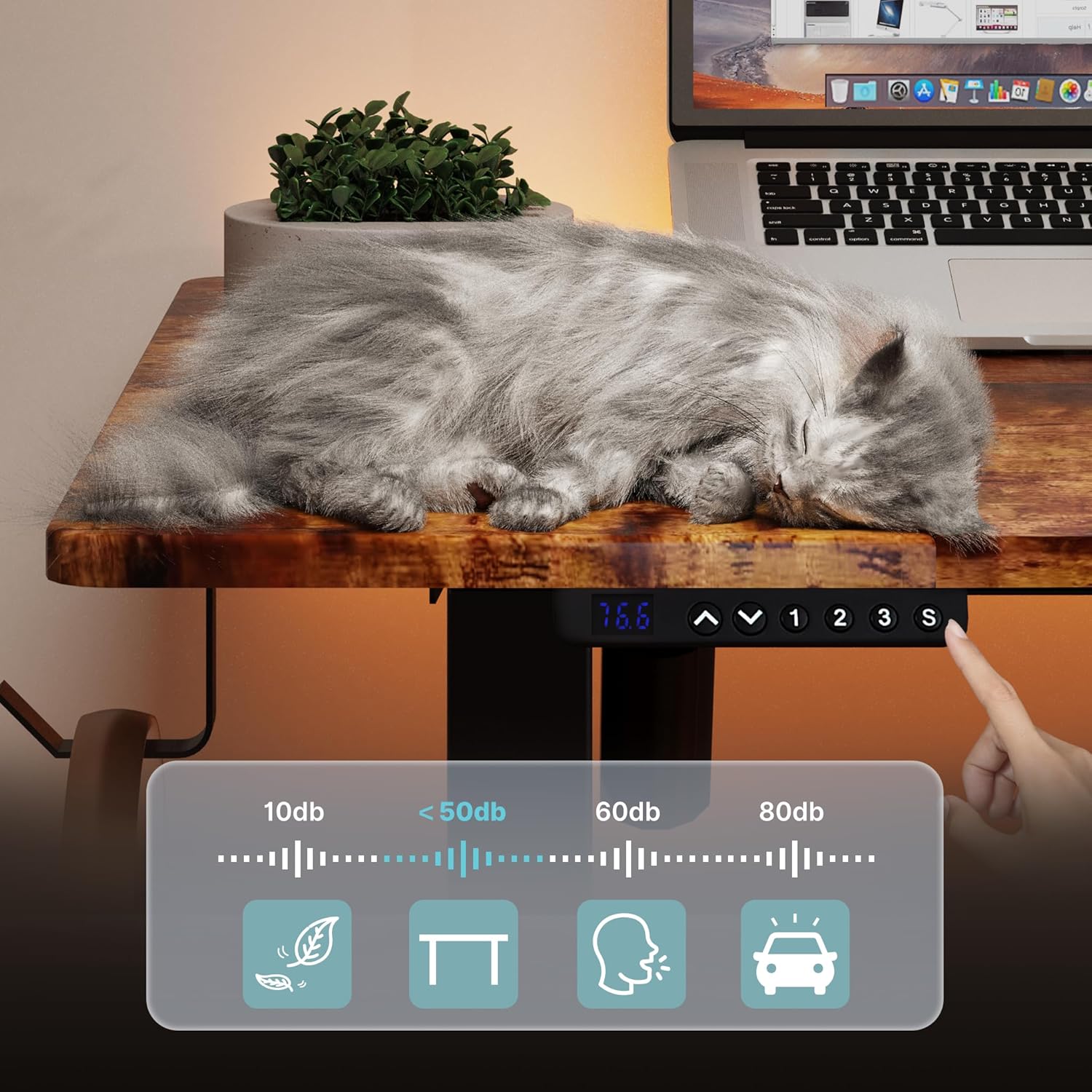
Image: A visual representation of the desk's quiet operation, demonstrating minimal noise during height adjustments.
నిర్వహణ
Regular maintenance helps ensure the longevity and optimal performance of your desk.
- శుభ్రపరచడం: డెస్క్ ఉపరితలాలను మృదువైన, డి-ప్యాక్తో తుడవండి.amp cloth. Avoid using abrasive cleaners, harsh chemicals, or solvents that could damage the finish.
- కనెక్షన్ తనిఖీలు: అన్ని స్క్రూలు మరియు కనెక్షన్లు బిగుతుగా ఉన్నాయని నిర్ధారించుకోవడానికి కాలానుగుణంగా వాటిని తనిఖీ చేయండి. అవసరమైతే తిరిగి బిగించండి.
- కేబుల్ నిర్వహణ: Ensure power and control cables are not pinched or tangled, which could affect operation or cause damage.
- అడ్డంకి తొలగింపు: Keep the area around the desk clear of obstructions that could impede its movement.
ట్రబుల్షూటింగ్
If you encounter any issues with your Mondeer standing desk, refer to the following common solutions:
- డెస్క్ కదలడం లేదు:
- పవర్ కేబుల్ డెస్క్ మరియు వాల్ అవుట్లెట్ రెండింటిలోనూ సురక్షితంగా ప్లగ్ చేయబడిందో లేదో తనిఖీ చేయండి.
- Ensure all cables connecting the motor, control box, and control panel are properly connected.
- డెస్క్ను 10 సెకన్ల పాటు అన్ప్లగ్ చేసి, ఆపై సిస్టమ్ను రీసెట్ చేయడానికి దాన్ని తిరిగి ప్లగ్ చేయడానికి ప్రయత్నించండి.
- Uneven Movement or Desk Tilting:
- డెస్క్ ఒక సమతల ఉపరితలంపై ఉంచబడిందని నిర్ధారించుకోండి.
- డెస్క్ కాళ్ల కింద లేదా చుట్టూ ఏవైనా అడ్డంకులు ఉన్నాయా అని తనిఖీ చేయండి.
- Ensure all frame screws are tightened evenly.
- ప్రదర్శనలో లోపం కోడ్లు:
- If an error code appears, try resetting the desk by unplugging it for 10 seconds.
- Consult the full product manual (if provided separately) for specific error code meanings.
- సమస్య కొనసాగితే, కస్టమర్ సపోర్ట్ని సంప్రదించండి.
- Desk Stops Mid-Movement:
- The desk may have reached its maximum load capacity. Remove some weight and try again.
- The motor may have overheated from continuous use. Allow it to cool down for 20 minutes before attempting to operate again.
స్పెసిఫికేషన్లు
| బ్రాండ్ | మొండిర్ |
| మోడల్ సంఖ్య | FSDK17 |
| రంగు | గ్రామీణ గోధుమ మరియు నలుపు |
| కొలతలు (L x W x H) | 120 x 60 x 72-114 సెం.మీ. |
| బరువు | 29.19 కిలోలు (64.35 పౌండ్లు) |
| మెటీరియల్ | Particle Board and Steel |
| ఫీచర్లు | Ergonomic, Height Adjustable, Electric, Memory Presets |
| గరిష్ట లోడ్ సామర్థ్యం | 80 కిలోలు (176 పౌండ్లు) |
వారంటీ మరియు మద్దతు
For warranty information, technical assistance, or to inquire about replacement parts, please contact Mondeer customer service through the retailer where the product was purchased or visit the official Mondeer website. Please have your model number (FSDK17) and purchase date available when contacting support.