
1. పరిచయం
This manual provides comprehensive instructions for the safe and correct installation, operation, and maintenance of your Generic Long Arm Full Motion TV Wall Mount. Please read all instructions carefully before installation to ensure proper setup and to prevent damage or injury. Keep this manual for future reference.
2. భద్రతా సమాచారం
- Ensure the mounting surface can safely support the combined weight of the mount and your television.
- Do not exceed the maximum load capacity of 45kg (99 lbs).
- This mount is designed for TVs between 32 and 65 inches. Verify your TV's VESA pattern is compatible (up to 400x400mm).
- Always use appropriate safety equipment during installation, including eye protection.
- ఇన్స్టాలేషన్ ప్రక్రియలోని ఏదైనా భాగం గురించి మీకు ఖచ్చితంగా తెలియకపోతే, అర్హత కలిగిన ప్రొఫెషనల్ని సంప్రదించండి.
- సంస్థాపన సమయంలో పిల్లలు మరియు పెంపుడు జంతువులను పని ప్రదేశం నుండి దూరంగా ఉంచండి.
- స్క్రూలను ఎక్కువగా బిగించవద్దు, ఎందుకంటే ఇది దెబ్బతినవచ్చు.
3. ప్యాకేజీ విషయాలు
Verify that all components are present and undamaged before beginning installation. Refer to the image below for a visual representation of the included hardware.

మూర్తి 3.1: Included Hardware Components. This image displays the assortment of screws, washers, wall anchors, and a small wrench provided for installation.
- వాల్ ప్లేట్ అసెంబ్లీ
- టీవీ బ్రాకెట్ ఆర్మ్స్ (2)
- Various Wall Mounting Hardware (Lag bolts, wall anchors)
- Various TV Mounting Hardware (Screws, washers, spacers)
- రెంచ్
4. స్పెసిఫికేషన్లు
| మెటీరియల్ | SPCC Reinforced Steel Plate |
| టీవీ సైజు అనుకూలత | 32 - 65 అంగుళాలు |
| గరిష్ట లోడ్ సామర్థ్యం | 45 కిలోలు (99 పౌండ్లు) |
| VESA అనుకూలత | 400x400mm వరకు |
| టిల్ట్ సర్దుబాటు | -5° (up) / +15° (down) |
| స్వివెల్ సర్దుబాటు | ±45° (ఎడమ/కుడి) |
| గోడ నుండి దూరం | 70mm (retracted) - 466mm (extended) |

మూర్తి 4.1: Mount Dimensions. This diagram illustrates the key measurements of the mount, such as the VESA plate dimensions (445mm width, 420mm height), arm extension (70-466mm), and wall plate size (230mm width, 405mm height).
5. సెటప్ మరియు ఇన్స్టాలేషన్
5.1 ప్రీ-ఇన్స్టాలేషన్ తనిఖీలు
- గోడ రకం: Determine if your wall is solid concrete, brick, or wood stud. Different wall types require specific anchors and drilling techniques.
- అవసరమైన సాధనాలు: Gather necessary tools such as a drill, stud finder, level, tape measure, pencil, and screwdriver.
- టీవీ బరువు మరియు VESA: Confirm your TV's weight and VESA mounting pattern are within the mount's specifications.
5.2 టీవీ బ్రాకెట్లను టీవీకి అటాచ్ చేయడం
- స్క్రీన్ దెబ్బతినకుండా ఉండటానికి మీ టీవీని మృదువైన, శుభ్రమైన ఉపరితలంపై ముఖం కిందకి జాగ్రత్తగా ఉంచండి.
- మీ టీవీ వెనుక ఉన్న VESA మౌంటు రంధ్రాలను గుర్తించండి.
- Select the appropriate screws and washers from the provided hardware that fit your TV's mounting holes. Use spacers if the TV back is uneven or if screws are too long.
- Attach the two TV bracket arms to the back of your TV, ensuring they are level and securely fastened. Do not overtighten.
5.3 వాల్ ప్లేట్ మౌంట్ చేయడం
- Determine the desired height for your TV. Mark the center of the desired location on the wall.
- Hold the wall plate against the wall at the marked location and use a level to ensure it is perfectly horizontal.
- Mark the drilling points through the holes on the wall plate.
- Drill pilot holes according to your wall type and the recommended drill bit size for the provided wall anchors/lag bolts.
- డ్రిల్ చేసిన రంధ్రాలలోకి వాల్ యాంకర్లను (వర్తిస్తే) చొప్పించండి.
- Secure the wall plate to the wall using the lag bolts and washers. Tighten firmly but do not overtighten.
5.4 టీవీని వాల్ ప్లేట్కు అమర్చడం
- సహాయంతో, జతచేయబడిన బ్రాకెట్లతో టీవీని జాగ్రత్తగా ఎత్తండి.
- Hook the TV brackets onto the wall plate. Ensure the TV is securely seated on the wall plate.
- Engage any safety locking mechanisms on the TV brackets to prevent accidental dislodgement.

మూర్తి 5.1: Mount with TV Installed. This image illustrates the TV mount fully extended from the wall with a television attached, showcasing its full motion capability.

మూర్తి 5.2: VESA Plate and Swivel Range. This top-down view highlights the adjustable VESA plate, demonstrating its ability to accommodate different TV sizes and its horizontal swivel capability.
6. ఆపరేటింగ్ సూచనలు
6.1 Adjusting Extension and Retraction
Gently pull or push the TV screen to extend or retract the mount. The mount allows for a distance from the wall ranging from 70mm (retracted) to 466mm (extended).
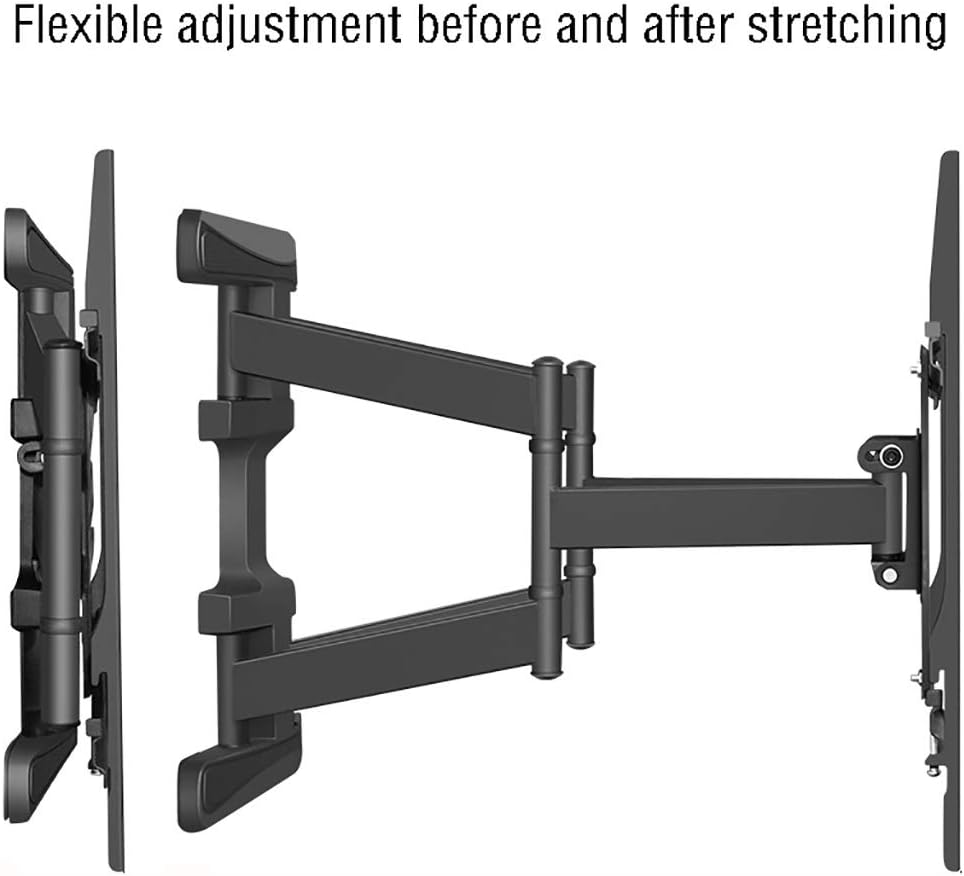
మూర్తి 6.1: Flexible Extension Adjustment. This side view demonstrates the mount's ability to extend and retract, providing flexible positioning for your television.
6.2 టిల్ట్ యాంగిల్ సర్దుబాటు చేయడం
The mount allows for a tilt adjustment of -5° (upward) to +15° (downward). Loosen the tilt adjustment knobs or bolts on the TV brackets, adjust the screen to the desired angle, and then securely tighten the knobs/bolts to fix the position.

మూర్తి 6.2: Pitch Angle Adjustment. This image illustrates the vertical tilt capability of the mount, allowing adjustment for optimal viewing angles and glare reduction.
6.3 Adjusting Swivel Angle
The mount can swivel ±45° left or right. Gently push the TV screen to rotate it horizontally to your preferred viewing కోణం.
6.4 కేబుల్ నిర్వహణ
Utilize the integrated cable management clips or straps on the mount arms to organize and conceal cables, ensuring a tidy appearance and preventing cable damage.

మూర్తి 6.3: Cable Management. This image demonstrates how cables can be effectively routed and secured along the mount's arms for a clean and organized setup.
7. నిర్వహణ
- శుభ్రపరచడం: మౌంట్ను మృదువైన, పొడి గుడ్డతో తుడవండి. రాపిడి క్లీనర్లు లేదా ద్రావకాలను ఉపయోగించవద్దు.
- కాలానుగుణ తనిఖీలు: అన్ని స్క్రూలు మరియు బోల్ట్లు బిగుతుగా మరియు సురక్షితంగా ఉన్నాయని నిర్ధారించుకోవడానికి కాలానుగుణంగా వాటిని తనిఖీ చేయండి. అవసరమైతే తిరిగి బిగించండి.
- సరళత: No lubrication is typically required for this type of mount. If movement becomes stiff, ensure no debris is obstructing the joints.
8. ట్రబుల్షూటింగ్
- టీవీ స్థాయి కాదు: Check the wall plate and TV brackets with a level. Adjust the wall plate if possible, or use the fine-tuning adjustments on the TV brackets if available.
- మౌంట్ వదులుగా అనిపిస్తుంది: Recheck all wall mounting bolts and TV bracket screws. Ensure they are securely tightened. Do not exceed torque specifications.
- సర్దుబాటు చేయడంలో ఇబ్బంది: Ensure no cables are snagged or obstructing movement. Check for any debris in the joints.
- Mount cannot hold TV weight: Verify your TV's weight is within the 45kg limit. If it exceeds this, the mount is not suitable.
9. వారంటీ సమాచారం
This product is covered by a standard manufacturer's warranty against defects in materials and workmanship. Please refer to the warranty card included with your purchase or contact the retailer for specific warranty terms and conditions. Keep your proof of purchase for warranty claims.
10. కస్టమర్ మద్దతు
For technical assistance, missing parts, or any questions regarding the installation or operation of your TV mount, please contact the retailer or manufacturer's customer support. Refer to your purchase documentation for contact details.