
1. ముఖ్యమైన భద్రతా సూచనలు
Please read these instructions carefully before using the Audizio Canzo DAB+ Internet Radio. Keep this manual for future reference.
- అగ్ని లేదా విద్యుత్ షాక్ను నివారించడానికి పరికరాన్ని వర్షం లేదా తేమకు గురిచేయవద్దు.
- సి ని తెరవవద్దుasing. లోపల వినియోగదారు-సేవ చేయగల భాగాలు లేవు. అన్ని సర్వీసింగ్లను అర్హత కలిగిన సిబ్బందికి సూచించండి.
- పరికరంతో సరఫరా చేయబడిన పవర్ అడాప్టర్ను మాత్రమే ఉపయోగించండి.
- యూనిట్ చుట్టూ సరైన వెంటిలేషన్ ఉండేలా చూసుకోండి. వెంటిలేషన్ ఓపెనింగ్లను బ్లాక్ చేయవద్దు.
- యూనిట్ను ఉష్ణ వనరుల దగ్గర లేదా ప్రత్యక్ష సూర్యకాంతిలో ఉంచకుండా ఉండండి.
- యూనిట్ను పొడి, మృదువైన గుడ్డతో మాత్రమే శుభ్రం చేయండి. లిక్విడ్ క్లీనర్లను ఉపయోగించవద్దు.
2. ఉత్పత్తి ముగిసిందిview
The Audizio Canzo is a versatile DAB+ Internet Radio designed for high-quality audio reception and playback. It features multiple connectivity options including Wi-Fi, Bluetooth 5.3, AUX, and USB, along with a remote control for convenient operation. The elegant wooden finish and clear display make it suitable for various home environments.
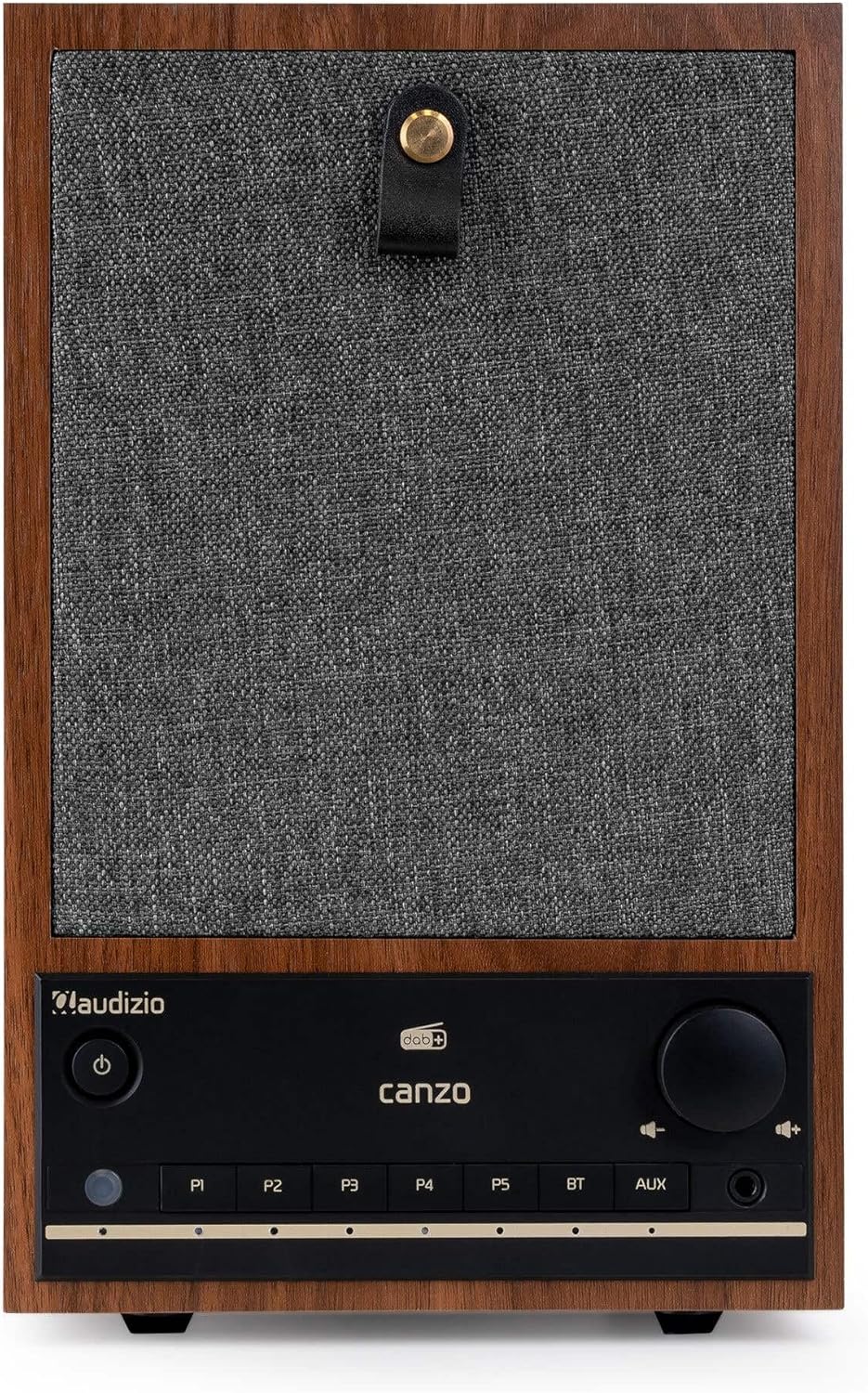
మూర్తి 2.1: ముందు view of the Audizio Canzo DAB+ Internet Radio in walnut finish.

మూర్తి 2.2: ముందు view with speaker grille removed, highlighting the speaker, display, and control panel.
3. పెట్టెలో ఏముంది
పెట్టెను జాగ్రత్తగా విప్పి, అన్ని వస్తువులు ఉన్నాయని నిర్ధారించుకోండి:
- Audizio Canzo DAB+ Internet Radio
- పవర్ అడాప్టర్
- రిమోట్ కంట్రోల్
- త్వరిత ప్రారంభ గైడ్
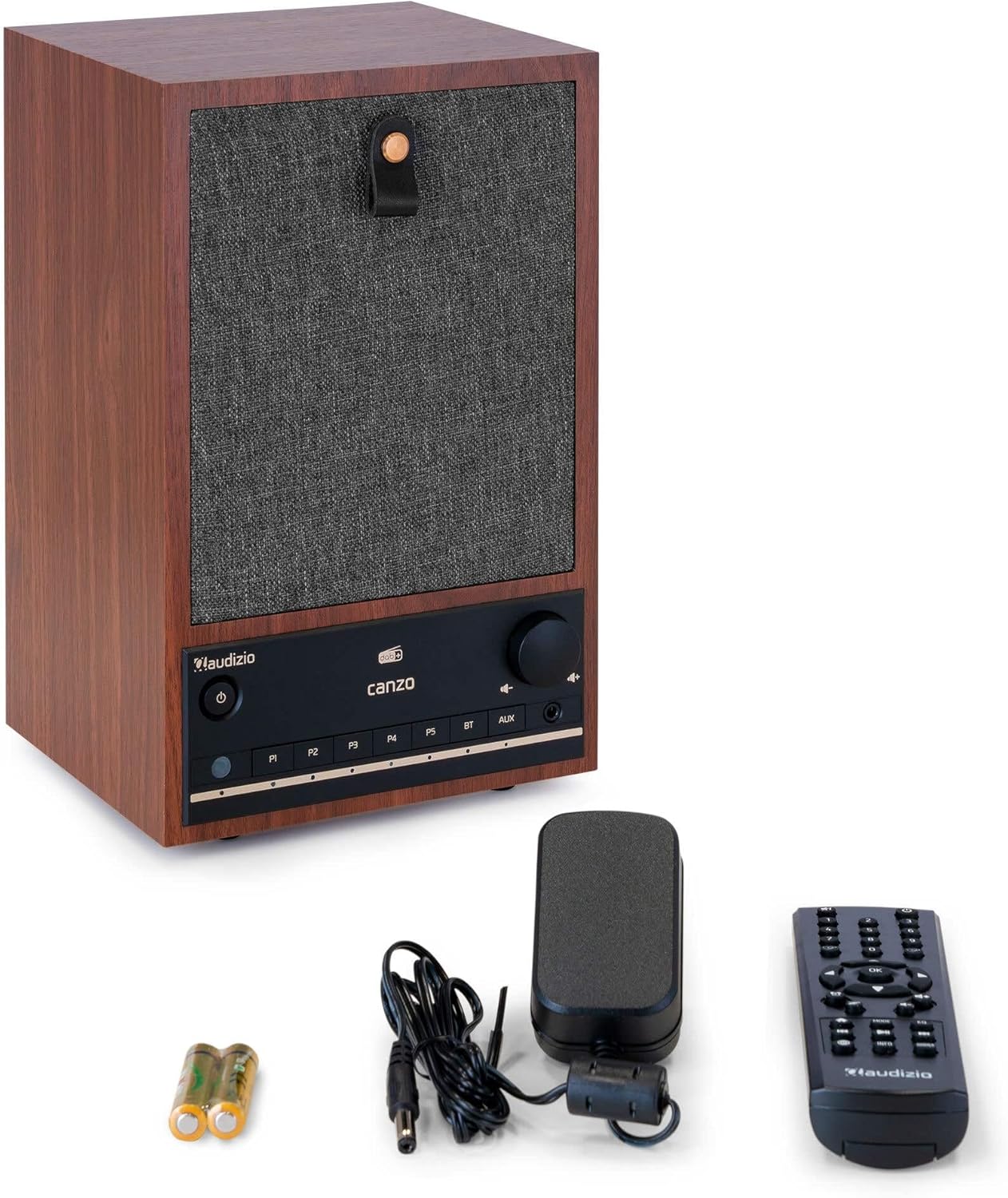
Figure 3.1: Audizio Canzo radio with its accessories.
4. సెటప్
4.1 కనెక్ట్ పవర్
- Insert the DC plug of the power adapter into the DC IN port on the back of the radio.
- Plug the power adapter into a standard wall outlet (220V).
- ఫ్లిప్ ది ఆన్/ఆఫ్ switch on the back of the unit to the ON స్థానం.
4.2 యాంటెన్నా కనెక్షన్
For optimal DAB+ and FM reception, extend the telescopic antenna located on the back of the unit. Adjust its position for the best signal.

Figure 4.1: Rear panel with power input, audio ports, USB, LAN, and antenna.
4.3 ప్రారంభ పవర్ ఆన్ మరియు నెట్వర్క్ సెటప్
- నొక్కండి శక్తి button on the front panel or remote control to turn on the radio.
- The display will show the Audizio logo and then guide you through the initial setup wizard.
- మీకు ఇష్టమైన భాషను ఎంచుకోండి.
- The radio will prompt you to connect to a network. Choose Wi-Fi or LAN.
- Wi-Fi కోసం: Select your Wi-Fi network from the list and enter the password using the navigation buttons and OK బటన్.
- For LAN: మీ రౌటర్ నుండి ఈథర్నెట్ కేబుల్ను కనెక్ట్ చేయండి LAN port on the back of the radio. The connection should be established automatically.
- Once connected, the radio will update the time and date automatically.
5. ఆపరేటింగ్ సూచనలు
5.1 ప్రాథమిక నియంత్రణలు
The front panel features a power button, preset buttons (P1-P5), Bluetooth (BT) and AUX input buttons, a volume knob, and navigation controls. The remote control provides full access to all functions.
5.2 మోడ్ ఎంపిక
నొక్కండి మోడ్ button on the radio or remote control to cycle through available modes: Internet Radio, DAB+, FM, Bluetooth, AUX, and USB Playback.
5.3 ఇంటర్నెట్ రేడియో
- ఎంచుకోండి ఇంటర్నెట్ రేడియో మోడ్.
- Use the navigation buttons to browse stations by location, genre, or search.
- నొక్కండి OK స్టేషన్ ఎంచుకోవడానికి.
- స్టేషన్ను ప్రీసెట్గా సేవ్ చేయడానికి, ఒకదాన్ని నొక్కి పట్టుకోండి P1-P5 buttons until the display confirms.
5.4 DAB+ రేడియో
- ఎంచుకోండి DAB+ మోడ్.
- The radio will automatically scan for available DAB+ stations.
- Use the navigation buttons to scroll through the list of found stations.
- నొక్కండి OK స్టేషన్ ఎంచుకోవడానికి.
- స్టేషన్ను ప్రీసెట్గా సేవ్ చేయడానికి, ఒకదాన్ని నొక్కి పట్టుకోండి P1-P5 బటన్లు.
5.5 FM రేడియో
- ఎంచుకోండి FM మోడ్.
- నొక్కండి మరియు పట్టుకోండి స్కాన్ చేయండి button (usually on the remote or via menu) to auto-scan for FM stations.
- Use the navigation buttons to tune manually or select from scanned stations.
- స్టేషన్ను ప్రీసెట్గా సేవ్ చేయడానికి, ఒకదాన్ని నొక్కి పట్టుకోండి P1-P5 బటన్లు.
5.6 బ్లూటూత్ ప్లేబ్యాక్
- ఎంచుకోండి బ్లూటూత్ mode. The radio will enter pairing mode, indicated on the display.
- మీ స్మార్ట్ఫోన్ లేదా టాబ్లెట్లో, బ్లూటూత్ని ప్రారంభించండి మరియు అందుబాటులో ఉన్న పరికరాల కోసం శోధించండి.
- Select "Audizio Canzo" from the list to pair.
- Once paired, you can play audio from your device through the radio.
5.7 AUX ఇన్పుట్
- బాహ్య ఆడియో పరికరాన్ని (ఉదా. MP3 ప్లేయర్) కనెక్ట్ చేయండి AUX IN port on the back of the radio using a 3.5mm audio cable.
- ఎంచుకోండి AUX మోడ్.
- కనెక్ట్ చేయబడిన పరికరం నుండి ఆడియో ఇప్పుడు రేడియో ద్వారా ప్లే అవుతుంది.
5.8 USB ప్లేబ్యాక్
- ఆడియోను కలిగి ఉన్న USB ఫ్లాష్ డ్రైవ్ను చొప్పించండి fileలోకి లు USB ప్లేబ్యాక్ port on the back of the radio.
- ఎంచుకోండి USB మోడ్.
- Use the navigation buttons to browse and select audio fileప్లేబ్యాక్ కోసం లు.
5.9 Alarm Clock and Sleep Timer
- అలారం: Access the Alarm settings via the menu. Set up to two alarms with desired time, source (buzzer, radio), and volume.
- స్లీప్ టైమర్: Access the Sleep Timer settings via the menu. Set a duration (e.g., 15, 30, 60 minutes) after which the radio will automatically turn off.
- ఆగే: అలారం మోగినప్పుడు, నొక్కండి తాత్కాలికంగా ఆపివేయండి button on the remote or radio to temporarily silence it.
6. నిర్వహణ
6.1 శుభ్రపరచడం
To clean the radio, use a soft, dry, lint-free cloth. Do not use abrasive cleaners, waxes, or solvents as they may damage the finish or internal components.
6.2 నిల్వ
యూనిట్ను ఎక్కువ కాలం నిల్వ ఉంచినట్లయితే, దానిని పవర్ అవుట్లెట్ నుండి డిస్కనెక్ట్ చేసి, ప్రత్యక్ష సూర్యకాంతి మరియు తీవ్రమైన ఉష్ణోగ్రతలు లేకుండా చల్లని, పొడి ప్రదేశంలో నిల్వ చేయండి.
7. ట్రబుల్షూటింగ్
| సమస్య | సాధ్యమైన కారణం | పరిష్కారం |
|---|---|---|
| శక్తి లేదు | Power adapter not connected; ON/OFF switch is OFF. | Ensure power adapter is securely connected and ON/OFF switch is ON. |
| శబ్దం లేదు | Volume too low; incorrect source selected; headphones connected. | Increase volume; select correct input mode; disconnect headphones. |
| Wi-Fiకి కనెక్ట్ చేయడం సాధ్యపడదు | పాస్వర్డ్ తప్పు; రౌటర్ చాలా దూరంగా ఉంది; నెట్వర్క్ సమస్య. | Wi-Fi పాస్వర్డ్ను ధృవీకరించండి; రేడియోను రౌటర్కు దగ్గరగా తరలించండి; రౌటర్ను పునఃప్రారంభించండి. |
| DAB+/FM రిసెప్షన్ సరిగా లేదు | యాంటెన్నా విస్తరించబడలేదు; బలహీనమైన సిగ్నల్ ప్రాంతం. | Fully extend and adjust the telescopic antenna; try repositioning the radio. |
| రిమోట్ కంట్రోల్ పనిచేయడం లేదు | Batteries depleted; obstruction between remote and radio. | Replace remote control batteries; ensure clear line of sight to the radio's sensor. |
8. స్పెసిఫికేషన్లు
| ఫీచర్ | స్పెసిఫికేషన్ |
|---|---|
| మోడల్ సంఖ్య | Canzo |
| ఉత్పత్తి కొలతలు | 22.5 x 20.5 x 34 సెం.మీ |
| వస్తువు బరువు | 2.9 కిలోలు |
| రంగు | వాల్నట్ |
| స్క్రీన్ పరిమాణం | 2.4 అంగుళాలు |
| కనెక్టివిటీ టెక్నాలజీ | Aux, Bluetooth, Wi-Fi, LAN |
| బ్లూటూత్ వెర్షన్ | 5.3 |
| మద్దతు ఉన్న రేడియో బ్యాండ్లు | DAB+, FM, ఇంటర్నెట్ రేడియో |
| శక్తి మూలం | Corded Electric (220 Volt) |
| ప్రత్యేక లక్షణాలు | Integrated Clock, Sleep Timer, Alarm, Remote Control, Preset Stations |
| అనుకూల పరికరాలు | Smartphone, Tablet, Headphones, MP3 Player, USB Storage Device |
9. వారంటీ మరియు మద్దతు
For warranty information and technical support, please refer to the warranty card included with your product or contact your retailer. Keep your proof of purchase for any warranty claims.