
పరిచయం
Thank you for choosing the Ledwood ACCESS130 Portable HiFi Speaker. This manual provides essential information for the safe and efficient operation of your device. The ACCESS130 is a versatile portable speaker featuring dynamic RGB LED effects, Bluetooth 5.3 connectivity, USB input, and a karaoke function with an included wireless microphone. It is designed to deliver a powerful audio experience for various occasions.
భద్రతా సమాచారం
- ఉత్పత్తిని ఉపయోగించే ముందు అన్ని సూచనలను జాగ్రత్తగా చదవండి.
- స్పీకర్ను నీటికి లేదా అధిక తేమకు గురిచేయవద్దు. ఈ ఉత్పత్తి నీటి నిరోధకం కాదు.
- స్పీకర్ను వేడి వనరులు, ప్రత్యక్ష సూర్యకాంతి మరియు మండే పదార్థాల నుండి దూరంగా ఉంచండి.
- పరికరాన్ని విడదీయడానికి, మరమ్మతు చేయడానికి లేదా సవరించడానికి ప్రయత్నించవద్దు. అన్ని సర్వీసింగ్లను అర్హత కలిగిన సిబ్బందికి సూచించండి.
- అందించిన USB-C ఛార్జింగ్ కేబుల్ను మాత్రమే ఉపయోగించండి.
- వినికిడి దెబ్బతినకుండా నిరోధించడానికి ఎక్కువ కాలం పాటు అధిక వాల్యూమ్ స్థాయిలలో వినడం మానుకోండి.
- పిల్లలకు దూరంగా ఉంచండి.
ప్యాకేజీ విషయాలు
దయచేసి ఈ క్రింది అంశాల కోసం ప్యాకేజీని తనిఖీ చేయండి:
- Ledwood ACCESS130 Portable HiFi Speaker
- USB-C ఛార్జింగ్ కేబుల్
- వైర్లెస్ మైక్రోఫోన్
- పట్టీని తీసుకువెళుతోంది
ఉత్పత్తి ముగిసిందిview
Familiarize yourself with the components and controls of your Ledwood ACCESS130 speaker.
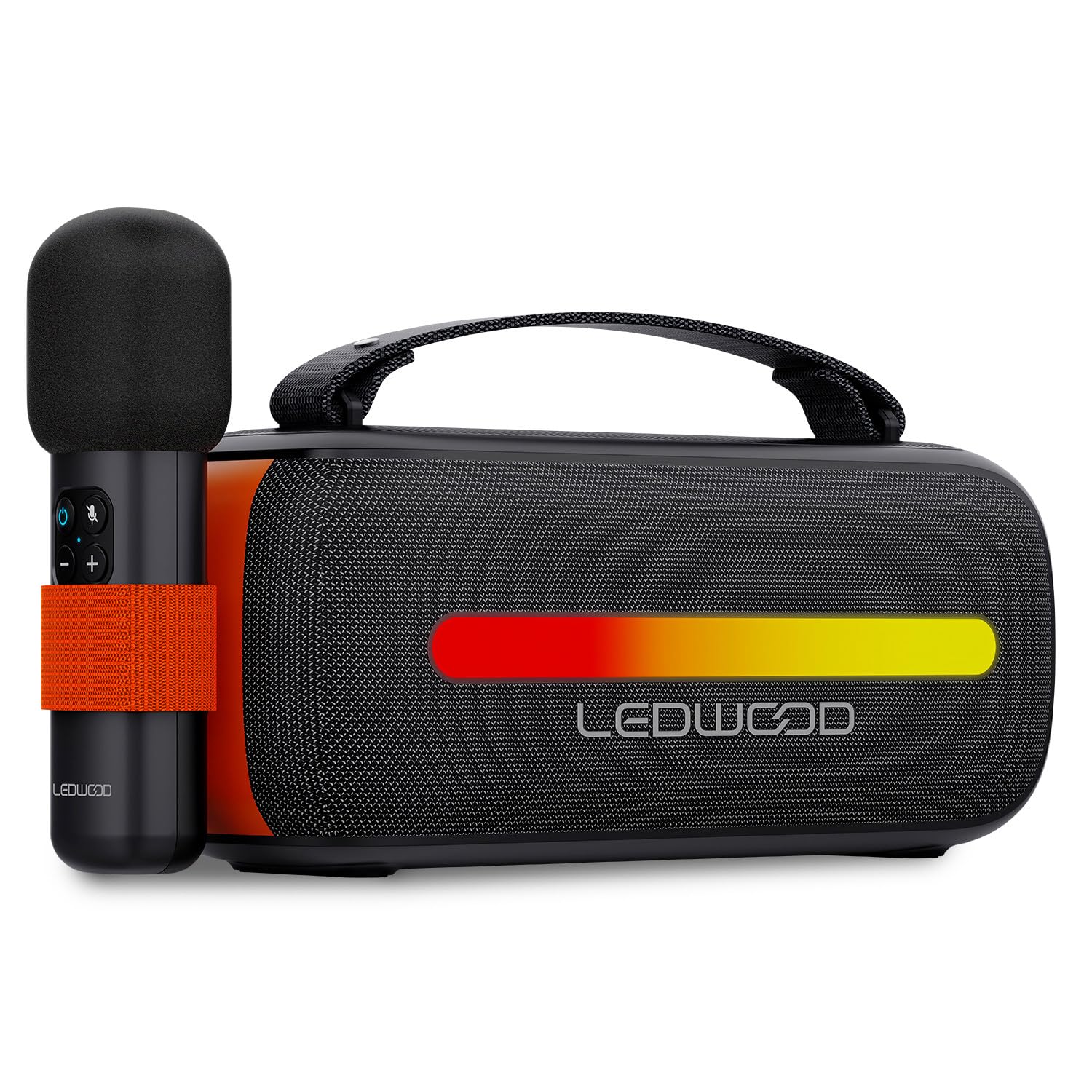
Image: The Ledwood ACCESS130 portable speaker shown with its wireless microphone attached to the side. The speaker features a black mesh grille and an illuminated LED strip on the front.
నియంత్రణలు మరియు పోర్టులు

చిత్రం: పై నుండి క్రిందికి view of the Ledwood ACCESS130 speaker, highlighting the control panel with buttons for power, volume, mode, and LED effects. Icons for LED colors, microphone, karaoke function, USB-C, and wireless connection are also visible.
- పవర్ బటన్: స్పీకర్ను ఆన్/ఆఫ్ చేయడానికి నొక్కి పట్టుకోండి.
- మోడ్ బటన్ (M): Press to switch between Bluetooth, USB, and other input modes.
- వాల్యూమ్ అప్ (+): వాల్యూమ్ పెంచండి.
- వాల్యూమ్ డౌన్ (-): వాల్యూమ్ తగ్గించండి.
- ప్లే/పాజ్ బటన్: ఆడియో ప్లేబ్యాక్ను ప్లే చేయండి లేదా పాజ్ చేయండి.
- LED Effect Button: Cycle through different LED lighting modes or turn them off.
- USB-C పోర్ట్: స్పీకర్ను ఛార్జ్ చేసినందుకు.
- USB-A పోర్ట్: For USB audio playback.
సెటప్
1. స్పీకర్ను ఛార్జింగ్
- అందించిన USB-C ఛార్జింగ్ కేబుల్ను స్పీకర్ యొక్క USB-C పోర్ట్కి కనెక్ట్ చేయండి.
- కేబుల్ యొక్క మరొక చివరను అనుకూలమైన USB పవర్ అడాప్టర్ (చేర్చబడలేదు) లేదా కంప్యూటర్ యొక్క USB పోర్ట్కు కనెక్ట్ చేయండి.
- The LED indicator will show charging status. A full charge takes approximately [Charging Time - not specified in input, omit if not available].
2. పవర్ చేయడం ఆన్/ఆఫ్
- To power on, press and hold the Power button until the speaker activates.
- పవర్ ఆఫ్ చేయడానికి, స్పీకర్ షట్ డౌన్ అయ్యే వరకు పవర్ బటన్ను మళ్లీ నొక్కి పట్టుకోండి.
3. బ్లూటూత్ పెయిరింగ్
- Ensure the speaker is powered on and in Bluetooth mode (indicated by a flashing Bluetooth LED). If not, press the 'M' (Mode) button to switch to Bluetooth mode.
- మీ స్మార్ట్ఫోన్, టాబ్లెట్ లేదా కంప్యూటర్లో, బ్లూటూత్ను ప్రారంభించి, అందుబాటులో ఉన్న పరికరాల కోసం శోధించండి.
- Select "Ledwood ACCESS130" from the list of devices.
- Once paired, the Bluetooth LED will stop flashing and remain solid, indicating a successful connection.
4. వైర్లెస్ మైక్రోఫోన్ను కనెక్ట్ చేస్తోంది
- Ensure the wireless microphone is charged and powered on.
- The microphone should automatically connect to the speaker when both are powered on and within range.
- Test the microphone by speaking into it to confirm audio output from the speaker.
ఆపరేటింగ్
1. బ్లూటూత్ ప్లేబ్యాక్
- విజయవంతమైన బ్లూటూత్ జత చేసిన తర్వాత, మీ కనెక్ట్ చేయబడిన పరికరంలో మీ మ్యూజిక్ అప్లికేషన్ను తెరవండి.
- Start playing audio. The sound will be transmitted wirelessly to the ACCESS130 speaker.
- Use the volume buttons on the speaker or your connected device to adjust the audio level.
- ప్లేబ్యాక్ను నియంత్రించడానికి స్పీకర్లోని ప్లే/పాజ్ బటన్ను నొక్కండి.
2. USB ప్లేబ్యాక్
- ఆడియోను కలిగి ఉన్న USB ఫ్లాష్ డ్రైవ్ను చొప్పించండి files (e.g., MP3) into the speaker's USB-A port.
- Press the 'M' (Mode) button to switch to USB mode.
- The speaker will automatically begin playing audio from the USB drive.
- Use the speaker's controls to adjust volume and navigate tracks.
3. కరోకే ఫంక్షన్
- Ensure the wireless microphone is connected to the speaker as described in the Setup section.
- Play your desired instrumental track via Bluetooth or USB.
- మైక్రోఫోన్లో మాట్లాడండి లేదా పాడండి. మీ వాయిస్ ఇలా ఉంటుంది amplified through the speaker, mixing with the music.
4. LED లైట్ ఎఫెక్ట్స్
- Press the LED Effect button to cycle through various dynamic RGB lighting modes.
- Continue pressing the button to select your preferred lighting effect or to turn the LEDs off.
నిర్వహణ
- శుభ్రపరచడం: స్పీకర్ ఉపరితలాన్ని శుభ్రం చేయడానికి మృదువైన, పొడి వస్త్రాన్ని ఉపయోగించండి. రాపిడి క్లీనర్లను లేదా ద్రావకాలను ఉపయోగించవద్దు.
- నిల్వ: ఎక్కువసేపు ఉపయోగంలో లేనప్పుడు ప్రత్యక్ష సూర్యకాంతి మరియు తీవ్రమైన ఉష్ణోగ్రతలకు దూరంగా చల్లని, పొడి ప్రదేశంలో స్పీకర్ను నిల్వ చేయండి.
- బ్యాటరీ సంరక్షణ: To prolong battery life, fully charge the speaker before first use and recharge it at least once every three months if not used regularly. Avoid completely draining the battery.
ట్రబుల్షూటింగ్
| సమస్య | సాధ్యమైన కారణం | పరిష్కారం |
|---|---|---|
| స్పీకర్ ఆన్ చేయలేదు. | తక్కువ బ్యాటరీ. | అందించిన USB-C కేబుల్ని ఉపయోగించి స్పీకర్ను ఛార్జ్ చేయండి. |
| బ్లూటూత్ కనెక్షన్ లేదు. | Speaker not in pairing mode; device out of range; previously connected device. | Ensure speaker is in Bluetooth pairing mode. Move device closer. Disconnect from other devices. |
| మైక్రోఫోన్ నుండి శబ్దం లేదు. | Microphone not powered on; microphone not paired. | Ensure microphone is charged and powered on. Check if it automatically connects. |
| USB ప్లేబ్యాక్ పనిచేయడం లేదు. | తప్పు మోడ్; మద్దతు లేదు file format; corrupted USB drive. | Press 'M' button to select USB mode. Ensure fileలు MP3. వేరే USB డ్రైవ్ని ప్రయత్నించండి. |
| LED లైట్లు పనిచేయడం లేదు. | LED effects turned off. | Press the LED Effect button to cycle through modes. |
స్పెసిఫికేషన్లు
| మోడల్ పేరు: | యాక్సెస్ 130 |
| బ్రాండ్: | Ledwood |
| స్పీకర్ రకం: | పోర్టబుల్ స్పీకర్ |
| గరిష్ట స్పీకర్ అవుట్పుట్ పవర్: | 130 వాట్స్ (12W RMS) |
| ఆడియో అవుట్పుట్ మోడ్: | స్టీరియో |
| వైర్లెస్ కమ్యూనికేషన్ టెక్నాలజీ: | బ్లూటూత్ 5.3 |
| బ్లూటూత్ గరిష్ట శక్తి: | -6 నుండి 4dBm |
| సిగ్నల్-టు-శబ్ద నిష్పత్తి: | ≥80dB |
| శక్తి మూలం: | బ్యాటరీ ఆధారితమైనది |
| బ్యాటరీ: | 3.7V - 3600mAh |
| Total Playtime (50% volume): | 6 గంటల 30 నిమిషాలు |
| నియంత్రణ పద్ధతి: | Application, Touch |
| కనెక్షన్లు: | Bluetooth 5.3, USB-A |
| Dimensions (H x D x L): | 12.04 cm x 9.9 cm x 26.1 cm |
| బరువు: | 1 కి.గ్రా |
| జలనిరోధిత: | నం |
| చేర్చబడిన భాగాలు: | USB-C charging cable, Wireless microphone, Carrying strap |
వారంటీ మరియు మద్దతు
For warranty information or technical support, please refer to the documentation provided at the time of purchase or contact your retailer. You may also visit the official Ledwood webతదుపరి సహాయం కోసం సైట్.