
1. పరిచయం
Thank you for choosing the LEAGOO YMX-C570 Office Chair with Foot Rest. This ergonomic executive office chair is designed to provide comfort and support for various activities, from working and studying to relaxing. This manual provides detailed instructions for assembly, operation, and maintenance to ensure optimal use and longevity of your chair.
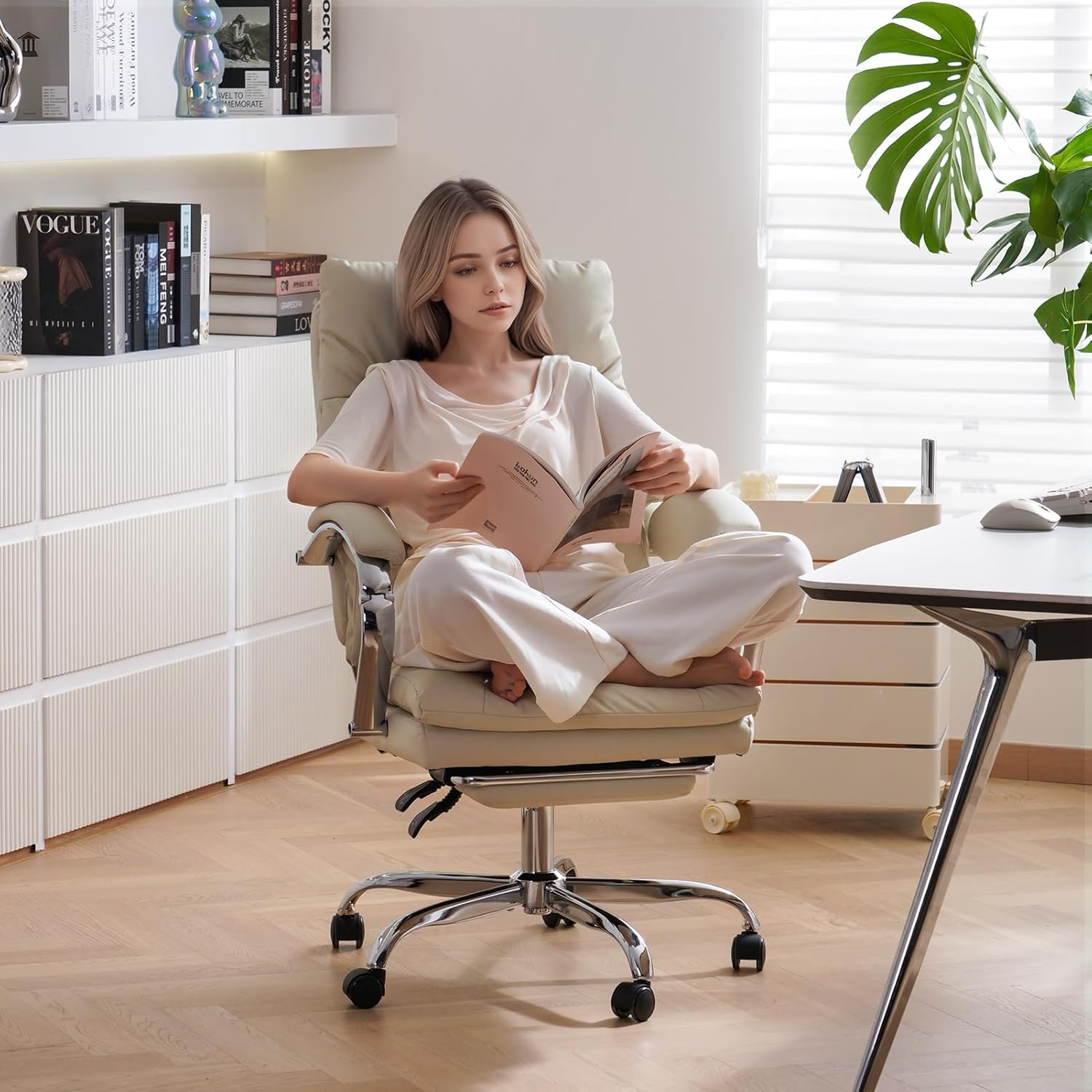
Figure 1: LEAGOO YMX-C570 Office Chair in Cream.
2. భద్రతా సమాచారం
Please read and understand all safety instructions before assembling and using the chair. Keep this manual for future reference.
- గరిష్ట బరువు సామర్థ్యం: Do not exceed the maximum weight capacity of 300 lbs (136.08 kg) to ensure stability and safety.
- Ensure all screws and bolts are securely tightened after assembly and periodically check for any loosening.
- కుర్చీపై నిలబడటం లేదా దానిని మెట్ల స్టూల్గా ఉపయోగించడం మానుకోండి.
- Keep children away from moving parts during assembly and operation.
3. ప్యాకేజీ విషయాలు
అసెంబ్లీని ప్రారంభించే ముందు అన్ని భాగాలు ఉన్నాయని ధృవీకరించండి. ఏవైనా భాగాలు తప్పిపోయినా లేదా దెబ్బతిన్నా, దయచేసి కస్టమర్ సపోర్ట్ను సంప్రదించండి.
- బ్యాక్రెస్ట్
- Seat Cushion with Mechanism
- ఆర్మ్రెస్ట్లు (2)
- Foot Rest Assembly
- గ్యాస్ లిఫ్ట్ సిలిండర్
- స్టార్ బేస్
- కాస్టర్స్ (5)
- కటి పిల్లో
- అసెంబ్లీ హార్డ్వేర్ (స్క్రూలు, రెంచ్)
4. సెటప్ మరియు అసెంబ్లీ సూచనలు
The product requires assembly. Clear instructions are provided for straightforward assembly, typically completed in about one hour. For a visual guide, please refer to the assembly videos below.
అసెంబ్లీ వీడియో గైడ్
Video 1: C570 Series Installation Video. This video provides a step-by-step guide for assembling your LEAGOO YMX-C570 office chair.
Video 2: How to install it (109). Another detailed video demonstrating the installation process for the office chair.
కీలక అసెంబ్లీ దశలు:
- ఆధారాన్ని సమీకరించండి: Insert the casters into the star base. Place the gas lift cylinder into the center hole of the base.
- Attach Foot Rest: Secure the foot rest assembly to the underside of the seat cushion using the provided screws.
- Install Seat Mechanism: Attach the seat mechanism to the underside of the seat cushion, ensuring the 'FRONT' label faces the front of the seat.
- బ్యాక్రెస్ట్ను కనెక్ట్ చేయండి: Attach the backrest to the seat mechanism using the appropriate bolts.
- ఆర్మ్రెస్ట్లను అటాచ్ చేయండి: Secure the armrests to both the seat and backrest.
- Mount Seat onto Gas Lift: Carefully place the assembled seat onto the gas lift cylinder.
5. ఆపరేటింగ్ సూచనలు
Your LEAGOO YMX-C570 office chair offers multiple adjustment features for personalized comfort.
కుర్చీ సర్దుబాట్లు:
- సీటు ఎత్తు సర్దుబాటు: Use the 'LIFT' lever located under the seat to adjust the chair's height. Pull the lever up while seated to lower, or pull up while standing to raise.
- రిక్లైనింగ్ ఫంక్షన్: The backrest can recline from 95° to 155°. Use the 'RCL' lever to adjust the recline angle. Pull the lever to recline, and push it back to lock the desired position. The armrests will adjust along with the reclining angle.
- Retractable Foot Rest: Pull out the hidden foot rest from under the seat for extended leg support during recline. Push it back in when not in use.
- 360° స్వివెల్: The chair features 360° swivel casters for easy movement and flexibility.
- Lumbar Support Pillow: The included lumbar pillow provides additional support for your lower back. Adjust its position as needed for optimal comfort.

Figure 2: Chair details displaying the lift and reclining levers, and silent wheels.

Figure 3: The chair's multi-angle reclining feature (95°-155°) with the footrest extended for relaxation.
ఉత్పత్తి ముగిసిందిview వీడియో
Video 3: C570 Cream Executive Chair. This video highlights the key features and functionality of the LEAGOO YMX-C570 chair.
6. నిర్వహణ
Proper care will extend the life and appearance of your LEAGOO office chair.
- శుభ్రపరచడం: For the PU leather upholstery, use a dry cloth or wipe clean with a damp వస్త్రం మరియు తేలికపాటి సబ్బు. కఠినమైన రసాయనాలను నివారించండి.
- సాధారణ తనిఖీలు: Periodically inspect all bolts and screws to ensure they are tight. Retighten if necessary.
- ప్రత్యక్ష సూర్యకాంతిని నివారించండి: ప్రత్యక్ష సూర్యకాంతికి ఎక్కువసేపు గురికావడం వల్ల అప్హోల్స్టరీ వాడిపోవచ్చు లేదా పగుళ్లు రావచ్చు.
7. ట్రబుల్షూటింగ్
మీ కుర్చీతో మీకు ఏవైనా సమస్యలు ఎదురైతే, దయచేసి ఈ క్రింది సాధారణ పరిష్కారాలను చూడండి:
- కుర్చీ అస్థిరంగా అనిపిస్తుంది: Ensure all assembly screws are fully tightened. Check that the gas lift is properly seated in the base.
- Recline not working: Verify that the recline lever is engaged correctly. Check for any obstructions in the reclining mechanism.
- ఎత్తు సర్దుబాటు పనిచేయడం లేదు: Ensure the gas lift lever is fully pulled up or pushed down as required. Check for any obstructions around the gas lift.
- కీచుమనే శబ్దాలు: Apply a small amount of lubricant to moving parts or re-tighten loose screws.
8. స్పెసిఫికేషన్లు
| ఫీచర్ | వివరాలు |
|---|---|
| బ్రాండ్ | లీగూ |
| మోడల్ పేరు | YMX-C570 |
| రంగు | క్రీమ్ |
| మెటీరియల్ | Faux Leather, Foam, Sponge |
| ఉత్పత్తి కొలతలు | 25.6"డి x 13"వా x 22.8"హ |
| గరిష్ట బరువు సిఫార్సు | 300 పౌండ్లు |
| రిక్లైనింగ్ పొజిషన్ కౌంట్ | 5 (95° నుండి 155°) |
| ప్రత్యేక లక్షణాలు | Adjustable Backrest, Arm Rest, Back Support, Foot Rest, Reclining |
| ఫర్నిచర్ బేస్ ఉద్యమం | స్వివెల్ |
| చేర్చబడిన భాగాలు | Arm Pad, Lumbar Pillow |
9. వారంటీ మరియు మద్దతు
LEAGOO provides one year after-service support for this product. Our customer service team is available to assist with any pre-sales or after-sales inquiries. Please do not hesitate to send an email to us for assistance.
For further assistance or to report any issues, please contact LEAGOO customer support through the retailer's platform or the official LEAGOO webసైట్.