
DOMO SLP9
DOMO Slate SLP9 OS12 T310 Tablet PC User Manual
మోడల్: SLP9
పరిచయం
This manual provides essential information for the proper use and maintenance of your DOMO Slate SLP9 OS12 T310 Tablet PC. Please read it thoroughly before operating the device to ensure optimal performance and longevity.
పెట్టెలో ఏముంది
- 1 Pc DOMO Slate SLP9 OS12 T310 Tablet PC
- 1 Pc Charging Power Adapter
- 1 Pc Type-C USB Cable
- 1 Pc Type-C OTG Cable
- 1 Sim Card Tray Eject Pin
- వినియోగదారు మాన్యువల్ (ఈ పత్రం)
ఉత్పత్తి ముగిసిందిview
Familiarize yourself with the physical components of your DOMO Slate SLP9 OS12 T310 Tablet PC.
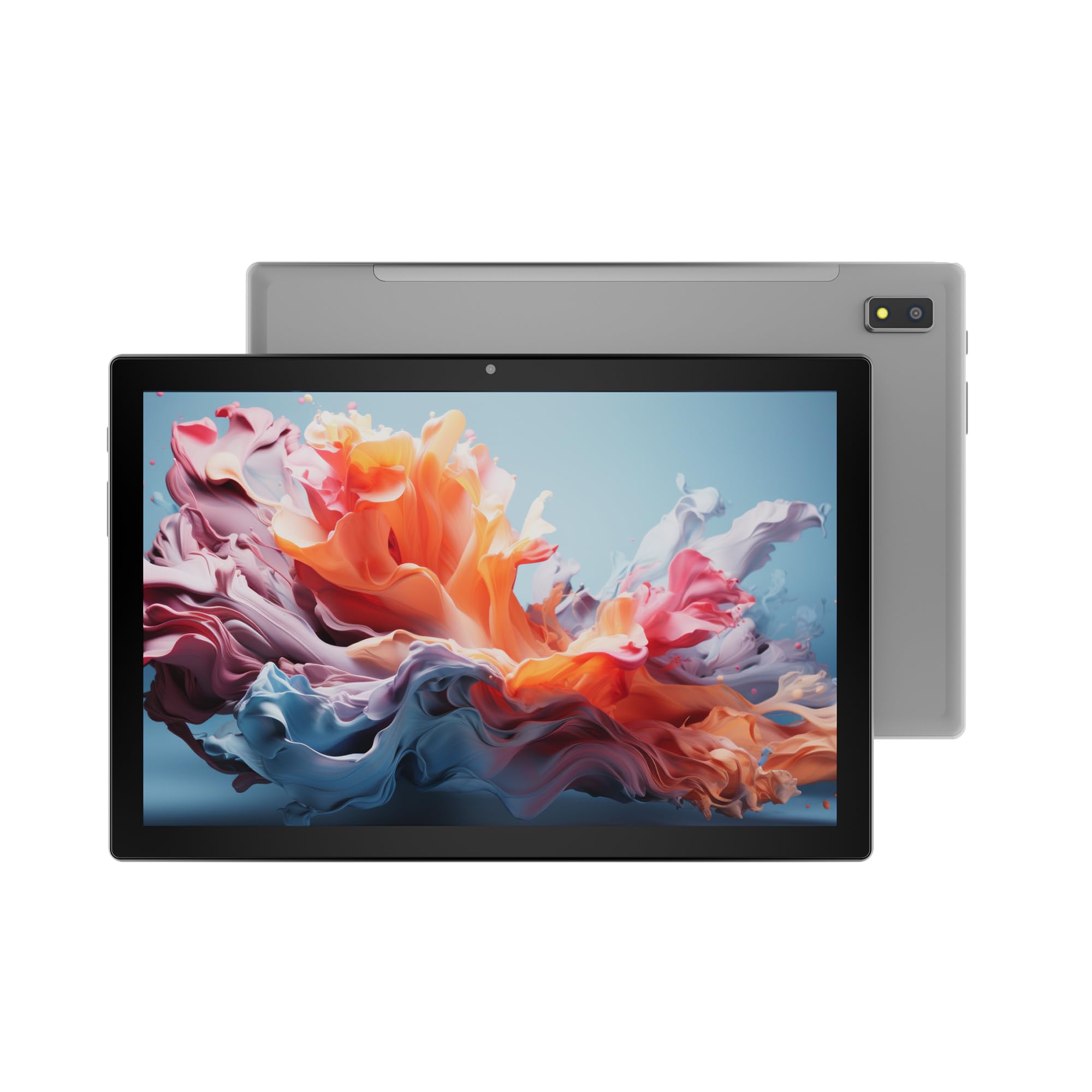
మూర్తి 1: ముందు view of the DOMO Slate SLP9 OS12 T310 Tablet PC, showcasing the 10.1-inch IPS LCD display.

మూర్తి 2: కోణీయ view of the tablet, highlighting its slim profile మరియు స్క్రీన్.

మూర్తి 3: వైపు view of the tablet, showing the placement of buttons and ports.

మూర్తి 4: వెనుక view of the tablet, displaying the camera module and branding.
కీ భాగాలు
- 10.1-inch IPS HD LCD Display: స్పష్టమైన దృశ్యాల కోసం అధిక రిజల్యూషన్ స్క్రీన్.
- ముందు కెమెరా: Located above the screen for video calls and selfies.
- Rear Camera with LED Flash: ఫోటోలు మరియు వీడియోలను సంగ్రహించడానికి.
- పవర్ బటన్: పరికరాన్ని ఆన్/ఆఫ్ చేయడానికి లేదా నిద్రపోయేలా చేయడానికి.
- వాల్యూమ్ బటన్లు: ఆడియో స్థాయిలను సర్దుబాటు చేయడానికి.
- టైప్-సి USB పోర్ట్: ఛార్జింగ్ మరియు డేటా బదిలీ కోసం.
- డ్యూయల్ సిమ్ స్లాట్: Supports 4G, 3G, and 2G SIM cards for cellular connectivity and voice calling.
- మైక్రో SD కార్డ్ స్లాట్: For expandable storage up to 1TB.
- Dual Box Type Speakers: ఆడియో అవుట్పుట్ కోసం.
సెటప్
1. టాబ్లెట్ను ఛార్జ్ చేయడం
Before first use, fully charge your tablet. Connect the provided Type-C USB cable to the tablet's Type-C port and the other end to the charging power adapter. Plug the adapter into a wall outlet. The battery indicator on the screen will show charging status.
2. SIM మరియు మైక్రో SD కార్డ్లను చొప్పించడం
- టాబ్లెట్ వైపున SIM/MicroSD కార్డ్ ట్రేని గుర్తించండి.
- Insert the provided SIM eject pin into the small hole next to the tray to open it.
- Carefully place your 4G/3G/2G SIM card(s) and/or MicroSD card into the designated slots on the tray. Ensure correct orientation as indicated on the tray.
- ట్రే సరైన స్థానంలోకి వచ్చే వరకు దాన్ని తిరిగి టాబ్లెట్లోకి సున్నితంగా నెట్టండి.
3. ప్రారంభ పవర్ ఆన్ మరియు సెటప్
- నొక్కండి మరియు పట్టుకోండి పవర్ బటన్ until the DOMO logo appears on the screen.
- మీ భాషను ఎంచుకోవడానికి, Wi-Fi నెట్వర్క్కి కనెక్ట్ చేయడానికి, మీ Google ఖాతాను సెటప్ చేయడానికి మరియు ఇతర ప్రారంభ సెట్టింగ్లను కాన్ఫిగర్ చేయడానికి ఆన్-స్క్రీన్ ప్రాంప్ట్లను అనుసరించండి.
- Once setup is complete, your tablet is ready for use.
ఆపరేటింగ్ సూచనలు
ప్రాథమిక నావిగేషన్
- టచ్: యాప్ను తెరవడానికి లేదా అంశాన్ని ఎంచుకోవడానికి చిహ్నాన్ని నొక్కండి.
- తాకి మరియు పట్టుకోండి: సందర్భోచిత మెనులను యాక్సెస్ చేయడానికి లేదా చిహ్నాలను తరలించడానికి ఒక అంశాన్ని నొక్కి పట్టుకోండి.
- స్వైప్: పేజీలు లేదా జాబితాల ద్వారా స్క్రోల్ చేయడానికి మీ వేలిని స్క్రీన్పైకి లాగండి.
- చిటికెడు: ఫోటోలను జూమ్ ఇన్ లేదా అవుట్ చేయడానికి రెండు వేళ్లను ఉపయోగించండి మరియు web పేజీలు.
నెట్వర్క్లకు కనెక్ట్ చేస్తోంది
Wi-Fi కనెక్షన్
- వెళ్ళండి సెట్టింగ్లు > నెట్వర్క్ & ఇంటర్నెట్ > Wi-Fi.
- Wi-Fiని టోగుల్ చేయి On.
- జాబితా నుండి మీకు కావలసిన నెట్వర్క్ను ఎంచుకుని, ప్రాంప్ట్ చేయబడితే పాస్వర్డ్ను నమోదు చేయండి.
బ్లూటూత్ పెయిరింగ్
- వెళ్ళండి సెట్టింగ్లు > కనెక్ట్ చేయబడిన పరికరాలు > బ్లూటూత్.
- బ్లూటూత్ను టోగుల్ చేయండి On.
- Select the device you wish to pair with from the list of available devices. Confirm the pairing code if prompted.
Cellular Data and Voice Calling (4G)
With a valid SIM card inserted, your tablet supports 4G cellular data and voice calling (VoLTE). Ensure your SIM card is activated for these services.
- To enable/disable mobile data, go to సెట్టింగ్లు > నెట్వర్క్ & ఇంటర్నెట్ > మొబైల్ నెట్వర్క్.
- కాల్ చేయడానికి, తెరవండి ఫోన్ app and dial the number.
కెమెరా ఆపరేషన్
తెరవండి కెమెరా మీ హోమ్ స్క్రీన్ లేదా యాప్ డ్రాయర్ నుండి యాప్.
- నొక్కండి షట్టర్ ఫోటో తీయడానికి బటన్.
- నొక్కండి వీడియో icon to switch to video recording mode.
- ఉపయోగించండి కెమెరాను మార్చండి icon to toggle between the front and rear cameras.
GPS కార్యాచరణ
The tablet has an inbuilt GPS chip and antenna. To use location services, ensure GPS is enabled in సెట్టింగ్లు > స్థానం. You can then use navigation apps or other location-based services.
నిర్వహణ
పరికరాన్ని శుభ్రపరచడం
- టాబ్లెట్ స్క్రీన్ మరియు బాడీని శుభ్రం చేయడానికి మృదువైన, మెత్తటి బట్టను ఉపయోగించండి.
- కఠినమైన రసాయనాలు, రాపిడి క్లీనర్లు లేదా ఏరోసోల్ స్ప్రేలను ఉపయోగించడం మానుకోండి.
- Do not allow moisture to enter openings.
బ్యాటరీ సంరక్షణ
- అధిక ఉష్ణోగ్రతలను నివారించండి, ఎందుకంటే అవి బ్యాటరీ జీవితకాలాన్ని క్షీణింపజేస్తాయి.
- అందించిన ఛార్జర్ మరియు కేబుల్ను మాత్రమే ఉపయోగించండి.
- Do not leave the tablet charging for extended periods after it is fully charged.
సాఫ్ట్వేర్ నవీకరణలు
Periodically check for system updates to ensure your tablet has the latest features and security enhancements. Go to సెట్టింగ్లు > వ్యవస్థ > సిస్టమ్ నవీకరణ.
ట్రబుల్షూటింగ్
| సమస్య | సాధ్యమైన పరిష్కారం |
|---|---|
| టాబ్లెట్ పవర్ ఆన్ అవ్వదు. | బ్యాటరీ ఛార్జ్ అయ్యిందని నిర్ధారించుకోండి. ఛార్జర్ను కనెక్ట్ చేసి మళ్ళీ ప్రయత్నించండి. స్పందించకపోతే, రీస్టార్ట్ చేయమని బలవంతం చేయడానికి పవర్ బటన్ను 10-15 సెకన్ల పాటు నొక్కి పట్టుకోండి. |
| Wi-Fiకి కనెక్ట్ చేయడం సాధ్యపడదు. | Check if Wi-Fi is enabled in settings. Ensure the Wi-Fi password is correct. Restart your router and the tablet. |
| SIM కార్డ్ కనుగొనబడలేదు. | Ensure the SIM card is correctly inserted into the tray. Restart the tablet. Check if the SIM card is active with your service provider. |
| నెమ్మదిగా పనితీరు. | Close unused applications. Clear cache. Consider uninstalling unnecessary apps. Perform a factory reset as a last resort (backup data first). |
| కెమెరా పనిచేయడం లేదు. | Ensure the camera app has necessary permissions. Restart the tablet. |
స్పెసిఫికేషన్లు
| ఫీచర్ | వివరాలు |
|---|---|
| బ్రాండ్ | DOMO |
| మోడల్ పేరు | Slate SLP9 OS12 T310 |
| ప్రదర్శించు | 10.1-inch IPS HD LCD, 1920 x 1200 Pixels, 400 NITS Brightness, 2.5D Corning Glass Touch Screen |
| ప్రాసెసర్ | UNISOC Tiger T310 - 64-bit Quadcore @ 3.8Ghz |
| RAM | 4GB LPDDR4 |
| అంతర్గత నిల్వ | 64GB |
| విస్తరించదగిన నిల్వ | మైక్రో SD కార్డ్ ద్వారా 1TB వరకు |
| ఆపరేటింగ్ సిస్టమ్ | ఆండ్రాయిడ్ 12 |
| వెనుక కెమెరా | 13MP with LED Flash |
| ఫ్రంట్ కెమెరా | 5MP |
| బ్యాటరీ | 5020 mAh rechargeable polymer battery |
| కనెక్టివిటీ | Dual SIM (4G VoLTE, 3G, 2G), DualBand Wi-Fi (2.4GHz & 5GHz), Bluetooth 5.0, GPS, FM Radio |
| ఓడరేవులు | Type-C USB Port, POGO Connector |
| కొలతలు (L x W x మందం) | 24.4L x 16.2W x 1Th Centimeters |
| బరువు | 505 గ్రాములు |
| హౌసింగ్ | మెటల్ |
| మూలం దేశం | భారతదేశం |
వారంటీ మరియు మద్దతు
వారంటీ సమాచారం
The DOMO Slate SLP9 OS12 T310 Tablet PC comes with a 1 సంవత్సరాల వారంటీ for the device and 3 నెలల వారంటీ for accessories. The warranty type is Onsite, which includes free pickups and deliveries for service.
వారంటీ మినహాయింపులు: Physical damages, water damages, moisture damages, seal tampering, and burnout cases are not covered under warranty.
కస్టమర్ మద్దతు
For technical assistance, troubleshooting, or warranty claims, please contact DOMO customer support. Support options include an online knowledge base, support tickets, and phone support. Post-warranty services are available as paid onsite services.
మరింత సమాచారం కోసం, అధికారిని సందర్శించండి DOMO Store on Amazon.
Ask a question about this manual
Ask about setup, troubleshooting, compatibility, parts, safety, or missing instructions. Manuals+ will review the question and use this page’s manual context to help answer it.