
DCHK HBT-03
DCHK Haribo HBT-03 Noise Cancelling Bluetooth Earphones User Manual
Model: HBT-03 | Brand: DCHK
పరిచయం
Thank you for choosing the DCHK Haribo HBT-03 Noise Cancelling Bluetooth Earphones. This manual provides essential information for the safe and efficient use of your new earphones. Please read it thoroughly before use and retain it for future reference.
ప్యాకేజీ విషయాలు
ప్యాకేజీలో అన్ని వస్తువులు ఉన్నాయని నిర్ధారించుకోండి:
- వైర్లెస్ ఇయర్ఫోన్లు (ఎడమ మరియు కుడి)
- LCD టచ్ స్క్రీన్తో ఛార్జింగ్ కేస్
- చెవి కుషన్లు (S, M, L సైజులు)
- USB ఛార్జింగ్ కేబుల్
- వినియోగదారు మాన్యువల్ (ఈ పత్రం)

Image: The package includes the wireless earphones, the charging case, three pairs of ear tips in sizes S (11.4mm), M (11.9mm), and L (13.0mm), and a USB charging cable.
ఉత్పత్తి ముగిసిందిview
The DCHK Haribo HBT-03 earphones feature a compact design with advanced audio capabilities.
- 13mm డైనమిక్ డ్రైవర్లు: Deliver powerful bass and clear mid-high tones.
- బ్లూటూత్ 5.4: స్థిరమైన మరియు సమర్థవంతమైన వైర్లెస్ కనెక్టివిటీని నిర్ధారిస్తుంది.
- యాక్టివ్ నాయిస్ క్యాన్సిలింగ్ (ANC): లీనమయ్యే శ్రవణ అనుభవం కోసం పరిసర శబ్దాన్ని తగ్గిస్తుంది.
- పరిసర సౌండ్ మోడ్: ఆడియో వింటున్నప్పుడు మీ పరిసరాలను వినడానికి మిమ్మల్ని అనుమతిస్తుంది.
- LCD Touch Screen Charging Case: Provides intuitive control over various functions.
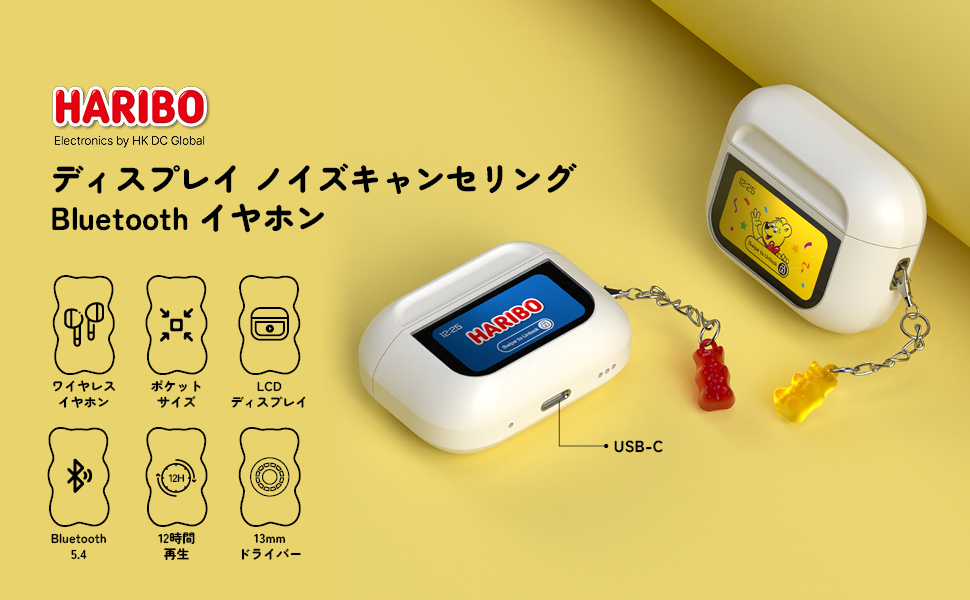
Image: An illustration of the Haribo HBT-03 earphones and their charging case, emphasizing key features such as wireless design, pocket-sized form factor, LCD display, Bluetooth 5.4 connectivity, up to 12 hours of playback, and 13mm dynamic drivers.
సెటప్
1. ప్రారంభ ఛార్జింగ్
మొదటిసారి ఉపయోగించే ముందు, ఇయర్ఫోన్లు మరియు ఛార్జింగ్ కేసును పూర్తిగా ఛార్జ్ చేయండి.
- ఛార్జింగ్ కేస్లో ఇయర్ఫోన్లను ఉంచండి.
- USB ఛార్జింగ్ కేబుల్ను కేస్లోని ఛార్జింగ్ పోర్ట్కు మరియు పవర్ సోర్స్కు కనెక్ట్ చేయండి.
- The LCD screen on the case will display the charging status. A full charge takes approximately 1.5 hours for the case.

Image: This graphic illustrates the charging and playback times: 1.5 hours for a full charge of the case, 5 hours of playback for the earphones alone, and up to 12 hours of total playback when used with the charging case.
2. బ్లూటూత్ పెయిరింగ్
- ఛార్జింగ్ కేస్ను తెరవండి. ఇయర్ఫోన్లు స్వయంచాలకంగా జత చేసే మోడ్లోకి ప్రవేశిస్తాయి.
- మీ పరికరంలో (స్మార్ట్ఫోన్, టాబ్లెట్, మొదలైనవి), బ్లూటూత్ను ప్రారంభించండి.
- కోసం వెతకండి available Bluetooth devices and select "HBT-03" from the list.
- Once connected, the LCD screen on the case may indicate successful pairing.
పరికరంలో బ్లూటూత్ ప్రారంభించబడితే, ఇయర్ఫోన్లను కేస్ నుండి బయటకు తీసినప్పుడు అవి చివరిగా జత చేసిన పరికరానికి స్వయంచాలకంగా తిరిగి కనెక్ట్ అవుతాయి.

Image: This image highlights the benefits of Bluetooth 5.4 connectivity, including an enhanced communication range of 9.7 meters, high-quality audio transmission, optimized power consumption, and excellent connection stability.
ఆపరేటింగ్ సూచనలు
ఇయర్ఫోన్ టచ్ నియంత్రణలు
The earphones feature touch-sensitive areas for control. Specific functions may vary based on the number of taps or long presses.
- ప్లే/పాజ్: ఏ ఇయర్ఫోన్పైనైనా ఒకసారి నొక్కండి.
- తదుపరి ట్రాక్: కుడి ఇయర్ఫోన్పై రెండుసార్లు నొక్కండి.
- మునుపటి ట్రాక్: ఎడమ ఇయర్ఫోన్పై రెండుసార్లు నొక్కండి.
- సమాధానం/ముగింపు కాల్: ఏ ఇయర్ఫోన్పైనైనా ఒకసారి నొక్కండి.
- కాల్ని తిరస్కరించండి: Long press on either earphone.
- వాయిస్ అసిస్టెంట్ను సక్రియం చేయండి: ఏ ఇయర్ఫోన్నైనా మూడుసార్లు నొక్కండి.
Charging Case LCD Touch Screen Functions
The full-color LCD touch screen on the charging case provides access to various settings and controls. Swipe left/right or tap icons to navigate.

Image: A comprehensive display of the various functions available on the charging case's LCD touch screen. These include battery level display, track control, volume adjustment, equalizer settings (Standard, Classic, Jazz, Rock, Pop), noise reduction/ambient sound mode switching, flashlight activation, screen lock, language selection, earphone locator, remote camera control, timer, power off, and factory reset options.
- బ్యాటరీ స్థాయి ప్రదర్శన: Shows real-time battery status of both earphones and case.
- సంగీతం ప్లేబ్యాక్ నియంత్రణలు: ప్లే చేయండి, పాజ్ చేయండి, ట్రాక్లను దాటవేయండి.
- వాల్యూమ్ సర్దుబాటు: Control audio volume directly from the case.
- EQ మోడ్లు: Select from 5 preset equalizer modes (Standard, Classic, Jazz, Rock, Pop) to optimize sound for different genres.
- శబ్ద నియంత్రణ మోడ్లు: Switch between Active Noise Cancelling (ANC) and Ambient Sound Mode.
- స్క్రీన్ ప్రకాశం సర్దుబాటు: Modify the display brightness.
- భాష మారడం: ప్రదర్శన భాషను మార్చండి.
- ఇయర్ఫోన్ శోధన: Helps locate misplaced earphones.
- ఫ్లాష్లైట్: Built-in flashlight function.
- టైమర్: కౌంట్డౌన్ టైమర్ని సెట్ చేయండి.
- రిమోట్ కెమెరా కంట్రోల్: Use the case to trigger your phone's camera shutter.
- Wallpaper Change: స్క్రీన్ నేపథ్యాన్ని అనుకూలీకరించండి.
నిర్వహణ
క్లీనింగ్
- ఇయర్ఫోన్లు మరియు ఛార్జింగ్ కేసును మృదువైన, పొడి, మెత్తటి రహిత వస్త్రంతో క్రమం తప్పకుండా శుభ్రం చేయండి.
- చెవుల చివరలను తీసివేసి, తేలికపాటి సబ్బు మరియు నీటితో శుభ్రం చేసి, తిరిగి అతికించే ముందు పూర్తిగా ఆరబెట్టండి.
- రాపిడి క్లీనర్లు, ఆల్కహాల్ లేదా రసాయన ద్రావకాలను ఉపయోగించవద్దు.
నిల్వ
- ఇయర్ఫోన్లను రక్షించడానికి మరియు వాటిని ఛార్జ్లో ఉంచడానికి ఉపయోగంలో లేనప్పుడు వాటి ఛార్జింగ్ కేసులో ఉంచండి.
- Avoid storing in extreme temperatures, high humidity, or dusty environments.
ట్రబుల్షూటింగ్
| సమస్య | సాధ్యమైన కారణం | పరిష్కారం |
|---|---|---|
| ఇయర్ఫోన్లు ఆన్ చేయవు. | తక్కువ బ్యాటరీ. | Charge the earphones and case fully. |
| పరికరంతో జత చేయడం సాధ్యం కాదు. | Bluetooth is off on device; earphones not in pairing mode; too far from device. | Ensure Bluetooth is on. Place earphones in case, close, then open to re-enter pairing mode. Move closer to device. |
| ధ్వని లేదు లేదా ధ్వని నాణ్యత తక్కువగా ఉంది. | Volume too low; ear tips not properly fitted; dirty ear tips/grilles; connection issue. | Adjust volume. Try different ear tip sizes. Clean ear tips and grilles. Reconnect Bluetooth. |
| టచ్ నియంత్రణలు స్పందించడం లేదు. | Dirty touch sensor; temporary software glitch. | Clean the touch sensor area. Restart earphones by placing them in the case and taking them out. |
| Charging case LCD screen is blank. | Low battery on case. | ఛార్జింగ్ కేసును ఛార్జ్ చేయండి. |
స్పెసిఫికేషన్లు
| ఫీచర్ | వివరాలు |
|---|---|
| మోడల్ పేరు | HBT-03 |
| బ్రాండ్ | DCHK |
| కనెక్టివిటీ టెక్నాలజీ | వైర్లెస్ (బ్లూటూత్ 5.4) |
| డ్రైవర్ పరిమాణం | 13mm డైనమిక్ డ్రైవర్ |
| నాయిస్ కంట్రోల్ | యాక్టివ్ నాయిస్ రద్దు |
| ఫ్రీక్వెన్సీ రెస్పాన్స్ | 20 KHz (Upper limit, typical range 20Hz-20kHz) |
| ఇంపెడెన్స్ | 16 ఓం |
| నియంత్రణ పద్ధతి | Touch (Earphones & Case LCD) |
| నీటి నిరోధక స్థాయి | IPX4 (Water resistant) |
| ఇయర్ఫోన్ ప్లేబ్యాక్ సమయం | 6-8 గంటలు (ఒకసారి ఛార్జ్ చేస్తే) |
| మొత్తం ప్లేబ్యాక్ సమయం (కేస్తో సహా) | 12 గంటల వరకు |
| కేసు ఛార్జింగ్ సమయం | సుమారు 1.5 గంటలు |
| మెటీరియల్ | యాక్రిలోనిట్రైల్ బుటాడిన్ స్టైరీన్ (ABS) |
| ప్యాకేజీ కొలతలు | 11.2 x 7.6 x 3.2 సెం.మీ |
| బరువు | 100 గ్రా |
వారంటీ మరియు మద్దతు
For warranty information and customer support, please refer to the contact details provided with your purchase or visit the official DCHK webవారంటీ క్లెయిమ్ల కోసం మీ కొనుగోలు రుజువును ఉంచండి.
Ask a question about this manual
Ask about setup, troubleshooting, compatibility, parts, safety, or missing instructions. Manuals+ will review the question and use this page’s manual context to help answer it.