1. పరిచయం
This manual provides essential information for the safe and effective operation of your Generic HY260 PRO Projector. The HY260 PRO is designed to deliver a high-quality viewing experience with native 1080P resolution, 4K support, and smart features powered by Android 11. It includes advanced connectivity options like Bluetooth 5.4 and WIFI6, along with a 180-degree rotatable design and automatic keystone correction for flexible setup.
2. పెట్టెలో ఏముంది
పెట్టెను జాగ్రత్తగా అన్ప్యాక్ చేసి, అన్ని వస్తువులు ఉన్నాయని మరియు మంచి స్థితిలో ఉన్నాయని నిర్ధారించుకోండి. ఏవైనా వస్తువులు తప్పిపోయినా లేదా దెబ్బతిన్నా, దయచేసి కస్టమర్ సపోర్ట్ను సంప్రదించండి.
- HY260 PRO Projector
- రిమోట్ కంట్రోల్
- పవర్ కార్డ్
- వినియోగదారు మాన్యువల్ (ఈ పత్రం)
- HDMI కేబుల్

Image: Contents of the HY260 PRO Projector box, showing the projector, remote control, power cord, user manual, and HDMI cable.
3. ఉత్పత్తి ముగిసిందిview
Familiarize yourself with the projector's physical components and connection ports.
3.1 ఫ్రంట్ View

చిత్రం: ముందు భాగం view of the HY260 PRO Projector, highlighting the projection lens.
3.2 వైపు View మరియు పోర్ట్లు
The side of the projector features various input/output ports for connecting external devices.

చిత్రం: వైపు view of the HY260 PRO Projector, showing the HDMI and USB ports, along with product information.
- HDMI పోర్ట్: Connect to laptops, gaming consoles, TV boxes, etc.
- USB పోర్ట్: మీడియా ప్లేబ్యాక్ కోసం USB డ్రైవ్లను కనెక్ట్ చేయండి.
- పవర్ ఇన్పుట్: Connect the provided power cord.
4. సెటప్
4.1 పవర్ కనెక్షన్
- ప్రొజెక్టర్ యొక్క పవర్ ఇన్పుట్ పోర్ట్కు పవర్ కార్డ్ను కనెక్ట్ చేయండి.
- పవర్ కార్డ్ యొక్క మరొక చివరను తగిన ఎలక్ట్రికల్ అవుట్లెట్లోకి ప్లగ్ చేయండి.
4.2 Placement and Image Adjustment
The HY260 PRO Projector offers flexible placement options and automatic image correction.
- 180-డిగ్రీ భ్రమణం: The projector's base allows for 180-degree rotation, enabling projection onto ceilings or walls from various angles.
- స్వీయ కీస్టోన్ దిద్దుబాటు: The projector automatically adjusts the image to correct trapezoidal distortion, ensuring a rectangular picture even when placed at an angle.
- ఆప్టిమల్ ప్రొజెక్షన్ దూరం: For screen sizes ranging from 35 to 130 inches, an optimal projection distance of approximately 1.68 meters is recommended.

Image: Illustration of the HY260 PRO Projector's projection capabilities, showing recommended distances for screen sizes from 35 to 130 inches.
4.3 కనెక్టివిటీ
The projector supports multiple connection methods for various devices.
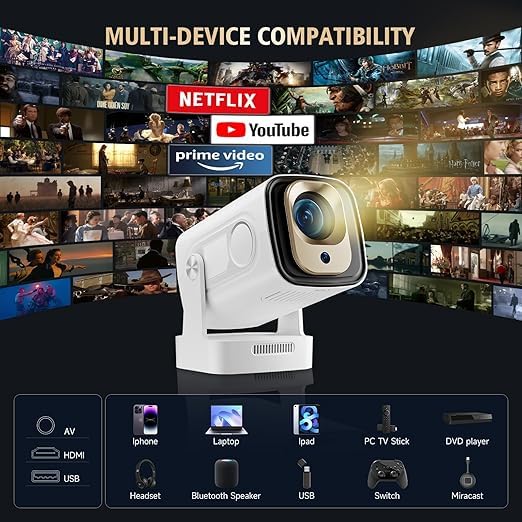
Image: Multi-device compatibility chart for the HY260 PRO Projector, showing connections for HDMI, USB, Bluetooth, and Miracast with various devices and streaming platforms.
- HDMI: Connect devices such as gaming consoles, laptops, and TV boxes using the provided HDMI cable.
- USB: మీడియాను ప్లే చేయడానికి USB పోర్ట్లోకి USB డ్రైవ్ను చొప్పించండి. fileనేరుగా లు.
- బ్లూటూత్ 5.4: Pair with external Bluetooth speakers or headphones for enhanced audio. Navigate to the Bluetooth settings in the Android 11 interface to pair devices.
- WIFI6: Connect to your wireless network for internet access and streaming. Go to Network Settings in Android 11 to connect to a Wi-Fi network.
- మిరాకాస్ట్: For screen mirroring from compatible smartphones and tablets.
5. ఆపరేటింగ్ సూచనలు
5.1 పవర్ ఆన్/ఆఫ్
పరికరాన్ని ఆన్ లేదా ఆఫ్ చేయడానికి ప్రొజెక్టర్ లేదా రిమోట్ కంట్రోల్లోని పవర్ బటన్ను నొక్కండి.
5.2 Android 11 Interface and Navigation
The projector runs on Android 11, providing a user-friendly interface for accessing applications and settings. Use the remote control to navigate through menus, select apps, and adjust settings.
5.3 మూలం ఎంపిక
To switch between different input sources (e.g., HDMI, USB, or internal Android apps), use the source selection button on the remote control or navigate through the input menu in the Android interface.
5.4 Google Voice Remote Control
The included remote control supports Google Voice commands, allowing for convenient navigation and content search.

Image: The Google Voice Remote Control, illustrating its functionality for quick access to services like YouTube and Google Play Music.
- Press the dedicated voice button on the remote.
- Speak your command clearly into the remote's microphone (e.g., "Open YouTube," "కోసం వెతకండి movies").
5.5 ఆడియో అవుట్పుట్
The projector features integrated audio capabilities and supports external audio devices.
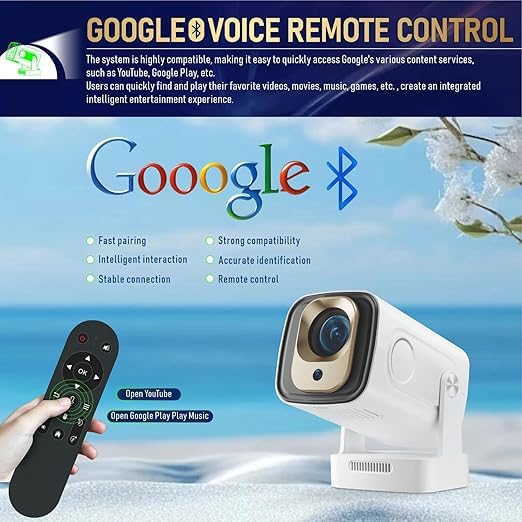
Image: Visual representation of the HY260 PRO Projector's immersive HD sound and advanced noise reduction, featuring Dolby Audio support.
- అంతర్గత స్పీకర్: The projector has a built-in speaker for audio playback.
- బ్లూటూత్ ఆడియో: Connect to Bluetooth speakers or headphones for a more personalized or powerful audio experience.
- డాల్బీ ఆడియో: The projector supports Dolby Audio, enhancing the cinematic experience.
6. నిర్వహణ
సరైన నిర్వహణ మీ ప్రొజెక్టర్ యొక్క దీర్ఘాయువు మరియు సరైన పనితీరును నిర్ధారిస్తుంది.
6.1 శుభ్రపరచడం
- లెన్స్: ప్రొజెక్టర్ లెన్స్ను సున్నితంగా తుడవడానికి ఆప్టికల్ లెన్స్ల కోసం ప్రత్యేకంగా రూపొందించిన మృదువైన, మెత్తటి రహిత వస్త్రాన్ని ఉపయోగించండి. రాపిడి పదార్థాలు లేదా కఠినమైన రసాయనాలను నివారించండి.
- బాహ్య: ప్రొజెక్టర్ బాహ్య భాగాన్ని మృదువైన, పొడి గుడ్డతో తుడవండి. పరికరంపై నేరుగా లిక్విడ్ క్లీనర్లను ఉపయోగించవద్దు.
- వెంటిలేషన్: వేడెక్కకుండా నిరోధించడానికి వెంటిలేషన్ ఓపెనింగ్లు దుమ్ము మరియు అడ్డంకులు లేకుండా చూసుకోండి.
6.2 నిల్వ
ఎక్కువసేపు ఉపయోగంలో లేనప్పుడు, ప్రొజెక్టర్ను చల్లని, పొడి ప్రదేశంలో, ప్రత్యక్ష సూర్యకాంతి మరియు తీవ్రమైన ఉష్ణోగ్రతలకు దూరంగా నిల్వ చేయండి. దుమ్ము పేరుకుపోవడం మరియు భౌతిక నష్టాన్ని నివారించడానికి అసలు ప్యాకేజింగ్ లేదా రక్షణ కేసును ఉపయోగించండి.
7. ట్రబుల్షూటింగ్
మీ ప్రొజెక్టర్తో మీకు సమస్యలు ఎదురైతే, ఈ క్రింది సాధారణ సమస్యలు మరియు పరిష్కారాలను చూడండి.
| సమస్య | సాధ్యమైన కారణం | పరిష్కారం |
|---|---|---|
| పవర్ లేదు | పవర్ కార్డ్ కనెక్ట్ కాలేదు; పవర్ అవుట్లెట్ సమస్య | పవర్ కార్డ్ సురక్షితంగా కనెక్ట్ చేయబడిందని నిర్ధారించుకోండి; వేరే పవర్ అవుట్లెట్ను ప్రయత్నించండి. |
| చిత్రం లేదు | Incorrect input source; Device not connected; Lens cap on | Select correct input source; Check HDMI/USB connections; Remove lens cap. |
| అస్పష్టమైన చిత్రం | ఫోకస్ సర్దుబాటు కాలేదు; ప్రొజెక్టర్ చాలా దగ్గరగా/దూరంగా ఉంది. | Adjust focus manually if available; Reposition projector within optimal distance. |
| సౌండ్ లేదు | Volume too low; Muted; External audio device not connected/paired | Increase volume; Unmute; Check Bluetooth connection or external speaker cable. |
| Wi-Fi/Bluetooth Connectivity Issues | Incorrect password; Out of range; Interference | Verify password; Move closer to router/device; Reduce interference. |
8. స్పెసిఫికేషన్లు
Key technical specifications for the HY260 PRO Projector:

చిత్రం: పైగాview of the HY260 PRO Projector's core features, including brightness, Bluetooth, Wi-Fi, and native resolution.

Image: Visual confirmation of the HY260 PRO Projector's 4K resolution support.
- స్థానిక రిజల్యూషన్: 1920 x 1080 (1080 పి)
- మద్దతు ఉన్న రిజల్యూషన్: Up to 4K (3840 Pixels)
- ప్రకాశం: 300 ANSI లుమెన్స్
- ఆపరేటింగ్ సిస్టమ్: ఆండ్రాయిడ్ 11
- బ్లూటూత్: వెర్షన్ 5.4
- Wi-Fi: WIFI6 (2.4G & 5G)
- కారక నిష్పత్తి: 16:9
- ప్రదర్శన రకం: LCD
- హార్డ్వేర్ ఇంటర్ఫేస్: HDMI, USB
- అనుకూల పరికరాలు: Gaming Console, Laptop, Smartphone, TV Box, USB Drive
- ప్రత్యేక లక్షణాలు: 180 Degree Rotation, Auto Keystone Correction, Dolby Audio
- ఉత్పత్తి కొలతలు: 25 x 25 x 8 సెం.మీ
- వస్తువు బరువు: 2.5 కిలోలు
- వాల్యూమ్tage: 220 వోల్ట్లు
- వాట్tage: 100 వాట్స్
- రిఫ్రెష్ రేట్: 60 Hz
9. వారంటీ మరియు మద్దతు
For warranty information, please refer to the documentation provided at the time of purchase. For technical support or inquiries, please contact:
కస్టమర్ సేవ: Support@hy260.com


