1. పరిచయం
This manual provides essential information for the safe and efficient operation of your Generic 4K Drone Model 22028158. Please read this manual thoroughly before operating the drone to ensure proper usage and to prevent damage or injury. This drone features a 4K adjustable triple camera, brushless motors, 360° obstacle avoidance, optical flow positioning, and a 4.5-inch LCD remote control.
2. భద్రతా సమాచారం
ముఖ్యమైన భద్రతా మార్గదర్శకాలు:
- డ్రోన్ను ఎల్లప్పుడూ బహిరంగ ప్రదేశాలలో, వ్యక్తులు, జంతువులు మరియు అడ్డంకులకు దూరంగా ఆపరేట్ చేయండి.
- ఆపరేషన్ సమయంలో డ్రోన్ నుండి సురక్షితమైన దూరం పాటించండి.
- Do not operate the drone near airports, restricted airspace, or sensitive areas.
- Ensure all propellers are securely attached and undamaged before each flight.
- Keep batteries away from naked flames or direct heat sources.
- డ్రోన్ లేదా దాని భాగాలను సవరించడానికి ప్రయత్నించవద్దు.
- పిల్లలు డ్రోన్ ఉపయోగిస్తున్నప్పుడు లేదా డ్రోన్ దగ్గర ఉన్నప్పుడు వారిని పర్యవేక్షించండి.
- Always turn off the drone and remote control when not in use.
- Refer to local regulations regarding drone operation in your area.
3. ప్యాకేజీ విషయాలు
క్రింద జాబితా చేయబడిన అన్ని అంశాలు మీ ప్యాకేజీలో చేర్చబడ్డాయని ధృవీకరించండి. ఏవైనా అంశాలు తప్పిపోయినా లేదా దెబ్బతిన్నా, దయచేసి కస్టమర్ మద్దతును సంప్రదించండి.

చిత్రం 3.1: Contents of the drone package. This includes the foldable drone, the 4.5-inch LCD remote control, one body battery, a set of spare propeller blades, a screwdriver, a USB charging cable, and a storage bag.
- Generic 4K Drone (Model 22028158)
- 4.5-Inch LCD Remote Control
- Body Battery (x1)
- Spare Propeller Blades (x4)
- USB ఛార్జింగ్ కేబుల్
- స్క్రూడ్రైవర్
- నిల్వ బ్యాగ్
- వినియోగదారు మాన్యువల్ (ఈ పత్రం)
4. భాగాలు ఓవర్view
4.1 డ్రోన్ భాగాలు

చిత్రం 4.1: The Generic 4K Drone in both unfolded and folded states, alongside its 4.5-inch LCD remote control. Key features visible include the triple camera system, propellers, and motor arms.
- ప్రొపెల్లర్లు: Generate lift for flight.
- బ్రష్లెస్ మోటార్లు: Provide efficient and powerful propulsion.
- Adjustable Triple Camera: Captures 4K UHD video and photos from multiple angles.
- Obstacle Avoidance Sensors: Detect obstacles in multiple directions.
- Optical Flow Sensor: Assists with stable hovering, especially indoors.
- బ్యాటరీ కంపార్ట్మెంట్: Houses the drone's flight battery.
- మడవగల చేతులు: Allow for compact storage and transport.
4.2 Remote Control Components

చిత్రం 4.2: The 4.5-inch LCD remote control, showing the screen, joysticks, and various control buttons for drone operation and camera functions.
- 4.5-అంగుళాల LCD స్క్రీన్: Displays real-time video feed and flight data.
- కంట్రోల్ స్టిక్స్: Left stick for throttle/yaw, right stick for pitch/roll.
- పవర్ బటన్: రిమోట్ కంట్రోల్ను ఆన్/ఆఫ్ చేస్తుంది.
- Takeoff/Landing Button: One-key automatic takeoff and landing.
- హోమ్కి తిరిగి వెళ్ళు (RTH) బటన్: టేకాఫ్ పాయింట్కు ఆటోమేటిక్ రిటర్న్ను ప్రారంభిస్తుంది.
- ఫోటో/వీడియో బటన్: చిత్రాలను సంగ్రహిస్తుంది లేదా వీడియో రికార్డింగ్ను ప్రారంభిస్తుంది/ఆపివేస్తుంది.
- కెమెరా యాంగిల్ అడ్జస్ట్మెంట్: Controls the tilt of the drone's camera.
- Speed Mode Button: Toggles between different flight speeds.
5. సెటప్
5.1 బ్యాటరీని ఛార్జ్ చేయడం
- Connect the drone battery to the USB charging cable.
- Plug the USB cable into a 5V/2A USB power adapter (not included).
- The charging indicator light will show the charging status. Charge until fully charged (refer to battery indicator for full charge).
- Charge the remote control using its dedicated charging port and cable.
గమనిక: Ensure batteries are fully charged before each flight for optimal performance and safety.
5.2 ప్రొపెల్లర్లను వ్యవస్థాపించడం
- Unfold the drone arms.
- Identify the 'A' and 'B' marked propellers and corresponding motor arms.
- Attach each propeller to its designated motor shaft, ensuring a secure fit. Use the provided screwdriver if necessary.
- Double-check that all propellers are firmly attached and rotate freely without obstruction.
5.3 Installing Drone Battery
- డ్రోన్లో బ్యాటరీ కంపార్ట్మెంట్ను గుర్తించండి.
- Insert the fully charged battery into the compartment, ensuring it clicks into place.
- బ్యాటరీ కంపార్ట్మెంట్ కవర్ను సురక్షితంగా మూసివేయండి.
5.4 రిమోట్ కంట్రోల్ జత చేయడం
- డ్రోన్ను చదునైన, స్థాయి ఉపరితలంపై ఉంచండి.
- Press and hold the power button on the drone until the indicator lights begin to flash.
- రిమోట్ కంట్రోల్ ఆన్ చేయండి.
- Push the left control stick (throttle) all the way up, then all the way down.
- The drone's indicator lights will stop flashing and remain solid, indicating successful pairing.
6. ఆపరేటింగ్ సూచనలు
6.1 ప్రీ-ఫ్లైట్ చెక్లిస్ట్
- డ్రోన్ మరియు రిమోట్ కంట్రోల్ బ్యాటరీలు పూర్తిగా ఛార్జ్ అయ్యాయని నిర్ధారించుకోండి.
- Check that propellers are correctly installed and undamaged.
- Verify the drone and remote control are successfully paired.
- Choose an open, clear area for flight, free from obstacles and people.
- Check weather conditions; avoid strong winds (drone has 5-level wind resistance, but extreme conditions should be avoided).
6.2 టేకాఫ్ మరియు ల్యాండింగ్
- ఆటోమేటిక్ టేకాఫ్: After pairing, press the One-Key Takeoff/Landing button on the remote control. The drone will automatically ascend to a safe hovering altitude.
- మాన్యువల్ టేకాఫ్: Push both control sticks down and outwards simultaneously to unlock the motors. Then, slowly push the left control stick (throttle) upwards to ascend.
- ఆటోమేటిక్ ల్యాండింగ్: Press the One-Key Takeoff/Landing button again. The drone will slowly descend and land.
- మాన్యువల్ ల్యాండింగ్: Slowly pull the left control stick (throttle) downwards until the drone lands. Once landed, push both control sticks down and inwards to lock the motors.
6.3 Flight Controls (4.5-Inch LCD Remote)
The 4.5-inch LCD screen provides real-time flight data and video feed. Familiarize yourself with the control stick functions:
- ఎడమ కర్ర (థ్రాటిల్/యా):
- Up/Down: Ascend/Descend (Throttle)
- Left/Right: Rotate Left/Right (Yaw)
- కుడి కర్ర (పిచ్/రోల్):
- Up/Down: Fly Forward/Backward (Pitch)
- Left/Right: Fly Left/Right (Roll)
6.4 కెమెరా ఆపరేషన్
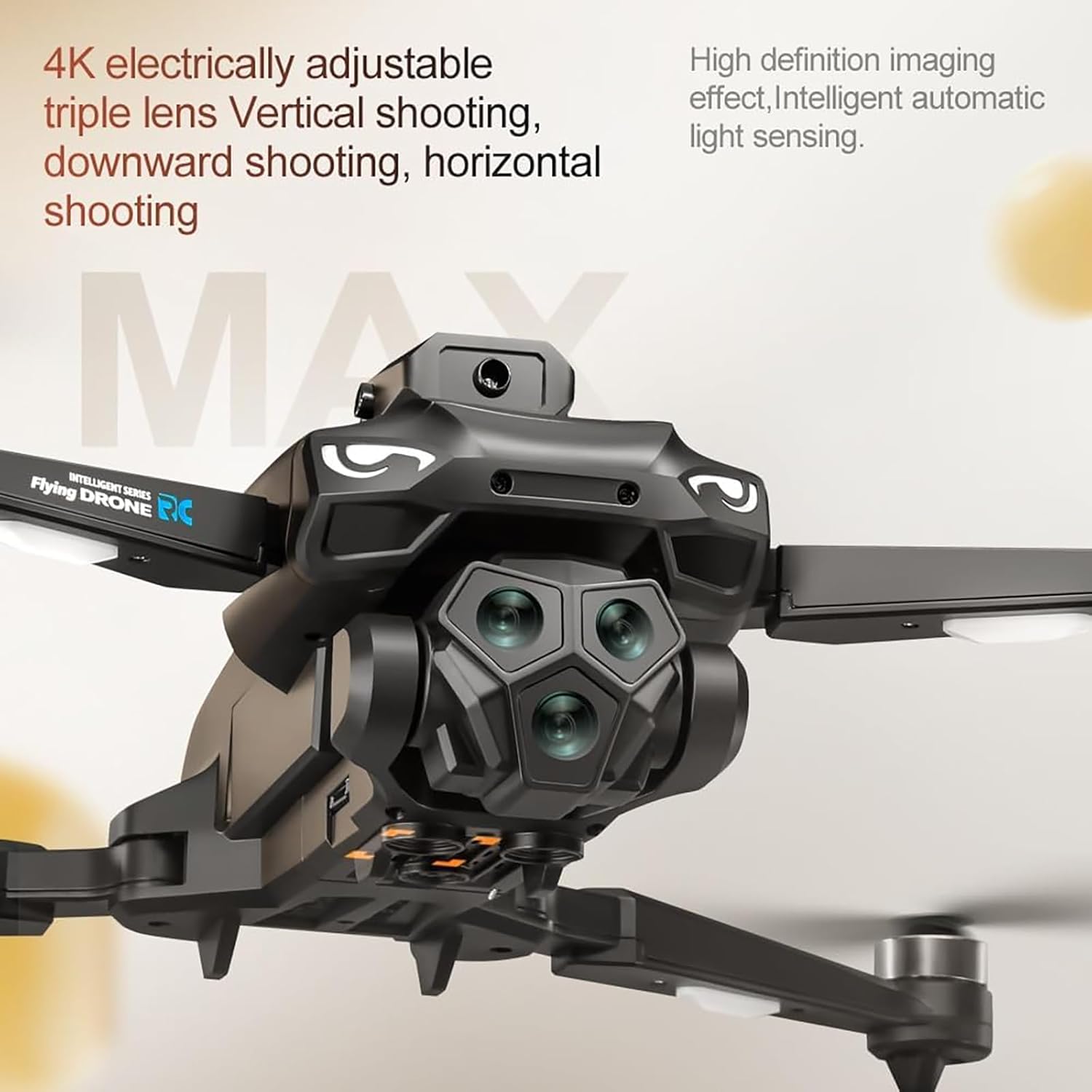
చిత్రం 6.1: The drone's triple camera setup, capable of vertical, downward, and horizontal shooting with intelligent light sensing for 4K UHD capture.
- 4K UHD Triple Camera: The drone is equipped with a high-resolution 4K camera system that can be adjusted to capture vertical, downward, and horizontal views.
- ఫోటోలు తీస్కోడం: Press the Photo button on the remote control once to capture an image.
- వీడియో రికార్డింగ్: Press the Video button once to start recording. Press it again to stop recording.
- కెమెరా యాంగిల్ అడ్జస్ట్మెంట్: Use the dedicated button/dial on the remote control to adjust the camera's tilt angle during flight.
- Intelligent Light Sensing: The camera system automatically adjusts for optimal clarity in varying light conditions.
6.5 అధునాతన విమాన లక్షణాలు
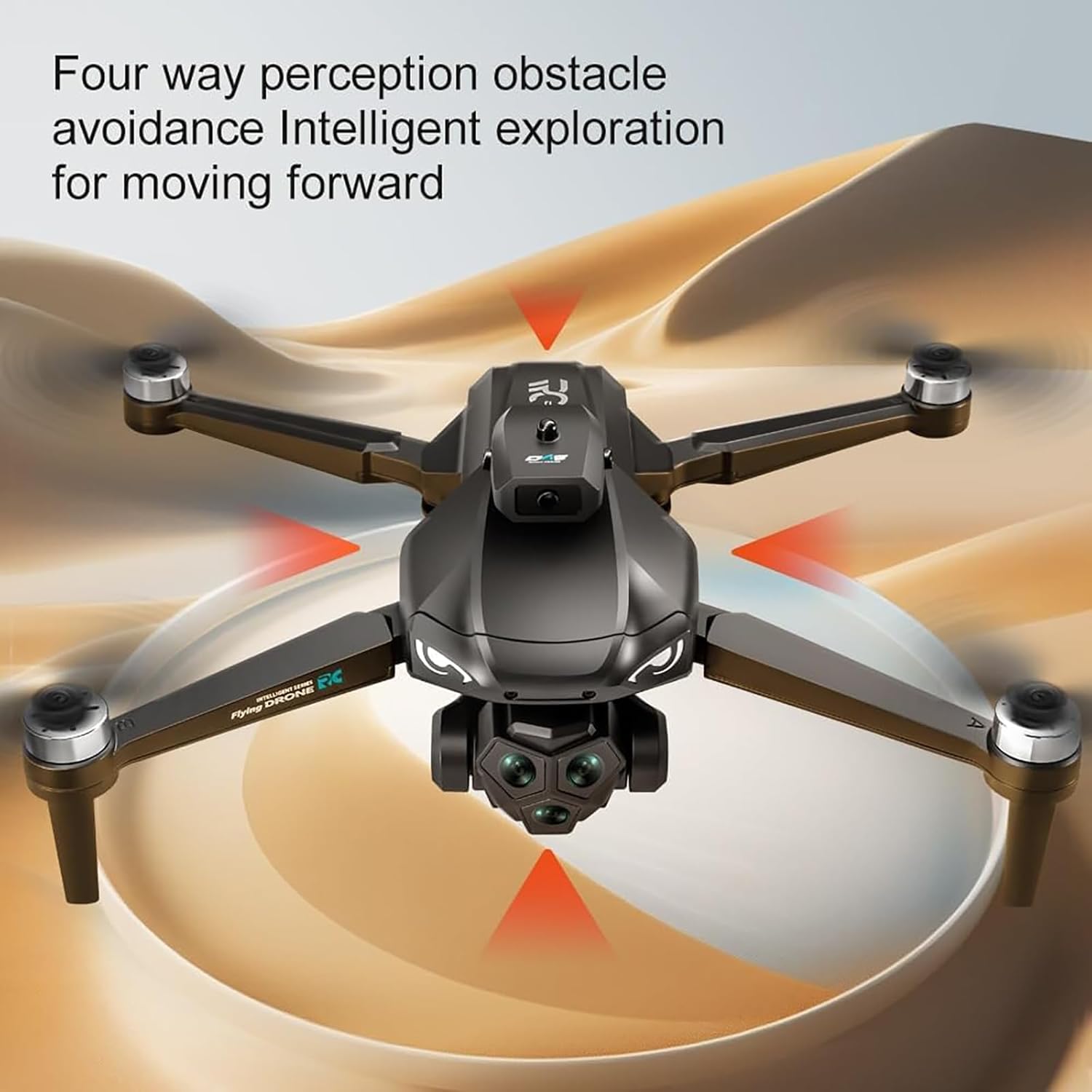
చిత్రం 6.2: Visualization of the drone's four-way perception obstacle avoidance system, detecting obstacles from multiple directions.
- 360° Obstacle Avoidance: The drone features four-way perception obstacle detection. When an obstacle is detected, the drone will automatically adjust its flight path to avoid collision. This system enhances safety, especially for new pilots.
- ఆప్టికల్ ఫ్లో పొజిషనింగ్: This technology helps the drone maintain a stable hover, particularly in indoor environments or when GPS signals are weak. It uses a downward-facing camera to track ground patterns.
- 5-Level Wind Resistance: Equipped with powerful brushless motors, the drone can maintain stable flight even in moderate wind conditions. Exercise caution in strong winds.
- GPS Return-to-Home (RTH): Press the RTH button on the remote control. The drone will automatically fly back to its recorded takeoff point. Ensure a clear path for return.
- ట్రాజెక్టరీ ఫ్లైట్: (If available via app) Draw a path on the connected app interface, and the drone will follow the specified route.
- స్టంట్ రోల్: (If available) Perform aerial stunts by pressing the designated button and moving the right control stick in a desired direction.
7. నిర్వహణ
- శుభ్రపరచడం: Use a soft, dry cloth to clean the drone and remote control. Avoid using liquids or solvents. Ensure camera lenses and sensors are free from dust and debris.
- ప్రొపెల్లర్ తనిఖీ: Regularly check propellers for cracks, bends, or damage. Replace any damaged propellers immediately using the provided spare blades and screwdriver.
- బ్యాటరీ సంరక్షణ:
- చల్లని, పొడి ప్రదేశంలో బ్యాటరీలను నిల్వ చేయండి.
- బ్యాటరీలను ఓవర్ఛార్జ్ చేయవద్దు లేదా ఎక్కువ డిశ్చార్జ్ చేయవద్దు.
- ఎక్కువసేపు నిల్వ చేస్తే, బ్యాటరీలను సుమారు 50-60% వరకు ఛార్జ్ చేయండి.
- బ్యాటరీలను తీవ్రమైన ఉష్ణోగ్రతలకు గురిచేయవద్దు.
- నిల్వ: When not in use, fold the drone arms and store the drone and remote control in the provided storage bag to protect them from dust and physical damage.
8. ట్రబుల్షూటింగ్
| సమస్య | సాధ్యమైన కారణం | పరిష్కారం |
|---|---|---|
| డ్రోన్ పవర్ ఆన్ చేయదు. | బ్యాటరీ ఛార్జ్ చేయబడలేదు లేదా తప్పుగా ఇన్స్టాల్ చేయబడలేదు. | Ensure battery is fully charged and correctly inserted into the drone. |
| Remote control does not connect to drone. | Not paired correctly or low remote battery. | Re-attempt pairing process. Charge remote control battery. |
| ఎగురుతున్నప్పుడు డ్రోన్ కదులుతుంది. | Not calibrated on a flat surface; strong wind. | Recalibrate the drone on a level surface. Avoid flying in strong winds. |
| కెమెరా చిత్ర నాణ్యత పేలవంగా ఉంది. | Dirty lens; insufficient light; SD card issue. | Clean camera lens. Ensure adequate lighting. Check SD card for proper insertion and format. |
| అడ్డంకులను నివారించడం పనిచేయడం లేదు. | Sensors obstructed or dirty. | Clean all obstacle avoidance sensors. Ensure no physical obstructions. |
9. స్పెసిఫికేషన్లు
| ఫీచర్ | వివరాలు |
|---|---|
| మోడల్ పేరు | 22028158 |
| బ్రాండ్ | సాధారణమైనది |
| కెమెరా | 4K UHD Adjustable Triple Camera |
| మోటార్ రకం | బ్రష్ లేని మోటార్ |
| అడ్డంకి నివారణ | 360° Four-way Perception |
| స్థాన వ్యవస్థ | Optical Flow Positioning, GPS Return |
| గాలి నిరోధకత | 5-స్థాయి |
| రిమోట్ కంట్రోల్ | 4.5-Inch LCD Screen Remote |
| మెటీరియల్ | ప్లాస్టిక్ |
| ఉత్పత్తి కొలతలు | 0.39 x 0.39 x 0.39 inches (Note: These dimensions appear to be placeholder values and may not reflect the actual size of the drone.) |
| వస్తువు బరువు | 2.2 పౌండ్లు (1 కిలోగ్రాము) |
| సిఫార్సు చేసిన వయస్సు | Adult (Manufacturer also suggests 6-15 years, but adult supervision is recommended for younger users.) |
10. వారంటీ మరియు మద్దతు
For warranty information or technical support, please refer to the documentation provided with your purchase or contact the retailer/manufacturer directly. Keep your proof of purchase for any warranty claims.