
1. పరిచయం
This manual provides essential information for the proper setup, operation, and maintenance of your Ulefone Armor 29 Ultra 5G rugged smartphone. Please read this guide thoroughly before using your device to ensure optimal performance and longevity.
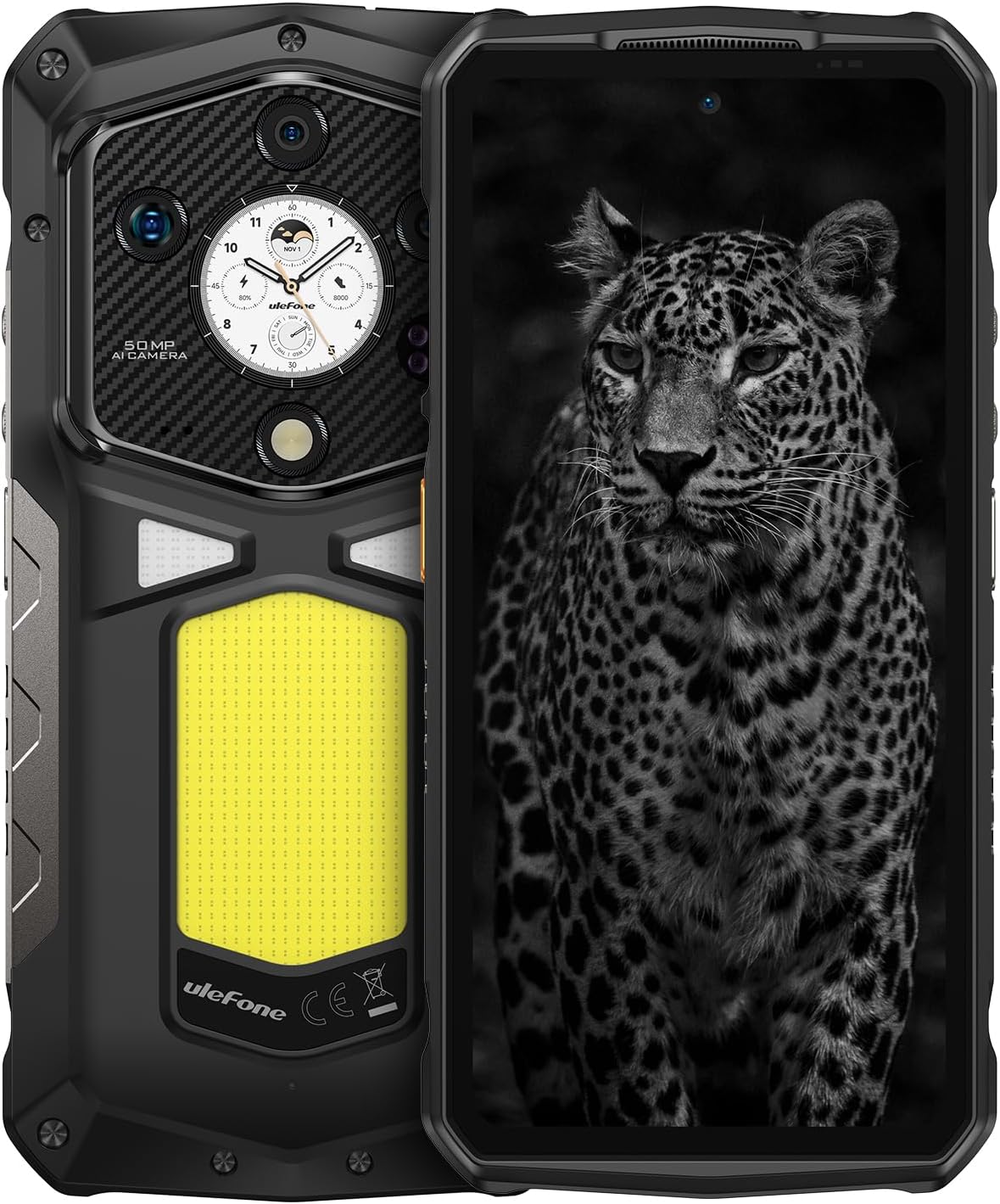
చిత్రం 1.1: ముందు మరియు వెనుక view of the Ulefone Armor 29 Ultra 5G smartphone.
2. సెటప్
2.1 బాక్స్ కంటెంట్లు
ప్యాకేజీలో అన్ని అంశాలు ఉన్నాయని నిర్ధారించుకోండి:
- Ulefone Armor 29 Ultra 5G Smartphone
- AC పవర్ ఛార్జర్ (100~240V)
- టైప్-సి నుండి టైప్-సి డేటా కేబుల్ (100సెం.మీ)
- స్క్రీన్ ప్రొటెక్టర్ (ముందే వర్తింపజేయబడింది లేదా విడిగా)
- SIM ట్రే ఎజెక్టర్
- లాన్యార్డ్

Image 2.1: Contents included in the Ulefone Armor 29 Ultra retail box.
2.2 SIM కార్డ్ ఇన్స్టాలేషన్
- పరికరం వైపున SIM కార్డ్ ట్రేని గుర్తించండి.
- ట్రే పక్కన ఉన్న చిన్న రంధ్రంలోకి సిమ్ ట్రే ఎజెక్టర్ సాధనాన్ని చొప్పించి, ట్రే బయటకు వచ్చే వరకు గట్టిగా నొక్కండి.
- మీ నానో-సిమ్ కార్డ్(లు) మరియు/లేదా మైక్రో SD కార్డ్ను ట్రేలోని నిర్దేశించిన స్లాట్లలో ఉంచండి. సరైన ఓరియంటేషన్ను నిర్ధారించుకోండి.
- పరికర బాడీతో ఫ్లష్ అయ్యే వరకు ట్రేని ఫోన్లోకి జాగ్రత్తగా తిరిగి చొప్పించండి.
2.3 ప్రారంభ పవర్ ఆన్
Press and hold the Power button (located on the right side of the phone) until the Ulefone logo appears. Follow the on-screen instructions to complete the initial setup, including language selection, Wi-Fi connection, and Google account setup.
3. ఆపరేటింగ్ సూచనలు
3.1 పనితీరు మరియు నిల్వ
The Armor 29 Ultra is powered by the MediaTek Dimensity 9300+ processor, offering robust performance. It features up to 32GB RAM (16GB physical + 16GB virtual) and 1TB internal storage, expandable up to 2TB via microSD card.
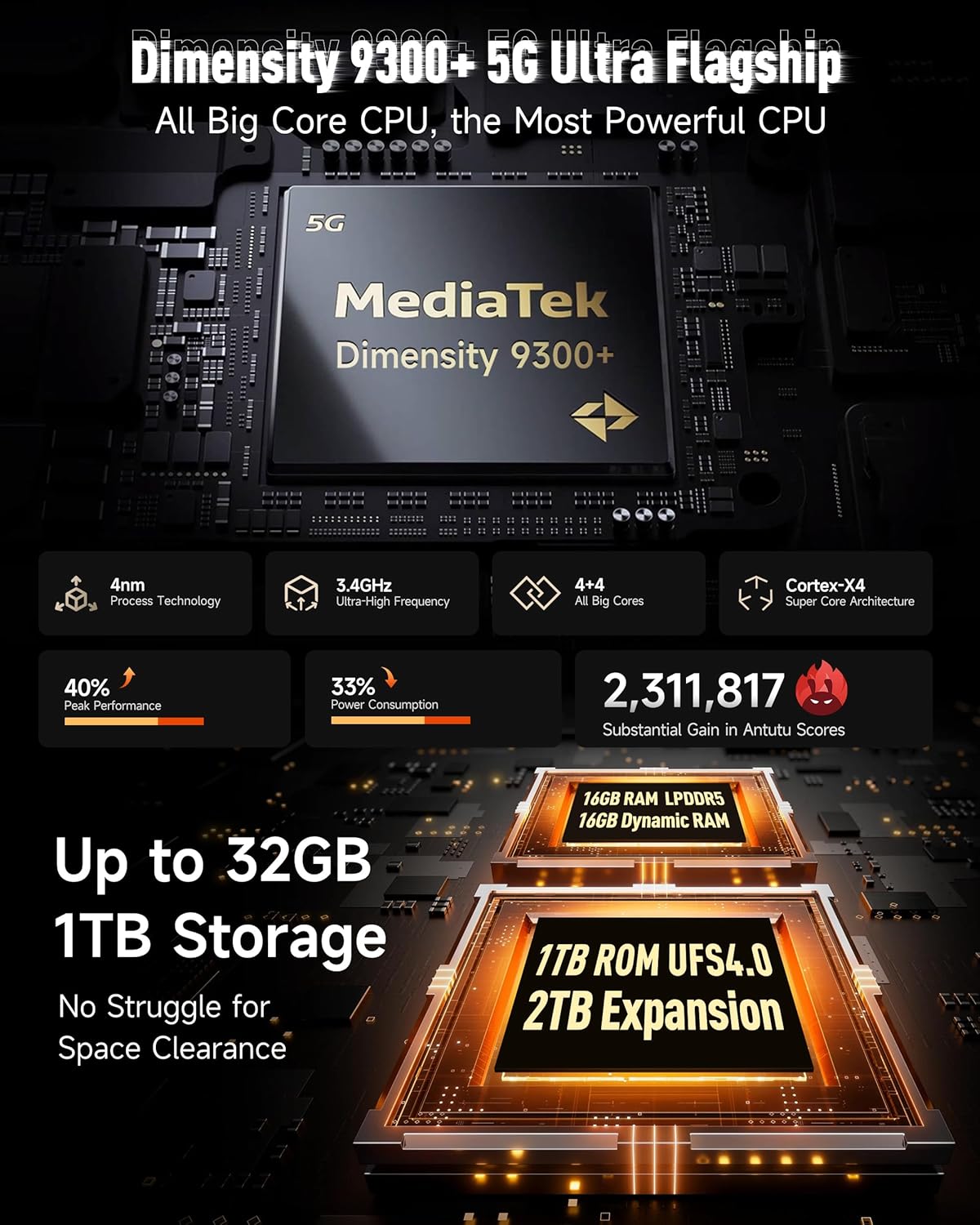
చిత్రం 3.1: ముగిసిందిview of the Dimensity 9300+ processor and memory configuration.
3.2 Dual AMOLED Display
The device features a 6.67-inch flexible AMOLED main display with a 120Hz refresh rate and up to 2200 nits peak brightness. A 1.04-inch flexible AMOLED sub-display on the rear provides quick access to notifications, music controls, and selfie previews.

Image 3.2: Details of the 6.67-inch main AMOLED display and the 1.04-inch sub-display.
3.3 కెమెరా సిస్టమ్
The Armor 29 Ultra is equipped with a versatile camera system:
- 50MP ప్రధాన కెమెరా: 1-inch Sony IMX989 sensor, capable of 8K video recording.
- 64MP నైట్ విజన్ కెమెరా: OMNIVISION OV64B sensor with 4 infrared LEDs for enhanced low-light visibility.
- 50MP Ultra-wide Macro Lens: Samsung JN1 sensor with a 117.3° field of view.
- 50MP ఫ్రంట్ కెమెరా: For high-resolution selfies and video calls.

చిత్రం 3.3: ముగిసిందిview of the triple rear camera setup and front camera.
3.4 బ్యాటరీ మరియు ఛార్జింగ్
The device features a 21200mAh battery. It supports 120W flash charging, allowing for a 20% charge in approximately 10 minutes. Additionally, it offers 10W reverse charging to power other devices.

Image 3.4: Details on the 21200mAh battery capacity and 120W fast charging capabilities.
3.5 LED Light and Warning Lights
The Armor 29 Ultra includes a powerful 1000-lumen LED camping light with 570 LEDs and a 5-watt output. It also features red and blue warning lights for emergency situations, which can operate in constant or flashing modes with selectable alarm sounds.

Image 3.5: Illustration of the 1000-lumen LED light and emergency warning lights.
3.6 దృఢత్వం మరియు మన్నిక
The phone is designed to meet MIL-STD 810G standards and boasts IP68 and IP69K ratings, providing protection against water, dust, dirt, sand, humidity, and salt mist. The display is protected by Corning Gorilla Glass 5.

Image 3.6: Visual representation of the phone's IP68/IP69K and MIL-STD-810H durability ratings.
3.7 కనెక్టివిటీ
The Armor 29 Ultra supports global 5G networks with dual SIM dual standby. It features Wi-Fi 7, Bluetooth 5.4, NFC, Infrared, USB 3.2 Gen 2, and comprehensive GPS (GPS + GLONASS + Beidou + Galileo).

Image 3.7: Information on 5G network support and Wi-Fi 7 capabilities.
3.8 uSmart విస్తరణ కనెక్టర్
The device includes a uSmart Expansion Connector for compatibility with various external accessories, enhancing its functionality for specialized tasks.

Image 3.8: The uSmart Expansion Connector and exampసరిపోలే ఉపకరణాలు.
3.9 Android 15 and AI Features
The Armor 29 Ultra runs on Android 15, offering the latest features and security updates. It integrates an AI engine for enhanced computations and supports third-party AI applications.

Image 3.9: Visual representation of the Android 15 operating system interface.
4. నిర్వహణ
4.1 సాధారణ సంరక్షణ
- ఫోన్ను ఎక్కువసేపు తీవ్రమైన ఉష్ణోగ్రతలకు లేదా ప్రత్యక్ష సూర్యకాంతికి బహిర్గతం చేయకుండా ఉండండి.
- Do not attempt to disassemble the device, as this will void the warranty and may cause damage.
- Keep the charging port and other openings free from dust and debris.
4.2 శుభ్రపరచడం
To clean the device, use a soft, lint-free cloth. For stubborn dirt, a slightly damp cloth with mild soap can be used, ensuring all ports are securely closed. Avoid using harsh chemicals or abrasive materials.
4.3 సాఫ్ట్వేర్ నవీకరణలు
సరైన పనితీరు, భద్రత మరియు కొత్త ఫీచర్లకు ప్రాప్యతను నిర్ధారించుకోవడానికి సాఫ్ట్వేర్ నవీకరణలను క్రమం తప్పకుండా తనిఖీ చేసి, ఇన్స్టాల్ చేయండి. నావిగేట్ చేయండి సెట్టింగ్లు > సిస్టమ్ > సిస్టమ్ అప్డేట్ అందుబాటులో ఉన్న నవీకరణల కోసం తనిఖీ చేయడానికి.
5. ట్రబుల్షూటింగ్
5.1 పరికరం ఆన్ కావడం లేదు
- బ్యాటరీ ఛార్జ్ అయ్యిందని నిర్ధారించుకోండి. ఫోన్ను ఛార్జర్కు కనెక్ట్ చేసి, మళ్లీ పవర్ ఆన్ చేయడానికి ప్రయత్నించే ముందు కొన్ని నిమిషాలు వేచి ఉండండి.
- బలవంతంగా రీస్టార్ట్ చేయడానికి పవర్ బటన్ను కనీసం 10-15 సెకన్ల పాటు నొక్కి పట్టుకోండి.
5.2 ఛార్జింగ్ సమస్యలు
- ఛార్జింగ్ కేబుల్ మరియు అడాప్టర్ సురక్షితంగా కనెక్ట్ చేయబడ్డాయని మరియు దెబ్బతినకుండా ఉన్నాయని ధృవీకరించండి.
- వేరే అనుకూల ఛార్జర్ మరియు కేబుల్ని ఉపయోగించి ప్రయత్నించండి.
- Clean the charging port gently with a dry, soft brush to remove any debris.
5.3 నెట్వర్క్ కనెక్టివిటీ సమస్యలు
- సిమ్ కార్డ్ సరిగ్గా చొప్పించబడి యాక్టివేట్ చేయబడిందో లేదో తనిఖీ చేయండి.
- ఫోన్ని రీస్టార్ట్ చేయండి.
- వెళ్ళండి సెట్టింగ్లు > నెట్వర్క్ & ఇంటర్నెట్ > మొబైల్ నెట్వర్క్ and ensure mobile data is enabled and the correct network type is selected.
- నెట్వర్క్ సెట్టింగ్లను రీసెట్ చేయండి: సెట్టింగ్లు > సిస్టమ్ > రీసెట్ ఎంపికలు > Wi-Fi, మొబైల్ & బ్లూటూత్ను రీసెట్ చేయండి.
5.4 Camera Malfunction
- Clear the cache and data of the Camera app: Settings > Apps > See all apps > Camera > Storage & cache > Clear cache / Clear storage.
- ఫోన్ని రీస్టార్ట్ చేయండి.
- కెమెరా లెన్స్లపై ఎటువంటి భౌతిక అడ్డంకులు లేవని నిర్ధారించుకోండి.
6. స్పెసిఫికేషన్లు
| ఫీచర్ | స్పెసిఫికేషన్ |
|---|---|
| ఉత్పత్తి కొలతలు | 6.98 x 3.37 x 1.32 అంగుళాలు |
| వస్తువు బరువు | 2.66 పౌండ్లు (688గ్రా) |
| అంశం మోడల్ సంఖ్య | arm29u |
| ఆపరేటింగ్ సిస్టమ్ | ఆండ్రాయిడ్ 15 |
| CPU వేగం | 3.4 GHz (Dimensity 9300+) |
| RAM మెమరీ ఇన్స్టాల్ చేయబడిన పరిమాణం | 32 GB (16GB భౌతిక + 16GB వర్చువల్) |
| మెమరీ స్టోరేజ్ కెపాసిటీ | 1024 GB (1TB), expandable up to 2TB |
| స్టాండింగ్ స్క్రీన్ డిస్ప్లే సైజు | 6.67 Inches (Main AMOLED) |
| ఉప-ప్రదర్శన పరిమాణం | 1.04 అంగుళాలు (AMOLED) |
| రిఫ్రెష్ రేట్ | 120 Hz (Main Display) |
| రిజల్యూషన్ | 8K (Scanner Resolution, likely referring to video recording capability) |
| ప్రధాన కెమెరా | 50MP (Sony IMX989, f/1.9) |
| నైట్ విజన్ కెమెరా | 64MP (OV64B, f/1.79) with 4 IR LEDs |
| Ultrawide/Macro Camera | 50MP (Samsung JN1, f/2.2, 117.3° FOV) |
| ఫ్రంట్ కెమెరా | 50MP |
| బ్యాటరీ కెపాసిటీ | 21200 మిల్లీamp గంటలు |
| ఛార్జింగ్ | 120W Flash Charging, 10W Reverse Charging |
| కనెక్టివిటీ టెక్నాలజీస్ | Bluetooth 5.4, Infrared, NFC, USB 3.2 Gen 2, Wi-Fi 7, 5G |
| GPS | GPS, గ్లోనాస్, బీడౌ, గెలీలియో |
| ప్రత్యేక లక్షణాలు | Always On Display, Dual Screen, Fast Charging, Rugged Body, Water Resistant, 1000LM LED Light, Custom Key, uSmart Expansion Connector |
| ఆడియో జాక్ | 3.5 మి.మీ |
| వైర్లెస్ క్యారియర్ | అన్లాక్ చేయబడింది |
7. వారంటీ మరియు మద్దతు
7.1 వారంటీ సమాచారం
Ulefone provides a 12-month manufacturer warranty service in the US for the Armor 29 Ultra. This warranty covers manufacturing defects under normal use. Please retain your proof of purchase for warranty claims.
7.2 కస్టమర్ మద్దతు
For any questions, technical assistance, or warranty inquiries regarding your Ulefone Armor 29 Ultra, please contact Ulefone customer support. Refer to the contact information provided in your product packaging or visit the official Ulefone webమద్దతు వివరాల కోసం సైట్.