
పరిచయం
ధన్యవాదాలు, ధన్యవాదాలు.asing the Kisonli G103 Wooden Retro Portable Speaker. This speaker combines a classic aesthetic with modern audio technology, offering versatile playback options and powerful sound. Please read this manual carefully before using the product to ensure proper operation and to maximize your listening experience. Keep this manual for future reference.
భద్రతా సమాచారం
- Do not expose the speaker to water or excessive moisture. This product is not water-resistant.
- Avoid placing the speaker near heat sources, such as radiators, heat registers, stoves, or other apparatus (including ampలిఫైయర్లు) వేడిని ఉత్పత్తి చేస్తాయి.
- తయారీదారు పేర్కొన్న జోడింపులు/యాక్సెసరీలను మాత్రమే ఉపయోగించండి.
- పొడి గుడ్డతో మాత్రమే శుభ్రం చేయండి.
- వెంటిలేషన్ ఓపెనింగ్లను బ్లాక్ చేయవద్దు. తయారీదారు సూచనలకు అనుగుణంగా ఇన్స్టాల్ చేయండి.
- ప్రత్యేకించి ప్లగ్లు, కన్వీనియన్స్ రెసెప్టాకిల్స్ మరియు అవి ఉపకరణం నుండి నిష్క్రమించే ప్రదేశంలో నడవడం లేదా పించ్ చేయడం నుండి పవర్ కార్డ్ను రక్షించండి.
- మెరుపు తుఫానుల సమయంలో లేదా ఎక్కువ కాలం ఉపయోగించనప్పుడు ఈ ఉపకరణాన్ని అన్ప్లగ్ చేయండి.
- అన్ని సేవలను అర్హత కలిగిన సేవా సిబ్బందికి సూచించండి. విద్యుత్ సరఫరా త్రాడు లేదా ప్లగ్ పాడైపోయినప్పుడు, ద్రవం చిందినప్పుడు లేదా ఉపకరణంలో వస్తువులు పడిపోయినప్పుడు, ఉపకరణం వర్షం లేదా తేమకు గురైనప్పుడు, సాధారణంగా పని చేయనప్పుడు, ఉపకరణం ఏదైనా విధంగా దెబ్బతిన్నప్పుడు సర్వీసింగ్ అవసరం. , లేదా తొలగించబడింది.
ప్యాకేజీ విషయాలు
దయచేసి అన్ని అంశాలు ఉన్నాయో లేదో తనిఖీ చేయండి:
- Kisonli G103 Wooden Retro Portable Speaker
- Power Cable (for charging)
- సూచనల మాన్యువల్ (ఈ పత్రం)
ఉత్పత్తి ముగిసిందిview
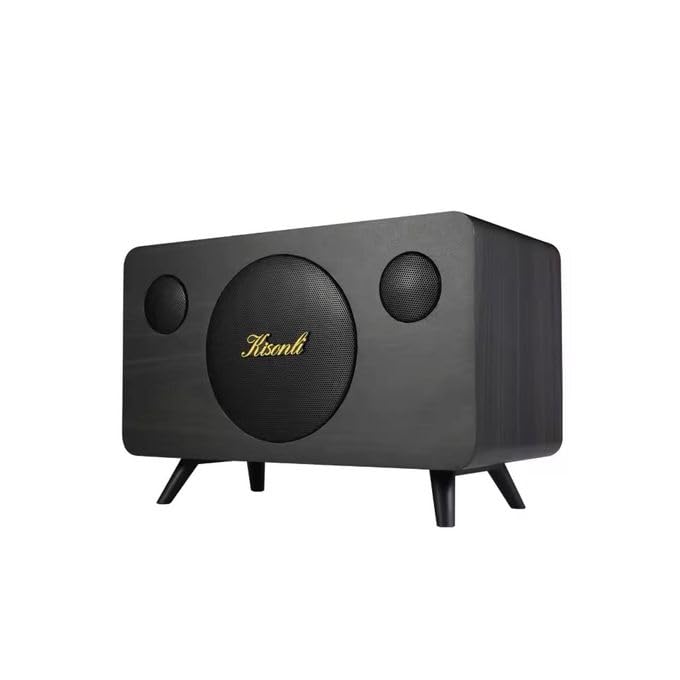
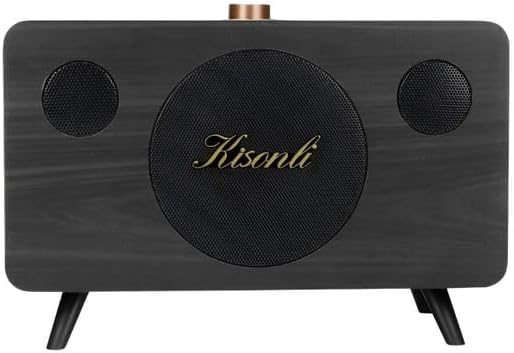
The Kisonli G103 speaker features a classic wooden design with a 20W internal speaker for clear and powerful audio. It supports multiple input sources and is designed for portability.
చిత్రం 1: ముందు view of the Kisonli G103 speaker, showcasing its wooden finish and central speaker grille with the Kisonli logo.

చిత్రం 2: టాప్ view of the Kisonli G103 speaker, highlighting the control panel with the rotary volume knob and input ports.
చిత్రం 3: కోణీయ view of the Kisonli G103 speaker, showing its compact size and retro design with small feet.

చిత్రం 4: Diagram illustrating the internal 3.5-inch, 20W horn speaker, emphasizing its powerful sound capabilities including super volume, echo sound, and shock bass.
సెటప్
1. ప్రారంభ ఛార్జింగ్
Before first use, it is recommended to fully charge the speaker. Connect the provided power cable to the charging port on the speaker and plug the other end into a suitable power source (e.g., USB wall adapter, computer USB port). The charging indicator light will illuminate. Once fully charged, the light may change color or turn off.
2. ప్లేస్మెంట్
Place the speaker on a stable, flat surface. Its tabletop design ensures optimal sound projection in most environments. Avoid placing it in enclosed spaces that might obstruct sound or ventilation.
ఆపరేటింగ్ సూచనలు

చిత్రం 5: Close-up of the speaker's control panel, showing the rotary volume knob and various function buttons for easy operation.
1. పవర్ ఆన్/ఆఫ్
- To power on: Press and hold the Power button (usually integrated with the Mode button or a dedicated button) for a few seconds until an indicator light illuminates or an audible prompt is heard.
- To power off: Press and hold the Power button again for a few seconds.
2. వాల్యూమ్ నియంత్రణ
The speaker features a prominent rotary knob for volume adjustment. Turn the knob clockwise to increase the volume and counter-clockwise to decrease it.
3. మోడ్ ఎంపిక
The Kisonli G103 supports multiple playback modes:
- USB ఫ్లాష్ డ్రైవ్ మోడ్: MP3 ఆడియో ఉన్న USB ఫ్లాష్ డ్రైవ్ను చొప్పించండి files into the USB port. The speaker should automatically switch to USB mode and begin playback.
- TF కార్డ్ మోడ్: Insert a TF (MicroSD) card containing MP3 audio files into the TF card slot. The speaker should automatically switch to TF card mode and begin playback.
- ఆక్స్ మోడ్: Connect an external audio device (e.g., smartphone, tablet, laptop) to the 3.5mm AUX input port using a 3.5mm audio cable (not included). Use the Mode button to switch to AUX mode if it doesn't switch automatically.
Press the "M" (Mode) button on the control panel to cycle through available input modes (USB, TF, AUX).

చిత్రం 6: Rear panel of the Kisonli G103 speaker, showing the USB port, TF card slot, and AUX input for various connectivity options.
4. ప్లేబ్యాక్ నియంత్రణలు
Use the buttons on the control panel for playback management:
- ప్లే/పాజ్: Press the Play/Pause button (often indicated by a triangle/two vertical bars icon) to start or pause playback.
- తదుపరి ట్రాక్: Press the "Next" button (often indicated by a double arrow or skip icon) to skip to the next track.
- మునుపటి ట్రాక్: Press the "Previous" button (often indicated by a double arrow or skip icon) to go back to the beginning of the current track or to the previous track.
బ్యాటరీని ఛార్జ్ చేస్తోంది
The Kisonli G103 speaker has a built-in 1800mAh rechargeable battery, providing approximately 2-8 hours of wireless playback depending on volume levels and usage. To charge the speaker:
- Connect the small end of the provided power cable to the charging port on the speaker.
- Connect the larger USB end of the cable to a USB power adapter (e.g., smartphone charger, computer USB port) or a power bank.
- The charging indicator light will show the charging status. Refer to the speaker's specific indicator behavior (e.g., red light for charging, off/blue for full).
- పూర్తిగా ఛార్జ్ కావడానికి సాధారణంగా కొన్ని గంటలు పడుతుంది.
The speaker can also be used while connected to a power source via the power cable.
స్పెసిఫికేషన్లు
| ఫీచర్ | వివరణ |
|---|---|
| బ్రాండ్ | కిసోన్లీ |
| మోడల్ పేరు | G103 |
| గరిష్ట స్పీకర్ అవుట్పుట్ పవర్ | 20 వాట్స్ |
| కనెక్టివిటీ టెక్నాలజీ | USB, AUX |
| ఆడియో అవుట్పుట్ మోడ్ | స్టీరియో (2.0 ఛానల్) |
| మౌంటు రకం | టాబ్లెట్ టాప్ |
| మెటీరియల్ | చెక్క |
| స్పీకర్ రకం | పోర్టబుల్ |
| సిఫార్సు చేసిన ఉపయోగాలు | Smartphones, Tablets, Computers, TVs, Music Players |
| అనుకూల పరికరాలు | Tablet, Laptop, MP3 Player, Smartphone |
| వాటర్ రెసిస్టెంట్ | నం |
| నియంత్రణ పద్ధతి | Manual (Rotary Knob, Buttons) |
| నిర్దిష్ట ఉత్పత్తి ఉపయోగాలు | Portable Personal Audio, Home/Office Decor |
| బ్యాటరీ లైఫ్ | 2-8 hours (depending on usage) |
| బ్యాటరీ కెపాసిటీ | 1800 mAh |
| చేర్చబడిన భాగాలు | పవర్ కేబుల్ |
| ఉత్పత్తి కొలతలు (D x W x H) | 30 cm x 19 cm x 17 cm |
| వస్తువు బరువు | 1020 గ్రాములు |
| శక్తి మూలం | కార్డెడ్ ఎలక్ట్రిక్, బ్యాటరీ పవర్డ్ |
ట్రబుల్షూటింగ్
- శక్తి లేదు:
- Ensure the speaker is charged. Connect it to a power source using the provided cable.
- Press and hold the Power button for a few seconds to ensure it's properly turned on.
- ధ్వని లేదు:
- Check the volume level on both the speaker and the connected device (if using AUX).
- Ensure the correct input mode (USB, TF, AUX) is selected. Press the "M" button to cycle through modes.
- If using USB or TF card, ensure the audio files are in a compatible format (e.g., MP3) and the storage device is properly inserted.
- If using AUX, ensure the 3.5mm audio cable is securely connected to both the speaker and the external device.
- వక్రీకరించిన ధ్వని:
- స్పీకర్ మరియు కనెక్ట్ చేయబడిన పరికరం రెండింటిలోనూ వాల్యూమ్ను తగ్గించండి.
- Ensure the audio source file is not corrupted or of low quality.
- స్పీకర్ స్పందించకపోవడం:
- Try turning the speaker off and then on again.
- If the issue persists, allow the battery to fully discharge and then recharge it.
నిర్వహణ
- శుభ్రపరచడం: స్పీకర్ బాహ్య భాగాన్ని శుభ్రం చేయడానికి మృదువైన, పొడి వస్త్రాన్ని ఉపయోగించండి. ద్రవ క్లీనర్లను లేదా రాపిడి పదార్థాలను ఉపయోగించవద్దు.
- నిల్వ: ఎక్కువసేపు ఉపయోగంలో లేనప్పుడు, స్పీకర్ను ప్రత్యక్ష సూర్యకాంతి మరియు తీవ్రమైన ఉష్ణోగ్రతలకు దూరంగా చల్లని, పొడి ప్రదేశంలో నిల్వ చేయండి.
- బ్యాటరీ సంరక్షణ: To prolong battery life, avoid fully discharging the battery frequently. Recharge it regularly, even if not in constant use.
- ప్రభావాన్ని నివారించండి: Handle the speaker with care to prevent physical damage.
వారంటీ మరియు మద్దతు
According to the product specifications, this item is provided without a warranty. For any issues or inquiries, please contact your retailer or the point of purchase for assistance.