
పరిచయం
This manual provides comprehensive instructions for the installation, operation, and maintenance of your Jelkuz 4K Motorcycle CarPlay Dash Cam, Model MT26B. This device integrates a 6.25-inch display with wireless CarPlay and Android Auto functionalities, a 4K dual-camera DVR system, GPS navigation, and robust IP67 waterproofing, designed to enhance your riding experience and safety.
పెట్టెలో ఏముంది
సంస్థాపనతో కొనసాగే ముందు అన్ని భాగాలు ఉన్నాయని నిర్ధారించుకోండి.
- 6.25-inch Motorcycle CarPlay Screen
- 4K Front Camera
- 1080P వెనుక కెమెరా
- 64GB SD కార్డ్
- వైర్డు కంట్రోలర్
- GPS మాడ్యూల్
- పవర్ కేబుల్
- Extension Rod Bracket
- వినియోగదారు మాన్యువల్
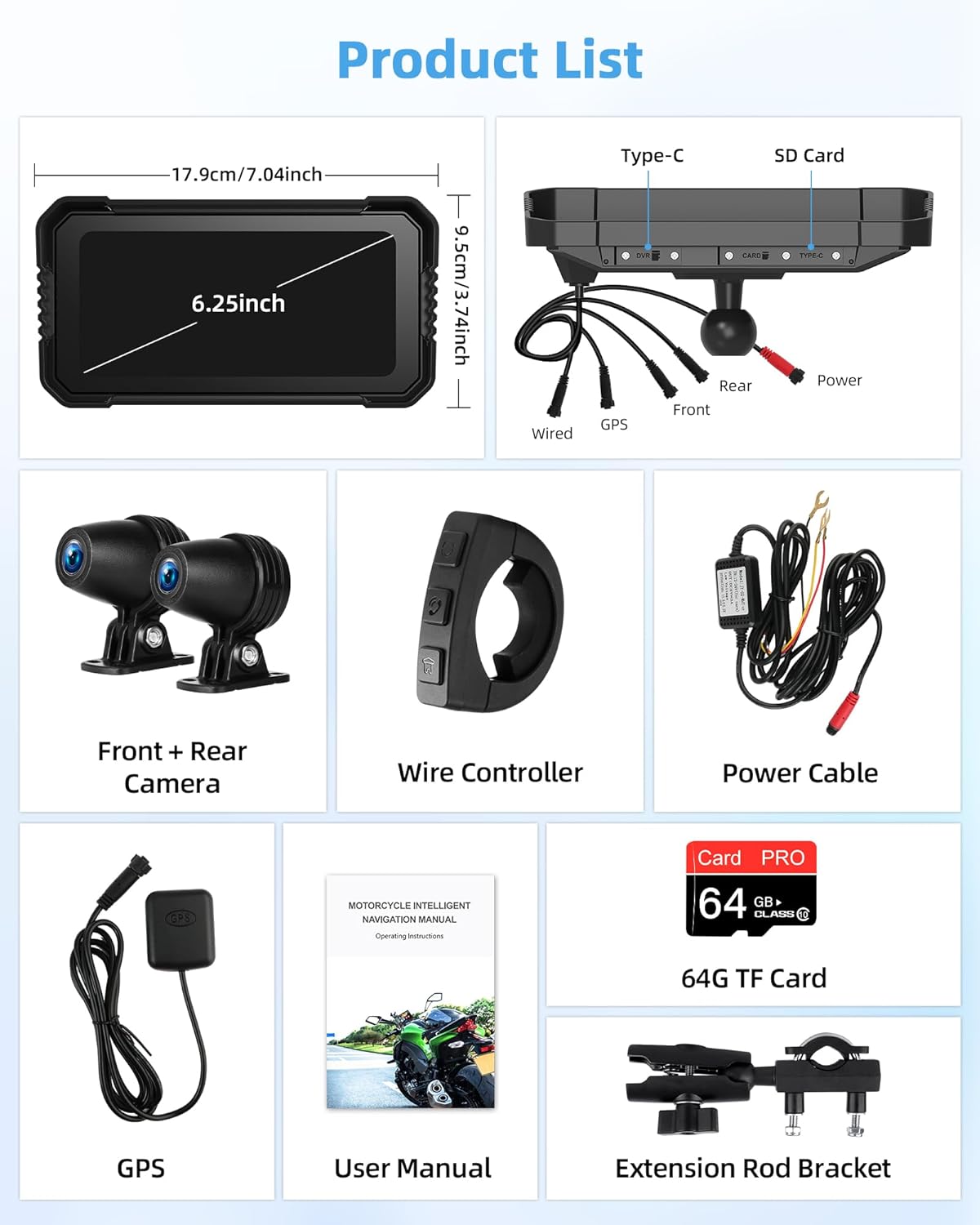
Image: All components included in the Jelkuz MT26B package.
సెటప్
1. పరికరాన్ని మౌంట్ చేయడం
Utilize the provided extension rod bracket to securely mount the 6.25-inch display on your motorcycle's handlebars. Ensure the mount is tightened to prevent movement during operation.
2. Wiring Diagram and Power Connection
Connect the power cable, front camera, rear camera, GPS module, and wired controller to the main CarPlay screen as indicated in the diagram below. The positive terminal of the device's power cable must be connected to the motorcycle's ACC control wire, and the negative terminal to the battery's negative terminal. The ACC control wire ensures the device powers on and off with the motorcycle's ignition.

Image: Detailed wiring connections for the Jelkuz MT26B.
3. SD Card Installation and Formatting
Insert the provided 64GB TF card into the designated slot on the device. For optimal performance and to ensure proper recording, it is recommended to format the SD card to FAT32 via the device's settings menu upon first use or if recording issues occur.
ఆపరేటింగ్ సూచనలు
1. వైర్లెస్ కార్ప్లే & ఆండ్రాయిడ్ ఆటో
Connect your smartphone wirelessly to the device via Bluetooth. Once paired, your phone's features, including map navigation, phone calls, music playback, and text messaging, will be accessible through the smart touchscreen. Utilize Siri or Google Assistant for hands-free control.

Image: Wireless CarPlay and Android Auto interfaces on the Jelkuz MT26B.
2. 4K DVR with Dual Cameras
The integrated dashcam records in 4K resolution with front and rear cameras, supporting split-screen display. Features include:
- లూప్ రికార్డింగ్: పాత ఫూను ఓవర్రైట్ చేస్తూ నిరంతరం రికార్డ్ చేస్తుందిtage SD కార్డ్ నిండినప్పుడు.
- పార్కింగ్ పర్యవేక్షణ: Records automatically if motion or impact is detected while parked.
- G-సెన్సార్: foo ని ఆటోమేటిక్గా లాక్ చేస్తుందిtage during sudden impacts or collisions to prevent overwriting.

చిత్రం: పైగాview of the 4K DVR dual camera system features.
3. 6.25-inch HD IPS Touchscreen
The high-definition IPS touchscreen provides clear visuals and responsive touch control. It features an automatic light-sensitive function that adjusts screen brightness based on ambient light conditions for optimal visibility day or night. The built-in WiFi chip allows you to connect to your phone to view, download, and share recorded footage or trip data.

Image: Screen visibility in various lighting conditions and WiFi sharing feature.
4. Dual Bluetooth Connectivity
The device supports dual Bluetooth connectivity, allowing simultaneous pairing with your smartphone for CarPlay/Android Auto and a Bluetooth-enabled headset or helmet. This enables hands-free calls and music streaming directly to your helmet audio system.

Image: Dual Bluetooth pairing with phone and helmet.
5. GPS Navigation & Voice Controls
Access popular mapping applications like Google Maps and Waze through CarPlay or Android Auto. Use voice commands via Siri or Google Assistant for navigation, music control, and making calls. The included wired controller, mounted near the handlebar, allows quick switching between front/rear camera views, accessing the home screen, and managing phone calls.

Image: Voice control functionality for navigation and media.
నిర్వహణ
1. IP67 Waterproofing
The device features an IP67 protection rating, making it resistant to dust and water immersion up to 1 meter for 30 minutes. This ensures reliable operation in various weather conditions, including heavy rain. However, avoid prolonged submersion or high-pressure water jets.

Image: Durability and weather resistance of the Jelkuz MT26B.
2. స్క్రీన్ కేర్
Clean the touchscreen with a soft, lint-free cloth. For stubborn smudges, lightly dampen the cloth with water or a screen-safe cleaner. Avoid abrasive materials or harsh chemicals that could damage the screen coating.
ట్రబుల్షూటింగ్
- SD కార్డ్ రికార్డ్ కావడం లేదు: If the device is not recording footage, remove the SD card and format it to FAT32 using a computer or the device's settings menu. Reinsert the card and test.
- తేదీ/సమయం తప్పు: The device's date and time are updated automatically when connected to the GPS module. Ensure the GPS module is properly connected and has a clear view ఆకాశం యొక్క.
- బ్లూటూత్ కనెక్షన్ సమస్యలు: If experiencing difficulty pairing with your phone or helmet, ensure both devices are in pairing mode and within range. Avoid connecting your phone to a Bluetooth helmet or headset directly while attempting to pair with the CarPlay screen, as this may interfere with the process.
- స్క్రీన్ గడ్డకట్టడం/ప్రతిస్పందించకపోవడం: If the screen freezes, perform a soft reset by holding down the power button for 10-15 seconds until the device restarts.
స్పెసిఫికేషన్లు
| మోడల్ సంఖ్య | MT26B |
| స్క్రీన్ పరిమాణం | 6.25 అంగుళాలు |
| ప్రదర్శన రకం | HD IPS Touchscreen |
| ఫ్రంట్ కెమెరా రిజల్యూషన్ | 4K |
| వెనుక కెమెరా రిజల్యూషన్ | 1080P |
| నిల్వ | 64GB SD Card (Included) |
| జలనిరోధిత రేటింగ్ | IP67 |
| కనెక్టివిటీ | Wireless CarPlay, Android Auto, Dual Bluetooth, WiFi |
| ప్రత్యేక లక్షణాలు | Loop Recording, Parking Monitoring, G-Sensor, Auto Brightness, Voice Control |
| వాహన సేవా రకం | Motorcycle (Compatible with 12-18V models) |
| మౌంటు రకం | హ్యాండిల్ బార్ మౌంట్ |
| వస్తువు బరువు | 2.99 పౌండ్లు |
| ప్యాకేజీ కొలతలు | 11.1 x 6.81 x 3.66 అంగుళాలు |
వారంటీ మరియు మద్దతు
The Jelkuz 4K Motorcycle CarPlay Dash Cam (Model MT26B) comes with a 12 నెలల వారంటీ from the date of purchase. This warranty covers manufacturing defects and malfunctions under normal use. For technical assistance, troubleshooting, or warranty claims, please contact Jelkuz customer support. Our support team aims to provide a satisfactory solution within 24 hours.
వారంటీ ధ్రువీకరణ కోసం దయచేసి మీ కొనుగోలు రుజువును ఉంచుకోండి.