
AJAZZ 308i
AJAZZ 308i Wireless Bluetooth Keyboard User Manual
మోడల్: 308i
పరిచయం
ధన్యవాదాలు, ధన్యవాదాలు.asing the AJAZZ 308i Wireless Bluetooth Keyboard. This manual provides detailed instructions on how to set up, operate, and maintain your keyboard. Please read this manual carefully before use to ensure optimal performance and longevity of your device.
ఉత్పత్తి ముగిసిందిview
The AJAZZ 308i is a compact 84-key wireless Bluetooth keyboard featuring a unique typewriter-inspired design with round keycaps. It offers multi-system compatibility and a comfortable typing experience.

Figure 1: AJAZZ 308i Wireless Bluetooth Keyboard (Gradient Green)
ముఖ్య లక్షణాలు:
- Typewriter-Inspired Design: Round keycaps provide a retro aesthetic and comfortable typing feel.
- కాంపాక్ట్ 84-కీ లేఅవుట్: Lightweight and portable, measuring 32cm x 13.6cm x 3cm, making it easy to carry.
- వైర్లెస్ బ్లూటూత్ కనెక్టివిటీ: Stable connection up to 10 meters, compatible with various devices.
- బహుళ-వ్యవస్థ అనుకూలత: Supports Windows, Mac OS, iOS, and Android operating systems.
- స్మార్ట్ పవర్ సేవింగ్: బ్యాటరీని ఆదా చేయడానికి 15 నిమిషాలు ఇనాక్టివిటీ తర్వాత స్వయంచాలకంగా స్లీప్ మోడ్లోకి ప్రవేశిస్తుంది.
- నిశ్శబ్ద టైపింగ్: Soft chocolate keys ensure a smooth and silent typing experience.
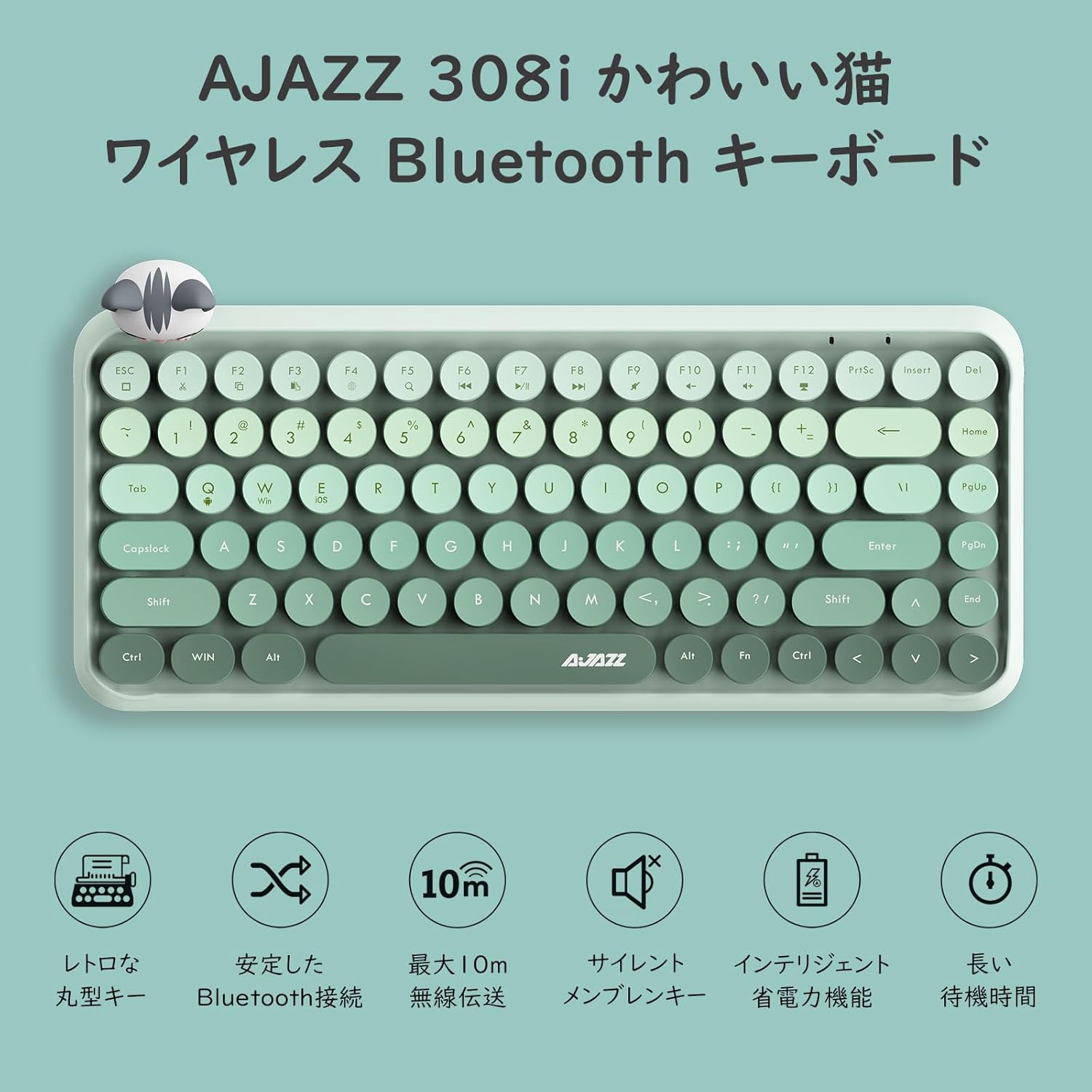
చిత్రం 2: పైగాview of AJAZZ 308i Keyboard Features
సెటప్: బ్లూటూత్ జత చేయడం
Follow these steps to connect your AJAZZ 308i keyboard via Bluetooth:
- Ensure your device's Bluetooth is turned ON.
- తిరగండి ON the power switch on the keyboard.
- నొక్కండి మరియు పట్టుకోండి FN + C keys simultaneously on the keyboard. The keyboard will enter Bluetooth device search mode.
- On your device (tablet, smartphone, computer), search for Bluetooth devices.
- When "AJAZZ BLUETOOTH 5.0 KEYBOARD" appears in the list of available devices, tap or click on it to initiate pairing.
- A code will be displayed on your device's screen. Type this code using the AJAZZ 308i keyboard and press నమోదు చేయండి.
- The keyboard is now successfully connected to your device.

Figure 3: Multi-device compatibility and connection example
ఆపరేటింగ్ సూచనలు
మీడియా కీలు:
The keyboard includes dedicated media function keys, accessible by pressing the FN key in combination with the F-keys:
- FN+F1: కట్
- FN+F2: కాపీ చేయండి
- FN+F3: అతికించండి
- FN+F5: శోధన
- FN+F6: మునుపటి ట్రాక్
- FN+F7: ప్లే/పాజ్ చేయండి
- FN+F8: తదుపరి ట్రాక్
- FN+F9: మ్యూట్ చేయండి
- FN+F10: వాల్యూమ్ డౌన్
- FN+F11: వాల్యూమ్ అప్
- FN+F12: తాళం వేయండి
Note: On some devices like iPad, certain F-keys (e.g., F2, F3) might function directly without the FN key for copy/paste. Experimentation may be required depending on your operating system.
పవర్ సేవింగ్ మోడ్:
The AJAZZ 308i features a smart power-saving mechanism. If there is no key operation for more than 15 minutes, the keyboard will automatically enter sleep mode. To reactivate it, simply double-click any key.
నిర్వహణ
బ్యాటరీ ఇన్స్టాలేషన్ మరియు రీప్లేస్మెంట్:
The keyboard is powered by two AAA alkaline batteries. To install or replace batteries:
- కీబోర్డ్ దిగువన బ్యాటరీ కంపార్ట్మెంట్ను గుర్తించండి.
- బ్యాటరీ కంపార్ట్మెంట్ కవర్ తెరవండి.
- సరైన ధ్రువణతను (+/-) నిర్ధారించుకోవడానికి, రెండు కొత్త AAA ఆల్కలీన్ బ్యాటరీలను చొప్పించండి.
- బ్యాటరీ కంపార్ట్మెంట్ కవర్ను సురక్షితంగా మూసివేయండి.
With smart power-saving technology, two AAA alkaline batteries can last for several months under normal use. Avoid using rechargeable lithium batteries as their performance degradation can lead to keyboard malfunction.
ట్రబుల్షూటింగ్
Key Layout Differences (English vs. Japanese Input):
The AJAZZ 308i keyboard has an English layout. When using Japanese input, some characters output may not match the characters printed on the keycaps. In such cases:
- Switch your device's input method to English and type according to the characters displayed on the keycaps.
- Alternatively, for Japanese input, refer to the standard Japanese keyboard layout for character mapping.
If you encounter any other issues or have questions, please refer to the warranty and support section for assistance.
స్పెసిఫికేషన్లు
| ఫీచర్ | వివరాలు |
|---|---|
| బ్రాండ్ | అజాజ్ |
| మోడల్ సంఖ్య | 308i |
| కనెక్టివిటీ టెక్నాలజీ | బ్లూటూత్ 5.0 |
| అనుకూల పరికరాలు | Windows, Mac OS, iOS, Android (Bluetooth function required) |
| కీల సంఖ్య | 84 |
| కీబోర్డ్ లేఅవుట్ | QWERTY (English Layout) |
| కీ స్విచ్ రకం | Membrane (Chocolate Key) |
| వైర్లెస్ రేంజ్ | 10 మీటర్ వరకు |
| శక్తి మూలం | 2 x AAA ఆల్కలీన్ బ్యాటరీలు |
| వస్తువు బరువు | 590 గ్రాములు |
| కొలతలు | 32cm x 13.6cm x 3cm |
| చేర్చబడిన భాగాలు | Magnetic Cat Figurine |
| రంగు | గ్రేడియంట్ గ్రీన్ |
వారంటీ మరియు మద్దతు
The AJAZZ 308i Wireless Bluetooth Keyboard comes with a 12 నెలల వారంటీ కొనుగోలు చేసిన తేదీ నుండి.
If you have any questions, concerns, or require technical assistance, please do not hesitate to contact our customer support. Contact details can typically be found on the product packaging or the retailer's webమీరు మీ కొనుగోలు చేసిన సైట్.
Ask a question about this manual
Ask about setup, troubleshooting, compatibility, parts, safety, or missing instructions. Manuals+ will review the question and use this page’s manual context to help answer it.