
పరిచయం
The Xoopar 4-in-1 Multi USB Octopus Cable is a versatile charging solution designed for a wide range of electronic devices. This cable is constructed using recycled materials, specifically plastic collected from oceans, contributing to environmental sustainability. Its compact and durable design makes it an ideal accessory for charging on the go.
వీడియో వివరణ: This video from Xoopar explains the process of using Ocean Bound Plastic in their products, highlighting the collection of plastic from oceans and its transformation into new recycled material for products like the Octopus Cable. It demonstrates Xoopar's commitment to environmental sustainability.
ఉత్పత్తి ముగిసిందిview
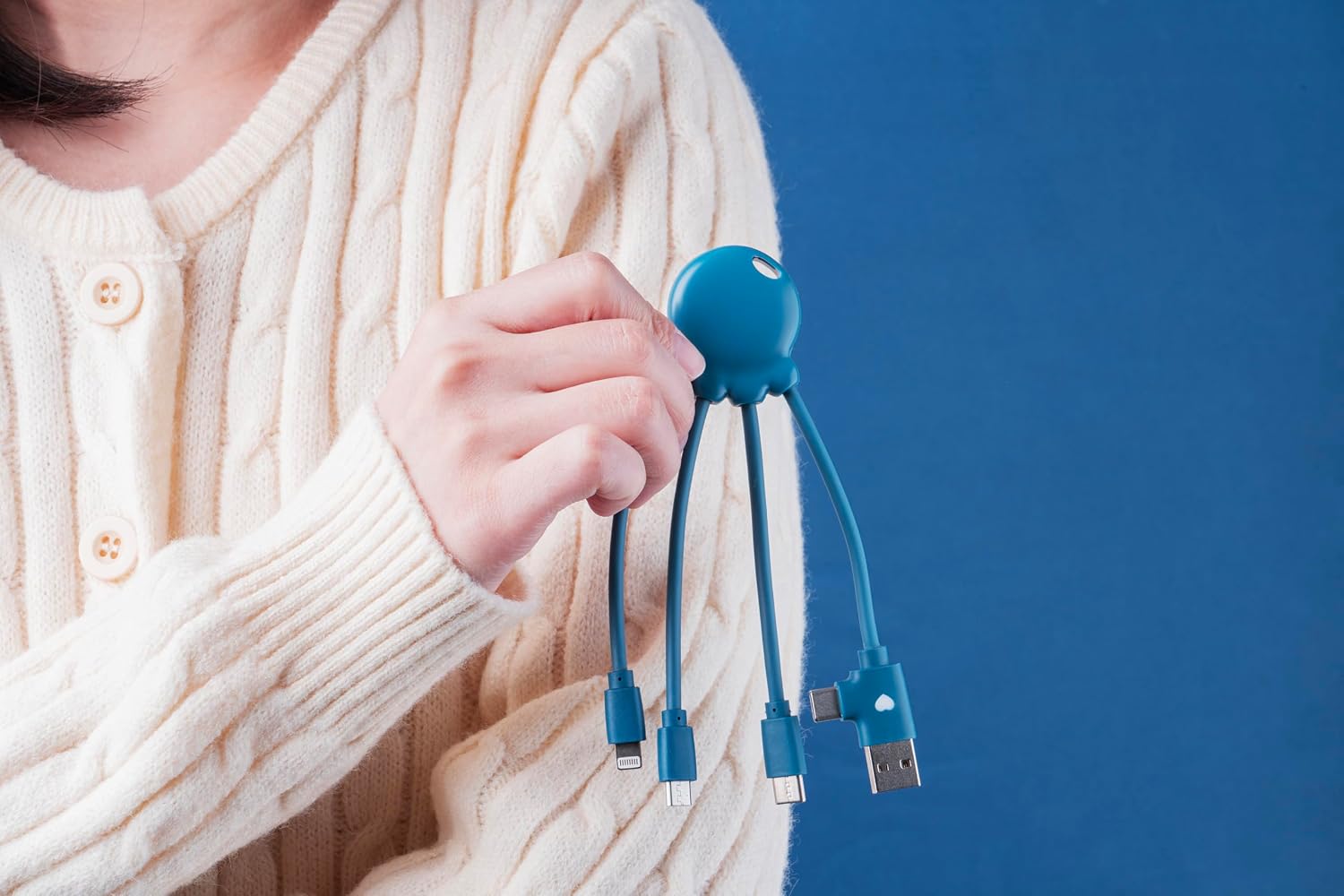
The Xoopar Octopus Cable features a central hub with four integrated connectors, providing broad compatibility for various devices. The cable is designed for convenience and durability.
- ఇన్పుట్ కనెక్టర్లు: USB-A, USB-C
- అవుట్పుట్ కనెక్టర్లు: USB-C, Lightning, Micro-USB
- మెటీరియల్: Made from Ocean Bound Plastic (OBP)

చిత్ర వివరణ: This image displays the Xoopar 4-in-1 Multi USB Octopus Cable, highlighting its four distinct connectors: USB-A, USB-C, Micro-USB, and Lightning, extending from a central octopus-shaped hub. This visual aids in identifying each connector type.
సెటప్
No specific setup or software installation is required for the Xoopar Octopus Cable. It is a plug-and-play device. Simply connect the appropriate end to your power source and the other end to your device.
ఆపరేటింగ్ సూచనలు
To charge a device, follow these steps:
- కనెక్టర్లను గుర్తించండి: Determine the correct output connector for your device. Use the Lightning connector for Apple devices (iPhone, iPad, iPod), the USB-C connector for newer Android devices and other compatible electronics, or the Micro-USB connector for older Android devices and accessories.
- శక్తి మూలానికి కనెక్ట్ చేయండి: Plug the USB-A or USB-C input connector of the Octopus Cable into a compatible power source. This can be a wall adapter, a power bank, a computer USB port, or a car charger.
- పరికరానికి కనెక్ట్ చేయండి: Plug the selected output connector into your device's charging port.
- ఛార్జింగ్ సూచన: Your device should indicate that it is charging. The cable supports charging for a wide range of devices including smartphones, Bluetooth headphones, e-cigarettes, and other compatible electronics.
చిత్ర వివరణ: This image illustrates the Xoopar 4-in-1 Multi USB Octopus Cable in use, connecting a smartphone to a laptop for charging. It demonstrates the cable's functionality across different devices and power sources, highlighting its versatility.
నిర్వహణ
To ensure the longevity and optimal performance of your Xoopar Octopus Cable, follow these guidelines:
- జాగ్రత్తగా నిర్వహించండి: అంతర్గత వైర్ దెబ్బతినకుండా ఉండటానికి, ముఖ్యంగా కనెక్టర్ల దగ్గర, కేబుల్ను ఎక్కువగా వంగడం లేదా తిప్పడం మానుకోండి.
- సరైన నిల్వ: Store the cable in a clean, dry place away from extreme temperatures, direct sunlight, and high humidity.
- ద్రవాలను నివారించండి: Do not expose the cable to water or other liquids. If it gets wet, ensure it is completely dry before use.
- క్లీన్ కనెక్టర్లు: If necessary, gently clean the metal contacts of the connectors with a dry, soft, lint-free cloth to remove dust or debris. Do not use abrasive cleaners.
ట్రబుల్షూటింగ్
If you encounter issues with your Xoopar Octopus Cable, consider the following troubleshooting steps:
- పరికరం ఛార్జ్ చేయబడదు:
- కనెక్షన్లను తనిఖీ చేయండి: Ensure all connectors are securely plugged into both the power source and the device.
- అనుకూలతను ధృవీకరించండి: Confirm that you are using the correct connector type for your specific device.
- పరీక్షా శక్తి వనరు: Try a different USB port or power adapter to rule out issues with the power source itself.
- కేబుల్ని తనిఖీ చేయండి: Visually check the cable and its connectors for any signs of damage, such as frayed wires or bent pins. If damaged, discontinue use.
- Device Charging Port: మీ పరికరం ఛార్జింగ్ పోర్ట్ శుభ్రంగా మరియు చెత్త లేకుండా ఉందని నిర్ధారించుకోండి.
- నెమ్మదిగా ఛార్జింగ్:
- Power Source Output: Ensure your power source provides sufficient current (e.g., 2.4A for faster charging).
- నేపథ్య యాప్లు: Close unnecessary applications on your device that might be consuming power.
స్పెసిఫికేషన్లు
| బ్రాండ్ | జూపర్ |
| మోడల్ | XP61040.OP.16 |
| కనెక్టర్ రకాలు | Micro USB, USB Type B, USB Type C, Lightning |
| అనుకూల పరికరాలు | Headphone, Laptop, Power Bank, Smartphone, Speaker |
| ప్రత్యేక ఫీచర్ | తేలికైనది |
| గరిష్ట కరెంట్ | 2.4 Amps |
| గరిష్ట వాల్యూమ్tage | 5 వోల్ట్లు |
| పిన్ల సంఖ్య | 4 |
| ఇండోర్/అవుట్డోర్ వినియోగం | ఇండోర్, అవుట్డోర్ |
వారంటీ మరియు మద్దతు
The Xoopar Octopus Cable comes with a 2 సంవత్సరాల వారంటీ in Europe. For technical assistance, warranty claims, or any product-related inquiries, please contact Xoopar customer support. Refer to the official Xoopar website or the product packaging for the most up-to-date contact details and warranty terms.