
పరిచయం
This manual provides essential information for setting up, operating, maintaining, and troubleshooting your NIMO 15.6-inch FHD Gaming Laptop, model Nimo N153. Please read this manual thoroughly before using your device to ensure proper function and longevity.

Image: The NIMO 15.6-inch FHD Gaming Laptop, showcasing దాని సొగసైన డిజైన్.
పెట్టెలో ఏముంది
అన్బాక్సింగ్ చేసిన తర్వాత, క్రింద జాబితా చేయబడిన అన్ని అంశాలు ఉన్నాయని నిర్ధారించుకోండి:
- 1 x నిమో N153 ల్యాప్టాప్
- 1 x టైప్-C 100W PD ఫాస్ట్ ఛార్జర్
- 1 x యూజర్ మాన్యువల్ (ఈ పత్రం)
- విండోస్ 11 హోమ్ (ముందే ఇన్స్టాల్ చేయబడింది)
- వారంటీ మరియు రిటర్న్ సమాచారం
సెటప్
1. ప్రారంభ పవర్ ఆన్ మరియు ఛార్జింగ్
Before first use, connect the laptop to the power adapter and a wall outlet. The Type-C 100W PD Fast Charger is designed for efficient charging. Allow the battery to charge sufficiently before disconnecting.

Image: The compact Type-C 100W PD Fast Charger included with the laptop.
2. ఆపరేటింగ్ సిస్టమ్ సెటప్ (Windows 11)
Upon first boot, follow the on-screen instructions to complete the Windows 11 Home setup. This includes selecting your region, language, connecting to a Wi-Fi network, and creating a user account.
3. ఫింగర్ప్రింట్ రీడర్ సెటప్
For enhanced security, set up the integrated fingerprint reader. Navigate to Windows Settings > Accounts > Sign-in options and follow the prompts to register your fingerprint.

Image: Close-up of the laptop's keyboard, highlighting the fingerprint reader and backlit keys.
4. పెరిఫెరల్స్ కనెక్ట్ చేయడం
The laptop features various ports for connecting external devices:
- USB పోర్ట్లు: Connect USB devices such as mice, keyboards, and external storage.
- HDMI పోర్ట్: పొడిగించిన డిస్ప్లే కోసం బాహ్య మానిటర్ లేదా టీవీకి కనెక్ట్ చేయండి.
- టైప్-సి పోర్ట్లు: For data transfer, charging, and connecting compatible Type-C accessories.
- మైక్రో SD కార్డ్ స్లాట్: Insert Micro SD cards for additional storage or data transfer.
- హెడ్ఫోన్ జాక్: హెడ్ఫోన్లు లేదా బాహ్య స్పీకర్లను కనెక్ట్ చేయండి.
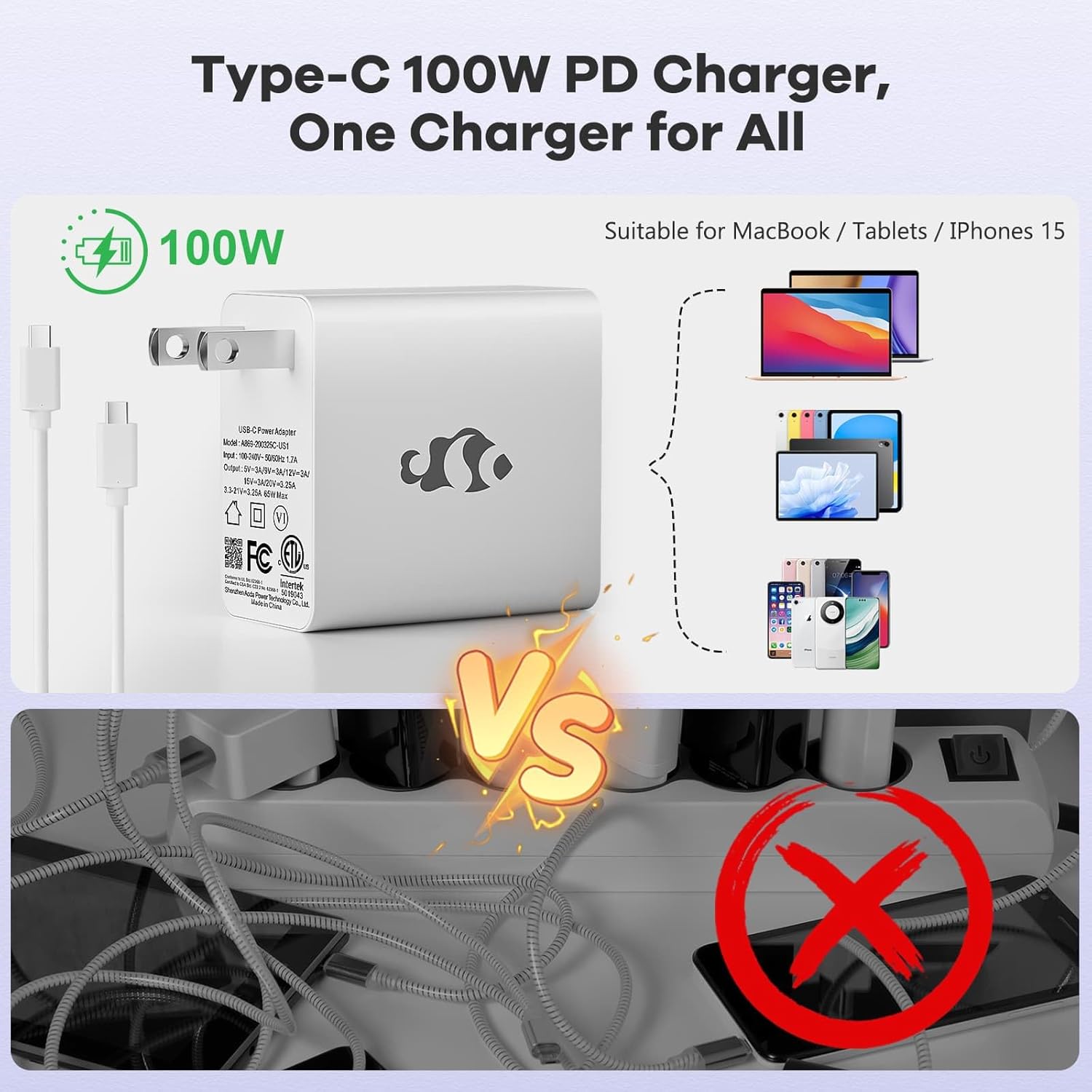
Image: Diagram illustrating the various ports available on the NIMO laptop, including USB, HDMI, Type-C, Micro SD, and headphone jack.
ఆపరేటింగ్ సూచనలు
1. పవర్ ఆన్/ఆఫ్ మరియు స్లీప్ మోడ్
- పవర్ ఆన్: కీబోర్డ్పై ఉన్న పవర్ బటన్ను నొక్కండి.
- పవర్ ఆఫ్: విండోస్లో స్టార్ట్ బటన్ను క్లిక్ చేసి, ఆపై పవర్ > షట్ డౌన్ ఎంచుకోండి.
- స్లీప్ మోడ్: ల్యాప్టాప్ మూతను మూసివేయండి లేదా స్టార్ట్ బటన్ను క్లిక్ చేయండి, ఆపై పవర్ > స్లీప్ ఎంచుకోండి.
2. Keyboard and Touchpad Functions
- బ్యాక్లిట్ కీబోర్డ్: The keyboard features backlighting for use in low-light conditions. Use the dedicated function key (Fn + F key combination, typically) to adjust brightness or toggle it on/off.
- సంఖ్యా కీప్యాడ్: The full-size keyboard includes a numeric keypad for convenient data entry.
- Multi-touch Touchpad: Supports various gestures for navigation and control within Windows. Refer to Windows settings for touchpad gesture customization.
3. వైర్లెస్ కనెక్టివిటీ
- Wi-Fi: To connect to a wireless network, click the Wi-Fi icon in the taskbar, select your desired network, and enter the password if required.
- బ్లూటూత్: బ్లూటూత్ పరికరాలను జత చేయడానికి, Windows సెట్టింగ్లు > బ్లూటూత్ & పరికరాలకు వెళ్లి, కొత్త పరికరాన్ని జోడించడానికి సూచనలను అనుసరించండి.
4. Webకామ్ షీల్డ్
The laptop is equipped with a physical webcam shield for privacy. Slide the shield to cover or uncover the webకామ్ అవసరం.
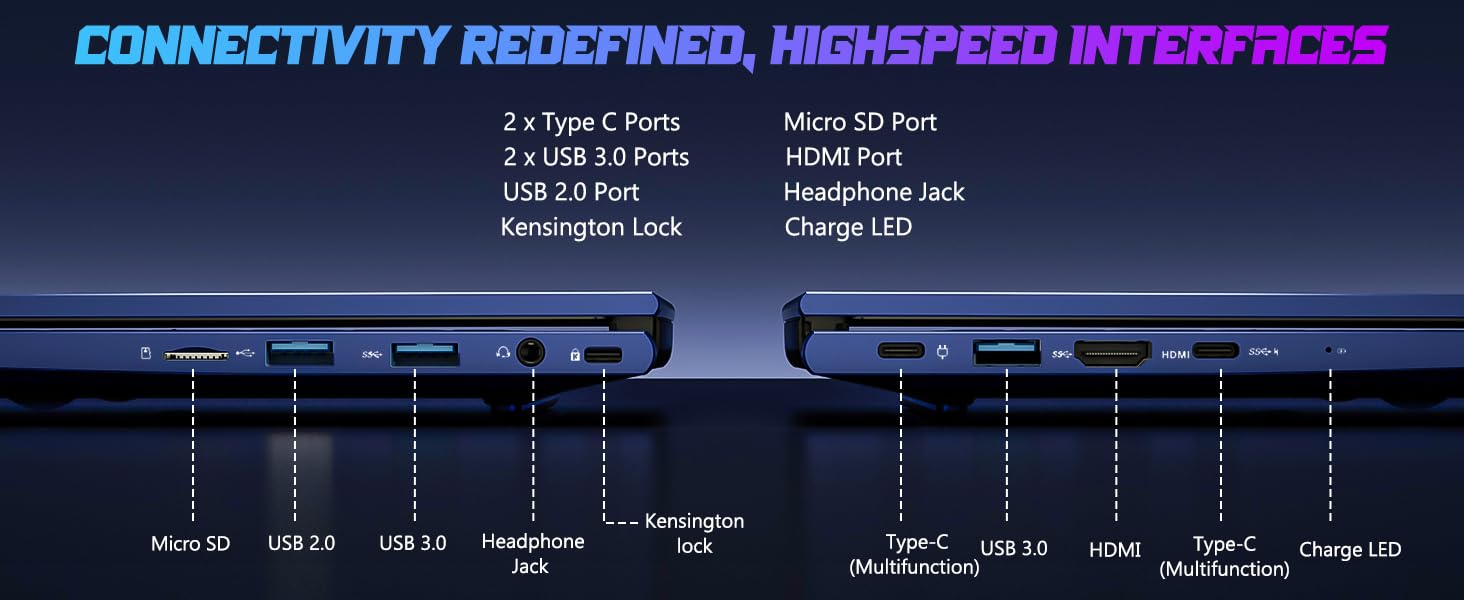
Image: Illustration of the laptop's webcam with a privacy shield feature.
5. డిస్ప్లే ఫీచర్లు
The 15.6-inch FHD IPS anti-glare display (1920x1080 resolution) provides clear visuals. Adjust display settings such as brightness and resolution through Windows Display Settings.

Image: The NIMO laptop displaying a vibrant image on its 15.6-inch FHD IPS screen.
నిర్వహణ
1. ల్యాప్టాప్ను శుభ్రపరచడం
- స్క్రీన్: మెత్తని, మెత్తని బట్టను తేలికగా ఉపయోగించండి డిampనీరు లేదా స్క్రీన్ క్లీనర్తో నింపబడి ఉండాలి. స్క్రీన్పై నేరుగా ద్రవాన్ని పిచికారీ చేయవద్దు.
- కీబోర్డ్ మరియు చాసిస్: మృదువైన, పొడి వస్త్రాన్ని ఉపయోగించండి. మొండి ధూళి కోసం, కొద్దిగా damp వస్త్రాన్ని ఉపయోగించవచ్చు, తద్వారా రంధ్రాలలోకి ద్రవం ప్రవేశించదు.
- పోర్టులు: పోర్టులను దుమ్ము మరియు చెత్త లేకుండా ఉంచండి. అవసరమైతే కంప్రెస్డ్ ఎయిర్ను ఉపయోగించండి, డబ్బాను నిటారుగా పట్టుకోండి.
2. సాఫ్ట్వేర్ నవీకరణలు
Regularly check for and install Windows updates to ensure system stability, security, and optimal performance. Go to Windows Settings > Windows Update.
3. Upgradability
The Nimo N153 laptop supports upgradable dual-channel memory and detachable RAM/SSD. If you plan to upgrade components, it is recommended to consult a qualified technician or refer to NIMO's official support resources to avoid voiding your warranty or damaging the device.
ట్రబుల్షూటింగ్
If you encounter issues with your NIMO laptop, try the following basic troubleshooting steps:
- శక్తి లేదు: Ensure the charger is securely connected to both the laptop and a working power outlet. Check the charge LED indicator.
- ప్రదర్శన సమస్యలు: If the screen is blank, try connecting an external monitor via HDMI to check if the issue is with the laptop's internal display. Ensure display drivers are up to date.
- కనెక్టివిటీ సమస్యలు (Wi-Fi/బ్లూటూత్): Restart the laptop and your router/Bluetooth device. Check Windows network settings to ensure Wi-Fi and Bluetooth are enabled.
- నెమ్మదిగా పనితీరు: Close unnecessary applications, check for malware, and ensure sufficient free storage space on the SSD.
- సిస్టమ్ స్తంభించిపోతుంది: ల్యాప్టాప్ను షట్డౌన్ చేయడానికి పవర్ బటన్ను 10-15 సెకన్ల పాటు నొక్కి పట్టుకోండి, ఆపై దాన్ని రీస్టార్ట్ చేయండి.
For more complex issues or if the problem persists, please contact NIMO customer support.
స్పెసిఫికేషన్లు
| ఫీచర్ | వివరాలు |
|---|---|
| బ్రాండ్ | నిమో |
| మోడల్ పేరు | నిమో N153 |
| స్క్రీన్ పరిమాణం | 15.6 అంగుళాలు |
| రిజల్యూషన్ | 1920x1080 Pixels (FHD IPS Anti-glare) |
| CPU మోడల్ | AMD రైజెన్ 5 6600H (6 కోర్లు, 12 థ్రెడ్లు, 4.5 GHz వరకు) |
| గ్రాఫిక్స్ కోప్రాసెసర్ | AMD Radeon 660M (Integrated GPU) |
| RAM మెమరీ ఇన్స్టాల్ చేయబడిన పరిమాణం | 16 GB DDR5 (4800 MHz) |
| హార్డ్ డిస్క్ పరిమాణం | 1 TB SSD (PCIe 4.0) |
| ఆపరేటింగ్ సిస్టమ్ | Windows 11 హోమ్ |
| ప్రత్యేక లక్షణాలు | బ్యాక్లిట్ కీబోర్డ్, ఫింగర్ప్రింట్ రీడర్, HD ఆడియో, న్యూమరిక్ కీప్యాడ్, Webకామ్ షీల్డ్ |
| కనెక్టివిటీ టెక్నాలజీ | Wi-Fi (802.11a/b/g/n/ac), బ్లూటూత్ |
| ఓడరేవులు | 2x Type-C, 2x USB 3.0, 1x USB 2.0, 1x HDMI, 1x Micro SD, 1x Headphone Jack, Kensington Lock |
| బ్యాటరీ లైఫ్ | Up to 5 Hours (Usage), Up to 7 Hours (Standby) |
| బ్యాటరీ కెపాసిటీ | 53.58 వాట్ గంటలు |
| ఛార్జర్ | 100W GaN Type-C PD Fast Charger |
| వస్తువు బరువు | 3.8 పౌండ్లు |
| కొలతలు (L x W x Th) | 14.07" x 8.98" x 0.76" |
గమనిక: ముందస్తు నోటీసు లేకుండా స్పెసిఫికేషన్లు మారవచ్చు.
వారంటీ మరియు మద్దతు
1. తయారీదారు వారంటీ
మీ NIMO N153 ల్యాప్టాప్ ఒక దాని ద్వారా కవర్ చేయబడింది 2-సంవత్సరం తయారీదారు వారంటీ from Nimo Direct Inc. This warranty covers defects in materials and workmanship under normal use. Please retain your proof of purchase for warranty claims.
2. రిటర్న్ పాలసీ
NIMO అందిస్తుంది a 90 రోజుల ఇబ్బంది లేని రిటర్న్ పాలసీ. If you are not satisfied with your purchase, you may return the product within 90 days of purchase. Refer to your purchase documentation for specific return procedures.
3. కస్టమర్ మద్దతు
For technical assistance, warranty claims, or any product-related inquiries, please contact NIMO customer support:
- ఇమెయిల్: service@nimopc.com
- ఆన్లైన్: అధికారిక NIMO ని సందర్శించండి webమద్దతు వనరులు మరియు సంప్రదింపు ఎంపికల కోసం సైట్.
Our dedicated support team is available to assist you.

Image: NIMO customer service representatives ready to assist.