
Lielyhod Lielyhod-Q62
Lielyhod Wireless HDMI Transmitter and Receiver User Manual
Model: Lielyhod-Q62
1. ఉత్పత్తి ముగిసిందిview
The Lielyhod Wireless HDMI Transmitter and Receiver system provides a convenient solution for wirelessly extending HDMI signals. It features an upgraded LED display for real-time status monitoring, supports plug-and-play operation, and delivers 1080P HD output with low latency. This system is designed for various applications, including home entertainment, business presentations, and multi-screen interactions.
- LED డిస్ప్లే: Real-time monitoring of connection status, signal strength, and power status.
- ప్లగ్ & ప్లే: No applications, Bluetooth, Wi-Fi, or complex settings required for connection.
- మల్టీ-స్క్రీన్ సపోర్ట్: Connects up to 6 displays simultaneously with additional receivers.
- స్థిరమైన ప్రసారం: Utilizes 2.4G and 5G dual-band chips for stable transmission up to 165 feet (50 meters) line of sight.
- 1080P HD Output: Supports 4K input and true 1080P@60Hz HD output with less than 0.1s latency.
- విస్తృత అనుకూలత: Works with various HDMI output devices and displays.
2. ప్యాకేజీ విషయాలు
క్రింద జాబితా చేయబడిన అన్ని వస్తువులు మీ ప్యాకేజీలో చేర్చబడ్డాయని దయచేసి ధృవీకరించండి:
- 1 x Wireless HDMI Transmitter (TX)
- 1 x Wireless HDMI Receiver (RX)
- 2 x యాంటెనాలు
- 2 x USB-C కేబుల్స్
- 1 x HDMI Extension Cord
- 1 x Mini HDMI to HDMI Adapter
- 1 x Micro HDMI to HDMI Adapter
- 1 x HDMI to USB-C/Type-C Conversion Cord
- 1 x వినియోగదారు మాన్యువల్

మూర్తి 2.1: Package Contents. This image illustrates the transmitter, receiver, various cables, and adapters included in the product package.
3. Device Components and LED Indicators
The Transmitter (TX) and Receiver (RX) units are equipped with LED displays to provide real-time status information. Understanding these indicators is crucial for proper operation and troubleshooting.
- విద్యుత్ సరఫరా సూచిక:
- Off: Low battery or no power.
- On: Sufficient power.
- సిగ్నల్ ఇండికేటర్ లైట్:
- 1-3 Bars: Indicates signal strength. 3 bars represent optimal performance.
- Connection Indicator Light:
- Blinking: Searching for connection.
- Steady: Connection established.

మూర్తి 3.1: LED Display Indicators. This image details the LED indicators on both the transmitter (TX) and receiver (RX) units, explaining what each light signifies regarding power, signal strength, and connection status.
4. సెటప్ సూచనలు
Follow these steps to set up your Lielyhod Wireless HDMI system:
- యాంటెన్నాలను ఇన్స్టాల్ చేయండి: Screw the provided antennas onto both the Transmitter (TX) and Receiver (RX) units. Ensure they are securely attached for optimal signal performance.
- కనెక్ట్ రిసీవర్ (RX): Plug the Receiver into an HDMI input port on your display device (e.g., HDTV, projector, monitor).
- కనెక్ట్ ట్రాన్స్మిటర్ (TX): Plug the Transmitter into an HDMI output port on your source device (e.g., laptop, PC, camera, TV box, game console). Use the appropriate adapters (mini HDMI, micro HDMI, or USB-C to HDMI conversion cord) if necessary.
- శక్తిని అందించండి: Connect a USB-C cable to the power input port on both the Transmitter and Receiver units, and then connect the other end to a USB power source (e.g., USB wall adapter, device's USB port). Both units require external power to function correctly.
- కనెక్షన్ కోసం వేచి ఉండండి: After powering on both units, wait approximately 5 seconds for them to automatically pair and establish a connection. The Connection Indicator Light on both units will turn steady when connected.
గమనిక: An antenna must be installed and both units must be powered for proper operation.

మూర్తి 4.1: Basic Setup Steps. This image visually guides the user through connecting the receiver to an HDMI display and the transmitter to an HDMI source, emphasizing the plug-and-play nature.
5. ఆపరేటింగ్ సూచనలు
5.1. పవర్ చేయడం ఆన్/ఆఫ్
The devices power on automatically when connected to a power source via the USB-C cable. To power off, simply disconnect the USB-C power cable from the units.
5.2. Understanding Display Modes
The system supports two primary display modes for PC connections:
- Copy Mode (Mirroring): The display connected to the Receiver will show the exact same content as your source device's screen. This is ideal for presentations or sharing content directly.
- విస్తరించిన మోడ్: The display connected to the Receiver acts as an extension of your source device's screen, allowing you to display different content on each screen. This mode is useful for multitasking and expanding your workspace.

మూర్తి 5.1: Copy Mode vs. Extended Mode. This image illustrates the difference between duplicating your screen (Copy mode) and extending your desktop (Extended mode) to a connected display.
5.3. Multi-Screen Connection
The system allows for simultaneous streaming to multiple displays. You can connect one Transmitter to up to six Receivers (additional receivers sold separately) to expand your content across several screens.

మూర్తి 5.2: Multi-Screen Expansion. This image demonstrates the capability of the system to transmit from a single transmitter to multiple receivers, supporting up to six displays simultaneously.
5.4. Transmission Considerations
The wireless transmission range is up to 165 feet (50 meters) in line of sight. Performance may be affected by physical obstacles such as walls, furniture, or other electronic devices causing interference. For optimal performance, ensure a clear line of sight between the Transmitter and Receiver.

మూర్తి 5.3: Wireless Transmission Range. This image illustrates the effective transmission range of 165 feet (50 meters) in an open environment, such as a conference room.
6. అనుకూలత
The Lielyhod Wireless HDMI system offers broad compatibility with various devices:
- Transmitter (TX) Compatible Devices: Laptops, PCs, HDMI cameras, Blu-ray players, cable set-top boxes, game consoles (e.g., PS4/PS5), and other devices with HDMI or USB-C video output.
- Receiver (RX) Compatible Devices: HDTVs, monitors, projectors, and other displays with HDMI input.
- HDCP మద్దతు: The system supports HDCP, allowing playback of protected content from streaming services and media players.
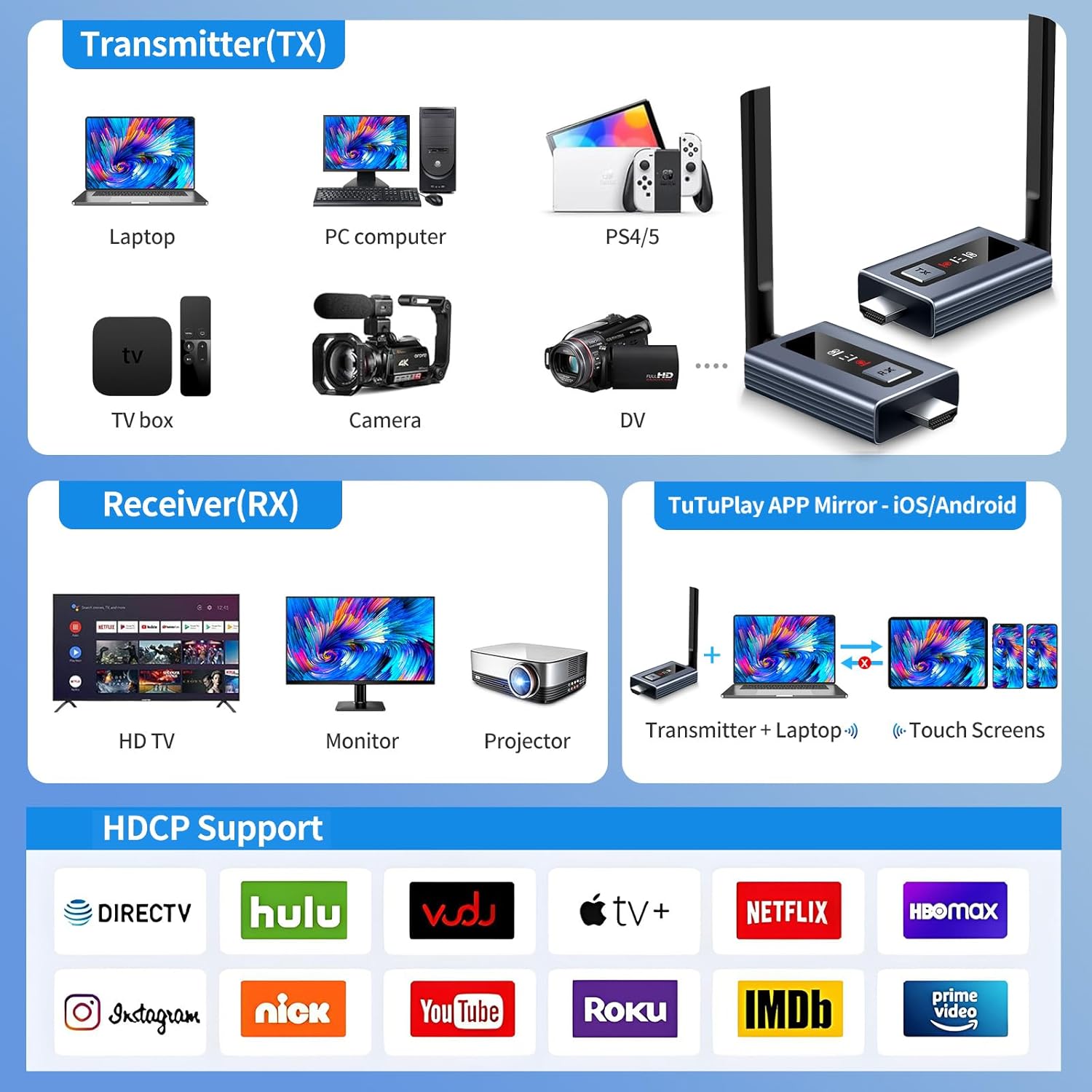
మూర్తి 6.1: Device Compatibility. This image provides a comprehensive overview of the types of source devices that can connect to the transmitter and the display devices that can connect to the receiver, including HDCP support for various internet services.
7. నిర్వహణ
To ensure the longevity and optimal performance of your wireless HDMI system, follow these maintenance guidelines:
- శుభ్రపరచడం: Use a soft, dry cloth to clean the exterior of the Transmitter and Receiver units. Avoid using liquid cleaners or abrasive materials, which can damage the surface.
- నిల్వ: ఎక్కువసేపు ఉపయోగంలో లేనప్పుడు, పరికరాలను ప్రత్యక్ష సూర్యకాంతి మరియు తీవ్రమైన ఉష్ణోగ్రతలకు దూరంగా చల్లని, పొడి ప్రదేశంలో నిల్వ చేయండి.
- నిర్వహణ: Handle the units with care. Avoid dropping them or subjecting them to strong impacts.
- పర్యావరణం: Keep the devices away from water, moisture, and excessive dust. Ensure proper ventilation to prevent overheating.
8. ట్రబుల్షూటింగ్
If you encounter issues with your Lielyhod Wireless HDMI system, refer to the following troubleshooting tips:
- డిస్ప్లేలో సిగ్నల్ లేదు:
- Ensure both the Transmitter and Receiver are properly powered via USB-C cables.
- Verify that the antennas are securely installed on both units.
- Check that the HDMI cables and adapters are firmly connected to both source and display devices.
- Confirm the display is set to the correct HDMI input source.
- Observe the Connection Indicator Light: if blinking, the units are searching for a connection. If steady, a connection is established.
- Unstable Connection or Signal Drops:
- ట్రాన్స్మిటర్ మరియు రిసీవర్ మధ్య దూరాన్ని తగ్గించండి.
- Ensure there is a clear line of sight between the units, minimizing obstacles like walls or large furniture.
- Check for potential interference from other wireless devices (e.g., Wi-Fi routers, cordless phones) and try to relocate the units if possible.
- Ensure both units have stable power supply.
- Video Lag or Stuttering:
- Ensure the signal strength is optimal (check the Signal Indicator Light for 3 bars).
- ట్రాన్స్మిటర్ మరియు రిసీవర్ మధ్య దూరాన్ని తగ్గించండి.
- Minimize wireless interference.
- Confirm your source device is outputting at 1080P@60Hz or lower, as higher resolutions may not be supported or may cause performance issues.
- LED డిస్ప్లే పనిచేయడం లేదు:
- Ensure the unit is receiving sufficient power.
- సమస్య కొనసాగితే, కస్టమర్ సపోర్ట్ని సంప్రదించండి.
9. స్పెసిఫికేషన్లు
| ఫీచర్ | స్పెసిఫికేషన్ |
|---|---|
| బ్రాండ్ | Lielyhod |
| మోడల్ పేరు | Lielyhod-Q62 |
| కనెక్టివిటీ టెక్నాలజీ | Wireless (2.4G/5G Dual-band), HDMI, USB-C/Type-C |
| మాక్స్ రిజల్యూషన్ | 1080P@60Hz (Supports 4K input) |
| ప్రసార దూరం | 165 అడుగుల (50 మీటర్లు) వరకు దృష్టి రేఖ |
| జాప్యం | 0.1 సెకన్ల కంటే తక్కువ |
| Multi-Screen Support | Up to 6 screens simultaneously (with additional receivers) |
| ప్రత్యేక లక్షణాలు | LED Screen, Plug & Play, Multi-Device Compatibility |
| వస్తువు బరువు | 32 గ్రా |
| అంశం కొలతలు (L x W x H) | 2.4" x 1.6" x 0.5" (సుమారుగా) |
| రంగు | బూడిద రంగు |
10. వారంటీ మరియు మద్దతు
Lielyhod provides comprehensive support for its products:
- వారంటీ: This product comes with a 24-month (2-year) quality warranty and replacement service.
- సాంకేతిక మద్దతు: If you encounter any problems during the use of your wireless HDMI system, please contact our professional technical team for assistance. We are committed to providing satisfactory solutions and one-on-one technical guidance.
For warranty claims or technical support, please refer to the contact information provided on the product packaging or the official Lielyhod webసైట్.
Ask a question about this manual
Ask about setup, troubleshooting, compatibility, parts, safety, or missing instructions. Manuals+ will review the question and use this page’s manual context to help answer it.