
Ulefone Armor X16 Pro 5G
Ulefone Armor X16 Pro 5G Rugged Smartphone User Manual
Model: Armor X16 Pro 5G
పరిచయం
Welcome to the user manual for your Ulefone Armor X16 Pro 5G Rugged Smartphone. This guide provides essential information on setting up, operating, maintaining, and troubleshooting your device. Designed for durability and high performance, the Armor X16 Pro 5G is equipped with advanced features to support your daily activities and outdoor adventures.
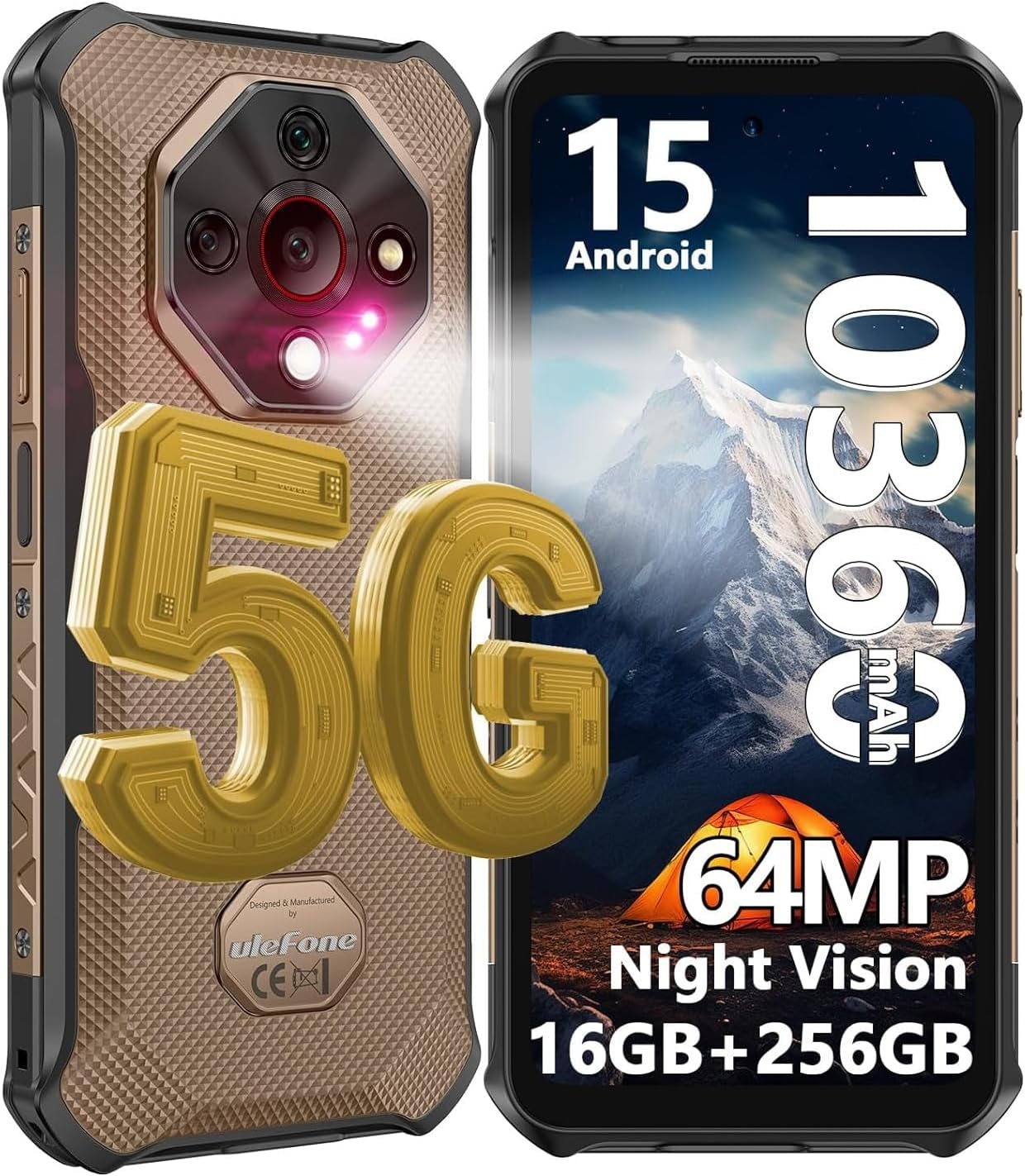
Figure 1: Ulefone Armor X16 Pro 5G Rugged Smartphone. This image displays the front and back of the Ulefone Armor X16 Pro 5G, highlighting its rugged design and key specifications like Android 15, 10360mAh battery, 64MP camera, and 16GB+256GB memory.
1. సెటప్
1.1 ప్యాకేజీ విషయాలు
మీరు ప్రారంభించడానికి ముందు, అన్ని అంశాలు ప్యాకేజీలో ఉన్నాయని నిర్ధారించుకోండి:
- 1x Ulefone Armor X16 Pro 5G Smartphone
- 1x AC Power Charger (100~240V Plug)
- 1x డేటా కేబుల్ (100సెం.మీ)
- 1x ప్రొటెక్టివ్ ఫిల్మ్ (ముందే ఇన్స్టాల్ చేయబడింది)
- 1x టెంపర్డ్ గ్లాస్ స్క్రీన్ ప్రొటెక్టర్
- 1x SIM Pick
- 1x లాన్యార్డ్
- 1x బహుళ భాషా వినియోగదారు మాన్యువల్
- 1x మల్టీ ఫంక్షన్ ఇన్స్ట్రక్షన్ కార్డ్
- 1x ఛార్జింగ్ ఇన్స్ట్రక్షన్ కార్డ్
- 1x సేఫ్టీ ప్రాంప్ట్ కార్డ్

Figure 2: Package List. This image shows the complete contents included with the Ulefone Armor X16 Pro 5G smartphone, such as the phone, charger, cables, and documentation.
1.2 SIM కార్డ్ మరియు SD కార్డ్ ఇన్స్టాలేషన్
The Armor X16 Pro 5G supports dual SIM dual standby and a dedicated microSD card slot for expanded storage up to 2TB. Use the provided SIM pick to open the SIM tray.
- పరికరం పక్కన SIM ట్రేని గుర్తించండి.
- Insert the SIM pick into the small hole next to the tray and press gently until the tray ejects.
- Place your Nano-SIM cards and/or microSD card into the designated slots on the tray. Ensure they are correctly oriented.
- ఫోన్ బాడీకి సరిగ్గా అతుక్కుపోయే వరకు ట్రేని జాగ్రత్తగా స్లాట్లోకి నెట్టండి.

Figure 3: Dual 5G Connectivity and 3 Card Slot. This image illustrates the phone's capability for dual 5G connectivity and the physical SIM/SD card tray, showing its three distinct slots.
1.3 ప్రారంభ ఛార్జింగ్ మరియు పవర్ ఆన్
For optimal performance, fully charge your device before first use.
- Connect the USB Type-C cable to the phone's charging port and the other end to the AC power charger.
- ఛార్జర్ను పవర్ అవుట్లెట్లోకి ప్లగ్ చేయండి. ఫోన్ 33W ఫాస్ట్ ఛార్జింగ్కు మద్దతు ఇస్తుంది.
- Once sufficiently charged, press and hold the Power button (usually on the right side) until the Ulefone logo appears.
- భాష ఎంపిక, Wi-Fi కనెక్షన్ మరియు Google ఖాతా సెటప్తో సహా ప్రారంభ సెటప్ను పూర్తి చేయడానికి ఆన్-స్క్రీన్ ప్రాంప్ట్లను అనుసరించండి.
2. మీ పరికరాన్ని ఆపరేట్ చేయడం
2.1 ప్రదర్శన మరియు పరస్పర చర్య
The Armor X16 Pro 5G features a 6.56-inch FHD+ display with a 120Hz refresh rate for smooth visuals and a resolution of 720 x 1612. With 910 nits brightness, it ensures visibility even under bright sunlight. The screen is protected by Corning Gorilla Glass 5 for enhanced durability.

Figure 4: 6.56" 120Hz Display. This image highlights the key features of the phone's display, including its size, 120Hz refresh rate, 910 nits brightness, and 720x1612 resolution.

Figure 5: Corning Gorilla Glass 5. This image illustrates the robust protection offered by Corning Gorilla Glass 5 on the display, emphasizing its durability against drops and scratches.
2.2 పనితీరు మరియు నిల్వ
Powered by the MediaTek Dimensity 6300 5G chipset with a 2.4GHz 8-core CPU, the Armor X16 Pro 5G delivers smooth performance. It comes with 16GB RAM (8GB physical + 8GB virtual) and 256GB internal storage, expandable up to 2TB via microSD card.

Figure 6: MediaTek Dimensity 6300 5G. This image showcases the MediaTek Dimensity 6300 5G processor, highlighting its 8-core CPU and 6nm advanced process for hyper-fast multitasking and gaming.

Figure 7: 16GB RAM + 256GB ROM. This image illustrates the phone's memory configuration, including 8GB physical RAM, 8GB dynamic RAM, and 256GB internal storage with 2TB SD card expansion.
2.3 కెమెరా సిస్టమ్
Capture stunning photos and videos with the versatile camera system:
- 64MP ప్రధాన కెమెరా: Featuring a Sony IMX682 sensor for high-resolution images.
- 25MP నైట్ విజన్ కెమెరా: For clear photos in low-light conditions.
- 2MP మాక్రో కెమెరా: To capture intricate details up close.
- 16MP ఫ్రంట్ కెమెరా: For enhanced selfies and video calls.
- Underwater Mode: Allows taking photos and videos while submerged.

చిత్రం 8: కెమెరా వ్యవస్థ ముగిసిందిview. This image provides a visual summary of the Ulefone Armor X16 Pro 5G's camera setup, including the 64MP main, 25MP night vision, 2MP macro, and 16MP front cameras.

Figure 9: Macro and Underwater Camera. This image demonstrates the capabilities of the 2MP macro camera for close-up shots and the underwater camera mode for use in aquatic environments.
2.4 బ్యాటరీ మరియు ఛార్జింగ్
The device is equipped with a robust 10360mAh battery, providing extended usage times. It supports 33W PD fast charging and can also function as a portable power bank via reverse charging.
- స్టాండ్బై సమయం: 555 గంటల వరకు
- చర్చ సమయం: 56 గంటల వరకు
- సంగీతం ప్లేబ్యాక్: 42 గంటల వరకు
- వీడియో ప్లేబ్యాక్: 13 గంటల వరకు

Figure 10: 10360mAh Mega Battery. This image highlights the large battery capacity and the 33W fast charging capability, along with estimated usage times for standby, talk, music, and video playback.
2.5 Connectivity and Navigation
The Armor X16 Pro 5G supports global 5G networks, ensuring fast and reliable connectivity. It also includes NFC for convenient mobile payments and comprehensive navigation support.
- నెట్వర్క్: Global 5G (Dual SIM Dual Standby)
- NFC: For Google Pay and other contactless transactions.
- నావిగేషన్: GPS + GLONASS + Beidou + Galileo for accurate positioning.
- బ్లూటూత్: BT5.2 for wireless accessory connection.

Figure 11: Connectivity and Security Features. This image displays the phone's support for NFC and Google Pay, GPS navigation, and biometric security options like Face Unlock and Fingerprint ID.
2.6 ప్రత్యేక లక్షణాలు
The Armor X16 Pro 5G includes several unique features for enhanced usability:
- ఆండ్రాయిడ్ 15: Provides a seamless, secure, and efficient user experience with enhanced privacy features.
- గూగుల్ జెమిని: Integrated AI assistant for intelligent interactions.
- AI Recorder: Automatically transcribes calls/meetings and generates instant summaries.
- 133 Lumen Flashlight: Independent, powerful flashlight for various lighting needs.
- వైడ్వైన్ L1: Allows access to HD video streaming on platforms like Netflix, Amazon Prime Video, and Hulu.
- అనుకూల కీ: Programmable button for quick access to preferred functions.
- హెడ్సెట్ రహిత FM రేడియో: Enjoy radio without needing wired headphones.
- IR బ్లాస్టర్: అనుకూల పరారుణ పరికరాలను నియంత్రించండి.
- గ్లోవ్స్ మోడ్: Enables touch screen operation while wearing gloves.

Figure 12: Android 15 and Google Gemini. This image highlights the phone's operating system, Android 15, and the integration of Google Gemini as an AI assistant.

Figure 13: 133 Lumen Flashlight. This image showcases the powerful built-in 133 lumen flashlight, ideal for illuminating dark environments.

Figure 14: Widevine L1 Certification. This image confirms the phone's Widevine L1 certification, enabling high-definition video streaming on popular platforms like Netflix, Amazon Prime Video, and Hulu.

Figure 15: Additional Features. This image highlights various convenient features such as Gloves Mode, a customizable key, headset-free FM radio, and an IR Blaster.
3. నిర్వహణ
3.1 Rugged Durability
The Ulefone Armor X16 Pro 5G is built to withstand harsh environments, certified with IP68/IP69K ratings and MIL-STD-810H compliance.
- IP68: 2 మీటర్ల లోతు వరకు 30 నిమిషాలు సబ్మెర్సిబుల్.
- IP69K: Protected against high-pressure, high-temperature water jets.
- MIL-STD-810H: Shockproof, enduring drops from up to 2 meters.
- డస్ట్ ప్రూఫ్: Fully protected against dust, dirt, and sand.

Figure 16: IP68/IP69K Defender. This image visually represents the phone's robust build, highlighting its IP68/IP69K waterproof and dustproof ratings, and its 2-meter drop resistance.
3.2 క్లీనింగ్ మరియు కేర్
To maintain your device's condition:
- స్క్రీన్ మరియు బాడీని మృదువైన, మెత్తటి బట్టతో తుడవండి.
- మొండి ధూళి కోసం, కొద్దిగా డి ఉపయోగించండిamp గుడ్డ. కఠినమైన రసాయనాలను నివారించండి.
- ఫోన్ను నీరు లేదా దుమ్ముకు గురిచేసే ముందు అన్ని పోర్ట్ కవర్లు సురక్షితంగా మూసివేయబడ్డాయని నిర్ధారించుకోండి.
- Avoid extreme temperatures and direct sunlight for prolonged periods.
4. ట్రబుల్షూటింగ్
If you encounter issues with your Ulefone Armor X16 Pro 5G, try the following common solutions:
- పరికరం స్పందించడం లేదు: రీస్టార్ట్ చేయమని బలవంతం చేయడానికి పవర్ బటన్ను దాదాపు 10-15 సెకన్ల పాటు నొక్కి పట్టుకోండి.
- పేలవమైన నెట్వర్క్ సిగ్నల్: Check your SIM card installation. Move to an area with better network coverage.
- బ్యాటరీ త్వరగా ఖాళీ అవుతోంది: Close unused apps running in the background. Reduce screen brightness. Check for app updates.
- కెమెరా పనిచేయడం లేదు: Restart the phone. Clear the cache and data of the Camera app in Settings.
- క్రాష్ అవుతున్న యాప్లు: యాప్లు వాటి తాజా వెర్షన్లకు అప్డేట్ చేయబడ్డాయని నిర్ధారించుకోండి. యాప్ కాష్ను క్లియర్ చేయండి లేదా యాప్ను మళ్లీ ఇన్స్టాల్ చేయండి.
- నిల్వ నిండింది: అనవసరంగా తొలగించండి files, photos, or videos. Move large files ఒక SD కార్డ్కి.
If the problem persists, refer to the official Ulefone support resources or contact customer service.
5. స్పెసిఫికేషన్లు
Detailed technical specifications for the Ulefone Armor X16 Pro 5G:
| ఫీచర్ | స్పెసిఫికేషన్ |
|---|---|
| బ్రాండ్ | ఉలేఫోన్ |
| మోడల్ పేరు | Armor X16 Pro Sand Dune Color |
| ఆపరేటింగ్ సిస్టమ్ | ఆండ్రాయిడ్ 15 |
| ప్రాసెసర్ | MediaTek Dimensity 6300 (8-core, 2.4GHz) |
| RAM | 16 GB (8GB భౌతిక + 8GB వర్చువల్) |
| అంతర్గత నిల్వ | 256 GB |
| విస్తరించదగిన నిల్వ | 2 TB వరకు (మైక్రో SD) |
| స్క్రీన్ పరిమాణం | 6.56 అంగుళాలు |
| ప్రదర్శన రకం | FHD+ LCD, 120Hz Refresh Rate, 910 nits brightness |
| డిస్ప్లే రిజల్యూషన్ | 720 x 1612 |
| ప్రదర్శన రక్షణ | కార్నింగ్ గొరిల్లా గ్లాస్ 5 |
| ప్రధాన కెమెరా | 64 MP (Sony IMX682 sensor) |
| నైట్ విజన్ కెమెరా | 25 ఎంపీ |
| మాక్రో కెమెరా | 2 ఎంపీ |
| ఫ్రంట్ కెమెరా | 16 ఎంపీ |
| బ్యాటరీ కెపాసిటీ | 10360 mAh |
| ఛార్జింగ్ | 33W Fast Charging, Reverse Charging |
| సెల్యులార్ టెక్నాలజీ | 5G (డ్యూయల్ సిమ్ డ్యూయల్ స్టాండ్బై) |
| వైర్లెస్ కనెక్టివిటీ | Wi-Fi, Bluetooth 5.2, NFC |
| నావిగేషన్ | GPS, గ్లోనాస్, బీడౌ, గెలీలియో |
| మన్నిక రేటింగ్లు | IP68, IP69K, MIL-STD-810H |
| ప్రత్యేక లక్షణాలు | 133 Lumen Flashlight, AI Recorder, Widevine L1, Fingerprint Unlock, Face Unlock, Custom Key, Headset-Free FM Radio, IR Blaster, Gloves Mode |
| కొలతలు | 14 x 8.2 x 1.36 సెం.మీ |
| బరువు | 300 గ్రా |
6. వారంటీ మరియు మద్దతు
6.1 వారంటీ సమాచారం
Your Ulefone Armor X16 Pro 5G comes with a standard manufacturer's warranty. Please refer to the warranty card included in your package for specific terms and conditions, including coverage period and limitations. Keep your proof of purchase for warranty claims.
6.2 కస్టమర్ మద్దతు
For technical assistance, troubleshooting, or any product-related inquiries, please contact Ulefone customer support. You can typically reach support via the Amazon messaging system by sending a message to the seller, as indicated in the product listing. Provide your product model and a detailed description of the issue for efficient assistance.
For more information, visit the official Ulefone website or the Ulefone store on Amazon.
Ask a question about this manual
Ask about setup, troubleshooting, compatibility, parts, safety, or missing instructions. Manuals+ will review the question and use this page’s manual context to help answer it.